

.jpg)



Full coverage, inside your walls.
Traditional security tools assume your code can be uploaded to the cloud. But for regulated industries and sensitive environments, security must happen where the code lives.
Some code can’t leave.
Most scanners assume it can.
If you’re working under:
You can’t risk sending source code to the cloud. But you still need full security coverage. Without compromise.
Run everything locally.
Same coverage. Same results.
The same engine we run in the cloud, installed on your own CI or servers. Secrets, dependencies, and SAST scans all happen inside your network. Your code never leaves the building.
Installable on any CI or server
Identical output to our cloud scanners
Map findings to CVSS, reachability, and asset criticality
Local scanner features
.jpg)
Scan fully locally
The same engine that powers our cloud scanners runs on your own hardware, so only findings reach your Aikido dashboard, never your code.
Run scans on dev machines, VMs, CI pipelines, or self-hosted Git
Scans code and container images
Supports SAST, SBOM, secrets, misconfigs, dependencies, mobile issues, malware, IaC and more…
.jpg)
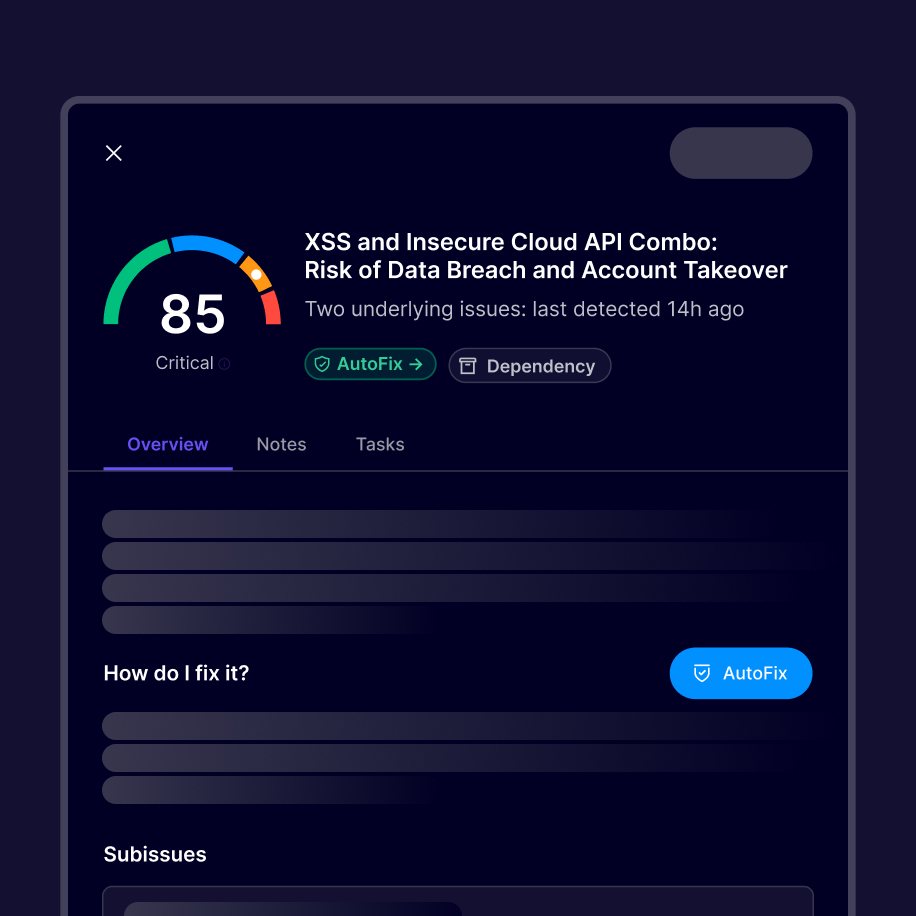

“If you're struggling to buy just one vulnerability scanning tool at an affordable price that checks the most boxes - this is the one I'd buy”
James BerthotyCyber Security Expert at latio.tech
Aikido runs fully locally in any environment


Security scanning without sending code to the cloud
Run Aikido's complete security platform inside your own infrastructure. Get the same findings, prioritization, and coverage while keeping source code fully under your control.
Built for compliance-heavy environments





Aikido is compliant

Secure your code locally
Secure your code, cloud, and runtime in one central system.
Find and fix vulnerabilities fast automatically.


FAQs about Local Scanning

No. All scans run locally. By default, Aikido doesn’t send your codebase to our servers. You can also configure it to block all code snippets from being sent.
Yes. Same engine, same results—just run locally.
We support local machines, VMs, CI pipelines, and self-hosted Git platforms.
Licenses are tied to your Aikido account; tokens authenticate scans per environment.