GitHub - bitsg/BinPy: An electronic simulation library written in pure Python


What is BinPy?
It is a library which will serve as a base to develop circuit based applications and educational software on top of it. BinPy is a clear representation of fundamentals. Everything has been written from scratch such as gates, logical operations, etc. This package does not depend on any external library other than pure Python. It aims to extend the hardware programming concepts to Python.
How to use
Here's an example of SR latch constructed from a pair of cross-coupled NOR gates
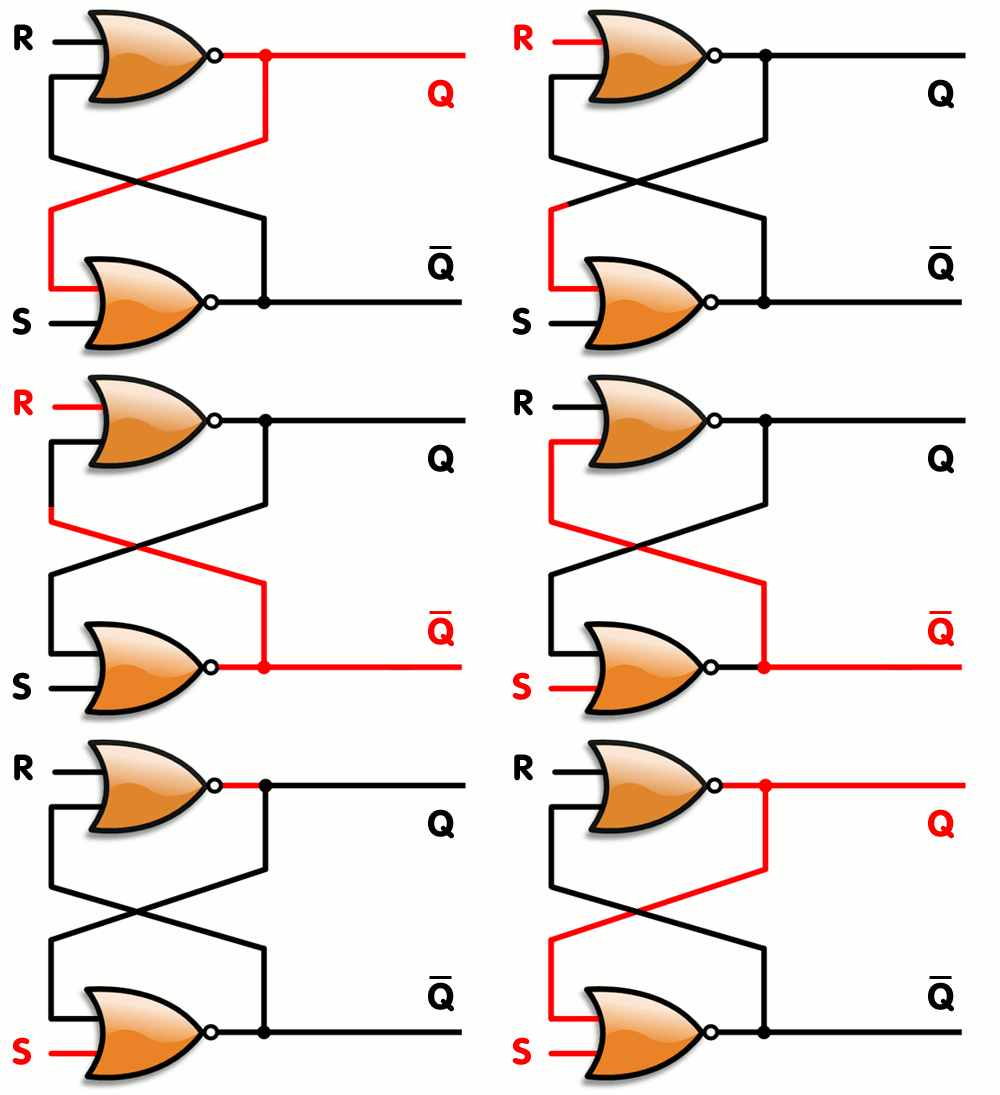
from BinPy import *

NOR1 = Nor('NOR1')  #First NOR gate
NOR2 = Nor('NOR2')  #Second NOR gate

#Connecting output of second NOR with input of first NOR
NOR2.C.connect(NOR1.B)
#Connecting output of first NOR with input of second NOR
NOR1.C.connect(NOR2.A)


NOR1.A.set(1);NOR2.B.set(0) #Set state
print 'Q: ',NOR2.C.getState(), '\t','Q\': ',NOR1.C.getState()


NOR1.A.set(0);NOR2.B.set(1) #Reset state
print 'Q: ',NOR2.C.getState(), '\t','Q\': ',NOR1.C.getState()


NOR1.A.set(0);NOR2.B.set(0) #Hold state
print 'Q: ',NOR2.C.getState(), '\t','Q\': ',NOR1.C.getState()


NOR1.A.set(1);NOR2.B.set(1) #Invalid state
print 'Q: ',NOR2.C.getState(), '\t','Q\': ',NOR1.C.getState()
Output
Q:  True 	Q':  False
Q:  False 	Q':  True
Q:  False 	Q':  True
Q:  False 	Q':  False	#Invalid State
Operations, Combinatonal Logic and Algorithms
from BinPy import *

# Operations
operator = Operations()
operator.ADD(1011,11)
operator.SUB(1011,11)
operator.COMP('0011',1) #Second argument chooses betweem 1's or 2's Compliment


# Combinational Logic
m = MUX(1,1,0,1)
m.selectLines(0,1)
print "MUX Out: ", m.output()

d = DEMUX()
d.selectLines(0,1)
print "DEMUX Out: ", d.output()

d = Decoder(0,1)
print "Decoder Out: ", d.output()

e = Encoder(0,1,0,0)
print "Encoder Out: ", e.output()

# Sequential Circuits
a = DFlipFlop(1,0)
print "DFlipFlop Out: ", a.output()

# IC
myIC = IC_7400()
p = {1:1,2:0,4:0,5:0,7:0,10:1,9:1,13:0,12:0,14:1}
myIC.setIC(p)
print "IC_7400 Out: ", myIC.run()

myIC1 = IC_7401()
p = {2:0,3:1,5:0,6:0,7:0,8:1,9:1,11:0,12:0,14:1}
myIC1.setIC(p)
print "IC_7401 Out: ", myIC1.run()

# Algorithms
# Includes the Quine-McCluskey algorithm for solving K-Maps
FinalEquation = QM(['A','B'])
print "Minimized Boolean Equation : " , FinalEquation.get_function(qm.solve([0,1,2],[])[1])
Output
{'carry': 0, 'sum': [1, 1, 1, 0]}
{'carry': 1, 'difference': [1, 0, 0, 0]}
MUX Out: 1
DEMUX Out: [0, 0, 0, 0]
Decoder Out:  [0, 1, 0, 0]
Encoder Out: [0, 1]
DFlipFlop Out: [1,0]
IC_7400 Out:  {8: 0, 11: 1, 3: 1, 6: 1}
IC_7401 Out:  {1: 1, 10: 0, 4: 1, 13: 1}
Minimized Boolean Equation : ((NOT B) OR (NOT A))
BinPy also comes with a console that is a simple wrapper around the classic python console from which you can directly use the BinPy Resources.
To start it, simply issue $ binpy if BinPy is installed in your path.
Documentation
Auto-generated documentation is available for reference at BinPy docs
Wiki
Check out the BinPy Wiki page for a complete summary of BinPy, The Development workflow, Downloading and Installation guide, Tutorials, Technical References and Much more.
Installation
Linux
###Install with pip
#####Python2
######PIP and setuptools
sudo apt-get install python-pip
sudo pip install --upgrade setuptools
######BinPy
sudo pip install https://github.com/BinPy/BinPy/zipball/master
######IPython Notebook
sudo pip install --upgrade ipython[all]
#####Python3
######PIP and setuptools
sudo apt-get install python3-pip
sudo pip3 install --upgrade setuptools
######BinPy
sudo pip3 install https://github.com/BinPy/BinPy/zipball/master
######IPython Notebook
sudo pip3 install --upgrade ipython[all]
#####Install autopep8 Tool to ensure your contributions pass the pep8 test.
sudo pip install --upgrade autopep8
###Install BinPy using git
#####Python2
sudo apt-get install git setuptools
git clone https://github.com/BinPy/BinPy.git
cd BinPy/
sudo python setup.py install
#####Python3
sudo apt-get install git python3-pip
sudo pip3 install --upgrade setuptools
git clone https://github.com/BinPy/BinPy.git
cd BinPy/
sudo python3 setup.py install
Future Work
- Introduction of all ICs
- Introduction of problem solving algorithms
- Addition of Microprocessors and Analog Devices
- Graphical representation of the circuit
Visit our roadmap and ideas page in Wiki to know more.
How To Contribute
For a detailed summary of all the coding guidelines and development workflow, visit our Wiki page.
- Report Bugs and Issues
- Solve Bugs and Issues
- Write Tutorials, Examples and Documentation
DEV NOTE:
-
It is expected that your code must follow pep8 standards. To conform to the same please install
autopep8tool following the instructions in the installation section. -
After installation is complete. Make the necessary changes and commit your changes. After Committing your changes,
cdto the BinPy root directory and issue the following commandautopep8 -r -i -a -a -v .To learn more about the
autopep8tool visit here. -
Ensure that all the tests pass by running
nosetests; nosetests3inBinPy\BinPy\testsdirectory. -
To check for the pep8 indentation status issue the following command
pep8 ./ --ignore=E501
If all the tests pass successfully push your repo to the origin/branch and send us a Pull Request. We'll be happy to review the same and merge it with our codebase.
