C++ String Basics
Strings (Basics) Strings (Basics) Strings
- dynamic array of
char(similar tovector<char>) - concatenation with
+or+= - single character access with
[index] - modifiable ("mutable") unlike in e.g., Python or Java
- regular: deeply copyable, deeply comparable
#include <iostream>
#include <string>

int main () {
using std::cout;

std::string hw = "Hello";
std::string s = hw;     // copy of hw
hw += " World!";
cout << hw << '\n';     // Hello World!
cout << hw[4] << '\n';  // o
cout << s << '\n';      // Hello
}
- one
charcan hold a single character - smallest integer type (usually 1 byte)
charliterals must be enclosed in single quotes:'a','b','c', …
#include <iostream>
#include <string>

int main () {
using std::cout;
char c1 = 'A';
char c2 = 65;  // ASCII code of 'A'
cout << c1 << '\n';          // A
cout << c2 << '\n';          // A
cout << (c1 == c2) << '\n';  // 1
std::string s = "xyz";
s[1] = c1;
cout << s << '\n';           // xAz
s += c2;
cout << s << '\n';           // xAzA
}
Special Characters
backslash \ acts as escape character
\n |
new line | "Line1\nLine1\nLine3" |
\t |
tab | "Column1\tColumn1\tColumn3" |
\' |
single quote | "he said \'quote\' to me" |
\" |
double quote | "he said \"quote\" to me" |
\\ |
backslash itself | "C:\\Users\\me\\hello.cpp" |


'a' // char Literal
#include <iostream>
#include <string>

int main () {
auto a = "seven of";  // type of a is char const[]
auto b = a;           // b refers to same object as a// refers to same object
// a += " nine";            //  COMPILER ERROR: can't be modified
// auto c = "al" + "cove";  //  COMPILER ERROR
std::string s = a;    // a is copied into s
s += " nine";         //  (s is std::string)

std::cout << "a: " << a << '\n';
std::cout << "b: " << b << '\n';
std::cout << "s: " << s << '\n';
}
#include <iostream>
#include <string>

int main () {
using std::cout;
using namespace std::string_literals;
auto s1 = "seven of"s;  // type of s1 is std::string
auto s2 = s1;           // s2 is a copy of s1
s1 += " nine";          //
cout << s1 << '\n';     // seven of nine
cout << s2 << '\n';     // seven of
auto s3 = "uni"s + "matrix"s;  //
cout << s3 << '\n';     // unimatrix
}
String literals that are only separated by whitespace are joined:
"first," "second"
⇒
"first,second"
std::string s =
  "This is one literal "
  "split into several "
"source code lines!";Use string_view for read-only parameters! C++17
- lightweight (= cheap to copy, can be passed by value)
- non-owning (= not responsible for allocating or deleting memory)
- read-only view (= does not allow modification of target string)
- of a string(-like) object (
std::string/"literal"/ …) - primary use case: read-only function parameters
#include <string>
#include <string_view>
int edit_distance (std::string_view s1,              std::string_view s2) { … }
std::string input = "abx";
int dist = edit_distance("abc", input);- avoids expensive temporary strings when string literals are passed to functions
can speed up accesses by avoiding a level of indirection:
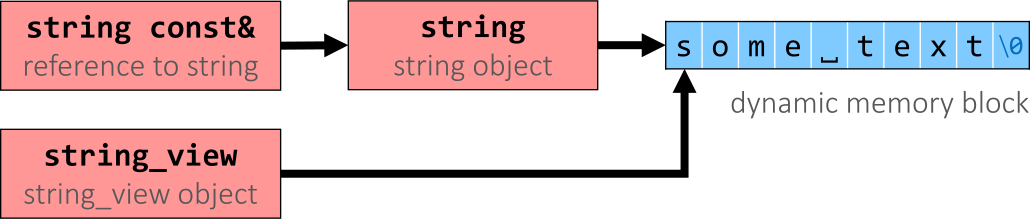
We will learn more about string_view and other view types later.
If You… | Use Parameter Type |
|---|---|
| always need a copy of the input string inside the function | std::string
pass by value |
want read-only access
|
#include <string_view>
std::string_view |
want read-only access
|
std::string const&
pass by const reference |
want the function to modify the input string in-place
(you should try to avoid such output parameters) |
std::string &
pass by (non-const) reference |
- read entire lines / chunks of text at once
- target string can be re-used (saving memory)
std::string s;
getline(std::cin, s);        // read entire line
getline(std::cin, s, '\t');  // read until next tab
getline(std::cin, s, 'a');   // read until next 'a'
Last updated: 2020-07-05
Found this useful? Share it: