It's like JSON. but fast and small.
MessagePack is an efficient binary serialization format. It lets you exchange data among multiple languages like JSON. But it's faster and smaller. Small integers are encoded into a single byte, and typical short strings require only one extra byte in addition to the strings themselves.
Next:
MessagePack is supported by over 50 programming languages and environments.
See list of implementations.

Redis scripting has support for MessagePack because it is a fast and compact serialization format with a simple to implement specification. I liked it so much that I implemented a MessagePack C extension for Lua just to include it into Redis.

Fluentd uses MessagePack for all internal data representation. It's crazy fast because of zero-copy optimization of msgpack-ruby. Now MessagePack is an essential component of Fluentd to achieve high performance and flexibility at the same time.
Sadayuki Furuhashi, creator of Fluentd

Treasure Data built a multi-tenant database optimized for analytical queries using MessagePack. The schemaless database is growing by billions of records every month. We also use MessagePack as a glue between components. Actually we just wanted a fast replacement of JSON, and MessagePack is simply useful.
Kazuki Ohta, CTO

MessagePack has been simply invaluable to us. We use MessagePack + Memcache to cache many of our feeds on Pinterest. These feeds are compressed and very quick to unpack thanks to MessagePack while Memcache gives us fast atomic pushes.
Marty Weiner, Software Engineer
Also use MessagePack? Waiting for your testimonial!
Languages
- ActionScript3 loteixeira
- Arduino hideakitai
- Arduino C HEADS-project
- C camgunz
- C ludocode
- C / Objective-C / Swift clwi
- C# msgpack
- C# ymofen
- C# caesay
- C# mlsomers
- C# neuecc
- C++11 Lichtso
- C++11 jonathonl
- C++11 ar90n
- C++17 mikeloomisgg
- C/C++ msgpack
- Clojure edma2
- Crystal crystal-community
- Crystal steakknife
- D msgpack
- Dart danellis
- Dart knopp
- Delphi chinawsb
- Elixir mururu
- Elixir lexmag
- Erlang msgpack
- F# Gab-km
- F# pocketberserker
- Go vmihailenco
- Go ugorji
- Go tinylib
- Go shamaton
- HHVM reeze
- Haskell msgpack
- Haskell rodrigosetti
- Haxe aaulia
- Jackson-dataformat komamitsu
- Java msgpack
- JavaScript kawanet
- JavaScript ygoe
- JavaScript/NodeJS kriszyp
- JavaScript/TypeScript/ECMA-262 msgpack
- Javascript/NodeJS davalapar
- Kotlin davethomas11
- Lua markstinson
- Lua kieselsteini
- Matlab bastibe
- Nim akiradeveloper
- Nim jangko
- Node mcollina
- Node sschizas
- OCaml msgpack
- Objective-C gabriel
- PHP msgpack
- PHP rybakit
- Pascal ymofen
- Perl msgpack
- Perl 6 pierre-vigier
- Pony seantallen-org
- PostgreSQL patriksimek
- Python msgpack
- Python vsergeev
- Python aviramha
- Python/Twisted jakm
- Qt romixlab
- R eddelbuettel
- Rails owenthereal
- Retrofit converter (Java) komamitsu
- Ruby msgpack
- Ruby/C++ mneumann
- Rust 3Hren
- SION,Swift dankogai
- Scala msgpack
- Scala msgpack4z
- Scala.js msgpack4z
- Shell jakm
- Smalltalk msgpack
- Swift briandw
- Swift a2
- Swift michael-yuji
- Swift hirotakan
- Swift swiftstack
- UNIX Shell ludocode
- kotlinx.serialization esensar
- mruby suzukaze
- mruby Asmod4n
- msgpack-inspect tagomoris
- scala-native msgpack4z
API
List your implementation here!
loteixeira/as3-msgpack https://github.com/loteixeira/as3-msgpack
MessagePack for Actionscript3 (Flash, Flex and AIR).
as3-msgpack was designed to work with the interfaces IDataInput and IDataOutput, thus the API might be easily connected with the native classes that handle binary data (such as ByteArray, Socket, FileStream and URLStream).
Moreover, as3-msgpack is capable of decoding data from binary streams.
Get started: http://loteixeira.github.io/lib/2013/08/19/as3-msgpack/
Basic usage (encoding/decoding):
// create messagepack object
var msgpack:MsgPack = new MsgPack();

// encode an array
var bytes:ByteArray = msgpack.write([1, 2, 3, 4, 5]);

// rewind the buffer
bytes.position = 0;

// print the decoded object
trace(msgpack.read(bytes));
For downloads, source code and further information, check the project repository: https://github.com/loteixeira/as3-msgpack.
hideakitai/MsgPack https://github.com/hideakitai/MsgPack
MsgPack
MessagePack implementation for Arduino (compatible with other C++ apps)
Feature
- one-line [serialize / deserialize] for almost all standard type of C++ same as msgpack-c
- support custom class [serialization / deserialization]
- support working with ArduinoJSON
- one-line [save / load] between custom serializable MsgPack class and JSON file
- one-line [save / load] custom serializable MsgPack class [to / from] EEPROM
Typical Usage
This library is only for serialize / deserialize.
To send / receive serialized data with Stream class, please use MsgPacketizer.
#include <MsgPack.h>

// input to msgpack
int i = 123;
float f = 1.23;
MsgPack::str_t s = "str"; // std::string or String
MsgPack::arr_t<int> v {1, 2, 3}; // std::vector or arx::vector
MsgPack::map_t<String, float> m {{"one", 1.1}, {"two", 2.2}, {"three", 3.3}}; // std::map or arx::map

// output from msgpack
int ri;
float rf;
MsgPack::str_t rs;
MsgPack::arr_t<int> rv;
MsgPack::map_t<String, float> rm;

void setup() {
    delay(2000);
    Serial.begin(115200);
    Serial.println("msgpack test start");

    // serialize to msgpack
    MsgPack::Packer packer;
    packer.serialize(i, f, s, v, m);

    // deserialize from msgpack
    MsgPack::Unpacker unpacker;
    unpacker.feed(packer.data(), packer.size());
    unpacker.deserialize(ri, rf, rs, rv, rm);

    if (i != ri) Serial.println("failed: int");
    if (f != rf) Serial.println("failed: float");
    if (s != rs) Serial.println("failed: string");
    if (v != rv) Serial.println("failed: vector<int>");
    if (m != rm) Serial.println("failed: map<string, int>");

    Serial.println("msgpack test success");
}

void loop() {}
Encode / Decode to Collections without Container
In msgpack, there are two collection types: Array and Map.
C++ containers will be converted to one of them but you can do that from individual parameters.
To pack / unpack values as such collections in a simple way, please use these functions.
packer.to_array(i, f, s); // becoms array format [i, f, s];
unpacker.from_array(ii, ff, ss); // unpack from array format to ii, ff, ss

packer.to_map("i", i, "f", f); // becoms {"i":i, "f":f}
unpacker.from_map(ki, ii, kf, ff); // unpack from map to ii, ff, ss
The same conversion can be achieved using serialize and deserialize.
packer.serialize(MsgPack::arr_size_t(3), i, f, s); // [i, f, s]
unpacker.deserialize(MsgPack::arr_size_t(3), ii, ff, ss);

packer.serialize(MsgPack::map_size_t(2), "i", i, "f", f); // {"i":i, "f":f}
unpacker.deserialize(MsgPack::map_size_t(2), ki, ii, kf, ff);
Here, MsgPack::arr_size_t and MsgPack::map_size_t are used to identify the size of Array and Map format in serialize or deserialize.
This way is expandable to pack and unpack complex data structure because it can be nested.
// {"i":i, "arr":[ii, iii]}
packer.serialize(MsgPack::map_size_t(2), "i", i, "arr", MsgPack::arr_size_t(2), ii, iii);
unpacker.deserialize(MsgPack::map_size_t(2), ki, i, karr, MsgPack::arr_size_t(2), ii, iii);
Custom Class Adaptation
To serialize / deserialize custom type you defined, please use MSGPACK_DEFINE() macro inside of your class. This macro enables you to convert your custom class to Array format.
struct CustomClass {
    int i;
    float f;
    MsgPack::str_t s;
    MSGPACK_DEFINE(i, f, s); // -> [i, f, s]
};
After that, you can serialize your class completely same as other types.
int i;
float f;
MsgPack::str_t s;
CustomClass c;

MsgPack::Packer packer;
packer.serialize(i, f, s, c);
// -> packer.serialize(i, f, s, arr_size_t(3), c.i, c.f, c.s)

int ii;
float ff;
MsgPack::str_t ss;
CustomClass cc;

MsgPack::Unpacker unpacker;
unpacker.feed(packer.data(), packer.size());
unpacker.deserialize(ii, ff, ss, cc);
You can also wrap your custom class to Map format by using MSGPACK_DEFINE_MAP macro.
Please note that you need "key" string for Map format.
struct CustomClass {
    MsgPack::str_t key_i {"i"}; int i;
    MsgPack::str_t key_f {"f"}; float f;
    MSGPACK_DEFINE_MAP(key_i, i, key_f, f); // -> {"i":i, "f":f}
};

CustomClass c;
MsgPack::Packer packer;
packer.serialize(c);
// -> packer.serialize(map_size_t(2), c.key_i, c.i, c.key_f, c.f)

CustomClass cc;
MsgPack::Unpacker unpacker;
unpacker.feed(packer.data(), packer.size());
unpacker.deserialize(cc);
Also you can use MSGPACK_BASE() macro to pack values of base class.
struct Base {
    int i;
    float f;
    MSGPACK_DEFINE(i, f);
};

struct Derived : public Base {
    MsgPack::str_t s;
    MSGPACK_DEFINE(s, MSGPACK_BASE(Base));
    // -> packer.serialize(arr_size_t(2), s, arr_size_t(2), Base::i, Base::f)
};
If you wamt to use Map format in derived class, add "key" for your MSGPACK_BASE.
struct Derived : public Base {
    MsgPack::str_t key_s; MsgPack::str_t s;
    MsgPack::str_t key_b; // key for base class
    MSGPACK_DEFINE_MAP(key_s, s, key_b, MSGPACK_BASE(Base));
    // -> packer.serialize(map_size_t(2), key_s, s, key_b, arr_size_t(2), Base::i, Base::f)
};
You can nest custom classes to express complex data structure.
// serialize and deserialize nested structure
// {"i":i, "f":f, "a":["str", {"first":1, "second":"two"}]}

// {"first":1, "second":"two"}
struct MyMap {
    MsgPack::str_t key_first; int i;
    MsgPack::str_t key_second; MsgPack::str_t s;
    MSGPACK_DEFINE_MAP(key_first, i, key_second, s);
};

// ["str", {"first":1, "second":"two"}]
struct MyArr {
    MsgPack::str_t s;
    MyMap m;
    MSGPACK_DEFINE(s, m):
};

// {"i":i, "f":f, "a":["str", {"first":1, "second":"two"}]}
struct MyNestedClass {
    MsgPack::str_t key_i; int i;
    MsgPack::str_t key_f; int f;
    MsgPack::str_t key_a;
    MyArr arr;
    MSGPACK_DEFINE_MAP(key_i, i, key_f, f, key_a, arr);
};
And you can serialize / deserialize as same as other types.
MyNestedClass c;
MsgPack::Packer packer;
packer.serialize(c);

MyNestedClass cc;
MsgPack::Unpacker unpacker;
unpacker.feed(packer.data(), packer.size());
unpacker.deserialize(cc);
JSON and Other language's msgpack compatibility
In other languages like JavaScript, Python and etc. has also library for msgpack.
But some libraries can NOT convert msgpack in "plain" style.
They always wrap them into collections like Array or Map by default.
For example, you can't convert "plain" format in other languages.
packer.serialize(i, f, s);                // "plain" format is NOT unpackable
packer.serialize(arr_size_t(3), i, f, s); // unpackable if you wrap that into Array
It is because the msgpack is used as based on JSON (I think).
So you need to use Array format for JSON array, and Map for Json Object.
To achieve that, there are several ways.
- use
to_arrayorto_mapto convert to simple structure - use
serialize()ordeserialize()witharr_size_t/map_size_tfor complex structure - use custom class as JSON array / object which is wrapped into
Array/Map - use custom class nest recursively for more complex structure
- use
ArduinoJsonfor more flexible handling of JSON
- you can [serialize / deserialize]
StaticJsonDocument<N>andDynamicJsonDocumentdirectly
#include <ArduinoJson.h>  // include before MsgPack.h
#include <MsgPack.h>

void setup() {
    StaticJsonDocument<200> doc_in;
    MsgPack::Packer packer;
    packer.serialize(doc_in); // serialize directly

    StaticJsonDocument<200> doc;
    MsgPack::Unpacker unpacker;
    unpacker.feed(packer.data(), packer.size());
    unpacker.deserialize(doc); // deserialize directly
}
Utilities
You can directly save/load to/from JSON file with this library. SD, SdFat, SD_MMC, SPIFFS, etc. are available for the target file system. Please see save_load_as_json_file example for more details.
#include <SD.h>
#include <MsgPack.h>

struct MyConfig {
    Meta meta;
    Data data;
    MSGPACK_DEFINE(meta, data);
};

MyConfig config;

void setup() {
    SD.begin();

    // load json data from /config.txt to config struct directly
    MsgPack::file::load_from_json_static<256>(SD, "/config.txt", config);

    // change your configuration...

    // save config data from config struct to /config.txt as json directly
    MsgPack::file::save_as_json_static<256>(SD, "/config.txt", config);
}
In Arduino, you can use the MsgPack utility to save/load to/from EEPROM. Following code shows how to use them. Please see save_load_eeprom example for more details.
struct MyConfig {
    Meta meta;
    Data data;
    MSGPACK_DEFINE(meta, data);
};

MyConfig config;

void setup() {
    EEPROM.begin();

    // load current config
    MsgPack::eeprom::load(config);

    // change your configuration...

    // save
    MsgPack::eeprom::save(config);

    EEPROM.end();
}
Supported Type Adaptors
These are the lists of types which can be serialize and deserialize.
You can also pack() or unpack() variable one by one.
MsgPack::object::nil_t
bool
char (signed/unsigned)ints (signed/unsigned)
floatdouble
char*char[]-
std::stringorString(Arduino)(MsgPack::str_t)
-
unsigned char*(need toserialize(ptr, size)orpack(ptr, size)) -
unsigned char[](need toserialize(ptr, size)orpack(ptr, size)) -
std::vector<char>(MsgPack::bin_t<char>) -
std::vector<unsigned char>(MsgPack::bin_t<unsigned char>) std::array<char>std::array<unsigned char>
-
T[](need toserialize(ptr, size)orpack(ptr, size)) -
std::vector(MsgPack::arr_t<T>) -
std::array(MsgPack::fix_arr_t<T, N>) std::dequestd::pairstd::tuplestd::liststd::forward_liststd::setstd::multisetstd::unordered_setstd::unordered_multiset
-
std::map(MsgPack::map_t<T>) std::multimapstd::unordered_mapstd::unordered_multimap
MsgPack::object::ext
MsgPack::object::timespec
std::queuestd::priority_queuestd::bitsetstd::stack
-
unordered_xxxcannot be used in all Arduino - C-style array and pointers are supported only packing.
- for NO-STL Arduino, following types can be used
- all types of NIL, Bool, Integer, Float, Str, Bin
- for Array, only
T[],MsgPack::arr_t<T>(arx::vector<T>), andMsgPack::fix_arr_t<T, N>(arx::array<T, N>) can be used - for Map, only
MsgPack::map_t<T, U>(arx::map<T, U>) can be used - for the detail of
arx::xxx, see ArxContainer
There are some additional types are defined to express msgpack formats easily.
These types have type aliases like this:
-
MsgPack::str_t=String(Arduino only) -
MsgPack::bin_t<T>=std::vector<T> -
MsgPack::arr_t<T>=std::vector<T> -
MsgPack::fix_arr_t<T, N>=std::array<T, N> -
MsgPack::map_t<T, U>=std::map<T, U>
For general C++ apps (not Arduino), str_t is defined as:
-
MsgPack::str_t=std::string
MsgPack::object::nil_t is used to pack and unpack Nil type.
This object is just a dummy and do nothing.
MsgPack::object::ext holds binary data of Ext type.
// create ext type with args: int8_t, const uint8_t*, uint32_t
MsgPack::object::ext e(type, bin_ptr, size);
MsgPack::Packer packer;
packer.serialize(e); // serialize ext type

MsgPack::object::ext r;
msgPack::Unpacker unpacker;
unpacker.feed(packer.data(), packer.size());
unpacker.deserialize(r); // deserialize ext type
MsgPack::object::timespec is used to pack and unpack Timestamp type.
MsgPack::object::timespec t = {
    .tv_sec  = 123456789, /* int64_t  */
    .tv_usec = 123456789  /* uint32_t */
};
MsgPack::Packer packer;
packer.serialize(t); // serialize timestamp type

MsgPack::object::timespec r;
msgPack::Unpacker unpacker;
unpacker.feed(packer.data(), packer.size());
unpacker.deserialize(r); // deserialize timestamp type
Other Options
Error information report is disabled by default. You can enable it by defining this macro.
#define MSGPACK_DEBUGLOG_ENABLE
Also you can change debug info stream by calling this macro (default: Serial).
DEBUG_LOG_ATTACH_STREAM(Serial1);See DebugLog for details.
STL is used to handle packet data by default, but for following boards/architectures, ArxContainer is used to store the packet data because STL can not be used for such boards. The storage size of such boards for max packet binary size and number of msgpack objects are limited.
- AVR
- megaAVR
- SAMD
As mentioned above, for such boards like Arduino Uno, the storage sizes are limited. And of course you can manage them by defining following macros. But these default values are optimized for such boards, please be careful not to excess your boards storage/memory.
// msgpack serialized binary size
#define MSGPACK_MAX_PACKET_BYTE_SIZE  128
// max size of MsgPack::arr_t
#define MSGPACK_MAX_ARRAY_SIZE          8
// max size of MsgPack::map_t
#define MSGPACK_MAX_MAP_SIZE            8
// msgpack objects size in one packet
#define MSGPACK_MAX_OBJECT_SIZE        24
These macros have no effect for STL enabled boards.
In addtion for such boards, type aliases for following types are different from others.
-
MsgPack::str_t=String -
MsgPack::bin_t<T>=arx::vector<T, N = MSGPACK_MAX_PACKET_BYTE_SIZE> -
MsgPack::arr_t<T>=arx::vector<T, N = MSGPACK_MAX_ARRAY_SIZE> -
MsgPack::map_t<T, U>=arx::map<T, U, N = MSGPACK_MAX_MAP_SIZE>
Please see "Memory Management" section and ArxContainer for detail.
For such boards, there are several STL libraries, like ArduinoSTL, StandardCPlusPlus, and so on. But such libraries are mainly based on uClibc++ and it has many lack of function. I considered to support them but I won't support them unless uClibc++ becomes much better compatibility to standard C++ library. I reccomend to use low cost but much better performance chip like ESP series.
Embedded Libraries
Used Inside of
APIs
// reserve internal buffer
void reserve_buffer(const size_t size);

// variable sized serializer for any type
template <typename First, typename ...Rest>
void serialize(const First& first, Rest&&... rest);
template <typename T>
void serialize(const arr_size_t& arr_size, Args&&... args);
template <typename ...Args>
void serialize(const map_size_t& map_size, Args&&... args);
template <size_t N>
void serialize(const StaticJsonDocument<N>& doc, const size_t num_max_string_type = 32);
void serialize(const DynamicJsonDocument& doc, const size_t num_max_string_type = 32);
void serialize_arduinojson(const JsonDocument& doc, const size_t num_max_string_type = 32);

// variable sized serializer to array or map for any type
template <typename ...Args>
void to_array(Args&&... args);
template <typename ...Args>
void to_map(Args&&... args);

// single arg packer for any type
template <typename T>
void pack<T>(const T& t);
template <typename T>
void pack<T>(const T* ptr, const size_t size); // only for pointer types

// accesor and utility for serialized binary data
const bin_t<uint8_t>& packet() const;
const uint8_t* data() const;
size_t size() const;
size_t indices() const;
void clear();

// abstract serializer for msgpack formats
// serialize() and pack() are wrapper for these methods
void packInteger(const T& value); // accept both uint and int
void packFloat(const T& value);
void packString(const T& str);
void packString(const T& str, const size_t len);
void packBinary(const uint8_t* bin, const size_t size);
void packArraySize(const size_t size);
void packMapSize(const size_t size);
void packFixExt(const int8_t type, const T value);
void packFixExt(const int8_t type, const uint64_t value_h, const uint64_t value_l);
void packFixExt(const int8_t type, const uint8_t* ptr, const uint8_t size);
void packFixExt(const int8_t type, const uint16_t* ptr, const uint8_t size);
void packFixExt(const int8_t type, const uint32_t* ptr, const uint8_t size);
void packFixExt(const int8_t type, const uint64_t* ptr, const uint8_t size);
void packExt(const int8_t type, const T* ptr, const U size);
void packExt(const object::ext& e);
void packTimestamp(const object::timespec& time);

// serializer for detailed msgpack format
// serialize() and pack() are wrapper for these methods
void packNil();
void packNil(const object::nil_t& n);
void packBool(const bool b);
void packUInt7(const uint8_t value);
void packUInt8(const uint8_t value);
void packUInt16(const uint16_t value);
void packUInt32(const uint32_t value);
void packUInt64(const uint64_t value);
void packInt5(const int8_t value);
void packInt8(const int8_t value);
void packInt16(const int16_t value);
void packInt32(const int32_t value);
void packInt64(const int64_t value);
void packFloat32(const float value);
void packFloat64(const double value);
void packString5(const str_t& str);
void packString5(const str_t& str, const size_t len);
void packString5(const char* value);
void packString5(const char* value, const size_t len);
void packString8(const str_t& str);
void packString8(const str_t& str, const size_t len);
void packString8(const char* value);
void packString8(const char* value, const size_t len);
void packString16(const str_t& str);
void packString16(const str_t& str, const size_t len);
void packString16(const char* value);
void packString16(const char* value, const size_t len);
void packString32(const str_t& str);
void packString32(const str_t& str, const size_t len);
void packString32(const char* value);
void packString32(const char* value, const size_t len);
void packString5(const __FlashStringHelper* str);
void packString5(const __FlashStringHelper* str, const size_t len);
void packString8(const __FlashStringHelper* str);
void packString8(const __FlashStringHelper* str, const size_t len);
void packString16(const __FlashStringHelper* str);
void packString16(const __FlashStringHelper* str, const size_t len);
void packString32(const __FlashStringHelper* str);
void packString32(const __FlashStringHelper* str, const size_t len);
void packBinary8(const uint8_t* value, const uint8_t size);
void packBinary16(const uint8_t* value, const uint16_t size);
void packBinary32(const uint8_t* value, const uint32_t size);
void packArraySize4(const uint8_t value);
void packArraySize16(const uint16_t value);
void packArraySize32(const uint32_t value);
void packMapSize4(const uint8_t value);
void packMapSize16(const uint16_t value);
void packMapSize32(const uint32_t value);
void packFixExt1(const int8_t type, const uint8_t value);
void packFixExt2(const int8_t type, const uint16_t value);
void packFixExt2(const int8_t type, const uint8_t* ptr);
void packFixExt2(const int8_t type, const uint16_t* ptr);
void packFixExt4(const int8_t type, const uint32_t value);
void packFixExt4(const int8_t type, const uint8_t* ptr);
void packFixExt4(const int8_t type, const uint32_t* ptr);
void packFixExt8(const int8_t type, const uint64_t value);
void packFixExt8(const int8_t type, const uint8_t* ptr);
void packFixExt8(const int8_t type, const uint64_t* ptr);
void packFixExt16(const int8_t type, const uint64_t value_h, const uint64_t value_l);
void packFixExt16(const int8_t type, const uint8_t* ptr);
void packFixExt16(const int8_t type, const uint64_t* ptr);
void packExtSize8(const int8_t type, const uint8_t size);
void packExtSize16(const int8_t type, const uint16_t size);
void packExtSize32(const int8_t type, const uint32_t size);
void packTimestamp32(const uint32_t unix_time_sec);
void packTimestamp64(const uint64_t unix_time);
void packTimestamp64(const uint64_t unix_time_sec, const uint32_t unix_time_nsec);
void packTimestamp96(const int64_t unix_time_sec, const uint32_t unix_time_nsec);
// reserve internal buffer for indices
void reserve_indices(const size_t size);

// feed data to deserialize
bool feed(const uint8_t* data, size_t size);

// variable sized deserializer
template <typename First, typename ...Rest>
bool deserialize(First& first, Rest&&... rest);
template <size_t N>
bool deserialize(StaticJsonDocument<N>& doc);
bool deserialize(DynamicJsonDocument& doc);

// varibale sized desrializer for array and map
template <typename ...Args>
bool from_array(Args&&... args);
template <typename ...Args>
bool from_map(Args&&... args);

// single arg deserializer
template <typename T>
bool unpack(T& value);

// check if next arg can be deserialized to value
template <typename T>
bool unpackable(const T& value) const;

// accesor and utility for deserialized msgpack data
bool decode_ready() const;
bool decoded() const;
size_t size() const;
void index(const size_t i);
size_t index() const;
void clear();

// abstract deserializer for msgpack formats
// deserialize() and unpack() are wrapper for these methods
T unpackUInt();
T unpackInt();
T unpackFloat();
str_t unpackString();
bin_t<T> unpackBinary();
bin_t<T> unpackBinary();
size_t unpackArraySize();
size_t unpackMapSize();
object::ext unpackExt();
object::timespec unpackTimestamp();

// deserializer for detailed msgpack format
// these methods check deserialize index overflow and type mismatch
// deserialize() and unpack() are wrapper for these methods
bool unpackNil();
bool unpackBool();
uint8_t unpackUInt7();
uint8_t unpackUInt8();
uint16_t unpackUInt16();
uint32_t unpackUInt32();
uint64_t unpackUInt64();
int8_t unpackInt5();
int8_t unpackInt8();
int16_t unpackInt16();
int32_t unpackInt32();
int64_t unpackInt64();
float unpackFloat32();
double unpackFloat64();
str_t unpackString5();
str_t unpackString8();
str_t unpackString16();
str_t unpackString32();
bin_t<T> unpackBinary8();
bin_t<T> unpackBinary16();
bin_t<T> unpackBinary32();
std::array<T, N> unpackBinary8();
std::array<T, N> unpackBinary16();
std::array<T, N> unpackBinary32();
size_t unpackArraySize4();
size_t unpackArraySize16();
size_t unpackArraySize32();
size_t unpackMapSize4();
size_t unpackMapSize16();
size_t unpackMapSize32();
object::ext unpackFixExt1();
object::ext unpackFixExt2();
object::ext unpackFixExt4();
object::ext unpackFixExt8();
object::ext unpackFixExt16();
object::ext unpackExt8();
object::ext unpackExt16();
object::ext unpackExt32();
object::timespec unpackTimestamp32();
object::timespec unpackTimestamp64();
object::timespec unpackTimestamp96();

// deserializer for detailed msgpack format
// these methods does NOT check index overflow and type mismatch
bool unpackNilUnchecked();
bool unpackBoolUnchecked();
uint8_t unpackUIntUnchecked7();
uint8_t unpackUIntUnchecked8();
uint16_t unpackUIntUnchecked16();
uint32_t unpackUIntUnchecked32();
uint64_t unpackUIntUnchecked64();
int8_t unpackIntUnchecked5();
int8_t unpackIntUnchecked8();
int16_t unpackIntUnchecked16();
int32_t unpackIntUnchecked32();
int64_t unpackIntUnchecked64();
float unpackFloatUnchecked32();
double unpackFloatUnchecked64();
str_t unpackStringUnchecked5();
str_t unpackStringUnchecked8();
str_t unpackStringUnchecked16();
str_t unpackStringUnchecked32();
bin_t<T> unpackBinaryUnchecked8();
bin_t<T> unpackBinaryUnchecked16();
bin_t<T> unpackBinaryUnchecked32();
std::array<T, N> unpackBinaryUnchecked8();
std::array<T, N> unpackBinaryUnchecked16();
std::array<T, N> unpackBinaryUnchecked32();
size_t unpackArraySizeUnchecked4();
size_t unpackArraySizeUnchecked16();
size_t unpackArraySizeUnchecked32();
size_t unpackMapSizeUnchecked4();
size_t unpackMapSizeUnchecked16();
size_t unpackMapSizeUnchecked32();
object::ext unpackFixExtUnchecked1();
object::ext unpackFixExtUnchecked2();
object::ext unpackFixExtUnchecked4();
object::ext unpackFixExtUnchecked8();
object::ext unpackFixExtUnchecked16();
object::ext unpackExtUnchecked8();
object::ext unpackExtUnchecked16();
object::ext unpackExtUnchecked32();
object::timespec unpackTimestampUnchecked32();
object::timespec unpackTimestampUnchecked64();
object::timespec unpackTimestampUnchecked96();

// checks types of next msgpack object
bool isNil() const;
bool isBool() const;
bool isUInt7() const;
bool isUInt8() const;
bool isUInt16() const;
bool isUInt32() const;
bool isUInt64() const;
bool isUInt() const;
bool isInt5() const;
bool isInt8() const;
bool isInt16() const;
bool isInt32() const;
bool isInt64() const;
bool isInt() const;
bool isFloat32() const;
bool isFloat64() const;
bool isFloat() const;
bool isStr5() const;
bool isStr8() const;
bool isStr16() const;
bool isStr32() const;
bool isStr() const;
bool isBin8() const;
bool isBin16() const;
bool isBin32() const;
bool isBin() const;
bool isArray4() const;
bool isArray16() const;
bool isArray32() const;
bool isArray() const;
bool isMap4() const;
bool isMap16() const;
bool isMap32() const;
bool isMap() const;
bool isFixExt1() const;
bool isFixExt2() const;
bool isFixExt4() const;
bool isFixExt8() const;
bool isFixExt16() const;
bool isFixExt() const;
bool isExt8() const;
bool isExt16() const;
bool isExt32() const;
bool isExt() const;
bool isTimestamp32() const;
bool isTimestamp64() const;
bool isTimestamp96() const;
bool isTimestamp() const;
MsgPack::Type getType() const
template <typename T>
inline size_t estimate_size(const T& msg);

namespace file {
    template <typename FsType, typename T>
    inline bool save_as_json(FsType& fs, const String& path, const T& value, JsonDocument& doc);
    template <size_t N, typename FsType, typename T>
    inline bool save_as_json_static(FsType& fs, const String& path, const T& value);
    template <typename FsType, typename T>
    inline bool save_as_json_dynamic(FsType& fs, const String& path, const T& value, const size_t json_size = 512);

    template <typename FsType, typename T>
    inline bool load_from_json(FsType& fs, const String& path, T& value, JsonDocument& doc, const size_t num_max_string_type = 32);
    template <size_t N, typename FsType, typename T>
    inline bool load_from_json_static(FsType& fs, const String& path, T& value);
    template <typename FsType, typename T>
    inline bool load_from_json_dynamic(FsType& fs, const String& path, T& value, const size_t json_size = 512);
}

namespace eeprom {
    template <typename T>
    inline bool save(const T& value, const size_t index_offset = 0);
    template <typename T>
    inline bool load(T& value, const size_t index_offset = 0);
    template <typename T>
    inline void clear(const T& value, const size_t index_offset = 0);
    inline void clear_size(const size_t size, const size_t index_offset = 0);
}
enum class Type : uint8_t {
    NA          = 0xC1, // never used
    NIL         = 0xC0,
    BOOL        = 0xC2,
    UINT7       = 0x00, // same as POSITIVE_FIXINT
    UINT8       = 0xCC,
    UINT16      = 0xCD,
    UINT32      = 0xCE,
    UINT64      = 0xCF,
    INT5        = 0xE0, // same as NEGATIVE_FIXINT
    INT8        = 0xD0,
    INT16       = 0xD1,
    INT32       = 0xD2,
    INT64       = 0xD3,
    FLOAT32     = 0xCA,
    FLOAT64     = 0xCB,
    STR5        = 0xA0, // same as FIXSTR
    STR8        = 0xD9,
    STR16       = 0xDA,
    STR32       = 0xDB,
    BIN8        = 0xC4,
    BIN16       = 0xC5,
    BIN32       = 0xC6,
    ARRAY4      = 0x90, // same as FIXARRAY
    ARRAY16     = 0xDC,
    ARRAY32     = 0xDD,
    MAP4        = 0x80, // same as FIXMAP
    MAP16       = 0xDE,
    MAP32       = 0xDF,
    FIXEXT1     = 0xD4,
    FIXEXT2     = 0xD5,
    FIXEXT4     = 0xD6,
    FIXEXT8     = 0xD7,
    FIXEXT16    = 0xD8,
    EXT8        = 0xC7,
    EXT16       = 0xC8,
    EXT32       = 0xC9,
    TIMESTAMP32 = 0xD6,
    TIMESTAMP64 = 0xD7,
    TIMESTAMP96 = 0xC7,

    POSITIVE_FIXINT = 0x00,
    NEGATIVE_FIXINT = 0xE0,
    FIXSTR          = 0xA0,
    FIXARRAY        = 0x90,
    FIXMAP          = 0x80,
};
Reference
License
MIT
HEADS-project/arduino_msgpack https://github.com/HEADS-project/arduino_msgpack
arduino_msgpack
This Arduino library provides a light weight serializer and parser for messagepack.
Install
Download the zip, and import it with your Arduino IDE: Sketch>Include Library>Add .zip library
Usage
See the either the .h file, or the examples (led_controller and test_uno_writer).
In short:
- functions like
msgpck_what_next(Stream * s);watch the next type of data without reading it (without advancing the buffer of Streams). - functions like
msgpck_read_bool(Stream * s, bool *b)read a value from Streams. - functions like
msgpck_write_bool(Stream * s, bool b)write a value on Streams.
Notes:
- Stream are used as much as possible in order not to add to much overhead with buffers. Therefore you should be able to store the minimum number of value at a given time.
- Map and Array related functions concern only their headers. Ex: If you want to write an array containing two elements you should write the array header, then write the two elements.
Limitations
Currently the library does not support:
- 8 bytes float (Only 4 bytes floats are supported by default on every Arduino and floats are anyway not recommended on Arduino)
- 2^32 char long (or longer) strings
- 2^32 byte long (or longer) bins
- extention types.
camgunz/cmp https://github.com/camgunz/cmp
CMP


CMP is a C implementation of the MessagePack serialization format. It currently implements version 5 of the MessagePack Spec.
CMP's goal is to be lightweight and straightforward, forcing nothing on the programmer.
License
While I'm a big believer in the GPL, I license CMP under the MIT license.
Example Usage
The following examples use a file as the backend, and are modeled after the examples included with the msgpack-c project.
#include <stdio.h>
#include <stdlib.h>

#include "cmp.h"

static bool read_bytes(void *data, size_t sz, FILE *fh) {
    return fread(data, sizeof(uint8_t), sz, fh) == (sz * sizeof(uint8_t));
}

static bool file_reader(cmp_ctx_t *ctx, void *data, size_t limit) {
    return read_bytes(data, limit, (FILE *)ctx->buf);
}

static bool file_skipper(cmp_ctx_t *ctx, size_t count) {
    return fseek((FILE *)ctx->buf, count, SEEK_CUR);
}

static size_t file_writer(cmp_ctx_t *ctx, const void *data, size_t count) {
    return fwrite(data, sizeof(uint8_t), count, (FILE *)ctx->buf);
}

static void error_and_exit(const char *msg) {
    fprintf(stderr, "%s\n\n", msg);
    exit(EXIT_FAILURE);
}

int main(void) {
    FILE *fh = NULL;
    cmp_ctx_t cmp = {0};
    uint32_t array_size = 0;
    uint32_t str_size = 0;
    char hello[6] = {0};
    char message_pack[12] = {0};

    fh = fopen("cmp_data.dat", "w+b");

    if (fh == NULL) {
        error_and_exit("Error opening data.dat");
    }

    cmp_init(&cmp, fh, file_reader, file_skipper, file_writer);

    if (!cmp_write_array(&cmp, 2)) {
        error_and_exit(cmp_strerror(&cmp));
    }

    if (!cmp_write_str(&cmp, "Hello", 5)) {
        error_and_exit(cmp_strerror(&cmp));
    }

    if (!cmp_write_str(&cmp, "MessagePack", 11)) {
        error_and_exit(cmp_strerror(&cmp));
    }

    rewind(fh);

    if (!cmp_read_array(&cmp, &array_size)) {
        error_and_exit(cmp_strerror(&cmp));
    }

    /* You can read the str byte size and then read str bytes... */

    if (!cmp_read_str_size(&cmp, &str_size)) {
        error_and_exit(cmp_strerror(&cmp));
    }

    if (str_size > (sizeof(hello) - 1)) {
        error_and_exit("Packed 'hello' length too long\n");
    }

    if (!read_bytes(hello, str_size, fh)) {
        error_and_exit(cmp_strerror(&cmp));
    }

    /*
     * ...or you can set the maximum number of bytes to read and do it all in
     * one call
     */

    str_size = sizeof(message_pack);
    if (!cmp_read_str(&cmp, message_pack, &str_size)) {
        error_and_exit(cmp_strerror(&cmp));
    }

    printf("Array Length: %u.\n", array_size);
    printf("[\"%s\", \"%s\"]\n", hello, message_pack);

    fclose(fh);

    return EXIT_SUCCESS;
}
Advanced Usage
See the examples folder.
Fast, Lightweight, Flexible, and Robust
CMP uses no internal buffers; conversions, encoding and decoding are done on the fly.
CMP's source and header file together are ~4k LOC.
CMP makes no heap allocations.
CMP uses standardized types rather than declaring its own, and it depends only
on stdbool.h, stdint.h and string.h.
CMP is written using C89 (ANSI C), aside, of course, from its use of
fixed-width integer types and bool.
On the other hand, CMP's test suite requires C99.
CMP only requires the programmer supply a read function, a write function, and an optional skip function. In this way, the programmer can use CMP on memory, files, sockets, etc.
CMP is portable. It uses fixed-width integer types, and checks the endianness of the machine at runtime before swapping bytes (MessagePack is big-endian).
CMP provides a fairly comprehensive error reporting mechanism modeled after
errno and strerror.
CMP is thread aware; while contexts cannot be shared between threads, each thread may use its own context freely.
CMP is tested using the MessagePack test suite as well as a large set of custom
test cases. Its small test program is compiled with clang using -Wall -Werror -Wextra ... along with several other flags, and generates no compilation
errors in either clang or GCC.
CMP's source is written as readably as possible, using explicit, descriptive variable names and a consistent, clear style.
CMP's source is written to be as secure as possible. Its testing suite checks for invalid values, and data is always treated as suspect before it passes validation.
CMP's API is designed to be clear, convenient and unsurprising. Strings are null-terminated, binary data is not, error codes are clear, and so on.
CMP provides optional backwards compatibility for use with other MessagePack implementations that only implement version 4 of the spec.
Building
There is no build system for CMP. The programmer can drop cmp.c and cmp.h
in their source tree and modify as necessary. No special compiler settings are
required to build it, and it generates no compilation errors in either clang or
gcc.
Versioning
CMP's versions are single integers. I don't use semantic versioning because I don't guarantee that any version is completely compatible with any other. In general, semantic versioning provides a false sense of security. You should be evaluating compatibility yourself, not relying on some stranger's versioning convention.
Stability
I only guarantee stability for versions released on
the releases page. While rare, both master and develop
branches may have errors or mismatched versions.
Backwards Compatibility
Version 4 of the MessagePack spec has no BIN type, and provides no STR8
marker. In order to remain backwards compatible with version 4 of MessagePack,
do the following:
Avoid these functions:
cmp_write_bincmp_write_bin_markercmp_write_str8_markercmp_write_str8cmp_write_bin8_markercmp_write_bin8cmp_write_bin16_markercmp_write_bin16cmp_write_bin32_markercmp_write_bin32
Use these functions in lieu of their v5 counterparts:
-
cmp_write_str_marker_v4instead ofcmp_write_str_marker -
cmp_write_str_v4instead ofcmp_write_str -
cmp_write_object_v4instead ofcmp_write_object
Disabling Floating Point Operations
Thanks to tdragon it's possible to disable
floating point operations in CMP by defining CMP_NO_FLOAT. No floating point
functionality will be included. Fair warning: this changes the ABI.
Setting Endianness at Compile Time
CMP will honor WORDS_BIGENDIAN. If defined to 0 it will convert data
to/from little-endian format when writing/reading. If defined to 1 it won't.
If not defined, CMP will check at runtime.
ludocode/mpack https://github.com/ludocode/mpack
Introduction
MPack is a C implementation of an encoder and decoder for the MessagePack serialization format. It is:
- Simple and easy to use
- Secure against untrusted data
- Lightweight, suitable for embedded
- Extensively documented
- Extremely fast
The core of MPack contains a buffered reader and writer, and a tree-style parser that decodes into a tree of dynamically typed nodes. Helper functions can be enabled to read values of expected type, to work with files, to grow buffers or allocate strings automatically, to check UTF-8 encoding, and more.
The MPack code is small enough to be embedded directly into your codebase. Simply download the amalgamation package and add mpack.h and mpack.c to your project.
MPack supports all modern compilers, all desktop and smartphone OSes, WebAssembly, inside the Linux kernel, and even 8-bit microcontrollers such as Arduino. The MPack featureset can be customized at compile-time to set which features, components and debug checks are compiled, and what dependencies are available.
Build Status


The Node API
The Node API parses a chunk of MessagePack data into an immutable tree of dynamically-typed nodes. A series of helper functions can be used to extract data of specific types from each node.
// parse a file into a node tree
mpack_tree_t tree;
mpack_tree_init_filename(&tree, "homepage-example.mp", 0);
mpack_tree_parse(&tree);
mpack_node_t root = mpack_tree_root(&tree);

// extract the example data on the msgpack homepage
bool compact = mpack_node_bool(mpack_node_map_cstr(root, "compact"));
int schema = mpack_node_i32(mpack_node_map_cstr(root, "schema"));

// clean up and check for errors
if (mpack_tree_destroy(&tree) != mpack_ok) {
    fprintf(stderr, "An error occurred decoding the data!\n");
    return;
}
Note that no additional error handling is needed in the above code. If the file is missing or corrupt, if map keys are missing or if nodes are not in the expected types, special "nil" nodes and false/zero values are returned and the tree is placed in an error state. An error check is only needed before using the data.
The above example allocates nodes automatically. A fixed node pool can be provided to the parser instead in memory-constrained environments. For maximum performance and minimal memory usage, the Expect API can be used to parse data of a predefined schema.
The Write API
The Write API encodes structured data to MessagePack.
// encode to memory buffer
char* data;
size_t size;
mpack_writer_t writer;
mpack_writer_init_growable(&writer, &data, &size);

// write the example on the msgpack homepage
mpack_build_map(&writer);
mpack_write_cstr(&writer, "compact");
mpack_write_bool(&writer, true);
mpack_write_cstr(&writer, "schema");
mpack_write_uint(&writer, 0);
mpack_complete_map(&writer);

// finish writing
if (mpack_writer_destroy(&writer) != mpack_ok) {
    fprintf(stderr, "An error occurred encoding the data!\n");
    return;
}

// use the data
do_something_with_data(data, size);
free(data);
In the above example, we encode to a growable memory buffer. The writer can instead write to a pre-allocated or stack-allocated buffer (with up-front sizes for compound types), avoiding the need for memory allocation. The writer can also be provided with a flush function (such as a file or socket write function) to call when the buffer is full or when writing is done.
If any error occurs, the writer is placed in an error state. The writer will flag an error if too much data is written, if the wrong number of elements are written, if an allocation failure occurs, if the data could not be flushed, etc. No additional error handling is needed in the above code; any subsequent writes are ignored when the writer is in an error state, so you don't need to check every write for errors.
The above example uses mpack_build_map() to automatically determine the number of key-value pairs contained. If you know up-front the number of elements needed, you can pass it to mpack_start_map() instead. In that case the corresponding mpack_finish_map() will assert in debug mode that the expected number of elements were actually written, which is something that other MessagePack C/C++ libraries may not do.
Comparison With Other Parsers
MPack is rich in features while maintaining very high performance and a small code footprint. Here's a short feature table comparing it to other C parsers:
|
MPack (v1.1) |
msgpack-c (v3.3.0) |
CMP (v19) |
CWPack (v1.3.1) |
|
|---|---|---|---|---|
| No libc requirement | ✓ | ✓ | ✓ | |
| Growable memory writer | ✓ | ✓ | ✓* | |
| File I/O helpers | ✓ | ✓ | ✓* | |
| Stateful error handling | ✓ | ✓ | ||
| Incremental parser | ✓ | ✓ | ✓ | |
| Tree stream parser | ✓ | ✓ | ||
| Compound size tracking | ✓ | |||
| Automatic compound size | ✓ |
A larger feature comparison table is available here which includes descriptions of the various entries in the table.
This benchmarking suite compares the performance of MPack to other implementations of schemaless serialization formats. MPack outperforms all JSON and MessagePack libraries (except CWPack), and in some tests MPack is several times faster than RapidJSON for equivalent data.
Why Not Just Use JSON?
Conceptually, MessagePack stores data similarly to JSON: they are both composed of simple values such as numbers and strings, stored hierarchically in maps and arrays. So why not just use JSON instead? The main reason is that JSON is designed to be human-readable, so it is not as efficient as a binary serialization format:
-
Compound types such as strings, maps and arrays are delimited, so appropriate storage cannot be allocated upfront. The whole object must be parsed to determine its size.
-
Strings are not stored in their native encoding. Special characters such as quotes and backslashes must be escaped when written and converted back when read.
-
Numbers are particularly inefficient (especially when parsing back floats), making JSON inappropriate as a base format for structured data that contains lots of numbers.
-
Binary data is not supported by JSON at all. Small binary blobs such as icons and thumbnails need to be Base64 encoded or passed out-of-band.
The above issues greatly increase the complexity of the decoder. Full-featured JSON decoders are quite large, and minimal decoders tend to leave out such features as string unescaping and float parsing, instead leaving these up to the user or platform. This can lead to hard-to-find platform-specific and locale-specific bugs, as well as a greater potential for security vulnerabilites. This also significantly decreases performance, making JSON unattractive for use in applications such as mobile games.
While the space inefficiencies of JSON can be partially mitigated through minification and compression, the performance inefficiencies cannot. More importantly, if you are minifying and compressing the data, then why use a human-readable format in the first place?
Testing MPack
The MPack build process does not build MPack into a library; it is used to build and run the unit tests. You do not need to build MPack or the unit testing suite to use MPack.
See test/README.md for information on how to test MPack.
clwi/CWPack https://github.com/clwi/CWPack
CWPack
CWPack is a lightweight and yet complete implementation of the MessagePack serialization format version 5. It also supports the Timestamp extension type.
Excellent Performance
Together with MPack, CWPack is the fastest open-source messagepack implementation. Both totally outperform CMP and msgpack-c
Design
CWPack does no memory allocations and no file handling in its basic setup. All that is done outside of CWPack. Example extensions are included.
CWPack is working against memory buffers. User defined handlers are called when buffers are filled up (packing) or needs refill (unpack).
Containers (arrays, maps) are read/written in parts, first the item containing the size and then the contained items one by one. Exception to this is the cw_skip_items function which skip whole containers.
Example
Pack and unpack example from the MessagePack home page:
void example (void)
{
    cw_pack_context pc;
    char buffer[20];
    cw_pack_context_init (&pc, buffer, 20, 0);

    cw_pack_map_size (&pc, 2);
    cw_pack_str (&pc, "compact", 7);
    cw_pack_boolean (&pc, true);
    cw_pack_str (&pc, "schema", 6);
    cw_pack_unsigned (&pc, 0);

    if (pc.return_code != CWP_RC_OK)  ERROR;
    int length = pc.current - pc.start;
    if (length != 18) ERROR;

    cw_unpack_context uc;
    cw_unpack_context_init (&uc, pc.start, length, 0);

    if (cw_unpack_next_map_size(&uc) != 2) ERROR;
    if (cw_unpack_next_str_lengh(&uc) != 7) ERROR;
    if (strncmp("compact", uc.item.as.str.start, 7)) ERROR;
    if (cw_unpack_next_boolean(&uc) != true) ERROR;
    if (cw_unpack_next_str_lengh(&uc) != 6) ERROR;
    if (strncmp("schema", uc.item.as.str.start, 6)) ERROR;
    if (cw_unpack_next_signed32(&uc) != 0) ERROR;

    if (uc.return_code != CWP_RC_OK)  ERROR;
    cw_unpack_next(&uc);
    if (uc.return_code != CWP_RC_END_OF_INPUT)  ERROR;
}
In the examples folder there are more examples.
Backward compatibility
CWPack may be run in compatibility mode. It affects only packing; EXT & TIMESTAMP is considered illegal, BIN are transformed to STR and generation of STR8 is supressed.
Error handling
When an error is detected in a context, the context is stopped and all future calls to that context are immediatly returned without any actions. Thus it is possible to make some calls and delay error checking until all calls are done.
CWPack does not check for illegal values (e.g. in STR for illegal unicode characters).
Build
CWPack consists of a single src file and three header files. It is written in strict ansi C and the files are together ~ 1.4K lines. No separate build is neccesary, just include the files in your own build.
CWPack has no dependencies to other libraries.
Test
Included in the test folder are a module test and a performance test and shell scripts to run them.
Objective-C
CWPack also contains an Objective-C interface. The MessagePack home page example would look like:
CWPackContext *pc = [CWPackContext newWithContext:my_cw_pack_context];
[pc packObject:@{@"compact":@YES, @"schema":@0}];

CWUnpackContext *uc = [CWUnpackContext newWithContext:my_cw_unpack_context];
NSDictionary *dict = [uc unpackNextObject];
Swift
CWPack also contains a Swift interface. The MessagePack home page example would pack like:
let packer = CWDataPacker()
packer + DictionaryHeader(2) + "compact" + true + "schema" + 0
let data = packer.data

	```
msgpack/msgpack-cli https://github.com/msgpack/msgpack-cli
MessagePack for CLI
CI Status
| Configuration | Status |
|---|---|
| Release | |
| Debug (.NET Core 2.0) | |
| Debug (.NET Core 2.0) | |
| Debug (.NET Framework 4.x) | |
| Debug (Code DOM)] | |
| Debug (miscs)] | |
| Debug (.NET Framework 3.5) | |
| Debug (.NET Framework 3.5 Code DOM) |
What is it?
This is MessagePack serialization/deserialization for CLI (Common Language Infrastructure) implementations such as .NET Framework, Silverlight, Mono (including Moonlight.) This library can be used from ALL CLS compliant languages such as C#, F#, Visual Basic, Iron Python, Iron Ruby, PowerShell, C++/CLI or so.
Usage
You can serialize/deserialize objects as following:
- Create serializer via
MessagePackSerializer.Getgeneric method. This method creates dependent types serializers as well. - Invoke serializer as following:
-
Packmethod with destinationStreamand target object for serialization. -
Unpackmethod with sourceStream.
// Creates serializer.
var serializer = MessagePackSerializer.Get<T>();
// Pack obj to stream.
serializer.Pack(stream, obj);
// Unpack from stream.
var unpackedObject = serializer.Unpack(stream);
' Creates serializer.
Dim serializer = MessagePackSerializer.Get(Of T)()
' Pack obj to stream.
serializer.Pack(stream, obj)
' Unpack from stream.
Dim unpackedObject = serializer.Unpack(stream)
For production environment, you should instantiate own SerializationContext and manage its lifetime. It is good idea to treat it as singleton because SerializationContext is thread-safe.
Features
- Fast and interoperable binary format serialization with simple API.
- Generating pre-compiled assembly for rapid start up.
- Flexible MessagePackObject which represents MessagePack type system naturally.
Note: AOT support is limited yet. Use serializer pre-generation with mpu -s utility or API.
If you do not pre-generated serializers, MsgPack for CLI uses reflection in AOT environments, it is slower and it sometimes causes AOT related error (ExecutionEngineException for runtime JIT compilation). You also have to call MessagePackSerializer.PrepareType<T> and companions in advance to avoid AOT related error. See wiki for details.
Documentation
See wiki
Installation
- Binary files distributed via the NuGet package MsgPack.Cli.
- You can extract binary (DLL) file as following:
- Download *.zip file from GitHub Release page.
- Extract it.
- Under the
bindirectory, binaries are there!
- For mono, you can use
net461ornet35drops as you run with. - For Unity,
unity3ddrop is suitable.
How to build
-
Install Visual Studio 2017 (Community edition is OK) and 2015 (for MsgPack.Windows.sln).
- You must install .NET Framework 3.5, 4.x, .NET Core, and Xamarin dev tools to build all builds successfully.
If you do not want to install options, edit
<TargetFrameworks>element in*.csprojfiles to exclude platforms you want to exclude.
- You must install .NET Framework 3.5, 4.x, .NET Core, and Xamarin dev tools to build all builds successfully.
If you do not want to install options, edit
-
Install latest .NET Core SDK.
-
Run with Visual Studio Developer Command Prompt:
msbuild MsgPack.sln /t:Restore msbuild MsgPack.sln
Or (for Unity 3D drops):
msbuild MsgPack.compats.sln /t:Restore
msbuild MsgPack.compats.sln
Or (for Windows Runtime/Phone drops and Silverlight 5 drops):
msbuild MsgPack.Windows.sln /t:Restore
msbuild MsgPack.Windows.sln
Or (for Xamarin unit testing, you must have Xamarin Business or upper license and Mac machine on the LAN to build on Windows):
msbuild MsgPack.Xamarin.sln /t:Restore
msbuild MsgPack.Xamarin.sln
Or open one of above solution files in your IDE and run build command in it.
- Install latest Mono and .NET Core SDK.
- Now, you can build MsgPack.sln and MsgPack.Xamarin.sln with above instructions and
msbuildin latest Mono. Note thatxbuilddoes not work because it does not support latest csproj format.
First of all, there are binary drops on github release page, you should use it to save your time.
Because we will not guarantee source code organization compatibilities, we might add/remove non-public types or members, which should break source code build.
If you want to import sources, you must include just only described on MsgPack.Unity3D.csproj.
If you want to use ".NET 2.0 Subset" settings, you must use just only described on MsgPack.Unity3D.CorLibOnly.csproj file, and define CORLIB_ONLY compiler constants.
If you run on Windows, it is recommended to use HXM instead of Hyper-V based emulator.
You can disable Hyper-V from priviledged (administrator) powershell as follows:
Disable-WindowsOptionalFeature -Online -FeatureName Microsoft-Hyper-V-Hypervisor
If you want to use Hyper-V again (such as for Docker for Windows etc.), you can do it by following in priviledged (administrator) powershell:
Enable-WindowsOptionalFeature -Online -FeatureName Microsoft-Hyper-V-Hypervisor
-
Q: Javac shows compilation error.
- A: Rebuild the test project and try it run again.
You must create provisoning profiles in your MacOS devices.
See Xamarin documents about provisining for details.
There are bundle IDs of current iOS tests:
org.msgpack.msgpack-cli-xamarin-ios-testorg.msgpack.msgpack-cli-xamarin-ios-test-packerorg.msgpack.msgpack-cli-xamarin-ios-test-unpackerorg.msgpack.msgpack-cli-xamarin-ios-test-unpackingorg.msgpack.msgpack-cli-xamarin-ios-test-timestamporg.msgpack.msgpack-cli-xamarin-ios-test-arrayserializationorg.msgpack.msgpack-cli-xamarin-ios-test-mapserialization
Note that some reflection based serializer tests failed with AOT related limitation.
See Xamarin's official trouble shooting docs first.
-
Q: An error occurred while running unit test project.
- A: Rebuild the project and rerun it. Or, login your Mac again, ant retry it.
-
Q: It is hard to read English.
-
A: You can read localized Xamarin docs with putting
{region}-{lang}as the first component of URL path such ashttps://developer.xamarin.com/ja-jp/guides/....
-
A: You can read localized Xamarin docs with putting
Maintenance
This solution contains Silverlight5 and (old) UWP project for backward compability. They are required Visual Studio 2015 to build and test.
You can download Visual Studio 2015 community edition from here.
You do not have to install Visual Studio 2015 as long as you don't edit/test/build Silverlight and/or old UWP project.
See also
- GitHub Page : http://cli.msgpack.org/
- Wiki (documentation) : https://github.com/msgpack/msgpack-cli/wiki
- API Reference : http://cli.msgpack.org/doc/top.html
- Issue tracker : https://github.com/msgpack/msgpack-cli/issues
- MSBuild reference : http://msdn.microsoft.com/en-us/library/0k6kkbsd.aspx
- Mono xbuild reference : http://www.mono-project.com/Microsoft.Build
ymofen/SimpleMsgPack.Net https://github.com/ymofen/SimpleMsgPack.Net
SimpleMsgPack.Net
MessagePack implementation for C# / msgpack.org[C#]
Binary files distributed via the NuGet package SimpleMsgPack.
It's like JSON but small and fast.
unit Owner: D10.Mofen
contact:
       qq:185511468,
    email:[email protected]
	homepage:www.diocp.org
if you find any bug, please contact me!
Works with
.NET Framework 4.x
    MsgPack msgpack = new MsgPack();
    msgpack.ForcePathObject("p.name").AsString = "张三";
    msgpack.ForcePathObject("p.age").AsInteger = 25;
    msgpack.ForcePathObject("p.datas").AsArray.Add(90);
    msgpack.ForcePathObject("p.datas").AsArray.Add(80);
    msgpack.ForcePathObject("p.datas").AsArray.Add("李四");
    msgpack.ForcePathObject("p.datas").AsArray.Add(3.1415926);

    // pack file
    msgpack.ForcePathObject("p.filedata").LoadFileAsBytes("C:\\a.png");

    // pack msgPack binary
    byte[] packData = msgpack.Encode2Bytes();

    MsgPack unpack_msgpack = new MsgPack();

    // unpack msgpack
    unpack_msgpack.DecodeFromBytes(packData);

    System.Console.WriteLine("name:{0}, age:{1}",
          unpack_msgpack.ForcePathObject("p.name").AsString,
          unpack_msgpack.ForcePathObject("p.age").AsInteger);

    Console.WriteLine("==================================");
    System.Console.WriteLine("use index property, Length{0}:{1}",
          unpack_msgpack.ForcePathObject("p.datas").AsArray.Length,
          unpack_msgpack.ForcePathObject("p.datas").AsArray[0].AsString
          );

    Console.WriteLine("==================================");
    Console.WriteLine("use foreach statement:");
    foreach (MsgPack item in unpack_msgpack.ForcePathObject("p.datas"))
    {
        Console.WriteLine(item.AsString);
    }

    // unpack filedata
    unpack_msgpack.ForcePathObject("p.filedata").SaveBytesToFile("C:\\b.png");
    Console.Read();
caesay/MPack https://github.com/caesay/MPack
MPack
This library is a lightweight implementation of the MessagePack binary serialization format. MessagePack is a 1-to-1 binary representation of JSON, and the official specification can be found here: https://github.com/msgpack....
(https://ci.appveyor.com/project/caesay/mpack)
Notes
- This library is designed to be super light weight.
- Its easiest to understand how this library works if you think in terms of json. The type
MPackMaprepresents a dictionary, and the typeMPackArrayrepresents an array. - Create MPack instances with the static method
MPack.From(object);. You can pass any simple type (such as string, integer, etc), or any Array composed of a simple type. MPack also has implicit conversions from most of the basic types built in. - Transform an MPack object back into a CLR type with the static method
MPack.To<T>();or MPack.To(type);. MPack also has explicit converions going back to most basic types, you can dostring str = (string)mpack;for instance. - MPack now supports native asynchrounous reading and cancellation tokens. It will not block a thread to wait on a stream.
NuGet
MPack is available as a NuGet package!
PM> Install-Package MPack
Usage
Create a object model that can be represented as MsgPack. Here we are creating a dictionary, but really it can be anything:
MPackMap dictionary = new MPackMap
{
    {
        "array1", MPack.From(new[]
        {
            "array1_value1",  // implicitly converted string
            MPack.From("array1_value2"),
            MPack.FromString("array1_value3"),
        })
    },
    {"bool1", MPack.From(true)}, //boolean
    {"double1", MPack.From(50.5)}, //single-precision float
    {"double2", MPack.From(15.2)},
    {"int1", 50505}, // implicitly converted integer
    {"int2", MPack.From(50)} // integer
};
Serialize the data to a byte array or to a stream to be saved, transmitted, etc:
byte[] encodedBytes = dictionary.EncodeToBytes();
// -- or --
dictionary.EncodeToStream(stream);
Parse the binary data back into a MPack object model (you can also cast back to an MPackMap or MPackArray after reading if you want dictionary/array methods):
var reconstructed = MPack.ParseFromBytes(encodedBytes);
// -- or --
var reconstructed = MPack.ParseFromStream(stream);
Turn MPack objects back into types that we understand with the generic To<>() method. Since we know the types of everything here we can just call To<bool>() to reconstruct our bool, but if you don't know you can access the instance enum MPack.ValueType to know what kind of value it is:
bool bool1 = reconstructed["bool1"].To<bool>();
var array1 = reconstructed["array1"] as MPackArray;
var array1_value1 = array1[0];
double double1 = reconstructed["double1"].To<double>();
//etc...
Credits
The following people/projects have made this possible:
- Me: [caelantsayler]at[gmail]dot[com]
- All of the people that make MessagePack happen: https://github.com/msgpack
mlsomers/LsMsgPack http://www.infotopie.nl/open-source/msgpack-explorer
LsMsgPack
MsgPack debugging and validation tool also usable as Fiddler plugin
More info about this application (and screenshots) can be found at: http://www.infotopie.nl/open-source/msgpack-explorer
Library Usage Example
Although the original was optimised for debugging and analysing, a lightweight version of the lib is included which does not keep track of all offsets and other overhead needed for debugging. It can be used in your code.
Add LsMsgPackL.dll as a reference.
public class MyClass
{
    public string Name { get; set; }
    public int Quantity { get; set; }
    public List<object> Anything { get; set; }
}

public void Test()
{
    MyClass message = new MyClass()
    {
        Name = "Test message",
        Quantity = 100,
        Anything = new List<object>(new object[] { "first", 2, false, null, 4.2d, "last" })
    };

    // Serialize
    byte[] buffer = MsgPackSerializer.Serialize(message);

    // Deserialize
    MyClass returnMsg = MsgPackSerializer.Deserialize<MyClass>(buffer);
}
I have never run any benchmarks so I have no idea how it will perform against other implementations.
Fiddler Integration
In order to use this tool as a Fiddler plugin, copy the following files to the Fiddler Inspectors directory (usually C:\Program Files\Fiddler2\Inspectors):
- MsgPackExplorer.exe
- LsMsgPackFiddlerInspector.dll
- LsMsgPack.dll
Restart fiddler and you should see a MsgPack option in the Inspectors list.
Source documentation
This module contains the "parser" and generator of MsgPack Packages. It breaks down the binary file into a hirarchical structure, keeping track of offsets and errors. And it can also be used to generate MsgPack files.
The main winforms executable, containing a MsgPackExplorer UserControl (so it can easily be integrated into other tools such as Fiddler).
A tiny wrapper enabling the use of MsgPack Explorer as a Fiddler Inspector.
Some unit tests on the core LsMsgPack.dll. No full coverage yet, but at least it's a start.
A light version of the "parser". The parsing and generating methods are almost identical to the LsMsgPack lib, but with allot of overhead removed that comes with keeping track of offsets, original types and other debugging info. I'm planning to use this version in my projects that use the MsgPack format. The LightUnitTests are the same as LsMsgPackUnitTests with some tests omitted.
neuecc/MessagePack-CSharp https://github.com/neuecc/MessagePack-CSharp
MessagePack for C# (.NET, .NET Core, Unity, Xamarin)




The extremely fast MessagePack serializer for C#. It is 10x faster than MsgPack-Cli and outperforms other C# serializers. MessagePack for C# also ships with built-in support for LZ4 compression - an extremely fast compression algorithm. Performance is important, particularly in applications like games, distributed computing, microservices, or data caches.

MessagePack has a compact binary size and a full set of general purpose expressive data types. Please have a look at the comparison with JSON, protobuf, ZeroFormatter section and learn why MessagePack C# is the fastest.
Table of Contents
- Installation
- Quick Start
- Analyzer
- Built-in supported types
- Object Serialization
- DataContract compatibility
- Serializing readonly/immutable object members (SerializationConstructor)
- Serialization Callback
- Union
- Dynamic (Untyped) Deserialization
- Object Type Serialization
- Typeless
- Security
- Performance
- LZ4 Compression
- Comparison with protobuf, JSON, ZeroFormatter
- Hints to achieve maximum performance when using MessagePack for C#
- Extensions
- Experimental Features
-
High-Level API (
MessagePackSerializer) - Low-Level API (
IMessagePackFormatter<T>) -
Primitive API (
MessagePackWriter,MessagePackReader) - Main Extension Point (
IFormatterResolver) - MessagePackFormatterAttribute
- IgnoreFormatter
- Reserved Extension Types
- Unity support
- AOT Code Generation (support for Unity/Xamarin)
- RPC
- How to build
- Author Info
Installation
This library is distributed via NuGet. Special Unity support is available, too.
We target .NET Standard 2.0 with special optimizations for .NET Core 2.1+, making it compatible with most reasonably recent .NET runtimes such as Core 2.0 and later, Framework 4.6.1 and later, Mono 5.4 and later and Unity 2018.3 and later. The library code is pure C# (with Just-In-Time IL code generation on some platforms).
To install with NuGet, just install the MessagePack package:
Install-Package MessagePackInstall the optional C# analyzers package to get warnings about coding mistakes and automatic fix suggestions to save you time:
Install-Package MessagePackAnalyzerThere are also a range of official and third party Extension Packages available (learn more in our extensions section):
Install-Package MessagePack.ReactiveProperty
Install-Package MessagePack.UnityShims
Install-Package MessagePack.AspNetCoreMvcFormatter
For Unity projects, the releases page provides downloadable .unitypackage files. When using in Unity IL2CPP or Xamarin AOT environments, please carefully read the pre-code generation section.
If you were using MessagePack for C# v1.x, check out the "How to update to our new v2.x version" document.
Quick Start
Define the struct or class to be serialized and annotate it with a [MessagePackObject] attribute.
Annotate members whose values should be serialized (fields as well as properties) with [Key] attributes.
[MessagePackObject]
public class MyClass
{
    // Key attributes take a serialization index (or string name)
    // The values must be unique and versioning has to be considered as well.
    // Keys are described in later sections in more detail.
    [Key(0)]
    public int Age { get; set; }

    [Key(1)]
    public string FirstName { get; set; }

    [Key(2)]
    public string LastName { get; set; }

    // All fields or properties that should not be serialized must be annotated with [IgnoreMember].
    [IgnoreMember]
    public string FullName { get { return FirstName + LastName; } }
}
Call MessagePackSerializer.Serialize<T>/Deserialize<T> to serialize/deserialize your object instance.
You can use the ConvertToJson method to get a human readable representation of any MessagePack binary blob.
class Program
{
    static void Main(string[] args)
    {
        var mc = new MyClass
        {
            Age = 99,
            FirstName = "hoge",
            LastName = "huga",
        };

        // Call Serialize/Deserialize, that's all.
        byte[] bytes = MessagePackSerializer.Serialize(mc);
        MyClass mc2 = MessagePackSerializer.Deserialize<MyClass>(bytes);

        // You can dump MessagePack binary blobs to human readable json.
        // Using indexed keys (as opposed to string keys) will serialize to MessagePack arrays,
        // hence property names are not available.
        // [99,"hoge","huga"]
        var json = MessagePackSerializer.ConvertToJson(bytes);
        Console.WriteLine(json);
    }
}
By default, a MessagePackObject annotation is required. This can be made optional; see the Object Serialization section and the Formatter Resolver section for details.
Analyzer
The MessagePackAnalyzer package aids with:
- Automating definitions for your serializable objects.
- Produces compiler warnings upon incorrect attribute use, member accessibility, and more.

If you want to allow a specific custom type (for example, when registering a custom type), put MessagePackAnalyzer.json at the project root and change the Build Action to AdditionalFiles.

An example MessagePackAnalyzer.json:
[ "MyNamespace.FooClass", "MyNameSpace.BarStruct" ]
Built-in supported types
These types can serialize by default:
- Primitives (
int,string, etc...),Enums,Nullable<>,Lazy<> -
TimeSpan,DateTime,DateTimeOffset -
Guid,Uri,Version,StringBuilder -
BigInteger,Complex,Half -
Array[],Array[,],Array[,,],Array[,,,],ArraySegment<>,BitArray -
KeyValuePair<,>,Tuple<,...>,ValueTuple<,...> -
ArrayList,Hashtable -
List<>,LinkedList<>,Queue<>,Stack<>,HashSet<>,ReadOnlyCollection<>,SortedList<,> -
IList<>,ICollection<>,IEnumerable<>,IReadOnlyCollection<>,IReadOnlyList<> -
Dictionary<,>,IDictionary<,>,SortedDictionary<,>,ILookup<,>,IGrouping<,>,ReadOnlyDictionary<,>,IReadOnlyDictionary<,> -
ObservableCollection<>,ReadOnlyObservableCollection<> -
ISet<>, -
ConcurrentBag<>,ConcurrentQueue<>,ConcurrentStack<>,ConcurrentDictionary<,> - Immutable collections (
ImmutableList<>, etc) - Custom implementations of
ICollection<>orIDictionary<,>with a parameterless constructor - Custom implementations of
IListorIDictionarywith a parameterless constructor
You can add support for custom types, and there are some official/third-party extension packages for:
- ReactiveProperty
- for Unity (
Vector3,Quaternion, etc...) - F# (Record, FsList, Discriminated Unions, etc...)
Please see the extensions section.
MessagePack.Nil is the built-in type representing null/void in MessagePack for C#.
Object Serialization
MessagePack for C# can serialize your own public class or struct types. By default, serializable types must be annotated with the [MessagePackObject] attribute and members with the [Key] attribute. Keys can be either indexes (int) or arbitrary strings. If all keys are indexes, arrays are used for serialization, which offers advantages in performance and binary size. Otherwise, MessagePack maps (dictionaries) will be used.
If you use [MessagePackObject(keyAsPropertyName: true)], then members do not require explicit Key attributes, but string keys will be used.
[MessagePackObject]
public class Sample1
{
    [Key(0)]
    public int Foo { get; set; }
    [Key(1)]
    public int Bar { get; set; }
}

[MessagePackObject]
public class Sample2
{
    [Key("foo")]
    public int Foo { get; set; }
    [Key("bar")]
    public int Bar { get; set; }
}

[MessagePackObject(keyAsPropertyName: true)]
public class Sample3
{
    // No need for a Key attribute
    public int Foo { get; set; }

    // If want to ignore a public member, you can use the  IgnoreMember attribute
    [IgnoreMember]
    public int Bar { get; set; }
}

// [10,20]
Console.WriteLine(MessagePackSerializer.SerializeToJson(new Sample1 { Foo = 10, Bar = 20 }));

// {"foo":10,"bar":20}
Console.WriteLine(MessagePackSerializer.SerializeToJson(new Sample2 { Foo = 10, Bar = 20 }));

// {"Foo":10}
Console.WriteLine(MessagePackSerializer.SerializeToJson(new Sample3 { Foo = 10, Bar = 20 }));
All public instance members (fields as well as properties) will be serialized. If you want to ignore certain public members, annotate the member with a [IgnoreMember] attribute.
Please note that any serializable struct or class must have public accessibility; private and internal structs and classes cannot be serialized!
The default of requiring MessagePackObject annotations is meant to enforce explicitness and therefore may help write more robust code.
Should you use an indexed (int) key or a string key?
We recommend using indexed keys for faster serialization and a more compact binary representation than string keys.
However, the additional information in the strings of string keys can be quite useful when debugging.
When classes change or are extended, be careful about versioning. MessagePackSerializer will initialize members to their default value if a key does not exist in the serialized binary blob, meaning members using reference types can be initialized to null.
If you use indexed (int) keys, the keys should start at 0 and should be sequential. If a later version stops using certain members, you should keep the obsolete members (C# provides an Obsolete attribute to annotate such members) until all other clients had a chance to update and remove their uses of these members as well. Also, when the values of indexed keys "jump" a lot, leaving gaps in the sequence, it will negatively affect the binary size, as null placeholders will be inserted into the resulting arrays. However, you shouldn't reuse indexes of removed members to avoid compatibility issues between clients or when trying to deserialize legacy blobs.
Example of index gaps and resulting placeholders:
[MessagePackObject]
public class IntKeySample
{
    [Key(3)]
    public int A { get; set; }
    [Key(10)]
    public int B { get; set; }
}

// [null,null,null,0,null,null,null,null,null,null,0]
Console.WriteLine(MessagePackSerializer.SerializeToJson(new IntKeySample()));
If you do not want to explicitly annotate with the MessagePackObject/Key attributes and instead want to use MessagePack for C# more like e.g. Json.NET, you can make use of the contractless resolver.
public class ContractlessSample
{
    public int MyProperty1 { get; set; }
    public int MyProperty2 { get; set; }
}

var data = new ContractlessSample { MyProperty1 = 99, MyProperty2 = 9999 };
var bin = MessagePackSerializer.Serialize(
  data,
  MessagePack.Resolvers.ContractlessStandardResolver.Options);

// {"MyProperty1":99,"MyProperty2":9999}
Console.WriteLine(MessagePackSerializer.ConvertToJson(bin));

// You can also set ContractlessStandardResolver as the default.
// (Global state; Not recommended when writing library code)
MessagePackSerializer.DefaultOptions = MessagePack.Resolvers.ContractlessStandardResolver.Options;

// Now serializable...
var bin2 = MessagePackSerializer.Serialize(data);
If you want to serialize private members as well, you can use one of the *AllowPrivate resolvers.
[MessagePackObject]
public class PrivateSample
{
    [Key(0)]
    int x;

    public void SetX(int v)
    {
        x = v;
    }

    public int GetX()
    {
        return x;
    }
}

var data = new PrivateSample();
data.SetX(9999);

// You can choose either StandardResolverAllowPrivate
// or ContractlessStandardResolverAllowPrivate
var bin = MessagePackSerializer.Serialize(
  data,
  MessagePack.Resolvers.DynamicObjectResolverAllowPrivate.Options);
If you want to use MessagePack for C# more like a BinaryFormatter with a typeless serialization API, use the typeless resolver and helpers. Please consult the Typeless section.
Resolvers are the way to add specialized support for custom types to MessagePack for C#. Please refer to the Extension point section.
DataContract compatibility
You can use [DataContract] annotations instead of [MessagePackObject] ones. If type is annotated with DataContract, you can use [DataMember] annotations instead of [Key] ones and [IgnoreDataMember] instead of [IgnoreMember].
Then [DataMember(Order = int)] will behave the same as [Key(int)], [DataMember(Name = string)] the same as [Key(string)], and [DataMember] the same as [Key(nameof(member name)].
Using DataContract, e.g. in shared libraries, makes your classes/structs independent from MessagePack for C# serialization. However, it is not supported by the analyzers nor in code generation by the mpc tool. Also, features like UnionAttribute, MessagePackFormatter, SerializationConstructor, etc can not be used. Due to this, we recommend that you use the specific MessagePack for C# annotations when possible.
Serializing readonly/immutable object members (SerializationConstructor)
MessagePack for C# supports serialization of readonly/immutable objects/members. For example, this struct can be serialized and deserialized.
[MessagePackObject]
public struct Point
{
    [Key(0)]
    public readonly int X;
    [Key(1)]
    public readonly int Y;

    public Point(int x, int y)
    {
        this.X = x;
        this.Y = y;
    }
}

var data = new Point(99, 9999);
var bin = MessagePackSerializer.Serialize(data);

// Okay to deserialize immutable object
var point = MessagePackSerializer.Deserialize<Point>(bin);
MessagePackSerializer will choose the constructor with the best matched argument list, using argument indexes index for index keys, or parameter names for string keys. If it cannot determine an appropriate constructor, a MessagePackDynamicObjectResolverException: can't find matched constructor parameter exception will be thrown.
You can specify which constructor to use manually with a [SerializationConstructor] annotation.
[MessagePackObject]
public struct Point
{
    [Key(0)]
    public readonly int X;
    [Key(1)]
    public readonly int Y;

    [SerializationConstructor]
    public Point(int x)
    {
        this.X = x;
        this.Y = -1;
    }

    // If not marked attribute, used this(most matched argument)
    public Point(int x, int y)
    {
        this.X = x;
        this.Y = y;
    }
}
record typesC# 9.0 record with primary constructor is similar immutable object, also supports serialize/deserialize.
// use key as property name
[MessagePackObject(true)]public record Point(int X, int Y);

// use property: to set KeyAttribute
[MessagePackObject] public record Point([property:Key(0)] int X, [property: Key(1)] int Y);

// Or use explicit properties
[MessagePackObject]
public record Person
{
    [Key(0)]
    public string FirstName { get; init; }

    [Key(1)]
    public string LastName { get; init; }
}
init property setter limitationsWhen using init property setters in generic classes, a CLR bug prevents our most efficient code generation from invoking the property setter.
As a result, you should avoid using init on property setters in generic classes when using the public-only DynamicObjectResolver/StandardResolver.
When using the DynamicObjectResolverAllowPrivate/StandardResolverAllowPrivate resolver the bug does not apply and you may use init without restriction.
Serialization Callback
Objects implementing the IMessagePackSerializationCallbackReceiver interface will received OnBeforeSerialize and OnAfterDeserialize calls during serialization/deserialization.
[MessagePackObject]
public class SampleCallback : IMessagePackSerializationCallbackReceiver
{
    [Key(0)]
    public int Key { get; set; }

    public void OnBeforeSerialize()
    {
        Console.WriteLine("OnBefore");
    }

    public void OnAfterDeserialize()
    {
        Console.WriteLine("OnAfter");
    }
}
Union
MessagePack for C# supports serializing interface-typed and abstract class-typed objects. It behaves like XmlInclude or ProtoInclude. In MessagePack for C# these are called Union. Only interfaces and abstracts classes are allowed to be annotated with Union attributes. Unique union keys are required.
// Annotate inheritance types
[MessagePack.Union(0, typeof(FooClass))]
[MessagePack.Union(1, typeof(BarClass))]
public interface IUnionSample
{
}

[MessagePackObject]
public class FooClass : IUnionSample
{
    [Key(0)]
    public int XYZ { get; set; }
}

[MessagePackObject]
public class BarClass : IUnionSample
{
    [Key(0)]
    public string OPQ { get; set; }
}

// ---

IUnionSample data = new FooClass() { XYZ = 999 };

// Serialize interface-typed object.
var bin = MessagePackSerializer.Serialize(data);

// Deserialize again.
var reData = MessagePackSerializer.Deserialize<IUnionSample>(bin);

// Use with e.g. type-switching in C# 7.0
switch (reData)
{
    case FooClass x:
        Console.WriteLine(x.XYZ);
        break;
    case BarClass x:
        Console.WriteLine(x.OPQ);
        break;
    default:
        break;
}
Unions are internally serialized to two-element arrays.
IUnionSample data = new BarClass { OPQ = "FooBar" };

var bin = MessagePackSerializer.Serialize(data);

// Union is serialized to two-length array, [key, object]
// [1,["FooBar"]]
Console.WriteLine(MessagePackSerializer.ConvertToJson(bin));
Using Union with abstract classes works the same way.
[Union(0, typeof(SubUnionType1))]
[Union(1, typeof(SubUnionType2))]
[MessagePackObject]
public abstract class ParentUnionType
{
    [Key(0)]
    public int MyProperty { get; set; }
}

[MessagePackObject]
public class SubUnionType1 : ParentUnionType
{
    [Key(1)]
    public int MyProperty1 { get; set; }
}

[MessagePackObject]
public class SubUnionType2 : ParentUnionType
{
    [Key(1)]
    public int MyProperty2 { get; set; }
}
Please be mindful that you cannot reuse the same keys in derived types that are already present in the parent type, as internally a single flat array or map will be used and thus cannot have duplicate indexes/keys.
Dynamic (Untyped) Deserialization
When calling MessagePackSerializer.Deserialize<object> or MessagePackSerializer.Deserialize<dynamic>, any values present in the blob will be converted to primitive values, i.e. bool, char, sbyte, byte, short, int, long, ushort, uint, ulong, float, double, DateTime, string, byte[], object[], IDictionary<object, object>.
// Sample blob.
var model = new DynamicModel { Name = "foobar", Items = new[] { 1, 10, 100, 1000 } };
var blob = MessagePackSerializer.Serialize(model, ContractlessStandardResolver.Options);

// Dynamic ("untyped")
var dynamicModel = MessagePackSerializer.Deserialize<dynamic>(blob, ContractlessStandardResolver.Options);

// You can access the data using array/dictionary indexers, as shown above
Console.WriteLine(dynamicModel["Name"]); // foobar
Console.WriteLine(dynamicModel["Items"][2]); // 100
Exploring object trees using the dictionary indexer syntax is the fastest option for untyped deserialization, but it is tedious to read and write. Where performance is not as important as code readability, consider deserializing with ExpandoObject.
Object Type Serialization
StandardResolver and ContractlessStandardResolver can serialize object/anonymous typed objects.
var objects = new object[] { 1, "aaa", new ObjectFieldType { Anything = 9999 } };
var bin = MessagePackSerializer.Serialize(objects);

// [1,"aaa",[9999]]
Console.WriteLine(MessagePackSerializer.ConvertToJson(bin));

// Support anonymous Type Serialize
var anonType = new { Foo = 100, Bar = "foobar" };
var bin2 = MessagePackSerializer.Serialize(anonType, MessagePack.Resolvers.ContractlessStandardResolver.Options);

// {"Foo":100,"Bar":"foobar"}
Console.WriteLine(MessagePackSerializer.ConvertToJson(bin2));
Unity supports is limited.
When deserializing, the behavior will be the same as Dynamic (Untyped) Deserialization.
Typeless
The typeless API is similar to BinaryFormatter, as it will embed type information into the blobs, so no types need to be specified explicitly when calling the API.
object mc = new Sandbox.MyClass()
{
    Age = 10,
    FirstName = "hoge",
    LastName = "huga"
};

// Serialize with the typeless API
var blob = MessagePackSerializer.Typeless.Serialize(mc);

// Blob has embedded type-assembly information.
// ["Sandbox.MyClass, Sandbox",10,"hoge","huga"]
Console.WriteLine(MessagePackSerializer.ConvertToJson(bin));

// You can deserialize to MyClass again with the typeless API
// Note that no type has to be specified explicitly in the Deserialize call
// as type information is embedded in the binary blob
var objModel = MessagePackSerializer.Typeless.Deserialize(bin) as MyClass;
Type information is represented by the MessagePack ext format, type code 100.
MessagePackSerializer.Typeless is a shortcut of Serialize/Deserialize<object>(TypelessContractlessStandardResolver.Instance).
If you want to configure it as the default resolver, you can use MessagePackSerializer.Typeless.RegisterDefaultResolver.
TypelessFormatter can used standalone or combined with other resolvers.
// Replaced `object` uses the typeless resolver
var resolver = MessagePack.Resolvers.CompositeResolver.Create(
    new[] { MessagePack.Formatters.TypelessFormatter.Instance },
    new[] { MessagePack.Resolvers.StandardResolver.Instance });

public class Foo
{
    // use Typeless(this field only)
    [MessagePackFormatter(typeof(TypelessFormatter))]
    public object Bar;
}
If a type's name is changed later, you can no longer deserialize old blobs. But you can specify a fallback name in such cases, providing a TypelessFormatter.BindToType function of your own.
MessagePack.Formatters.TypelessFormatter.BindToType = typeName =>
{
    if (typeName.StartsWith("SomeNamespace"))
    {
        typeName = typeName.Replace("SomeNamespace", "AnotherNamespace");
    }

    return Type.GetType(typeName, false);
};
Security
Deserializing data from an untrusted source can introduce security vulnerabilities in your application.
Depending on the settings used during deserialization, untrusted data may be able to execute arbitrary code or cause a denial of service attack.
Untrusted data might come from over the network from an untrusted source (e.g. any and every networked client) or can be tampered with by an intermediary when transmitted over an unauthenticated connection, or from a local storage that might have been tampered with, or many other sources. MessagePack for C# does not provide any means to authenticate data or make it tamper-resistant. Please use an appropriate method of authenticating data before deserialization - such as a MAC .
Please be very mindful of these attack scenarios; many projects and companies, and serialization library users in general, have been bitten by untrusted user data deserialization in the past.
When deserializing untrusted data, put MessagePack into a more secure mode by configuring your MessagePackSerializerOptions.Security property:
var options = MessagePackSerializerOptions.Standard
    .WithSecurity(MessagePackSecurity.UntrustedData);

// Pass the options explicitly for the greatest control.
T object = MessagePackSerializer.Deserialize<T>(data, options);

// Or set the security level as the default.
MessagePackSerializer.DefaultOptions = options;
You should also avoid the Typeless serializer/formatters/resolvers for untrusted data as that opens the door for the untrusted data to potentially deserialize unanticipated types that can compromise security.
The UntrustedData mode merely hardens against some common attacks, but is no fully secure solution in itself.
Performance
Benchmarks comparing MessagePack For C# to other serializers were run on Windows 10 Pro x64 Intel Core i7-6700K 4.00GHz, 32GB RAM. Benchmark code is available here - and their version info.
ZeroFormatter and FlatBuffers have infinitely fast deserializers, so ignore their deserialization performance.

MessagePack for C# uses many techniques to improve performance.
- The serializer uses
IBufferWriter<byte>rather thanSystem.IO.Streamto reduce memory overhead. - Buffers are rented from pools to reduce allocations, keeping throughput high through reduced GC pressure.
- Don't create intermediate utility instances (
*Writer/*Reader,*Context, etc...) - Utilize dynamic code generation and JIT to avoid boxing value types. Use AOT generation on platforms that prohibit JITs.
- Cached generated formatters on static generic fields (don't use dictionary-cache because dictionary lookup is overhead). See Resolvers
- Heavily tuned dynamic IL code generation and JIT to avoid boxing value types. See DynamicObjectTypeBuilder. Use AOT generation on platforms that prohibit JIT.
- Call the Primitive API directly when IL code generation determines target types to be primitive.
- Reduce branching of variable length formats when IL code generation knows the target type (integer/string) ranges
- Don't use the
IEnumerable<T>abstraction to iterate over collections when possible, see: CollectionFormatterBase and derived collection formatters - Use pre-generated lookup tables to reduce checks of mgpack type constraints, see: MessagePackBinary
- Uses optimized type key dictionary for non-generic methods, see: ThreadsafeTypeKeyHashTable
- Avoid string key decoding for lookup maps (string key and use automata based name lookup with inlined IL code generation, see: AutomataDictionary
- To encode string keys, use pre-generated member name bytes and fixed sized byte array copies in IL, see: UnsafeMemory.cs
Before creating this library, I implemented a fast serializer with ZeroFormatter#Performance. This is a further evolved implementation. MessagePack for C# is always fast and optimized for all types (primitive, small struct, large object, any collections).
Performance varies depending on the options used. This is a micro benchmark with BenchmarkDotNet. The target object has 9 members (MyProperty1 ~ MyProperty9), values are zero.
| Method | Mean | Error | Scaled | Gen 0 | Allocated |
|---|---|---|---|---|---|
| M IntKey | 72.67 ns | NA | 1.00 | 0.0132 | 56 B |
| M StringKey | 217.95 ns | NA | 3.00 | 0.0131 | 56 B |
| M Typeless_IntKey | 176.71 ns | NA | 2.43 | 0.0131 | 56 B |
| M Typeless_StringKey | 378.64 ns | NA | 5.21 | 0.0129 | 56 B |
| MsgPackCliMap | 1,355.26 ns | NA | 18.65 | 0.1431 | 608 B |
| MsgPackCliArray | 455.28 ns | NA | 6.26 | 0.0415 | 176 B |
| ProtobufNet | 265.85 ns | NA | 3.66 | 0.0319 | 136 B |
| Hyperion | 366.47 ns | NA | 5.04 | 0.0949 | 400 B |
| JsonNetString | 2,783.39 ns | NA | 38.30 | 0.6790 | 2864 B |
| JsonNetStreamReader | 3,297.90 ns | NA | 45.38 | 1.4267 | 6000 B |
| JilString | 553.65 ns | NA | 7.62 | 0.0362 | 152 B |
| JilStreamReader | 1,408.46 ns | NA | 19.38 | 0.8450 | 3552 B |
ÌntKey, StringKey, Typeless_IntKey, Typeless_StringKey are MessagePack for C# options. All MessagePack for C# options achieve zero memory allocations in the deserialization process. JsonNetString/JilString is deserialized from strings. JsonNetStreamReader/JilStreamReader is deserialized from UTF-8 byte arrays using StreamReader. Deserialization is normally read from Stream. Thus, it will be restored from byte arrays (or Stream) instead of strings.
MessagePack for C# IntKey is the fastest. StringKey is slower than IntKey because matching the character string of property names is required. IntKey works by reading the array length, then for (array length) { binary decode }. StringKey works by reading map length, for (map length) { decode key, lookup key, binary decode }, so it requires an additional two steps (decoding of keys and lookups of keys).
String key is often a useful, contractless, simple replacement of JSON, interoperability with other languages, and more robust versioning. MessagePack for C# is also optimized for string keys as much a possible. First of all, it does not decode UTF-8 byte arrays to full string for matching with the member name; instead it will look up the byte arrays as it is (to avoid decoding costs and extra memory allocations).
And It will try to match each long type (per 8 character, if it is not enough, pad with 0) using automata and inline it when generating IL code.

This also avoids calculating the hash code of byte arrays, and the comparison can be made several times faster using the long type.
This is the sample of decompiled generated deserializer code, decompiled using ILSpy.

If the number of nodes is large, searches will use an embedded binary search.
Extra note, this is serialization benchmark result.
| Method | Mean | Error | Scaled | Gen 0 | Allocated |
|---|---|---|---|---|---|
| IntKey | 84.11 ns | NA | 1.00 | 0.0094 | 40 B |
| StringKey | 126.75 ns | NA | 1.51 | 0.0341 | 144 B |
| Typeless_IntKey | 183.31 ns | NA | 2.18 | 0.0265 | 112 B |
| Typeless_StringKey | 193.95 ns | NA | 2.31 | 0.0513 | 216 B |
| MsgPackCliMap | 967.68 ns | NA | 11.51 | 0.1297 | 552 B |
| MsgPackCliArray | 284.20 ns | NA | 3.38 | 0.1006 | 424 B |
| ProtobufNet | 176.43 ns | NA | 2.10 | 0.0665 | 280 B |
| Hyperion | 280.14 ns | NA | 3.33 | 0.1674 | 704 B |
| ZeroFormatter | 149.95 ns | NA | 1.78 | 0.1009 | 424 B |
| JsonNetString | 1,432.55 ns | NA | 17.03 | 0.4616 | 1944 B |
| JsonNetStreamWriter | 1,775.72 ns | NA | 21.11 | 1.5526 | 6522 B |
| JilString | 547.51 ns | NA | 6.51 | 0.3481 | 1464 B |
| JilStreamWriter | 778.78 ns | NA | 9.26 | 1.4448 | 6066 B |
Of course, IntKey is fastest but StringKey also performs reasonably well.
The msgpack format does not provide for reusing strings in the data stream.
This naturally leads the deserializer to create a new string object for every string encountered,
even if it is equal to another string previously encountered.
When deserializing data that may contain the same strings repeatedly it can be worthwhile to have the deserializer take a little extra time to check whether it has seen a given string before and reuse it if it has.
To enable string interning on all string values, use a resolver that specifies StringInterningFormatter
before any of the standard ones, like this:
var options = MessagePackSerializerOptions.Standard.WithResolver(
    CompositeResolver.Create(
        new IMessagePackFormatter[] { new StringInterningFormatter() },
        new IFormatterResolver[] { StandardResolver.Instance }));

MessagePackSerializer.Deserialize<ClassOfStrings>(data, options);
If you know which fields of a particular type are likely to contain duplicate strings,
you can apply the string interning formatter to just those fields so the deserializer only pays
for the interned string check where it matters most.
Note that this technique requires a [MessagePackObject] or [DataContract] class.
[MessagePackObject]
public class ClassOfStrings
{
    [Key(0)]
    [MessagePackFormatter(typeof(StringInterningFormatter))]
    public string InternedString { get; set; }

    [Key(1)]
    public string OrdinaryString { get; set; }
}
If you are writing your own formatter for some type that contains strings,
you can call on the StringInterningFormatter directly from your formatter as well for the strings.
LZ4 Compression
MessagePack is a fast and compact format but it is not compression. LZ4 is an extremely fast compression algorithm, and using it MessagePack for C# can achieve extremely fast performance as well as extremely compact binary sizes!
MessagePack for C# has built-in LZ4 support. You can activate it using a modified options object and passing it into an API like this:
var lz4Options = MessagePackSerializerOptions.Standard.WithCompression(MessagePackCompression.Lz4BlockArray);
MessagePackSerializer.Serialize(obj, lz4Options);
MessagePackCompression has two modes, Lz4Block and Lz4BlockArray. Neither is a simple binary LZ4 compression, but a special compression integrated into the serialization pipeline, using MessagePack ext code (Lz4BlockArray (98) or Lz4Block (99)). Therefore, it is not readily compatible with compression offered in other languages.
Lz4Block compresses an entire MessagePack sequence as a single LZ4 block. This is the simple compression that achieves best compression ratio, at the cost of copying the entire sequence when necessary to get contiguous memory.
Lz4BlockArray compresses an entire MessagePack sequence as a array of LZ4 blocks. Compressed/decompressed blocks are chunked and thus do not enter the GC's Large-Object-Heap, but the compression ratio is slightly worse.
We recommend to use Lz4BlockArray as the default when using compression.
For compatibility with MessagePack v1.x, use Lz4Block.
Regardless of which LZ4 option is set at the deserialization, both methods can be deserialized. For example, when the Lz4BlockArray option was used, binary data using either Lz4Block and Lz4BlockArray can be deserialized. Neither can be decompressed and hence deserialized when the compression option is set to None.
LZ4 compression support is using Milosz Krajewski's lz4net code with some modifications.
Comparison with protobuf, JSON, ZeroFormatter
protobuf-net is major, widely used binary-format library on .NET. I love protobuf-net and respect their great work. But when you use protobuf-net as a general purpose serialization format, you may encounter an annoying issue.
[ProtoContract]
public class Parent
{
    [ProtoMember(1)]
    public int Primitive { get; set; }
    [ProtoMember(2)]
    public Child Prop { get; set; }
    [ProtoMember(3)]
    public int[] Array { get; set; }
}

[ProtoContract]
public class Child
{
    [ProtoMember(1)]
    public int Number { get; set; }
}

using (var ms = new MemoryStream())
{
    // serialize null.
    ProtoBuf.Serializer.Serialize<Parent>(ms, null);

    ms.Position = 0;
    var result = ProtoBuf.Serializer.Deserialize<Parent>(ms);

    Console.WriteLine(result != null); // True, not null. but all property are zero formatted.
    Console.WriteLine(result.Primitive); // 0
    Console.WriteLine(result.Prop); // null
    Console.WriteLine(result.Array); // null
}

using (var ms = new MemoryStream())
{
    // serialize empty array.
    ProtoBuf.Serializer.Serialize<Parent>(ms, new Parent { Array = System.Array.Empty<int>() });

    ms.Position = 0;
    var result = ProtoBuf.Serializer.Deserialize<Parent>(ms);

    Console.WriteLine(result.Array == null); // True, null!
}
protobuf(-net) cannot handle null and empty collection correctly, because protobuf has no null representation (see this SO answer from a protobuf-net author).
MessagePack's type system can correctly serialize the entire C# type system. This is a strong reason to recommend MessagePack over protobuf.
Protocol Buffers have good IDL and gRPC support. If you want to use IDL, I recommend Google.Protobuf over MessagePack.
JSON is good general-purpose format. It is simple, human-readable and thoroughly-enough specified. Utf8Json - which I created as well - adopts same architecture as MessagePack for C# and avoids encoding/decoding costs as much as possible just like this library does. If you want to know more about binary vs text formats, see Utf8Json/which serializer should be used.
ZeroFormatter is similar as FlatBuffers but specialized to C#, and special in that regard. Deserialization is infinitely fast but the produced binary size is larger. And ZeroFormatter's caching algorithm requires additional memory.
For many common uses, MessagePack for C# would be a better fit.
Hints to achieve maximum performance when using MessagePack for C#
MessagePack for C# prioritizes maximum performance by default. However, there are also some options that sacrifice performance for convenience.
The Deserialization Performance for different options section shows the results of indexed keys (IntKey) vs string keys (StringKey) performance. Indexed keys serialize the object graph as a MessagePack array. String keys serializes the object graph as a MessagePack map.
For example this type is serialized to
[MessagePackObject]
public class Person
{
    [Key(0)] or [Key("name")]
    public string Name { get; set;}
    [Key(1)] or [Key("age")]
    public int Age { get; set;}
}

new Person { Name = "foobar", Age = 999 }
-
IntKey:["foobar", 999] -
StringKey:{"name:"foobar","age":999}.
IntKey is always fast in both serialization and deserialization because it does not have to handle and lookup key names, and always has the smaller binary size.
StringKey is often a useful, contractless, simple replacement for JSON, interoperability with other languages with MessagePack support, and less error prone versioning. But to achieve maximum performance, use IntKey.
CompositeResolver.Create is an easy way to create composite resolvers. But formatter lookups have some overhead. If you create a custom resolver (or use StaticCompositeResolver.Instance), you can avoid this overhead.
public class MyApplicationResolver : IFormatterResolver
{
    public static readonly IFormatterResolver Instance = new MyApplicationResolver();

    // configure your custom resolvers.
    private static readonly IFormatterResolver[] Resolvers = new IFormatterResolver[]
    {
    };

    private MyApplicationResolver() { }

    public IMessagePackFormatter<T> GetFormatter<T>()
    {
        return Cache<T>.Formatter;
    }

    private static class Cache<T>
    {
        public static IMessagePackFormatter<T> Formatter;

        static Cache()
        {
            // configure your custom formatters.
            if (typeof(T) == typeof(XXX))
            {
                Formatter = new ICustomFormatter();
                return;
            }

            foreach (var resolver in Resolvers)
            {
                var f = resolver.GetFormatter<T>();
                if (f != null)
                {
                    Formatter = f;
                    return;
                }
            }
        }
    }
}
NOTE: If you are creating a library, recommend using the above custom resolver instead of
CompositeResolver.Create. Also, libraries must not useStaticCompositeResolver- as it is global state - to avoid compatibility issues.
By default, MessagePack for C# serializes GUID as string. This is much slower than the native .NET format GUID. The same applies to Decimal. If your application makes heavy use of GUID or Decimal and you don't have to worry about interoperability with other languages, you can replace them with the native serializers NativeGuidResolver and NativeDecimalResolver respectively.
Also, DateTime is serialized using the MessagePack timestamp format. By using the NativeDateTimeResolver, it is possible to maintain Kind and perform faster serialization.
MessagePackSerializer.Serialize returns byte[] in default. The final byte[] is copied from an internal buffer pool. That is an extra cost. You can use IBufferWriter<T> or the Stream API to write to buffers directly. If you want to use a buffer pool outside of the serializer, you should implement custom IBufferWriter<byte> or use an existing one such as Sequence<T> from the Nerdbank.Streams package.
During deserialization, MessagePackSerializer.Deserialize(ReadOnlyMemory<byte> buffer) is better than the Deserialize(Stream stream) overload. This is because the Stream API version starts by reading the data, generating a ReadOnlySequence<byte>, and only then starts the deserialization.
Compression is generally effective when there is duplicate data. In MessagePack, arrays containing objects using string keys (Contractless) can be compressed efficiently because compression can be applied to many duplicate property names. Indexed keys compression is not as effectively compressed as string keys, but indexed keys are smaller in the first place.
This is some example benchmark performance data;
| Serializer | Mean | DataSize |
|---|---|---|
| IntKey | 2.941 us | 469.00 B |
| IntKey(Lz4) | 3.449 us | 451.00 B |
| StringKey | 4.340 us | 1023.00 B |
| StringKey(Lz4) | 5.469 us | 868.00 B |
IntKey(Lz4) is not as effectively compressed, but performance is still somewhat degraded. On the other hand, StringKey can be expected to have a sufficient effect on the binary size. However, this is just an example. Compression can be quite effective depending on the data, too, or have little effect other than slowing down your program. There are also cases in which well-compressible data exists in the values (such as long strings, e.g. containing HTML data with many repeated HTML tags). It is important to verify the actual effects of compression on a case by case basis.
Extensions
MessagePack for C# has extension points that enable you to provide optimal serialization support for custom types. There are official extension support packages.
Install-Package MessagePack.ReactiveProperty
Install-Package MessagePack.UnityShims
Install-Package MessagePack.AspNetCoreMvcFormatter
The MessagePack.ReactiveProperty package adds support for types of the ReactiveProperty library. It adds ReactiveProperty<>, IReactiveProperty<>, IReadOnlyReactiveProperty<>, ReactiveCollection<>, Unit serialization support. It is useful for save viewmodel state.
The MessagePack.UnityShims package provides shims for Unity's standard structs (Vector2, Vector3, Vector4, Quaternion, Color, Bounds, Rect, AnimationCurve, Keyframe, Matrix4x4, Gradient, Color32, RectOffset, LayerMask, Vector2Int, Vector3Int, RangeInt, RectInt, BoundsInt) and corresponding formatters. It can enable proper communication between servers and Unity clients.
After installation, extension packages must be enabled, by creating composite resolvers. Here is an example showing how to enable all extensions.
// Set extensions to default resolver.
var resolver = MessagePack.Resolvers.CompositeResolver.Create(
    // enable extension packages first
    ReactivePropertyResolver.Instance,
    MessagePack.Unity.Extension.UnityBlitResolver.Instance,
    MessagePack.Unity.UnityResolver.Instance,

    // finally use standard (default) resolver
    StandardResolver.Instance
);
var options = MessagePackSerializerOptions.Standard.WithResolver(resolver);

// Pass options every time or set as default
MessagePackSerializer.DefaultOptions = options;
For configuration details, see: Extension Point section.
The MessagePack.AspNetCoreMvcFormatter is add-on for ASP.NET Core MVC's serialization to boost up performance. This is configuration sample.
public void ConfigureServices(IServiceCollection services)
{
    services.AddMvc().AddMvcOptions(option =>
    {
        option.OutputFormatters.Clear();
        option.OutputFormatters.Add(new MessagePackOutputFormatter(ContractlessStandardResolver.Options));
        option.InputFormatters.Clear();
        option.InputFormatters.Add(new MessagePackInputFormatter(ContractlessStandardResolver.Options));
    });
}
Other authors are creating extension packages, too.
- MagicOnion - gRPC based HTTP/2 RPC Streaming Framework
- MasterMemory - Embedded Readonly In-Memory Document Database
You can make your own extension serializers or integrate with frameworks. Let's create and share!
- MessagePack.FSharpExtensions - supports F# list, set, map, unit, option, discriminated union
- MessagePack.NodaTime - Support for NodaTime types to MessagePack C#
- WebApiContrib.Core.Formatter.MessagePack - supports ASP.NET Core MVC (details in blog post)
- MessagePack.MediaTypeFormatter - MessagePack MediaTypeFormatter
Experimental Features
MessagePack for C# has experimental features which provides you with very performant formatters. There is an official package.
Install-Package MessagePack.ExperimentalFor detailed information, see: Experimental.md
API
High-Level API (MessagePackSerializer)
The MessagePackSerializer class is the entry point of MessagePack for C#. Static methods make up the main API of MessagePack for C#.
| API | Description |
|---|---|
Serialize<T> |
Serializes an object graph to a MessagePack binary blob. Async variant for Stream available. Non-generic overloads available. |
Deserialize<T> |
Deserializes a MessagePack binary to an object graph. Async variant for Stream available. Non-generic overloads available. |
SerializeToJson |
Serialize a MessagePack-compatible object graph to JSON instead of MessagePack. Useful for debugging. |
ConvertToJson |
Convert MessagePack binary to JSON. Useful for debugging. |
ConvertFromJson |
Convert JSON to a MessagePack binary. |
The MessagePackSerializer.Typeless class offers most of the same APIs as above, but removes all type arguments from the API, forcing serialization to include the full type name of the root object. It uses the TypelessContractlessStandardResolver. Consider the result to be a .NET-specific MessagePack binary that isn't readily compatible with MessagePack deserializers in other runtimes.
MessagePack for C# fundamentally serializes using IBufferWriter<byte> and deserializes using ReadOnlySequence<byte> or Memory<byte>. Method overloads are provided to conveniently use it with common buffer types and the .NET Stream class, but some of these convenience overloads require copying buffers once and therefore have a certain overhead.
The high-level API uses a memory pool internally to avoid unnecessary memory allocation. If result size is under 64K, it allocates GC memory only for the return bytes.
Each serialize/deserialize method takes an optional MessagePackSerializerOptions parameter which can be used to specify a custom IFormatterResolver to use or to activate LZ4 compression support.
Stream
To deserialize a Stream that contains multiple consecutive MessagePack data structures,
you can use the MessagePackStreamReader class to efficiently identify the ReadOnlySequence<byte>
for each data structure and deserialize it. For example:
static async Task<List<T>> DeserializeListFromStreamAsync<T>(Stream stream, CancellationToken cancellationToken)
{
    var dataStructures = new List<T>();
    using (var streamReader = new MessagePackStreamReader(stream))
    {
        while (await streamReader.ReadAsync(cancellationToken) is ReadOnlySequence<byte> msgpack)
        {
            dataStructures.Add(MessagePackSerializer.Deserialize<T>(msgpack, cancellationToken: cancellationToken));
        }
    }

    return dataStructures;
}
Low-Level API (IMessagePackFormatter<T>)
The IMessagePackFormatter<T> interface is responsible for serializing a unique type. For example Int32Formatter : IMessagePackFormatter<Int32> represents Int32 MessagePack serializer.
public interface IMessagePackFormatter<T>
{
    void Serialize(ref MessagePackWriter writer, T value, MessagePackSerializerOptions options);
    T Deserialize(ref MessagePackReader reader, MessagePackSerializerOptions options);
}
Many built-in formatters exists under MessagePack.Formatters. Your custom types are usually automatically supported with the built-in type resolvers that generate new IMessagePackFormatter<T> types on-the-fly using dynamic code generation. See our AOT code generation support for platforms that do not support this.
However, some types - especially those provided by third party libraries or the runtime itself - cannot be appropriately annotated, and contractless serialization would produce inefficient or even wrong results.
To take more control over the serialization of such custom types, write your own IMessagePackFormatter<T> implementation.
Here is an example of such a custom formatter implementation. Note its use of the primitive API that is described in the next section.
/// <summary>Serializes a <see cref="FileInfo" /> by its full path as a string.</summary>
public class FileInfoFormatter : IMessagePackFormatter<FileInfo>
{
    public void Serialize(
      ref MessagePackWriter writer, FileInfo value, MessagePackSerializerOptions options)
    {
        if (value == null)
        {
            writer.WriteNil();
            return;
        }

        writer.WriteString(value.FullName);
    }

    public FileInfo Deserialize(
      ref MessagePackReader reader, MessagePackSerializerOptions options)
    {
        if (reader.TryReadNil())
        {
            return null;
        }

        options.Security.DepthStep(ref reader);

        var path = reader.ReadString();

        reader.Depth--;
        return new FileInfo(path);
    }
}
The DepthStep and Depth-- statements provide a level of security while deserializing untrusted data
that might otherwise be able to execute a denial of service attack by sending MessagePack data that would
deserialize into a very deep object graph leading to a StackOverflowException that would crash the process.
This pair of statements should surround the bulk of any IMessagePackFormatter<T>.Deserialize method.
Important: A message pack formatter must read or write exactly one data structure. In the above example we just read/write a string. If you have more than one element to write out, you must precede it with a map or array header. You must read the entire map/array when deserializing. For example:
public class MySpecialObjectFormatter : IMessagePackFormatter<MySpecialObject>
{
    public void Serialize(
      ref MessagePackWriter writer, MySpecialObject value, MessagePackSerializerOptions options)
    {
        if (value == null)
        {
            writer.WriteNil();
            return;
        }

        writer.WriteArrayHeader(2);
        writer.WriteString(value.FullName);
        writer.WriteString(value.Age);
    }

    public MySpecialObject Deserialize(
      ref MessagePackReader reader, MessagePackSerializerOptions options)
    {
        if (reader.TryReadNil())
        {
            return null;
        }

        options.Security.DepthStep(ref reader);

        string fullName = null;
        int age = 0;

        // Loop over *all* array elements independently of how many we expect,
        // since if we're serializing an older/newer version of this object it might
        // vary in number of elements that were serialized, but the contract of the formatter
        // is that exactly one data structure must be read, regardless.
        // Alternatively, we could check that the size of the array/map is what we expect
        // and throw if it is not.
        int count = reader.ReadArrayHeader();
        for (int i = 0; i < count; i++)
        {
            switch (i)
            {
                case 0:
                    fullName = reader.ReadString();
                    break;
                case 1:
                    age = reader.ReadInt32();
                    break;
                default:
                    reader.Skip();
                    break;
            }
        }

        reader.Depth--;
        return new MySpecialObject(fullName, age);
    }
}
Your custom formatters must be discoverable via some IFormatterResolver. Learn more in our resolvers section.
You can see many other samples from builtin formatters.
Primitive API (MessagePackWriter, MessagePackReader)
The MessagePackWriter and MessagePackReader structs make up the lowest-level API. They read and write the primitives types defined in the MessagePack specification.
MessagePackReader
A MessagePackReader can efficiently read from ReadOnlyMemory<byte> or ReadOnlySequence<byte> without any allocations, except to allocate a new string as required by the ReadString() method. All other methods return either value structs or ReadOnlySequence<byte> slices for extensions/arrays.
Reading directly from ReadOnlySequence<byte> means the reader can directly consume some modern high performance APIs such as PipeReader.
| Method | Description |
|---|---|
Skip |
Advances the reader's position past the current value. If the value is complex (e.g. map, array) the entire structure is skipped. |
Read* |
Read and return a value whose type is named by the method name from the current reader position. Throws if the expected type does not match the actual type. When reading numbers, the type need not match the binary-specified type exactly. The numeric value will be coerced into the desired type or throw if the integer type is too small for a large value. |
TryReadNil |
Advances beyond the current value if the current value is nil and returns true; otherwise leaves the reader's position unchanged and returns false. |
ReadBytes |
Returns a slice of the input sequence representing the contents of a byte[], and advances the reader. |
ReadStringSequence |
Returns a slice of the input sequence representing the contents of a string without decoding it, and advances the reader. |
Clone |
Creates a new MessagePackReader with the specified input sequence and the same settings as the original reader. |
CreatePeekReader |
Creates a new reader with the same position as this one, allowing the caller to "read ahead" without impacting the original reader's position. |
NextCode |
Reads the low-level MessagePack byte that describes the type of the next value. Does not advance the reader. See MessagePack format of first byte. Its static class has ToMessagePackType and ToFormatName utility methods. MessagePackRange means Min-Max fix range of MessagePack format. |
NextMessagePackType |
Describes the NextCode value as a higher level category. Does not advance the reader. See MessagePack spec of source types. |
| (others) | Other methods and properties as described by the .xml doc comment file and Intellisense. |
The MessagePackReader is capable of automatically interpreting both the old and new MessagePack spec.
MessagePackWriter
A MessagePackWriter writes to a given instance of IBufferWriter<byte>. Several common implementations of this exist, allowing zero allocations and minimal buffer copies while writing directly to several I/O APIs including PipeWriter.
The MessagePackWriter writes the new MessagePack spec by default, but can write MessagePack compatible with the old spec by setting the OldSpec property to true.
| Method | Description |
|---|---|
Clone |
Creates a new MessagePackWriter with the specified underlying IBufferWriter<byte> and the same settings as the original writer. |
Flush |
Writes any buffered bytes to the underlying IBufferWriter<byte>. |
WriteNil |
Writes the MessagePack equivalent of .NET's null value. |
Write |
Writes any MessagePack primitive value in the most compact form possible. Has overloads for every primitive type defined by the MessagePack spec. |
Write*IntType* |
Writes an integer value in exactly the MessagePack type specified, even if a more compact format exists. |
WriteMapHeader |
Introduces a map by specifying the number of key=value pairs it contains. |
WriteArrayHeader |
Introduces an array by specifying the number of elements it contains. |
WriteExtensionFormat |
Writes the full content of an extension value including length, type code and content. |
WriteExtensionFormatHeader |
Writes just the header (length and type code) of an extension value. |
WriteRaw |
Copies the specified bytes directly to the underlying IBufferWriter<byte> without any validation. |
| (others) | Other methods and properties as described by the .xml doc comment file and Intellisense. |
DateTime is serialized to MessagePack Timestamp format, it serialize/deserialize UTC and loses Kind info and requires that MessagePackWriter.OldSpec == false.
If you use the NativeDateTimeResolver, DateTime values will be serialized using .NET's native Int64 representation, which preserves Kind info but may not be interoperable with non-.NET platforms.
Main Extension Point (IFormatterResolver)
An IFormatterResolver is storage of typed serializers. The MessagePackSerializer API accepts a MessagePackSerializerOptions object which specifies the IFormatterResolver to use, allowing customization of the serialization of complex types.
| Resolver Name | Description |
|---|---|
| BuiltinResolver | Builtin primitive and standard classes resolver. It includes primitive(int, bool, string...) and there nullable, array and list. and some extra builtin types(Guid, Uri, BigInteger, etc...). |
| StandardResolver | Composited resolver. It resolves in the following order builtin -> attribute -> dynamic enum -> dynamic generic -> dynamic union -> dynamic object -> dynamic object fallback. This is the default of MessagePackSerializer. |
| ContractlessStandardResolver | Composited StandardResolver(except dynamic object fallback) -> DynamicContractlessObjectResolver -> DynamicObjectTypeFallbackResolver. It enables contractless serialization. |
| StandardResolverAllowPrivate | Same as StandardResolver but allow serialize/deserialize private members. |
| ContractlessStandardResolverAllowPrivate | Same as ContractlessStandardResolver but allow serialize/deserialize private members. |
| PrimitiveObjectResolver | MessagePack primitive object resolver. It is used fallback in object type and supports bool, char, sbyte, byte, short, int, long, ushort, uint, ulong, float, double, DateTime, string, byte[], ICollection, IDictionary. |
| DynamicObjectTypeFallbackResolver | Serialize is used type in from object type, deserialize is used PrimitiveObjectResolver. |
| AttributeFormatterResolver | Get formatter from [MessagePackFormatter] attribute. |
| CompositeResolver | Composes several resolvers and/or formatters together in an ordered list, allowing reuse and overriding of behaviors of existing resolvers and formatters. |
| NativeDateTimeResolver | Serialize by .NET native DateTime binary format. It keeps DateTime.Kind that loses by standard(MessagePack timestamp) format. |
| NativeGuidResolver | Serialize by .NET native Guid binary representation. It is faster than standard(string) representation. |
| NativeDecimalResolver | Serialize by .NET native decimal binary representation. It is faster than standard(string) representation. |
| DynamicEnumResolver | Resolver of enum and there nullable, serialize there underlying type. It uses dynamic code generation to avoid boxing and boostup performance serialize there name. |
| DynamicEnumAsStringResolver | Resolver of enum and there nullable. It uses reflection call for resolve nullable at first time. |
| DynamicGenericResolver | Resolver of generic type(Tuple<>, List<>, Dictionary<,>, Array, etc). It uses reflection call for resolve generic argument at first time. |
| DynamicUnionResolver | Resolver of interface marked by UnionAttribute. It uses dynamic code generation to create dynamic formatter. |
| DynamicObjectResolver | Resolver of class and struct made by MessagePackObjectAttribute. It uses dynamic code generation to create dynamic formatter. |
| DynamicContractlessObjectResolver | Resolver of all classes and structs. It does not needs MessagePackObjectAttribute and serialized key as string(same as marked [MessagePackObject(true)]). |
| DynamicObjectResolverAllowPrivate | Same as DynamicObjectResolver but allow serialize/deserialize private members. |
| DynamicContractlessObjectResolverAllowPrivate | Same as DynamicContractlessObjectResolver but allow serialize/deserialize private members. |
| TypelessObjectResolver | Used for object, embed .NET type in binary by ext(100) format so no need to pass type in deserialization. |
| TypelessContractlessStandardResolver | Composited resolver. It resolves in the following order nativedatetime -> builtin -> attribute -> dynamic enum -> dynamic generic -> dynamic union -> dynamic object -> dynamiccontractless -> typeless. This is the default of MessagePackSerializer.Typeless
|
Each instance of MessagePackSerializer accepts only a single resolver. Most object graphs will need more than one for serialization, so composing a single resolver made up of several is often required, and can be done with the CompositeResolver as shown below:
// Do this once and store it for reuse.
var resolver = MessagePack.Resolvers.CompositeResolver.Create(
    // resolver custom types first
    ReactivePropertyResolver.Instance,
    MessagePack.Unity.Extension.UnityBlitResolver.Instance,
    MessagePack.Unity.UnityResolver.Instance,

    // finally use standard resolver
    StandardResolver.Instance
);
var options = MessagePackSerializerOptions.Standard.WithResolver(resolver);

// Each time you serialize/deserialize, specify the options:
byte[] msgpackBytes = MessagePackSerializer.Serialize(myObject, options);
T myObject2 = MessagePackSerializer.Deserialize<MyObject>(msgpackBytes, options);
A resolver can be set as default with MessagePackSerializer.DefaultOptions = options, but WARNING:
When developing an application where you control all MessagePack-related code it may be safe to rely on this mutable static to control behavior.
For all other libraries or multi-purpose applications that use MessagePackSerializer you should explicitly specify the MessagePackSerializerOptions to use with each method invocation to guarantee your code behaves as you expect even when sharing an AppDomain or process with other MessagePack users that may change this static property.
Here is sample of use DynamicEnumAsStringResolver with DynamicContractlessObjectResolver (It is Json.NET-like lightweight setting.)
// composite same as StandardResolver
var resolver = MessagePack.Resolvers.CompositeResolver.Create(
    MessagePack.Resolvers.BuiltinResolver.Instance,
    MessagePack.Resolvers.AttributeFormatterResolver.Instance,

    // replace enum resolver
    MessagePack.Resolvers.DynamicEnumAsStringResolver.Instance,

    MessagePack.Resolvers.DynamicGenericResolver.Instance,
    MessagePack.Resolvers.DynamicUnionResolver.Instance,
    MessagePack.Resolvers.DynamicObjectResolver.Instance,

    MessagePack.Resolvers.PrimitiveObjectResolver.Instance,

    // final fallback(last priority)
    MessagePack.Resolvers.DynamicContractlessObjectResolver.Instance
);
If you want to make an extension package, you should write both a formatter and resolver for easier consumption. Here is sample of a resolver:
public class SampleCustomResolver : IFormatterResolver
{
    // Resolver should be singleton.
    public static readonly IFormatterResolver Instance = new SampleCustomResolver();

    private SampleCustomResolver()
    {
    }

    // GetFormatter<T>'s get cost should be minimized so use type cache.
    public IMessagePackFormatter<T> GetFormatter<T>()
    {
        return FormatterCache<T>.Formatter;
    }

    private static class FormatterCache<T>
    {
        public static readonly IMessagePackFormatter<T> Formatter;

        // generic's static constructor should be minimized for reduce type generation size!
        // use outer helper method.
        static FormatterCache()
        {
            Formatter = (IMessagePackFormatter<T>)SampleCustomResolverGetFormatterHelper.GetFormatter(typeof(T));
        }
    }
}

internal static class SampleCustomResolverGetFormatterHelper
{
    // If type is concrete type, use type-formatter map
    static readonly Dictionary<Type, object> formatterMap = new Dictionary<Type, object>()
    {
        {typeof(FileInfo), new FileInfoFormatter()}
        // add more your own custom serializers.
    };

    internal static object GetFormatter(Type t)
    {
        object formatter;
        if (formatterMap.TryGetValue(t, out formatter))
        {
            return formatter;
        }

        // If type can not get, must return null for fallback mechanism.
        return null;
    }
}
MessagePackFormatterAttribute
MessagePackFormatterAttribute is a lightweight extension point of class, struct, interface, enum and property/field. This is like Json.NET's JsonConverterAttribute. For example, serialize private field, serialize x10 formatter.
[MessagePackFormatter(typeof(CustomObjectFormatter))]
public class CustomObject
{
    string internalId;

    public CustomObject()
    {
        this.internalId = Guid.NewGuid().ToString();
    }

    // serialize/deserialize internal field.
    class CustomObjectFormatter : IMessagePackFormatter<CustomObject>
    {
        public void Serialize(ref MessagePackWriter writer, CustomObject value, MessagePackSerializerOptions options)
        {
            options.Resolver.GetFormatterWithVerify<string>().Serialize(ref writer, value.internalId, options);
        }

        public CustomObject Deserialize(ref MessagePackReader reader, MessagePackSerializerOptions options)
        {
            var id = options.Resolver.GetFormatterWithVerify<string>().Deserialize(ref reader, options);
            return new CustomObject { internalId = id };
        }
    }
}

// per field, member

public class Int_x10Formatter : IMessagePackFormatter<int>
{
    public int Deserialize(ref MessagePackReader reader, MessagePackSerializerOptions options)
    {
        return reader.ReadInt32() * 10;
    }

    public void Serialize(ref MessagePackWriter writer, int value, MessagePackSerializerOptions options)
    {
        writer.WriteInt32(value * 10);
    }
}

[MessagePackObject]
public class MyClass
{
    // You can attach custom formatter per member.
    [Key(0)]
    [MessagePackFormatter(typeof(Int_x10Formatter))]
    public int MyProperty1 { get; set; }
}
Formatter is retrieved by AttributeFormatterResolver, it is included in StandardResolver.
IgnoreFormatter
IgnoreFormatter<T> is lightweight extension point of class and struct. If there exists types that can't be serialized, you can register IgnoreFormatter<T> that serializes those to nil/null.
// CompositeResolver can set custom formatter.
var resolver = MessagePack.Resolvers.CompositeResolver.Create(
    new IMessagePackFormatter[]
    {
        // for example, register reflection infos (can not serialize)
        new IgnoreFormatter<MethodBase>(),
        new IgnoreFormatter<MethodInfo>(),
        new IgnoreFormatter<PropertyInfo>(),
        new IgnoreFormatter<FieldInfo>()
    },
    new IFormatterResolver[]
    {
        ContractlessStandardResolver.Instance
    });
Reserved Extension Types
MessagePack for C# already used some MessagePack extension type codes, be careful to avoid using the same ext code for other purposes.
| Range | Reserved for |
|---|---|
| [-128, -1] | Reserved by the msgpack spec for predefined types |
| [30, 120) | Reserved for this library's use to support common types in .NET |
This leaves the following ranges for your use:
- [0, 30)
- [120, 127]
Within the reserved ranges, this library defines or implements extensions that use these type codes:
| Code | Type | Use by |
|---|---|---|
| -1 | DateTime | MessagePack-spec reserved for timestamp |
| 30 | Vector2[] | for Unity, UnsafeBlitFormatter |
| 31 | Vector3[] | for Unity, UnsafeBlitFormatter |
| 32 | Vector4[] | for Unity, UnsafeBlitFormatter |
| 33 | Quaternion[] | for Unity, UnsafeBlitFormatter |
| 34 | Color[] | for Unity, UnsafeBlitFormatter |
| 35 | Bounds[] | for Unity, UnsafeBlitFormatter |
| 36 | Rect[] | for Unity, UnsafeBlitFormatter |
| 37 | Int[] | for Unity, UnsafeBlitFormatter |
| 38 | Float[] | for Unity, UnsafeBlitFormatter |
| 39 | Double[] | for Unity, UnsafeBlitFormatter |
| 98 | All | MessagePackCompression.Lz4BlockArray |
| 99 | All | MessagePackCompression.Lz4Block |
| 100 | object | TypelessFormatter |
Unity support
Unity lowest supported version is 2018.3, API Compatibility Level supports both .NET 4.x and .NET Standard 2.0.
You can install the unitypackage from the releases page.
If your build targets .NET Framework 4.x and runs on mono, you can use it as is.
But if your build targets IL2CPP, you can not use Dynamic***Resolver, so it is required to use pre-code generation. Please see pre-code generation section.
MessagePack for C# includes some additional System.*.dll libraries that originally provides in NuGet. They are located under Plugins. If other packages use these libraries (e.g. Unity Collections package using System.Runtime.CompilerServices.Unsafe.dll), to avoid conflicts, please delete the DLL under Plugins.
Currently CompositeResolver.Create does not work on IL2CPP, so it is recommended to use StaticCompositeResolver.Instance.Register instead.
In Unity, MessagePackSerializer can serialize Vector2, Vector3, Vector4, Quaternion, Color, Bounds, Rect, AnimationCurve, Keyframe, Matrix4x4, Gradient, Color32, RectOffset, LayerMask, Vector2Int, Vector3Int, RangeInt, RectInt, BoundsInt and their nullable, array and list types with the built-in extension UnityResolver. It is included in StandardResolver by default.
MessagePack for C# has an additional unsafe extension. UnsafeBlitResolver is special resolver for extremely fast but unsafe serialization/deserialization of struct arrays.

x20 faster Vector3[] serialization than native JsonUtility. If use UnsafeBlitResolver, serialization uses a special format (ext:typecode 30~39) for Vector2[], Vector3[], Quaternion[], Color[], Bounds[], Rect[]. If use UnityBlitWithPrimitiveArrayResolver, it supports int[], float[], double[] too. This special feature is useful for serializing Mesh (many Vector3[]) or many transform positions.
If you want to use unsafe resolver, register UnityBlitResolver or UnityBlitWithPrimitiveArrayResolver.
Here is sample of configuration.
StaticCompositeResolver.Instance.Register(
    MessagePack.Unity.UnityResolver.Instance,
    MessagePack.Unity.Extension.UnityBlitWithPrimitiveArrayResolver.Instance,
    MessagePack.Resolvers.StandardResolver.Instance
);

var options = MessagePackSerializerOptions.Standard.WithResolver(StaticCompositeResolver.Instance);
MessagePackSerializer.DefaultOptions = options;
The MessagePack.UnityShims NuGet package is for .NET server-side serialization support to communicate with Unity. It includes shims for Vector3 etc and the Safe/Unsafe serialization extension.
If you want to share a class between Unity and a server, you can use SharedProject or Reference as Link or a glob reference (with LinkBase), etc. Anyway, you need to share at source-code level. This is a sample project structure using a glob reference (recommended).
- ServerProject(.NET 4.6/.NET Core/.NET Standard)
- [
<Compile Include="..\UnityProject\Assets\Scripts\Shared\**\*.cs" LinkBase="Shared" />] - [MessagePack]
- [MessagePack.UnityShims]
- [
- UnityProject
- [Concrete SharedCodes]
- [MessagePack](not dll/NuGet, use MessagePack.Unity.unitypackage's sourcecode)
AOT Code Generation (support for Unity/Xamarin)
By default, MessagePack for C# serializes custom objects by generating IL on the fly at runtime to create custom, highly tuned formatters for each type. This code generation has a minor upfront performance cost. Because strict-AOT environments such as Xamarin and Unity IL2CPP forbid runtime code generation, MessagePack provides a way for you to run a code generator ahead of time as well.
Note: When using Unity, dynamic code generation only works when targeting .NET Framework 4.x + mono runtime. For all other Unity targets, AOT is required.
If you want to avoid the upfront dynamic generation cost or you need to run on Xamarin or Unity, you need AOT code generation. mpc (MessagePackCompiler) is the code generator of MessagePack for C#. mpc uses Roslyn to analyze source code.
First of all, mpc requires .NET Core 3 Runtime. The easiest way to acquire and run mpc is as a dotnet tool.
dotnet tool install --global MessagePack.Generator
Installing it as a local tool allows you to include the tools and versions that you use in your source control system. Run these commands in the root of your repo:
dotnet new tool-manifest
dotnet tool install MessagePack.Generator
Check in your .config\dotnet-tools.json file. On another machine you can "restore" your tool using the dotnet tool restore command.
Once you have the tool installed, simply invoke using dotnet mpc within your repo:
Alternatively, you can download mpc from the releases page, that includes platform native binaries (that don't require a separate dotnet runtime).
Usage: mpc [options...]

Options:
  -i, -input <String>                                Input path to MSBuild project file or the directory containing Unity source files. (Required)
  -o, -output <String>                               Output file path(.cs) or directory(multiple generate file). (Required)
  -c, -conditionalSymbol <String>                    Conditional compiler symbols, split with ','. (Default: null)
  -r, -resolverName <String>                         Set resolver name. (Default: GeneratedResolver)
  -n, -namespace <String>                            Set namespace root name. (Default: MessagePack)
  -m, -useMapMode <Boolean>                          Force use map mode serialization. (Default: False)
  -ms, -multipleIfDirectiveOutputSymbols <String>    Generate #if-- files by symbols, split with ','. (Default: null)
mpc targets C# code with [MessagePackObject] or [Union] annotations.
// Simple Sample:
dotnet mpc -i "..\src\Sandbox.Shared.csproj" -o "MessagePackGenerated.cs"

// Use force map simulate DynamicContractlessObjectResolver
dotnet mpc -i "..\src\Sandbox.Shared.csproj" -o "MessagePackGenerated.cs" -m
By default, mpc generates the resolver as MessagePack.Resolvers.GeneratedResolver and formatters asMessagePack.Formatters.*.
Here is the full sample code to register a generated resolver in Unity.
using MessagePack;
using MessagePack.Resolvers;
using UnityEngine;

public class Startup
{
    static bool serializerRegistered = false;

    [RuntimeInitializeOnLoadMethod(RuntimeInitializeLoadType.BeforeSceneLoad)]
    static void Initialize()
    {
        if (!serializerRegistered)
        {
            StaticCompositeResolver.Instance.Register(
                 MessagePack.Resolvers.GeneratedResolver.Instance,
                 MessagePack.Resolvers.StandardResolver.Instance
            );

            var option = MessagePackSerializerOptions.Standard.WithResolver(StaticCompositeResolver.Instance);

            MessagePackSerializer.DefaultOptions = option;
            serializerRegistered = true;
        }
    }

#if UNITY_EDITOR


    [UnityEditor.InitializeOnLoadMethod]
    static void EditorInitialize()
    {
        Initialize();
    }

#endif
}
In Unity, you can use MessagePack CodeGen windows at Windows -> MessagePack -> CodeGenerator.

Install the .NET Core runtime, install mpc (as a .NET Core Tool as described above), and execute dotnet mpc. Currently this tool is experimental so please tell me your opinion.
In Xamarin, you can install the the MessagePack.MSBuild.Tasks NuGet package into your projects to pre-compile fast serialization code and run in environments where JIT compilation is not allowed.
RPC
MessagePack advocated MessagePack RPC, but work on it has stopped and it is not widely used.
I've created a gRPC based MessagePack HTTP/2 RPC streaming framework called MagicOnion. gRPC usually communicates with Protocol Buffers using IDL. But MagicOnion uses MessagePack for C# and does not need IDL. When communicating C# to C#, schemaless (or rather C# classes as schema) is better than using IDL.
The StreamJsonRpc library is based on JSON-RPC and includes a pluggable formatter architecture and as of v2.3 includes MessagePack support.
How to build
See our contributor's guide.
Author Info
Yoshifumi Kawai (a.k.a. neuecc) is a software developer in Japan. He is the Director/CTO at Grani, Inc. Grani is a mobile game developer company in Japan and well known for using C#. He is awarding Microsoft MVP for Visual C# since 2011. He is known as the creator of UniRx (Reactive Extensions for Unity)
- Blog: https://medium.com/@neuecc (English)
- Blog: http://neue.cc/ (Japanese)
- Twitter: https://twitter.com/neuecc (Japanese)
Lichtso/netLink https://github.com/Lichtso/netLink
MsgPack v5 implementation for C++ 11


Features
- std::streambuf serializer and deserializer
- hierarchy or token stream
- push and pull parser
- byte wise data flow control
Small Example
MsgPack::Serializer serializer(socket);
std::vector<std::unique_ptr<MsgPack::Element>> arrayWithoutElements, arrayWith3Elements;
arrayWith3Elements.push_back(MsgPack::Factory(true));
arrayWith3Elements.push_back(MsgPack__Factory(Array(std::move(arrayWithoutElements))));
arrayWith3Elements.push_back(MsgPack::Factory("Hello World!"));
serializer << MsgPack__Factory(Array(std::move(arrayWith3Elements)));

MsgPack::Deserializer deserializer(socket);
deserializer.deserialize([](std::unique_ptr<MsgPack::Element> parsed) {
    std::cout << "Parsed: " << *parsed << "\n";
    return false;
}, true);
Read More
jonathonl/goodform https://github.com/jonathonl/goodform
GoodForm
Form validation library. Includes MsgPack and JSON serializer/deserializer.
Building
GoodForm uses std::any, which requires c++17. When c++17 is not available, boost::any is expected and will be installed automatically when using cget.
cd goodform
cget install -f ./requirements.txt                      # Install dependencies locally.
mkdir build && cd build                                 # Create out of source build directory.
cmake -DCMAKE_TOOLCHAIN_FILE=../cget/cget/cget.cmake .. # Configure project with dependency paths.
make
MsgPack Usage
std::stringstream ss;
goodform::any var, var2;
var = goodform::object
  {
    {"compact", true},
    {"schema", 0}
  };

goodform::msgpack::serialize(var, ss);
goodform::msgpack::deserialize(ss, var2);

goodform::form form(var2);

struct
{
  bool compact;
  std::int32_t schema;
} mpack;

mpack.compact = form.at("compact").boolean().val();
mpack.schema = form.at("schema").int32().val();

if (form.is_good())
{
  std::cout << "{ \"compact\": " << std::boolalpha << mpack.compact << ", \"schema\": " << mpack.schema << " }" << std::endl;
}
JSON Usage
goodform::any var;
std::stringstream ss;
ss << "{" << std::endl
  << "\"first_name\":\"John\", // This is a comment" << std::endl
  << "\"last_name\":\"Smith\", " << std::endl
  << "\"age\": 23," << std::endl
  << "\"gpa\": 4.0," << std::endl
  << "\"email\":\"[email protected]\"," << std::endl
  << "\"password_hash\":\"5f4dcc3b5aa765d61d8327deb882cf99\"," << std::endl
  << "\"interests\": [\"sailing\",\"swimming\",\"yoga\"]" << std::endl
  << "}" << std::endl;

goodform::json::deserialize(ss, var);

goodform::form form(var);

struct
{
  std::string first_name;
  std::string last_name;
  std::uint8_t age;
  float gpa;
  std::string email;
  std::string password_hash;
  bool subscribe_to_email_marketing;
  std::list<std::string> interests;
} form_data;


form_data.first_name = form.at("first_name").string().match(std::regex("^[a-zA-Z ]{1,64}$")).val();
form_data.last_name = form.at("last_name").string().match(std::regex("^[a-zA-Z ]{1,64}$")).val();
form_data.age = form.at("age").uint8().val();
form_data.gpa = form.at("gpa").float32().gte(0).lte(4.0).val();
form_data.email = form.at("email").string().match(std::regex("^.{3,256}$")).val();
form_data.password_hash = form.at("password_hash").string().match(std::regex("^[a-fA-F0-9]{32}$")).val();
form_data.subscribe_to_email_marketing = form.at("subscribe_to_email_marketing", true).boolean().val(); // Optional field defaults to true.

form.at("interests").array().for_each([&form_data](goodform::sub_form& sf, std::size_t i)
{
  form_data.interests.push_back(sf.string().val());
});

if (form.is_good())
{
  // Use validated form_data.
}
else
{
  // Handle error.
}
ar90n/msgpack11 https://github.com/ar90n/msgpack11



What is msgpack11 ?
msgpack11 is a tiny MsgPack library for C++11, providing MsgPack parsing and serialization.
This library is inspired by json11.
The API of msgpack11 is designed to be similar with json11.
Installation
-
Using CMake
git clone [email protected]:ar90n/msgpack11.git mkdir build cd build cmake ../msgpack11 make && make install -
Using Buck
  git clone [email protected]:ar90n/msgpack11.git
  cd msgpack11
  buck build :msgpack11
Example
MsgPack my_msgpack = MsgPack::object {
    { "key1", "value1" },
    { "key2", false },
    { "key3", MsgPack::array { 1, 2, 3 } },
};

//access to elements
std::cout << my_msgpack["key1"].string_value();

//serialize
std::string msgpack_bytes = my_msgpack.dump();

//deserialize
std::string err;
MsgPack des_msgpack = MsgPack::parse(msgpack_bytes, err);
There are more specific examples in example.cpp. Please see it.
Benchmark
Derived from schemaless-benchmarks
| Library | Binary size | time[ms] @ Smallest | time[ms] @ Small | time[ms] @ Medium | time[ms] @ Large | time[ms] @ Largest |
|---|---|---|---|---|---|---|
| msgpack-c-pack(v2.1.4) | 6649 | 0.55 | 2.38 | 43.22 | 711.75 | 8748.20 |
| msgpack-c-unpack(v2.1.4) | 21804 | 1.34 | 6.00 | 83.09 | 714.64 | 11192.32 |
| msgpack11-pack(v0.0.9) | 99844 | 20.80 | 130.04 | 1063.24 | 10466.65 | 136640.99 |
| msgpack11-unpack(v0.0.9) | 99460 | 13.31 | 92.54 | 786.73 | 7345.43 | 99119.56 |
CPU : 2.6 GHz Intel Core i7
Memory : 16 GB 2133 MHz LPDDR3
Git revision : 6f6b4302b68b3c88312eb24367418b7fce81298c
Feature
- Support serialization and deserialization.
Acknowledgement
License
This software is released under the MIT License, see LICENSE.txt.
mikeloomisgg/cppack https://github.com/mikeloomisgg/cppack

cppack
A modern (c++17 required) implementation of the msgpack spec.
Msgpack is a binary serialization specification. It allows you to save and load application objects like classes and structs over networks, to files, and between programs and even different languages.
Check out this blog for my rational creating this library.
Features
- Fast and compact
- Full test coverage
- Easy to use
- Automatic type handling
- Open source MIT license
- Easy error handling
Want to use this library? Just #include the header and you're good to go. Its less than 1000 lines of code.
Easily pack objects into byte arrays using a pack free function:
struct Person {
  std::string name;
  uint16_t age;
  std::vector<std::string> aliases;

  template<class T>
  void msgpack(T &pack) {
    pack(name, age, aliases);
  }
};

int main() {
    auto person = Person{"John", 22, {"Ripper", "Silverhand"}};

    auto data = msgpack::pack(person); // Pack your object
    auto john = msgpack::unpack<Person>(data.data()); // Unpack it
}
- Support for extension types
- The msgpack spec allows for additional types to be enumerated as Extensions. If reasonable use cases come about for this feature then it may be added.
- Name/value pairs
- The msgpack spec uses the 'map' type differently than this library. This library implements maps in which key/value pairs must all have the same value types.
- Endian conversion shortcuts
- On platforms that already hold types in big endian, the serialization could be optimized using type traits.
msgpack/msgpack-c https://github.com/msgpack/msgpack-c
msgpack for C/C++
It's like JSON but smaller and faster.
Overview
MessagePack is an efficient binary serialization format, which lets you exchange data among multiple languages like JSON, except that it's faster and smaller. Small integers are encoded into a single byte and short strings require only one extra byte in addition to the strings themselves.
See c_master
See cpp_master
You can get additional information including the tutorial on the wiki.
Contributing
msgpack-c is developed on GitHub at msgpack/msgpack-c.
To report an issue or send a pull request, use the
issue tracker.
Here's the list of great contributors.
License
msgpack-c is licensed under the Boost Software License, Version 1.0. See
the LICENSE_1_0.txt file for details.
edma2/clojure-msgpack https://github.com/edma2/clojure-msgpack
clojure-msgpack
clojure-msgpack is a lightweight and simple library for converting between native Clojure data structures and MessagePack byte formats. clojure-msgpack only depends on Clojure itself; it has no third-party dependencies.
Installation


Usage
-
pack: Serialize object as a sequence of java.lang.Bytes. -
unpackDeserialize bytes as a Clojure object.
(require '[msgpack.core :as msg])
(require 'msgpack.clojure-extensions)

(msg/pack {:compact true :schema 0})
; => #<byte[] [B@60280b2e>

(msg/unpack (msg/pack {:compact true :schema 0}))
; => {:schema 0, :compact true}
clojure-msgpack provides a streaming API for situations where it is more
convenient or efficient to work with byte streams instead of fixed byte arrays
(e.g. size of object is not known ahead of time).
The streaming counterpart to msgpack.core/pack is msgpack.core/pack-stream
which returns nil and accepts either
java.io.OutputStream
or
java.io.DataOutput
as an additional argument.
msgpack.core/unpack is in "streaming mode" when the argument is of type
java.io.DataInput
or
java.io.InputStream.
(use 'clojure.java.io)

(with-open [s (output-stream "test.dat")]
  (msg/pack-stream {:compact true :schema 0} s))

(with-open [s (input-stream "test.dat")] (msg/unpack s))
; => {:schema 0, :compact true}
| Clojure | MessagePack |
|---|---|
| nil | Nil |
| java.lang.Boolean | Boolean |
| java.lang.Byte | Integer |
| java.lang.Short | Integer |
| java.lang.Integer | Integer |
| java.lang.Long | Integer |
| java.lang.BigInteger | Integer |
| clojure.lang.BigInt | Integer |
| java.lang.Float | Float |
| java.lang.Double | Float |
| java.math.BigDecimal | Float |
| java.lang.String | String |
| clojure.lang.Sequential | Array |
| clojure.lang.IPersistentMap | Map |
| msgpack.core.Ext | Extended |
Serializing a value of unrecognized type will fail with IllegalArgumentException. See Application types if you want to register your own types.
Some native Clojure types don't have an obvious MessagePack counterpart. We can
serialize them as Extended types. To enable automatic conversion of these
types, load the clojure-extensions library.
| Clojure | MessagePack |
|---|---|
| clojure.lang.Keyword | Extended (type = 3) |
| clojure.lang.Symbol | Extended (type = 4) |
| java.lang.Character | Extended (type = 5) |
| clojure.lang.Ratio | Extended (type = 6) |
| clojure.lang.IPersistentSet | Extended (type = 7) |
With msgpack.clojure-extensions:
(require 'msgpack.clojure-extensions)
(msg/pack :hello)
; => #<byte[] [B@a8c55bf>
Without msgpack.clojure-extensions:
(msg/pack :hello)
; => IllegalArgumentException No implementation of method: :pack-stream of
; protocol: #'msgpack.core/Packable found for class: clojure.lang.Keyword
; clojure.core/-cache-protocol-fn (core _deftype.clj:544)
You can also define your own Extended types with extend-msgpack.
(require '[msgpack.macros :refer [extend-msgpack]])

(defrecord Person [name])

(extend-msgpack
  Person
  100
  [p] (.getBytes (:name p))
  [bytes] (->Person (String. bytes)))

(msg/unpack (msg/pack [(->Person "bob") 5 "test"]))
; => (#user.Person{:name "bob"} 5 "test")
All pack and unpack functions take an optional map of options:
-
:compatibility-modeSerialize/deserialize strings and bytes using the raw-type defined here: https://github.com/msgpack/msgpack/blob/master/spec-old.mdNote: No error is thrown if an unpacked value is reserved under the old spec but defined under the new spec. We always deserialize something if we can regardless of
compatibility-mode.
(msg/pack (byte-array (byte 9)) {:compatibility-mode true})
License
clojure-msgpack is MIT licensed. See the included LICENSE file for more details.
steakknife/msgpack.cr https://github.com/steakknife/msgpack.cr
msgpack.cr
A low-level msgpack codec for Crystal
TODO
- More specs
- Mapping
Installation
Add this to your application's shard.yml:
dependencies:
  msgpack:
    github: steakknife/msgpack.cr
Usage
require "msgpack"

1.to_msgpack # => Slice[210, 0, 0, 0, 1]

# write 2_i32 to file foo.msgpack
File.open("foo.msgpack", "w") { |f| f.write(2.to_msgpack) }
Extending
Any type can become encodable by including Msgpack::Encodable and defining to_msgpack(io : IO)
Any type can become decodable by following the example
Development
Alternate Implementations
Contributing
- Fork it ( https://github.com/steakknife/msgpack.cr/fork )
- Create your feature branch (git checkout -b my-new-feature)
- Commit your changes (git commit -am 'Add some feature')
- Push to the branch (git push origin my-new-feature)
- Create a new Pull Request
Contributors
- [steakknife] Barry Allard - creator, maintainer
License
Copyright
2016 (c) Copyright Barry Allard
msgpack/msgpack-d https://github.com/msgpack/msgpack-d

MessagePack for D
MessagePack is a binary-based JSON-like serialization library.
MessagePack for D is a pure D implementation of MessagePack.
Features
- Small size and High performance
- Zero copy serialization / deserialization
- Streaming deserializer for non-contiguous IO situation
- Supports D features (Ranges, Tuples, real type)
Note: The real type is only supported in D.
Don't use the real type when communicating with other programming languages.
Note that Unpacker will raise an exception if a loss of precision occurs.
Current Limitations
- No circular references support
- If you want to use the LDC compiler, you need at least version 0.15.2 beta2
Install
Use dub to add it as a dependency:
Usage
Example code can be found in the example directory.
The documentation can be found here
pack / unpack
msgpack-d is very simple to use. Use pack for serialization, and unpack for deserialization:
import std.file;
import msgpack;

struct S { int x; float y; string z; }

void main()
{
    S input = S(10, 25.5, "message");

    // serialize data
    ubyte[] inData = pack(input);

    // write data to a file
    write("file.dat", inData);

    // read data from a file
    ubyte[] outData = cast(ubyte[])read("file.dat");

    // unserialize the data
    S target = outData.unpack!S();

    // verify data is the same
    assert(target.x == input.x);
    assert(target.y == input.y);
    assert(target.z == input.z);
}
Use the @nonPacked attribute:
struct User
{
    string name;
    @nonPacked int level;  // pack / unpack will ignore the 'level' field
}
msgpack-d provides the functions registerPackHandler / registerUnpackHandler to allow you
to use custom routines during the serialization or deserialization of user-defined class and struct types.
This feature is especially useful when serializing a derived class object when that object is statically
typed as a base class object.
For example:
class Document { }
class XmlDocument : Document
{
    this() { }
    this(string name) { this.name = name; }
    string name;
}

void xmlPackHandler(ref Packer p, ref XmlDocument xml)
{
    p.pack(xml.name);
}

void xmlUnpackHandler(ref Unpacker u, ref XmlDocument xml)
{
    u.unpack(xml.name);
}

void main()
{
    /// Register the 'xmlPackHandler' and 'xmlUnpackHandler' routines for
    /// XmlDocument object instances.
    registerPackHandler!(XmlDocument, xmlPackHandler);
    registerUnpackHandler!(XmlDocument, xmlUnpackHandler);

    /// Now we can serialize/deserialize XmlDocument object instances via a
    /// base class reference.
    Document doc = new XmlDocument("test.xml");
    auto data = pack(doc);
    XmlDocument xml = unpack!XmlDocument(data);
    assert(xml.name == "test.xml");  // xml.name is "test.xml"
}
In addition, here is also a method using @serializedAs attribute:
import std.datetime: Clock, SysTime;
static struct SysTimePackProxy
{
    static void serialize(ref Packer p, ref in SysTime tim)
    {
        p.pack(tim.toISOExtString());
    }

    static void deserialize(ref Unpacker u, ref SysTime tim)
    {
        string tmp;
        u.unpack(tmp);
        tim = SysTime.fromISOExtString(tmp);
    }
}
static struct LogData
{
    string msg;
    string file;
    ulong  line;
    @serializedAs!SysTimePackProxy SysTime timestamp;

    this(string message, string file = __FILE__, ulong line = __LINE__)
    {
        this.msg = message;
        this.file = file;
        this.line = line;
        this.timestamp = Clock.currTime();
    }
}

void main()
{
    /// Now we can serialize/deserialize LogData
    LogData[] logs;
    logs ~= LogData("MessagePack is nice!");
    auto data = pack(logs);
    LogData[] datas = unpack!(LogData[])(data);
    assert(datas[0].timestamp.toString() == datas[0].timestamp.toString());
}
The PackerImpl / Unpacker / StreamingUnpacker types
These types are used by the pack and unpack functions.
See the documentation of PackerImpl, Unpacker and StreamingUnpacker for more details.
Links
-
The official MessagePack protocol website.
-
Use this issue tracker to review and file bugs in msgpack-d.
-
Other language bindings and implementations of the msgpack protocol can be found here.
Copyright
Copyright (c) 2010- Masahiro Nakagawa
License
Distributed under the Boost Software License, Version 1.0.
danellis/dart-msgpack https://github.com/danellis/dart-msgpack
dart-msgpack
This is a very early release of my MessagePack library for Dart. Currently, message classes must be written by hand. For example:
class NotificationFrame extends Message {
    String kind;
    Map<String, Object> data;

    NotificationFrame(this.kind, this.data);

    static NotificationFrame fromList(List f) => new NotificationFrame(f[0], f[1]);
    List toList() => [kind, data];
}
For each class you need to define the fromList and toList methods, which convert from and to a list of fields respectively.
For example usage, see the unit tests.
chinawsb/qmsgpack-delphi http://www.qdac.cc
QMsgPack is a simple and powerful Delphi & C++ Builder implementation for messagepack protocol. QMsgPack is a part of QDAC 3.0,Source code hosted in Sourceforge(http://sourceforge.net/p/qdac3).
· Full types support,include messagepack extension type
· Full open source,free for used in ANY PURPOSE
· Quick and simple interface
· RTTI support include
QMsgPack is not a desgin time package.So just place QMsgPack files into search path and add to your project.
· Topic in Website (http://www.qdac.cc/?cat=44) ,CHINESE only
· Mail to author ([email protected])
· Post in forum (http://tieba.baidu.com/f?kw=qdac)
· QQ Group No:250530692 (http://jq.qq.com/?_wv=1027&k=ZH6mZR)
· HTTP (http://svn.code.sf.net/p/qdac3/code/)
· SVN (svn://svn.code.sf.net/p/qdac3/code/)
var
  lvMsg, lvMsg2:TQMsgPack;
  lvBytes:TBytes;
  s:string;
begin
  lvMsg := TQMsgPack.Create;
  lvMsg.ForcePath('key.obj').AsString := '汉字,ascii';

  //
  lvBytes := lvMsg.Encode;

  lvMsg2 := TQMsgPack.Create;
  lvMsg2.Parse(lvBytes);
  //
  showMessage(lvMsg.ForcePath('key.obj').AsString);
  ....
mururu/msgpack-elixir https://github.com/mururu/msgpack-elixir
MessagePack for Elixir

Installation
Add :message_pack as a dependency in your mix.exs file.
defp deps do
  [{:message_pack, "~> 0.2.0"}]
end
Usage
# pack
MessagePack.pack([1,2,3]) #=> { :ok, <<147,1,2,3>> }
MessagePack.pack!([1,2,3]) #=> <<147,1,2,3>>

# unpack
MessagePack.unpack(<<147,1,2,3>>) #=> { :ok, [1,2,3] }
MessagePack.unpack!(<<147,1,2,3>>) #=> [1,2,3]

# unpack_once
MessagePack.unpack_once(<<147,1,2,3,4>>) #=> {:ok, {[1, 2, 3], <<4>>}}
MessagePack.unpack_once!(<<147,1,2,3,4>>) #=> {[1, 2, 3], <<4>>}
Options
enable_string
Support string type. This options is false by default.
iex(1)> { :ok, bin } = MessagePack.pack(<<255>>)
{:ok, <<161, 255>>}
iex(3)> MessagePack.unpack(<<161, 255>>)
{:ok, <<255>>}
iex(4)> MessagePack.unpack(<<161, 255>>, enable_string: true)
{:error, {:invalid_string, <<255>>}}
ext
Support extention type.
See test/message_pack_ext_test.exs.
License
MIT
msgpack/msgpack-erlang https://github.com/msgpack/msgpack-erlang
MessagePack Erlang


Prerequisites for runtime
Erlang/OTP, >= 17.0 Also based on the new msgpack spec 0b8f5a.
edit rebar.config to use in your application
{deps, [
  {msgpack, ".*",
    {git, "git://github.com/msgpack/msgpack-erlang.git", {branch, "master"}}}
]}.
Or as it is now published at hex.pm, just
might work.
Simple deserialization
Ham = msgpack:pack(Spam),
{ok, Spam} = msgpack:unpack(Ham).
Stream deserialization
{Term0, Rest0} = msgpack:unpack_stream(Binary),
{Term1, Rest1} = msgpack:unpack_stream(Rest0),
...
Options, for packing and unpacking
{spec, new|old}
Both for packing and unpacking. Default is new. Major difference
between old and new spec is:
- raw family (
0xa0~0xbf,0xda,0xdb) becomes new str family -
0xd9is new as str8 - new bin space (
0xc4, 0xc5, 0xc6as bin8, bin16, bin32) - new ext space (
0xc7, 0xc8, 0xc9as ext8, ext16, ext32) - new fixext space (
0xd4, 0xd5, 0xd6, 0xd7, 0xd8as fixext1, fixext2, fixext4, fixext8, fixext16),
The default is new spec. Old spec mode does not handle these new types but returns error. To use old spec mode, this option is explicitly added.
OldHam = msgpack:pack(Spam, [{spec, old}]),
{ok, Spam} = msgpack:unpack(OldHam, [{spec, old}]).
{allow_atom, none|pack}
Only in packing. Atoms are packed as binaries. Default value is pack.
Otherwise, any term including atoms throws badarg.
{known_atoms, [atom()]}
Both in packing and unpacking. In packing, if an atom is in this list
a binary is encoded as a binary. In unpacking, msgpacked binaries are
decoded as atoms with erlang:binary_to_existing_atom/2 with encoding
utf8. Default value is an empty list.
Even if allow_atom is none, known atoms are packed.
{unpack_str, as_binary|as_list}
A switch to choose decoded term style of str type when unpacking.
Only available at new spec. Default is as_list.
mode        as_binary    as_list
-----------+------------+-------
bin         binary()     binary()
str         binary()     string()
{validate_string, boolean()}
Only in unpacking, UTF-8 validation at unpacking from str type will
be enabled. Default value is false.
{pack_str, from_binary|from_list|none}
A switch to choose packing of string() when packing. Only available
at new spec. Default is from_list for symmetry with unpack_str
option.
mode        from_list    from_binary    none
-----------+------------+--------------+-----------------
binary()    bin          str*/bin       bin
string()    str*/array   array of int   array of int
list()      array        array          array
But the default option pays the cost of performance for symmetry. If
the overhead of UTF-8 validation is unacceptable, choosing none as
the option would be the best.
- * Tries to pack as
strif it is a validstring().
{map_format, map|jiffy|jsx}
Both at packing and unpacking. Default value is map.
msgpack:pack(#{ <<"key">> => <<"value">> }, []).
msgpack:pack(#{ <<"key">> => <<"value">> }, [{map_format, map}]).
msgpack:pack({[{<<"key">>, <<"value">>}]}, [{map_format, jiffy}]),
msgpack:pack([{<<"key">>, <<"value">>}], [{map_format, jsx}]).
{ext, {msgpack_ext_packer(), msgpack_ext_unpacker()}|module()}
At both. The default behaviour in case of facing ext data at decoding is to ignore them as its length is known.
Now msgpack-erlang supports ext type. Now you can serialize everything
with your original (de)serializer. That will enable us to handle
erlang- native types like pid(), ref() contained in tuple(). See
test/msgpack_ext_example_tests.erl for example code.
Packer = fun({ref, Ref}, Opt) when is_reference(Ref) -> {ok, {12, term_to_binary(Ref)}} end,
Unpacker = fun(12, Bin) -> {ok, {ref, binary_to_term(Bin)}} end,
Ref = make_ref(),
Opt = [{ext,{Packer,Unpacker}}],
{ok, {ref, Ref}} = msgpack:unpack(msgpack:pack({ref, Ref}, Opt), Opt).
Misc
The Float type of Message Pack represents IEEE 754 floating point number, so it includes Nan and Infinity.
In unpacking, msgpack-erlang returns nan, positive_infinity and negative_infinity.
License
Apache License 2.0
Release Notes
0.7.0
- Support
nan,positive_infinityandnegative_infinity
0.6.0
- Support OTP 19.0
0.5.0
- Renewed optional arguments to pack/unpack interface. This is incompatible change from 0.4 series.
0.4.0
- Deprecate
nil - Moved to rebar3
- Promote default map unpacker as default format when OTP is >= 17
- Added QuickCheck tests
- Since this version OTP older than R16B03-1 are no more supported
0.3.5 / 0.3.4
- 0.3 series will be the last versions that supports R16B or older versions of OTP.
- OTP 18.0 support
- Promote default map unpacker as default format when OTP is >= 18
0.3.3
- Add OTP 17 series to Travis-CI tests
- Fix wrong numbering for ext types
- Allow packing maps even when {format,map} is not set
- Fix Dialyzer invalid contract warning
- Proper use of null for jiffy-style encoding/decoding
0.3.2
- set back default style as jiffy
- fix bugs around nil/null handling
0.3.0
- supports map new in 17.0
- jiffy-style maps will be deprecated in near future
- set default style as map
0.2.8
0.2 series works with OTP 17.0, R16, R15, and with MessagePack's new
and old format. But does not support map type introduced in
OTP 17.0.
It also supports JSX-compatible mode.
Gab-km/msgpack-fsharp https://github.com/Gab-km/msgpack-fsharp
MessagePack for F#
What is this?
MessagePack is a fast and compact binary serialization library.
MessagePack for F# is a MessagePack implementation of F#, by F#, for F#.
Usage
open MsgPack

[| 1uy; 2uy; 3uy |]
|> Array.map (Value.UInt8)
|> Value.Array
|> Packer.packOne
//=> val it : byte [] = [|147uy; 1uy; 2uy; 3uy|]

Unpacker.unpack [|147uy; 1uy; 2uy; 3uy|]
//=> [|Value.Array [|Value.UInt8 1uy; Value.UInt8 2uy; Value.UInt8 3uy|]|]
Copyright
Copyright (c) 2014- Kazuhiro Matsushima
License
Distributed under the Apache License, Version 2.0 .
pocketberserker/MessagePack.FSharpExtensions https://github.com/pocketberserker/MessagePack.FSharpExtensions
MessagePack.FSharpExtensions

MessagePack.FSharpExtensions is a MessagePack-CSharp extension library for F#.
Usage
open System
open System.Buffers
open MessagePack
open MessagePack.Resolvers
open MessagePack.FSharp

[<MessagePackObject>]
type UnionSample =
  | Foo of XYZ : int
  | Bar of OPQ : string list

let convertAsMemory<'T> options (value: 'T) =
  let memory = ReadOnlyMemory(MessagePackSerializer.Serialize(value, options))
  MessagePackSerializer.Deserialize<'T>(memory, options)

let convertAsSequence<'T> options (value: 'T) =
  let sequence = ReadOnlySequence(MessagePackSerializer.Serialize(value, options))
  MessagePackSerializer.Deserialize<'T>(& sequence, options)

let dump = function
| Foo x ->
  printfn "%d" x
| Bar xs ->
  printfn "%A" xs

let resolver =
  Resolvers.CompositeResolver.Create(
    FSharpResolver.Instance,
    StandardResolver.Instance
)

let options = MessagePackSerializerOptions.Standard.WithResolver(resolver)

Foo 999
|> convertAsMemory options
|> dump

Bar ["example"]
|> convertAsSequence options
|> dump
Supported types
- option
- voption
- list
- map
- set
- Discriminated Union
- Struct Discriminated Union
Records, Struct Records and Anonymous Records are serialized and deserialized using DynamicObjectResolver in MessagePack-CSharp.
vmihailenco/msgpack https://msgpack.uptrace.dev/
MessagePack encoding for Golang



msgpack is brought to you by
⭐ uptrace/uptrace. Uptrace is an open source and blazingly fast distributed tracing tool powered by OpenTelemetry and ClickHouse. Give it a star as well!
Resources
Features
- Primitives, arrays, maps, structs, time.Time and interface{}.
- Appengine *datastore.Key and datastore.Cursor.
- CustomEncoder/CustomDecoder interfaces for custom encoding.
- Extensions to encode type information.
- Renaming fields via
msgpack:"my_field_name"and alias viamsgpack:"alias:another_name". - Omitting individual empty fields via
msgpack:",omitempty"tag or all empty fields in a struct. - Map keys sorting.
- Encoding/decoding all structs as arrays or individual structs.
- Encoder.SetCustomStructTag with Decoder.SetCustomStructTag can turn msgpack into drop-in replacement for any tag.
- Simple but very fast and efficient queries.
Installation
msgpack supports 2 last Go versions and requires support for Go modules. So make sure to initialize a Go module:
go mod init github.com/my/repo
And then install msgpack/v5 (note v5 in the import; omitting it is a popular mistake):
go get github.com/vmihailenco/msgpack/v5
Quickstart
import "github.com/vmihailenco/msgpack/v5"

func ExampleMarshal() {
    type Item struct {
        Foo string
    }

    b, err := msgpack.Marshal(&Item{Foo: "bar"})
    if err != nil {
        panic(err)
    }

    var item Item
    err = msgpack.Unmarshal(b, &item)
    if err != nil {
        panic(err)
    }
    fmt.Println(item.Foo)
    // Output: bar
}
See also
- Golang ORM for PostgreSQL, MySQL, MSSQL, and SQLite
- Golang PostgreSQL
- Golang HTTP router
- Golang ClickHouse ORM
Contributors
Thanks to all the people who already contributed!
ugorji/go https://github.com/ugorji/go
MessagePack and Binc Codec for Go Language.
A High Performance, Feature-Rich, Idiomatic encode/decode and rpc library.
To install:
go get github.com/ugorji/go/codec
Source: [http://github.com/ugorji/go]
Online documentation: [http://godoc.org/github.com/ugorji/go/codec]
Typical usage:
    // create and use decoder/encoder
    var (
        v interface{} // value to decode/encode into
        r io.Reader
        w io.Writer
        b []byte
        mh codec.MsgpackHandle
    )

    dec = codec.NewDecoder(r, &mh)
    dec = codec.NewDecoderBytes(b, &mh)
    err = dec.Decode(&v)

    enc = codec.NewEncoder(w, &mh)
    enc = codec.NewEncoderBytes(&b, &mh)
    err = enc.Encode(v)

    //RPC Server
    go func() {
        for {
            conn, err := listener.Accept()
            rpcCodec := codec.GoRpc.ServerCodec(conn, h)
            //OR rpcCodec := codec.MsgpackSpecRpc.ServerCodec(conn, h)
            rpc.ServeCodec(rpcCodec)
        }
    }()

    //RPC Communication (client side)
    conn, err = net.Dial("tcp", "localhost:5555")
    rpcCodec := codec.GoRpc.ClientCodec(conn, h)
    //OR rpcCodec := codec.MsgpackSpecRpc.ClientCodec(conn, h)
    client := rpc.NewClientWithCodec(rpcCodec)
tinylib/msgp https://github.com/tinylib/msgp
MessagePack Code Generator 

This is a code generation tool and serialization library for MessagePack. You can read more about MessagePack in the wiki, or at msgpack.org.
- Use Go as your schema language
- Performance
- JSON interop
- User-defined extensions
- Type safety
- Encoding flexibility
In a source file, include the following directive:
The msgp command will generate serialization methods for all exported type declarations in the file.
You can read more about the code generation options here.
Field names can be set in much the same way as the encoding/json package. For example:
type Person struct {
	Name       string `msg:"name"`
	Address    string `msg:"address"`
	Age        int    `msg:"age"`
	Hidden     string `msg:"-"` // this field is ignored
	unexported bool             // this field is also ignored
}
By default, the code generator will satisfy msgp.Sizer, msgp.Encodable, msgp.Decodable,
msgp.Marshaler, and msgp.Unmarshaler. Carefully-designed applications can use these methods to do
marshalling/unmarshalling with zero heap allocations.
While msgp.Marshaler and msgp.Unmarshaler are quite similar to the standard library's
json.Marshaler and json.Unmarshaler, msgp.Encodable and msgp.Decodable are useful for
stream serialization. (*msgp.Writer and *msgp.Reader are essentially protocol-aware versions
of *bufio.Writer and *bufio.Reader, respectively.)
- Extremely fast generated code
- Test and benchmark generation
- JSON interoperability (see
msgp.CopyToJSON() and msgp.UnmarshalAsJSON()) - Support for complex type declarations
- Native support for Go's
time.Time,complex64, andcomplex128types - Generation of both
[]byte-oriented andio.Reader/io.Writer-oriented methods - Support for arbitrary type system extensions
- Preprocessor directives
- File-based dependency model means fast codegen regardless of source tree size.
Consider the following:
const Eight = 8
type MyInt int
type Data []byte

type Struct struct {
	Which  map[string]*MyInt `msg:"which"`
	Other  Data              `msg:"other"`
	Nums   [Eight]float64    `msg:"nums"`
}
As long as the declarations of MyInt and Data are in the same file as Struct, the parser will determine that the type information for MyInt and Data can be passed into the definition of Struct before its methods are generated.
MessagePack supports defining your own types through "extensions," which are just a tuple of
the data "type" (int8) and the raw binary. You can see a worked example in the wiki.
Mostly stable, in that no breaking changes have been made to the /msgp library in more than a year. Newer versions
of the code may generate different code than older versions for performance reasons. I (@philhofer) am aware of a
number of stability-critical commercial applications that use this code with good results. But, caveat emptor.
You can read more about how msgp maps MessagePack types onto Go types in the wiki.
Here some of the known limitations/restrictions:
- Identifiers from outside the processed source file are assumed (optimistically) to satisfy the generator's interfaces. If this isn't the case, your code will fail to compile.
- Like most serializers,
chanandfuncfields are ignored, as well as non-exported fields. - Encoding of
interface{}is limited to built-ins or types that have explicit encoding methods. -
Maps must have
stringkeys. This is intentional (as it preserves JSON interop.) Although non-string map keys are not forbidden by the MessagePack standard, many serializers impose this restriction. (It also means any well-formedstructcan be de-serialized into amap[string]interface{}.) The only exception to this rule is that the deserializers will allow you to read map keys encoded asbintypes, due to the fact that some legacy encodings permitted this. (However, those values will still be cast to Gostrings, and they will be converted tostrtypes when re-encoded. It is the responsibility of the user to ensure that map keys are UTF-8 safe in this case.) The same rules hold true for JSON translation.
If the output compiles, then there's a pretty good chance things are fine. (Plus, we generate tests for you.) Please, please, please file an issue if you think the generator is writing broken code.
If you like benchmarks, see here and here.
As one might expect, the generated methods that deal with []byte are faster for small objects, but the io.Reader/Writer methods are generally more memory-efficient (and, at some point, faster) for large (> 2KB) objects.
shamaton/msgpack https://github.com/shamaton/msgpack
MessagePack for Golang




📣 Notice
If your application serializes only primitive types, array, map and struct, code generation is also recommended. You can get the fastest performance with msgpackgen.
Features
- Supported types : primitive / array / slice / struct / map / interface{} and time.Time
- Renaming fields via
msgpack:"field_name" - Omitting fields via
msgpack:"-" - Supports extend encoder / decoder
- Can also Encoding / Decoding struct as array
This package requires more than version 1.13
Installation
Current version is msgpack/v2.
go get -u github.com/shamaton/msgpack/v2
Quick Start
package main

import (
  "github.com/shamaton/msgpack/v2"
)

func main() {
	type Struct struct {
		String string
	}
	v := Struct{String: "msgpack"}

	d, err := msgpack.Marshal(v)
	if err != nil {
		panic(err)
	}
	r := Struct{}
	err = msgpack.Unmarshal(d, &r)
	if err != nil {
		panic(err)
	}
}
Benchmark
This result made from shamaton/msgpack_bench

License
This library is under the MIT License.
reeze/msgpack-hhvm https://github.com/reeze/msgpack-hhvm
msgpack-hhvm
Build Status:

Msgpack for HHVM, It is a msgpack binding for HHVM
API
- msgpack_pack(mixed $input) : string; pack a input to msgpack, object and resource are not supported, array and other types supported, false on failure.
- msgpack_unpack(string $pac) : mixed; unpack a msgpack.
Installation
$ git clone https://github.com/reeze/msgpack-hhvm --depth=1
$ cd msgpack-hhvm
$ hphpize && cmake . && make
$ cp msgpack.so /path/to/your/hhvm/ext/dir
If you don't have hphpize program, please intall package hhvm-dev
$ sudo apt-get install hhvm-dev
Contribution and Issues
Feel free to send Pull Requests for bug report at: http://github.com/reeze/msgpack-hhvm/issues
Authors
- Reeze Xia [email protected]
rodrigosetti/messagepack http://hackage.haskell.org/package/messagepack
MessagePack for Haskell
This implementation defines an messagepack Object type, which is an instance of
Serialize (from cereal ):
data Object = ObjectNil
            | ObjectUInt   Word64
            | ObjectInt    Int64
            | ObjectBool   Bool
            | ObjectFloat  Float
            | ObjectDouble Double
            | ObjectString ByteString
            | ObjectBinary ByteString
            | ObjectArray  [Object]
            | ObjectMap    (M.Map Object Object )
            | ObjectExt    !Int8 BS.ByteString
    deriving (Eq, Ord, Show)

instance Serialize Object where
    -- ...
Thus, you can use cereal's encode and decode to pack and unpack objects.
aaulia/msgpack-haxe https://github.com/aaulia/msgpack-haxe


msgpack-haxe
MessagePack (http://msgpack.org) serialization library for Haxe
How to install:
Simply use haxelib git to use this github repo or haxelib install msgpack-haxe to use the one in the haxelib repository.
Supported Type:
- Null
- Bool
- Int
- Float
- Object
- Bytes
- String
- Array
- IntMap/StringMap
Example code:
package;
import org.msgpack.MsgPack;

class Example {
    public static function main() {
        var i = { a: 1, b: 2, c: "Hello World!" };
        var m = MsgPack.encode(i);
        var o = MsgPack.decode(m);

        trace(i);
        trace(m.toHex());
        trace(o);
    }
}
komamitsu/jackson-dataformat-msgpack https://github.com/komamitsu/jackson-dataformat-msgpack
jackson-dataformat-msgpack
This project is merged to msgpack-java!! Yay!
See msgpack-java/msgpack-jackson for the updated documents
Overview

This Jackson extension library handles reading and writing of data encoded in MessagePack data format.
It extends standard Jackson streaming API (JsonFactory, JsonParser, JsonGenerator), and as such works seamlessly with all the higher level data abstractions (data binding, tree model, and pluggable extensions).
Maven dependency
To use this module on Maven-based projects, use following dependency:
<dependency>
  <groupId>org.komamitsu</groupId>
  <artifactId>jackson-dataformat-msgpack</artifactId>
  <version>0.0.3</version>
</dependency>
Usage
Only thing you need to do is to instantiate MessagePackFactory and pass it to the constructor of ObjectMapper.
  ObjectMapper objectMapper = new ObjectMapper(new MessagePackFactory());
  ExamplePojo orig = new ExamplePojo("komamitsu");
  byte[] bytes = objectMapper.writeValueAsBytes(orig);
  ExamplePojo value = objectMapper.readValue(bytes, ExamplePojo.class);
  System.out.println(value.getName()); // => komamitsu
Also, you can exchange data among multiple languages.
Java
  // Serialize
  Map<String, Object> obj = new HashMap<String, Object>();
  obj.put("foo", "hello");
  obj.put("bar", "world");
  byte[] bs = objectMapper.writeValueAsBytes(obj);
  // bs => [-126, -93, 102, 111, 111, -91, 104, 101, 108, 108, 111,
  //        -93, 98, 97, 114, -91, 119, 111, 114, 108, 100]
Ruby
  require 'msgpack'

  # Deserialize
  xs = [-126, -93, 102, 111, 111, -91, 104, 101, 108, 108, 111,
        -93, 98, 97, 114, -91, 119, 111, 114, 108, 100]
  MessagePack.unpack(xs.pack("C*"))
  # => {"foo"=>"hello", "bar"=>"world"}

  # Serialize
  ["zero", 1, 2.0, nil].to_msgpack.unpack('C*')
  # => [148, 164, 122, 101, 114, 111, 1, 203, 64, 0, 0, 0, 0, 0, 0, 0, 192]
Java
  // Deserialize
  bs = new byte[] {(byte) 148, (byte) 164, 122, 101, 114, 111, 1,
                   (byte) 203, 64, 0, 0, 0, 0, 0, 0, 0, (byte) 192};
  TypeReference<List<Object>> typeReference = new TypeReference<List<Object>>(){};
  List<Object> xs = objectMapper.readValue(bs, typeReference);
  // xs => [zero, 1, 2.0, null]
msgpack/msgpack-java https://github.com/msgpack/msgpack-java
MessagePack for Java
MessagePack is a binary serialization format. If you need a fast and compact alternative of JSON, MessagePack is your friend. For example, a small integer can be encoded in a single byte, and short strings only need a single byte prefix + the original byte array. MessagePack implementation is already available in various languages (See also the list in http://msgpack.org) and works as a universal data format.
- Message Pack specification: https://github.com/msgpack/msgpack/blob/master/spec.md
MessagePack v7 (or later) is a faster implementation of the previous version v06, and supports all of the message pack types, including extension format.
JavaDoc is available at javadoc.io.
Quick Start


For Maven users:
<dependency>
   <groupId>org.msgpack</groupId>
   <artifactId>msgpack-core</artifactId>
   <version>(version)</version>
</dependency>
For sbt users:
libraryDependencies += "org.msgpack" % "msgpack-core" % "(version)"
For gradle users:
repositories {
    mavenCentral()
}

dependencies {
    compile 'org.msgpack:msgpack-core:(version)'
}
For using DirectByteBuffer (off-heap memory access methods) in JDK17, you need to specify two JVM options:
--add-opens=java.base/java.nio=ALL-UNNAMED
--add-opens=java.base/sun.nio.ch=ALL-UNNAMED
msgpack-java supports serialization and deserialization of Java objects through jackson-databind. For details, see msgpack-jackson/README.md. The template-based serialization mechanism used in v06 is deprecated.
For MessagePack Developers 

msgpack-java uses sbt for building the projects. For the basic usage of sbt, see:
Coding style
- msgpack-java uses the same coding style with Facebook Presto
- IntelliJ setting file
Enter the sbt console:
Here is a list of sbt commands for daily development:
> ~compile                                 # Compile source codes
> ~test:compile                            # Compile both source and test codes
> ~test                                    # Run tests upon source code change
> ~testOnly *MessagePackTest               # Run tests in the specified class
> ~testOnly *MessagePackTest -- (pattern)  # Run tests matching the pattern
> project msgpack-core                     # Focus on a specific project
> package                                  # Create a jar file in the target folder of each project
> findbugs                                 # Produce findbugs report in target/findbugs
> jacoco:cover                             # Report the code coverage of tests to target/jacoco folder
> jcheckStyle                              # Run check style
> ;scalafmt;test:scalafmt;scalafmtSbt      # Reformat Scala codes
> publishLocal            # Install to local .ivy2 repository
> publishM2               # Install to local .m2 Maven repository
> publish                 # Publishing a snapshot version to the Sonatype repository
To publish a new version, you only need to add a new git tag and push it to GitHub. GitHub Action will deploy a new release version to Maven Central (Sonatype).
$ git tag v0.x.y
$ git push origin v0.x.y
To generate a release notes, you can use this command line:
$ git log v(last version).. --oneline | cut -f 2- -d ' ' | perl -npe 's/(.*)\(\#([0-9]+)\)/* \1\[\#\2\]\(http:\/\/github.com\/msgpack\/msgpack-java\/pull\/\2\)/g'
If you need to publish to Maven central using a local machine, you need to configure sbt-sonatype plugin. First set Sonatype account information (user name and password) in the global sbt settings. To protect your password, never include this file in your project.
$HOME/.sbt/(sbt-version)/sonatype.sbt
credentials += Credentials("Sonatype Nexus Repository Manager",
        "oss.sonatype.org",
        "(Sonatype user name)",
        "(Sonatype password)")
You may also need to configure GPG. See the instruction in sbt-pgp.
Then, run publishedSigned followed by sonatypeBundleRelease:
# [optional] When you need to perform the individual release steps manually, use the following commands:
> publishSigned           # Publish GPG signed artifacts to the Sonatype repository
> sonatypeBundleRelease   # Publish to the Maven Central (It will be synched within less than 4 hours)
If some sporadic error happens (e.g., Sonatype timeout), rerun sonatypeBundleRelease again.
msgpack-core                 # Contains packer/unpacker implementation that never uses third-party libraries
msgpack-jackson              # Contains jackson-dataformat-java implementation
kawanet/msgpack-lite https://www.npmjs.com/package/msgpack-lite
msgpack-lite 


Fast Pure JavaScript MessagePack Encoder and Decoder

Online demo: http://kawanet.github.io/msgpack-lite/
- Pure JavaScript only (No node-gyp nor gcc required)
- Faster than any other pure JavaScript libraries on node.js v4
- Even faster than node-gyp C++ based msgpack library (90% faster on encoding)
- Streaming encoding and decoding interface is also available. It's more faster.
- Ready for Web browsers including Chrome, Firefox, Safari and even IE8
- Tested on Node.js v0.10, v0.12, v4, v5 and v6 as well as Web browsers
var msgpack = require("msgpack-lite");

// encode from JS Object to MessagePack (Buffer)
var buffer = msgpack.encode({"foo": "bar"});

// decode from MessagePack (Buffer) to JS Object
var data = msgpack.decode(buffer); // => {"foo": "bar"}

// if encode/decode receives an invalid argument an error is thrown
var fs = require("fs");
var msgpack = require("msgpack-lite");

var writeStream = fs.createWriteStream("test.msp");
var encodeStream = msgpack.createEncodeStream();
encodeStream.pipe(writeStream);

// send multiple objects to stream
encodeStream.write({foo: "bar"});
encodeStream.write({baz: "qux"});

// call this once you're done writing to the stream.
encodeStream.end();
var fs = require("fs");
var msgpack = require("msgpack-lite");

var readStream = fs.createReadStream("test.msp");
var decodeStream = msgpack.createDecodeStream();

// show multiple objects decoded from stream
readStream.pipe(decodeStream).on("data", console.warn);
var msgpack = require("msgpack-lite");

// decode() accepts Buffer instance per default
msgpack.decode(Buffer([0x81, 0xA3, 0x66, 0x6F, 0x6F, 0xA3, 0x62, 0x61, 0x72]));

// decode() also accepts Array instance
msgpack.decode([0x81, 0xA3, 0x66, 0x6F, 0x6F, 0xA3, 0x62, 0x61, 0x72]);

// decode() accepts raw Uint8Array instance as well
msgpack.decode(new Uint8Array([0x81, 0xA3, 0x66, 0x6F, 0x6F, 0xA3, 0x62, 0x61, 0x72]));
A CLI tool bin/msgpack converts data stream from JSON to MessagePack and vice versa.
$ echo '{"foo": "bar"}' | ./bin/msgpack -Jm | od -tx1
0000000    81  a3  66  6f  6f  a3  62  61  72

$ echo '{"foo": "bar"}' | ./bin/msgpack -Jm | ./bin/msgpack -Mj
{"foo":"bar"}
$ npm install --save msgpack-lite
Run tests on node.js:
Run tests on browsers:
$ make test-browser-local
open the following url in a browser:
http://localhost:4000/__zuul
Browser version msgpack.min.js is also available. 50KB minified, 14KB gziped.
<!--[if lte IE 9]>
<script src="https://cdnjs.cloudflare.com/ajax/libs/es5-shim/4.1.10/es5-shim.min.js"></script>
<script src="https://cdnjs.cloudflare.com/ajax/libs/json3/3.3.2/json3.min.js"></script>
<![endif]-->
<script src="https://rawgit.com/kawanet/msgpack-lite/master/dist/msgpack.min.js"></script>
<script>
// encode from JS Object to MessagePack (Uint8Array)
var buffer = msgpack.encode({foo: "bar"});

// decode from MessagePack (Uint8Array) to JS Object
var array = new Uint8Array([0x81, 0xA3, 0x66, 0x6F, 0x6F, 0xA3, 0x62, 0x61, 0x72]);
var data = msgpack.decode(array);
</script>
Step #1: write some code at first.
var msgpack = require("msgpack-lite");
var buffer = msgpack.encode({"foo": "bar"});
var data = msgpack.decode(buffer);
console.warn(data); // => {"foo": "bar"}
Proceed to the next steps if you prefer faster browserify compilation time.
Step #2: add browser property on package.json in your project. This refers the global msgpack object instead of including whole of msgpack-lite source code.
{
  "dependencies": {
    "msgpack-lite": "*"
  },
  "browser": {
    "msgpack-lite": "msgpack-lite/global"
  }
}
Step #3: compile it with browserify and uglifyjs.
browserify src/main.js -o tmp/main.browserify.js -s main
uglifyjs tmp/main.browserify.js -m -c -o js/main.min.js
cp node_modules/msgpack-lite/dist/msgpack.min.js js/msgpack.min.js
Step #4: load msgpack.min.js before your code.
<script src="js/msgpack.min.js"></script>
<script src="js/main.min.js"></script>
It is tested to have basic compatibility with other Node.js MessagePack modules below:
- https://www.npmjs.com/package/msgpack (1.0.2)
- https://www.npmjs.com/package/msgpack-js (0.3.0)
- https://www.npmjs.com/package/msgpack-js-v5 (0.3.0-v5)
- https://www.npmjs.com/package/msgpack-unpack (2.1.1)
- https://github.com/msgpack/msgpack-javascript (msgpack.codec)
- https://www.npmjs.com/package/msgpack5 (3.3.0)
- https://www.npmjs.com/package/notepack (0.0.2)
A benchmark tool lib/benchmark.js is available to compare encoding/decoding speed
(operation per second) with other MessagePack modules.
It counts operations of 1KB JSON document in 10 seconds.
$ npm install msgpack msgpack-js msgpack-js-v5 msgpack-unpack msgpack5 notepack
$ npm run benchmark 10
| operation | op | ms | op/s |
|---|---|---|---|
| buf = Buffer(JSON.stringify(obj)); | 1055200 | 10000 | 105520 |
| obj = JSON.parse(buf); | 863800 | 10000 | 86380 |
| buf = require("msgpack-lite").encode(obj); | 969100 | 10000 | 96910 |
| obj = require("msgpack-lite").decode(buf); | 600300 | 10000 | 60030 |
| buf = require("msgpack").pack(obj); | 503500 | 10001 | 50344 |
| obj = require("msgpack").unpack(buf); | 560200 | 10001 | 56014 |
| buf = Buffer(require("msgpack.codec").msgpack.pack(obj)); | 653500 | 10000 | 65349 |
| obj = require("msgpack.codec").msgpack.unpack(buf); | 367500 | 10001 | 36746 |
| buf = require("msgpack-js-v5").encode(obj); | 189500 | 10002 | 18946 |
| obj = require("msgpack-js-v5").decode(buf); | 408900 | 10000 | 40890 |
| buf = require("msgpack-js").encode(obj); | 189200 | 10000 | 18920 |
| obj = require("msgpack-js").decode(buf); | 375600 | 10002 | 37552 |
| buf = require("msgpack5")().encode(obj); | 110500 | 10009 | 11040 |
| obj = require("msgpack5")().decode(buf); | 165500 | 10000 | 16550 |
| buf = require("notepack")().encode(obj); | 847800 | 10000 | 84780 |
| obj = require("notepack")().decode(buf); | 599800 | 10000 | 59980 |
| obj = require("msgpack-unpack").decode(buf); | 48100 | 10002 | 4809 |
Streaming benchmark tool lib/benchmark-stream.js is also available.
It counts milliseconds for 1,000,000 operations of 30 bytes fluentd msgpack fragment.
This shows streaming encoding and decoding are super faster.
$ npm run benchmark-stream 2
| operation (1000000 x 2) | op | ms | op/s |
|---|---|---|---|
| stream.write(msgpack.encode(obj)); | 1000000 | 3027 | 330360 |
| stream.write(notepack.encode(obj)); | 1000000 | 2012 | 497017 |
| msgpack.Encoder().on("data",ondata).encode(obj); | 1000000 | 2956 | 338294 |
| msgpack.createEncodeStream().write(obj); | 1000000 | 1888 | 529661 |
| stream.write(msgpack.decode(buf)); | 1000000 | 2020 | 495049 |
| stream.write(notepack.decode(buf)); | 1000000 | 1794 | 557413 |
| msgpack.Decoder().on("data",ondata).decode(buf); | 1000000 | 2744 | 364431 |
| msgpack.createDecodeStream().write(buf); | 1000000 | 1341 | 745712 |
Test environment: msgpack-lite 0.1.14, Node v4.2.3, Intel(R) Xeon(R) CPU E5-2666 v3 @ 2.90GHz
The following table shows how JavaScript objects (value) will be mapped to MessagePack formats and vice versa.
| Source Value | MessagePack Format | Value Decoded |
|---|---|---|
| null, undefined | nil format family | null |
| Boolean (true, false) | bool format family | Boolean (true, false) |
| Number (32bit int) | int format family | Number (int or double) |
| Number (64bit double) | float format family | Number (double) |
| String | str format family | String |
| Buffer | bin format family | Buffer |
| Array | array format family | Array |
| Map | map format family | Map (if usemap=true) |
| Object (plain object) | map format family | Object (or Map if usemap=true) |
| Object (see below) | ext format family | Object (see below) |
Note that both null and undefined are mapped to nil 0xC1 type.
This means undefined value will be upgraded to null in other words.
The MessagePack specification allows 128 application-specific extension types. The library uses the following types to make round-trip conversion possible for JavaScript native objects.
| Type | Object | Type | Object |
|---|---|---|---|
| 0x00 | 0x10 | ||
| 0x01 | EvalError | 0x11 | Int8Array |
| 0x02 | RangeError | 0x12 | Uint8Array |
| 0x03 | ReferenceError | 0x13 | Int16Array |
| 0x04 | SyntaxError | 0x14 | Uint16Array |
| 0x05 | TypeError | 0x15 | Int32Array |
| 0x06 | URIError | 0x16 | Uint32Array |
| 0x07 | 0x17 | Float32Array | |
| 0x08 | 0x18 | Float64Array | |
| 0x09 | 0x19 | Uint8ClampedArray | |
| 0x0A | RegExp | 0x1A | ArrayBuffer |
| 0x0B | Boolean | 0x1B | Buffer |
| 0x0C | String | 0x1C | |
| 0x0D | Date | 0x1D | DataView |
| 0x0E | Error | 0x1E | |
| 0x0F | Number | 0x1F |
Other extension types are mapped to built-in ExtBuffer object.
Register a custom extension type number to serialize/deserialize your own class instances.
var msgpack = require("msgpack-lite");

var codec = msgpack.createCodec();
codec.addExtPacker(0x3F, MyVector, myVectorPacker);
codec.addExtUnpacker(0x3F, myVectorUnpacker);

var data = new MyVector(1, 2);
var encoded = msgpack.encode(data, {codec: codec});
var decoded = msgpack.decode(encoded, {codec: codec});

function MyVector(x, y) {
  this.x = x;
  this.y = y;
}

function myVectorPacker(vector) {
  var array = [vector.x, vector.y];
  return msgpack.encode(array); // return Buffer serialized
}

function myVectorUnpacker(buffer) {
  var array = msgpack.decode(buffer);
  return new MyVector(array[0], array[1]); // return Object deserialized
}
The first argument of addExtPacker and addExtUnpacker should be an integer within the range of 0 and 127 (0x0 and 0x7F). myClassPacker is a function that accepts an instance of MyClass, and should return a buffer representing that instance. myClassUnpacker is the opposite: it accepts a buffer and should return an instance of MyClass.
If you pass an array of functions to addExtPacker or addExtUnpacker, the value to be encoded/decoded will pass through each one in order. This allows you to do things like this:
codec.addExtPacker(0x00, Date, [Number, msgpack.encode]);
You can also pass the codec option to msgpack.Decoder(options), msgpack.Encoder(options), msgpack.createEncodeStream(options), and msgpack.createDecodeStream(options).
If you wish to modify the default built-in codec, you can access it at msgpack.codec.preset.
msgpack.createCodec() function accepts some options.
It does NOT have the preset extension types defined when no options given.
var codec = msgpack.createCodec();
preset: It has the preset extension types described above.
var codec = msgpack.createCodec({preset: true});
safe: It runs a validation of the value before writing it into buffer. This is the default behavior for some old browsers which do not support ArrayBuffer object.
var codec = msgpack.createCodec({safe: true});
useraw: It uses raw formats instead of bin and str.
var codec = msgpack.createCodec({useraw: true});
int64: It decodes msgpack's int64/uint64 formats with int64-buffer object.
var codec = msgpack.createCodec({int64: true});
binarraybuffer: It ties msgpack's bin format with ArrayBuffer object, instead of Buffer object.
var codec = msgpack.createCodec({binarraybuffer: true, preset: true});
uint8array: It returns Uint8Array object when encoding, instead of Buffer object.
var codec = msgpack.createCodec({uint8array: true});
usemap: Uses the global JavaScript Map type, if available, to unpack
MessagePack map elements.
var codec = msgpack.createCodec({usemap: true});
The compatibility mode respects for msgpack's old spec. Set true to useraw.
// default mode handles both str and bin formats individually
msgpack.encode("Aa"); // => <Buffer a2 41 61> (str format)
msgpack.encode(new Buffer([0x41, 0x61])); // => <Buffer c4 02 41 61> (bin format)

msgpack.decode(new Buffer([0xa2, 0x41, 0x61])); // => 'Aa' (String)
msgpack.decode(new Buffer([0xc4, 0x02, 0x41, 0x61])); // => <Buffer 41 61> (Buffer)

// compatibility mode handles only raw format both for String and Buffer
var options = {codec: msgpack.createCodec({useraw: true})};
msgpack.encode("Aa", options); // => <Buffer a2 41 61> (raw format)
msgpack.encode(new Buffer([0x41, 0x61]), options); // => <Buffer a2 41 61> (raw format)

msgpack.decode(new Buffer([0xa2, 0x41, 0x61]), options); // => <Buffer 41 61> (Buffer)
msgpack.decode(new Buffer([0xa2, 0x41, 0x61]), options).toString(); // => 'Aa' (String)
The MIT License (MIT)
Copyright (c) 2015-2016 Yusuke Kawasaki
Permission is hereby granted, free of charge, to any person obtaining a copy of this software and associated documentation files (the "Software"), to deal in the Software without restriction, including without limitation the rights to use, copy, modify, merge, publish, distribute, sublicense, and/or sell copies of the Software, and to permit persons to whom the Software is furnished to do so, subject to the following conditions:
The above copyright notice and this permission notice shall be included in all copies or substantial portions of the Software.
THE SOFTWARE IS PROVIDED "AS IS", WITHOUT WARRANTY OF ANY KIND, EXPRESS OR IMPLIED, INCLUDING BUT NOT LIMITED TO THE WARRANTIES OF MERCHANTABILITY, FITNESS FOR A PARTICULAR PURPOSE AND NONINFRINGEMENT. IN NO EVENT SHALL THE AUTHORS OR COPYRIGHT HOLDERS BE LIABLE FOR ANY CLAIM, DAMAGES OR OTHER LIABILITY, WHETHER IN AN ACTION OF CONTRACT, TORT OR OTHERWISE, ARISING FROM, OUT OF OR IN CONNECTION WITH THE SOFTWARE OR THE USE OR OTHER DEALINGS IN THE SOFTWARE.
ygoe/msgpack.js https://github.com/ygoe/msgpack.js
msgpack.js
This is a MessagePack serializer and deserializer written in JavaScript for web browsers (including IE 11) and Node.js.
It is compact but still fully-featured. This library supports the complete MessagePack specification released on 2017-08-09, including date/time values. No other extension types are implemented in this library, it’s only the standard types which is perfectly fine for interoperability with MessagePack codecs in other programming languages.
I’m using the MessagePack-CSharp library on the server side in my .NET applications.

MessagePack
MessagePack is an efficient binary serialisation format. It lets you exchange data among multiple languages like JSON. But it’s faster and smaller. Small integers are encoded into a single byte, and typical short strings require only one extra byte in addition to the strings themselves.
Size
This library is very lightweight. The source code has around 560 lines (incl. browser/Node detection), the minified file has 7.0 kB and can be GZip-compressed to 2.7 kB.
Performance
The file msgpack-tests.html contains some tests and a benchmark function that compares this library with msgpack-lite. Here are the results, in milliseconds (lower is better). All tests done on an Intel Core i7-3770 and Windows 10.
| Function | Chrome 72 | Firefox 65 | Edge 16 | IE 11 | ||||
|---|---|---|---|---|---|---|---|---|
| msgpack.js serialize | 702 ms | +6% | 1232 ms | −42% | 2483 ms | +41% | 2493 ms | −3% |
| msgpack-lite encode | 663 ms | 2124 ms | 1762 ms | 2578 ms | ||||
| msgpack.js deserialize | 652 ms | +13% | 869 ms | +5% | 821 ms | −48% | 651 ms | −68% |
| msgpack-lite decode | 577 ms | 827 ms | 1587 ms | 2021 ms |
The numbers show that this library is comparable with msgpack-lite. In Chrome it’s only 10% slower. But serializing in Firefox and deserializing in Microsoft browsers is twice as fast.
Usage
In browsers, a global msgpack object is created that contains the functions serialize and deserialize. The first can be called with any data and returns the serialized bytes. The second works in reverse, taking the serialized bytes and returning the runtime value.
Include the JavaScript file into your HTML document like this:
<script src="msgpack.min.js"></script>
You can use the library functions after loading the script.
If there should be a naming conflict with another library you want to load, you can change the global object name from msgpack to something else by setting msgpackJsName before loading the script file:
<script>
    msgpackJsName = "msgpackJs";
</script>
<script src="msgpack.min.js"></script>
In Node.js, these functions are exported in the object you get from the require function.
var msgpack = require("@ygoe/msgpack");
Here’s a simple example:
// Define some data
var sourceData = {
    number: 123,
    number2: -0.129,
    text: "Abc with Üñıçôðé and ユニコード",
    flag: true,
    list: [ 1, 2, 3 ],
    obj: { a: 1, b: "2", c: false, d: { a: 0, b: -1 } },
    time: Date.now()
};

// Serialize to byte array
var bytes = msgpack.serialize(sourceData);

// Deserialize again
var deserializedData = msgpack.deserialize(bytes);
You can also use the functions encode and decode which are aliases to serialize and deserialize. This makes it easier to replace other libraries that use these function names with msgpack.js.
New projects should use the preferred (and more precisely named) serialize and deserialize functions though.
License
kriszyp/msgpackr https://github.com/kriszyp/msgpackr
msgpackr








The msgpackr package is an extremely fast MessagePack NodeJS/JavaScript implementation. Currently, it is significantly faster than any other known implementations, faster than Avro (for JS), and generally faster than native V8 JSON.stringify/parse, on NodeJS. It also includes an optional record extension (the r in msgpackr), for defining record structures that makes MessagePack even faster and more compact, often over twice as fast as even native JSON functions, several times faster than other JS implementations, and 15-50% more compact. See the performance section for more details. Structured cloning (with support for cyclical references) is also supported through optional extensions.
Basic Usage
Install with:
And import or require it for basic standard serialization/encoding (pack) and deserialization/decoding (unpack) functions:
import { unpack, pack } from 'msgpackr';
let serializedAsBuffer = pack(value);
let data = unpack(serializedAsBuffer);
This pack function will generate standard MessagePack without any extensions that should be compatible with any standard MessagePack parser/decoder. It will serialize JavaScript objects as MessagePack maps by default. The unpack function will deserialize MessagePack maps as an Object with the properties from the map.
Node Usage
The msgpackr package runs on any modern JS platform, but is optimized for NodeJS usage (and will use a node addon for performance boost as an optional dependency).
We can use the including streaming functionality (which further improves performance). The PackrStream is a NodeJS transform stream that can be used to serialize objects to a binary stream (writing to network/socket, IPC, etc.), and the UnpackrStream can be used to deserialize objects from a binary sream (reading from network/socket, etc.):
import { PackrStream } from 'msgpackr';
let stream = new PackrStream();
stream.write(myData);
Or for a full example of sending and receiving data on a stream:
import { PackrStream, UnpackrStream } from 'msgpackr';
let sendingStream = new PackrStream();
let receivingStream = new UnpackrStream();
// we are just piping to our own stream, but normally you would send and
// receive over some type of inter-process or network connection.
sendingStream.pipe(receivingStream);
sendingStream.write(myData);
receivingStream.on('data', (data) => {
	// received data
});
The PackrStream and UnpackrStream instances will have also the record structure extension enabled by default (see below).
Deno Usage
Msgpackr modules are standard ESM modules and can be loaded directly from the deno.land registry for msgpackr for use in Deno. The standard pack/encode and unpack/decode functionality is available on Deno, like other platforms.
Browser Usage
Msgpackr works as standalone JavaScript as well, and runs on modern browsers. It includes a bundled script, at dist/index.js for ease of direct loading:
<script src="node_modules/msgpackr/dist/index.js"></script>
This is UMD based, and will register as a module if possible, or create a msgpackr global with all the exported functions.
For module-based development, it is recommended that you directly import the module of interest, to minimize dependencies that get pulled into your application:
import { unpack } from 'msgpackr/unpack' // if you only need to unpack
The package also includes a minified bundle in index.min.js. Additionally, the package includes a version that excludes dynamic code evaluation called index-no-eval.js, for situations where Content Security Policy (CSP) forbids eval/Function in code. The dynamic evaluation provides important performance optimizations (for records), so is not recommended unless required by CSP policy.
Structured Cloning
You can also use msgpackr for structured cloning. By enabling the structuredClone option, you can include references to other objects or cyclic references, and object identity will be preserved. Structured cloning also enables preserving certain typed objects like Error, Set, RegExp and TypedArray instances. For example:
let obj = {
	set: new Set(['a', 'b']),
	regular: /a\spattern/
};
obj.self = obj;
let packr = new Packr({ structuredClone: true });
let serialized = packr.pack(obj);
let copy = packr.unpack(serialized);
copy.self === copy // true
copy.set.has('a') // true
This option is disabled by default because it uses extensions and reference checking degrades performance (by about 25-30%). (Note this implementation doesn't serialize every class/type specified in the HTML specification since not all of them make sense for storing across platforms.)
If you prefer to use encoder/decode terminology, msgpackr exports aliases, so decode is equivalent to unpack, encode is pack, Encoder is Packr, Decoder is Unpackr, and EncoderStream and DecoderStream can be used as well.
Record / Object Structures
There is a critical difference between maps (or dictionaries) that hold an arbitrary set of keys and values (JavaScript Map is designed for these), and records or object structures that have a well-defined set of fields. Typical JS objects/records may have many instances re(use) the same structure. By using the record extension, this distinction is preserved in MessagePack and the encoding can reuse structures and not only provides better type preservation, but yield much more compact encodings and increase decoding performance by 2-3x. Msgpackr automatically generates record definitions that are reused and referenced by objects with the same structure. There are a number of ways to use this to our advantage. For large object structures with repeating nested objects with similar structures, simply serializing with the record extension can yield significant benefits. To use the record structures extension, we create a new Packr instance. By default a new Packr instance will have the record extension enabled:
import { Packr } from 'msgpackr';
let packr = new Packr();
packr.pack(bigDataWithLotsOfObjects);
Another way to further leverage the benefits of the msgpackr record structures is to use streams that naturally allow for data to reuse based on previous record structures. The stream classes have the record structure extension enabled by default and provide excellent out-of-the-box performance.
When creating a new Packr, Unpackr, PackrStream, or UnpackrStream instance, we can enable or disable the record structure extension with the useRecords property. When this is false, the record structure extension will be disabled (standard/compatibility mode), and all objects will revert to being serialized using MessageMap maps, and all maps will be deserialized to JS Objects as properties (like the standalone pack and unpack functions).
Streaming with record structures works by encoding a structure the first time it is seen in a stream and referencing the structure in later messages that are sent across that stream. When an encoder can expect a decoder to understand previous structure references, this can be configured using the sequential: true flag, which is auto-enabled by streams, but can also be used with Packr instances.
Another useful way of using msgpackr, and the record extension, is for storing data in a databases, files, or other storage systems. If a number of objects with common data structures are being stored, a shared structure can be used to greatly improve data storage and deserialization efficiency. In the simplest form, provide a structures array, which is updated if any new object structure is encountered:
import { Packr } from 'msgpackr';
let packr = new Packr({
	structures: [... structures that were last generated ...]
});
If you are working with persisted data, you will need to persist the structures data when it is updated. Msgpackr provides an API for loading and saving the structures on demand (which is robust and can be used in multiple-process situations where other processes may be updating this same structures array), we just need to provide a way to store the generated shared structure so it is available to deserialize stored data in the future:
import { Packr } from 'msgpackr';
let packr = new Packr({
	getStructures() {
		// storing our data in file (but we could also store in a db or key-value store)
		return unpack(readFileSync('my-shared-structures.mp')) || [];
	},
	saveStructures(structures) {
		writeFileSync('my-shared-structures.mp', pack(structures));
	}
});
Msgpackr will automatically add and saves structures as it encounters any new object structures (up to a limit of 32, by default). It will always add structures in an incremental/compatible way: Any object encoded with an earlier structure can be decoded with a later version (as long as it is persisted).
By default there is a limit of 32 shared structures. This default is designed to record common shared structures, but also be resilient against sharing too many structures if there are many objects with dynamic properties that are likely to be repeated. This also allows for slightly more efficient one byte encoding. However, if your application has more structures that are commonly repeated, you can increase this limit by setting maxSharedStructures to a higher value. The maximum supported shared structures is 8160.
You can also provide a shouldShareStructure function in the options if you want to specifically indicate which structures should be shared. This is called during the encoding process with the array of keys for a structure that is being considered for addition to the shared structure. For example, you might want:
	maxSharedStructures: 100,
	shouldShareStructure(keys) {
		return !(keys[0] > 1) // don't share structures that consist of numbers as keys
	}
If you have a buffer with multiple values sequentially encoded, you can choose to parse and read multiple values. This can be done using the unpackMultiple function/method, which can return an array of all the values it can sequentially parse within the provided buffer. For example:
let data = new Uint8Array([1, 2, 3]) // encodings of values 1, 2, and 3
let values = unpackMultiple(data) // [1, 2, 3]
Alternately, you can provide a callback function that is called as the parsing occurs with each value, and can optionally terminate the parsing by returning false:
let data = new Uint8Array([1, 2, 3]) // encodings of values 1, 2, and 3
unpackMultiple(data, (value) => {
	// called for each value
	// return false if you wish to end the parsing
})
Options
The following options properties can be provided to the Packr or Unpackr constructor:
-
useRecords- Setting this tofalsedisables the record extension and stores JavaScript objects as MessagePack maps, and unpacks maps as JavaScriptObjects, which ensures compatibilty with other decoders. -
structures- Provides the array of structures that is to be used for record extension, if you want the structures saved and used again. This array will be modified in place with new record structures that are serialized (if less than 32 structures are in the array). -
moreTypes- Enable serialization of additional built-in types/classes including typed arrays,Sets,Maps, andErrors. -
structuredClone- This enables the structured cloning extensions that will encode object/cyclic references.moreTypesis enabled by default when this is enabled. -
mapsAsObjects- Iftrue, this will decode MessagePack maps and JSObjects with the map entries decoded to object properties. Iffalse, maps are decoded as JavaScriptMaps. This is disabled by default ifuseRecordsis enabled (which allowsMaps to be preserved), and is enabled by default ifuseRecordsis disabled. -
useFloat32- This will enable msgpackr to encode non-integer numbers asfloat32. See next section for possible values. -
variableMapSize- This will use varying map size definition (fixmap, map16, map32) based on the number of keys when encoding objects, which yields slightly more compact encodings (for small objects), but is typically 5-10% slower during encoding. This is necessary if you need to use objects with more than 65535 keys. This is only relevant when record extension is disabled. -
bundleStrings- Iftruethis uses a custom extension that bundles strings together, so that they can be decoded more quickly on browsers and Deno that do not have access to the NodeJS addon. This a custom extension, so both encoder and decoder need to support this. This can yield significant decoding performance increases on browsers (30%-50%). -
copyBuffers- When decoding a MessagePack with binary data (Buffers are encoded as binary data), copy the buffer rather than providing a slice/view of the buffer. If you want your input data to be collected or modified while the decoded embedded buffer continues to live on, you can use this option (there is extra overhead to copying). -
useTimestamp32- Encode JSDates in 32-bit format when possible by dropping the milliseconds. This is a more efficient encoding of dates. You can also cause dates to use 32-bit format by manually setting the milliseconds to zero (date.setMilliseconds(0)). -
sequential- Encode structures in serialized data, and reference previously encoded structures with expectation that decoder will read the encoded structures in the same order as encoded, withunpackMultiple. -
largeBigIntToFloat- If a bigint needs to be encoded that is larger than will fit in 64-bit integers, it will be encoded as a float-64 (otherwise will throw a RangeError). -
encodeUndefinedAsNil- Encodes a value ofundefinedas a MessagePacknil, the same as anull. -
int64AsType- This will decode uint64 and int64 numbers as the specified type. The type can bebigint(default),number, orstring. -
onInvalidDate- This can be provided as function that will be called when an invalid date is provided. The function can throw an error, or return a value that will be encoded in place of the invalid date. If not provided, an invalid date will be encoded as an invalid timestamp (which decodes with msgpackr back to an invalid date).
By default all non-integer numbers are serialized as 64-bit float (double). This is fast, and ensures maximum precision. However, often real-world data doesn't not need 64-bits of precision, and using 32-bit encoding can be much more space efficient. There are several options that provide more efficient encodings. Using the decimal rounding options for encoding and decoding provides lossless storage of common decimal representations like 7.99, in more efficient 32-bit format (rather than 64-bit). The useFloat32 property has several possible options, available from the module as constants:
import { FLOAT32_OPTIONS } from 'msgpackr';
const { ALWAYS, DECIMAL_ROUND, DECIMAL_FIT } = FLOAT32_OPTIONS;
-
ALWAYS(1) - Always will encode non-integers (absolute less than 2147483648) as 32-bit float. -
DECIMAL_ROUND(3) - Always will encode non-integers as 32-bit float, and when decoding 32-bit float, round to the significant decimal digits (usually 7, but 6 or 8 digits for some ranges). -
DECIMAL_FIT(4) - Only encode non-integers as 32-bit float if all significant digits (usually up to 7) can be unambiguously encoded as a 32-bit float, and decode/unpack with decimal rounding (same as above). This will ensure round-trip encoding/decoding without loss in precision and uses 32-bit when possible.
Note, that the performance is decreased with decimal rounding by about 20-25%, although if only 5% of your values are floating point, that will only have about a 1% impact overall.
In addition, msgpackr exports a roundFloat32(number) function that can be used to round floating point numbers to the maximum significant decimal digits that can be stored in 32-bit float, just as DECIMAL_ROUND does when decoding. This can be useful for determining how a number will be decoded prior to encoding it.
Performance
Msgpackr employs an optional native node-addon to accelerate the parsing of strings. This should be automatically installed and utilized on NodeJS. However, you can verify this by checking the isNativeAccelerationEnabled property that is exported from msgpackr. If this is false, the msgpackr-extract package may not have been properly installed, and you may want to verify that it is installed correctly:
import { isNativeAccelerationEnabled } from 'msgpackr'
if (!isNativeAccelerationEnabled)
	console.warn('Native acceleration not enabled, verify that install finished properly')
Msgpackr is fast. Really fast. Here is comparison with the next fastest JS projects using the benchmark tool from msgpack-lite (and the sample data is from some clinical research data we use that has a good mix of different value types and structures). It also includes comparison to V8 native JSON functionality, and JavaScript Avro (avsc, a very optimized Avro implementation):
| operation | op | ms | op/s |
|---|---|---|---|
| buf = Buffer(JSON.stringify(obj)); | 81600 | 5002 | 16313 |
| obj = JSON.parse(buf); | 90700 | 5004 | 18125 |
| require("msgpackr").pack(obj); | 169700 | 5000 | 33940 |
| require("msgpackr").unpack(buf); | 109700 | 5003 | 21926 |
| msgpackr w/ shared structures: packr.pack(obj); | 190400 | 5001 | 38072 |
| msgpackr w/ shared structures: packr.unpack(buf); | 422900 | 5000 | 84580 |
| buf = require("msgpack-lite").encode(obj); | 31300 | 5005 | 6253 |
| obj = require("msgpack-lite").decode(buf); | 15700 | 5007 | 3135 |
| buf = require("@msgpack/msgpack").encode(obj); | 103100 | 5003 | 20607 |
| obj = require("@msgpack/msgpack").decode(buf); | 59100 | 5004 | 11810 |
| buf = require("notepack").encode(obj); | 65500 | 5007 | 13081 |
| obj = require("notepack").decode(buf); | 33400 | 5009 | 6667 |
| obj = require("msgpack-unpack").decode(buf); | 6900 | 5036 | 1370 |
| require("avsc")...make schema/type...type.toBuffer(obj); | 89300 | 5005 | 17842 |
| require("avsc")...make schema/type...type.fromBuffer(obj); | 108400 | 5001 | 21675 |
All benchmarks were performed on Node 15 / V8 8.6 (Windows i7-4770 3.4Ghz).
(avsc is schema-based and more comparable in style to msgpackr with shared structures).
Here is a benchmark of streaming data (again borrowed from msgpack-lite's benchmarking), where msgpackr is able to take advantage of the structured record extension and really demonstrate its performance capabilities:
| operation (1000000 x 2) | op | ms | op/s |
|---|---|---|---|
| new PackrStream().write(obj); | 1000000 | 372 | 2688172 |
| new UnpackrStream().write(buf); | 1000000 | 247 | 4048582 |
| stream.write(msgpack.encode(obj)); | 1000000 | 2898 | 345065 |
| stream.write(msgpack.decode(buf)); | 1000000 | 1969 | 507872 |
| stream.write(notepack.encode(obj)); | 1000000 | 901 | 1109877 |
| stream.write(notepack.decode(buf)); | 1000000 | 1012 | 988142 |
| msgpack.Encoder().on("data",ondata).encode(obj); | 1000000 | 1763 | 567214 |
| msgpack.createDecodeStream().write(buf); | 1000000 | 2222 | 450045 |
| msgpack.createEncodeStream().write(obj); | 1000000 | 1577 | 634115 |
| msgpack.Decoder().on("data",ondata).decode(buf); | 1000000 | 2246 | 445235 |
See the benchmark.md for more benchmarks and information about benchmarking.
Custom Extensions
You can add your own custom extensions, which can be used to encode specific types/classes in certain ways. This is done by using the addExtension function, and specifying the class, extension type code (should be a number from 1-100, reserving negatives for MessagePack, 101-127 for msgpackr), and your pack and unpack functions (or just the one you need).
import { addExtension, Packr } from 'msgpackr';

class MyCustomClass {...}

let extPackr = new Packr();
addExtension({
	Class: MyCustomClass,
	type: 11, // register your own extension code (a type code from 1-100)
	pack(instance) {
		// define how your custom class should be encoded
		return Buffer.from([instance.myData]); // return a buffer
	}
	unpack(buffer) {
		// define how your custom class should be decoded
		let instance = new MyCustomClass();
		instance.myData = buffer[0];
		return instance; // decoded value from buffer
	}
});
If you want to use msgpackr to encode and decode the data within your extensions, you can use the read and write functions and read and write data/objects that will be encoded and decoded by msgpackr, which can be easier and faster than creating and receiving separate buffers:
import { addExtension, Packr } from 'msgpackr';

class MyCustomClass {...}

let extPackr = new Packr();
addExtension({
	Class: MyCustomClass,
	type: 11, // register your own extension code (a type code from 1-100)
	write(instance) {
		// define how your custom class should be encoded
		return instance.myData; // return some data to be encoded
	}
	read(data) {
		// define how your custom class should be decoded,
		// data will already be unpacked/decoded
		let instance = new MyCustomClass();
		instance.myData = data;
		return instance; // return decoded value
	}
});
Note that you can just return the same object from write, and in this case msgpackr will encode it using the default object/array encoding:
addExtension({
	Class: MyCustomClass,
	type: 12,
	read: function(data) {
		Object.setPrototypeOf(data, MyCustomClass.prototype)
		return data
	},
	write: function(data) {
		return data
	}
})
You can also create an extension with Class and write methods, but no type (or read), if you just want to customize how a class is serialized without using MessagePack extension encoding.
Msgpackr is already fast, but here are some tips for making it faster:
Msgpackr is designed to work well with reusable buffers. Allocating new buffers can be relatively expensive, so if you have Node addons, it can be much faster to reuse buffers and use memcpy to copy data into existing buffers. Then msgpackr unpack can be executed on the same buffer, with new data, and optionally take a second paramter indicating the effective size of the available data in the buffer.
useBuffer())During the serialization process, data is written to buffers. Again, allocating new buffers is a relatively expensive process, and the useBuffer method can help allow reuse of buffers that will further improve performance. With useBuffer method, you can provide a buffer, serialize data into it, and when it is known that you are done using that buffer, you can call useBuffer again to reuse it. The use of useBuffer is never required, buffers will still be handled and cleaned up through GC if not used, it just provides a small performance boost.
Record Structure Extension Definition
The record struction extension uses extension id 0x72 ("r") to declare the use of this functionality. The extension "data" byte (or bytes) identifies the byte or bytes used to identify the start of a record in the subsequent MessagePack block or stream. The identifier byte (or the first byte in a sequence) must be from 0x40 - 0x7f (and therefore replaces one byte representations of positive integers 64 - 127, which can alternately be represented with int or uint types). The extension declaration must be immediately follow by an MessagePack array that defines the field names of the record structure.
Once a record identifier and record field names have been defined, the parser/decoder should proceed to read the next value. Any subsequent use of the record identifier as a value in the block or stream should parsed as a record instance, and the next n values, where is n is the number of fields (as defined in the array of field names), should be read as the values of the fields. For example, here we have defined a structure with fields "foo" and "bar", with the record identifier 0x40, and then read a record instance that defines the field values of 4 and 2, respectively:
+--------+--------+--------+~~~~~~~~~~~~~~~~~~~~~~~~~+--------+--------+
|  0xd4  |  0x72  |  0x40  | array: [ "foo", "bar" ] |  0x04  |  0x02  |
+--------+--------+--------+~~~~~~~~~~~~~~~~~~~~~~~~~+--------+--------+
Which should generate an object that would correspond to JSON:
Additional value types
msgpackr supports undefined (using fixext1 + type: 0 + data: 0 to match other JS implementations), NaN, Infinity, and -Infinity (using standard IEEE 754 representations with doubles/floats).
msgpackr saves all JavaScript Dates using the standard MessagePack date extension (type -1), using the smallest of 32-bit, 64-bit or 96-bit format needed to store the date without data loss (or using 32-bit if useTimestamp32 options is specified).
With structured cloning enabled, msgpackr will also use extensions to store Set, Map, Error, RegExp, ArrayBufferView objects and preserve their types.
Alternate Encoding/Package
The high-performance serialization and deserialization algorithms in the msgpackr package are also available in the cbor-x for the CBOR format, with the same API and design. A quick summary of the pros and cons of using MessagePack vs CBOR are:
- MessagePack has wider adoption, and, at least with this implementation is slightly more efficient (by roughly 1%).
- CBOR has an official IETF standardization track, and the record extensions is conceptually/philosophically a better fit for CBOR tags.
License
MIT
MessagePack can be a great choice for high-performance data delivery to browsers, as reasonable data size is possible without compression. And msgpackr works very well in modern browsers. However, it is worth noting that if you want highly compact data, brotli or gzip are most effective in compressing, and MessagePack's character frequency tends to defeat Huffman encoding used by these standard compression algorithms, resulting in less compact data than compressed JSON.
Various projects have been inspirations for this, and code has been borrowed from https://github.com/msgpack/msgpack-javascript and https://github.com/mtth/avsc.
msgpack/msgpack-javascript https://msgpack.org/
MessagePack for JavaScript/ECMA-262



This is a JavaScript/ECMA-262 implementation of MessagePack, an efficient binary serilization format:
This library is a universal JavaScript, meaning it is compatible with all the major browsers and NodeJS. In addition, because it is implemented in TypeScript, type definition files (d.ts) are always up-to-date and bundled in the distribution.
Note that this is the second version of MessagePack for JavaScript. The first version, which was implemented in ES5 and was never released to npmjs.com, is tagged as classic.
Synopsis
import { deepStrictEqual } from "assert";
import { encode, decode } from "@msgpack/msgpack";

const object = {
  nil: null,
  integer: 1,
  float: Math.PI,
  string: "Hello, world!",
  binary: Uint8Array.from([1, 2, 3]),
  array: [10, 20, 30],
  map: { foo: "bar" },
  timestampExt: new Date(),
};

const encoded: Uint8Array = encode(object);

deepStrictEqual(decode(encoded), object);
Table of Contents
- Synopsis
- Table of Contents
- Install
-
API
-
encode(data: unknown, options?: EncodeOptions): Uint8Array -
decode(buffer: ArrayLike<number> | BufferSource, options?: DecodeOptions): unknown decodeMulti(buffer: ArrayLike<number> | BufferSource, options?: DecodeOptions): Generator<unknown, void, unknown>decodeAsync(stream: ReadableStreamLike<ArrayLike<number> | BufferSource>, options?: DecodeAsyncOptions): Promise<unknown>decodeArrayStream(stream: ReadableStreamLike<ArrayLike<number> | BufferSource>, options?: DecodeAsyncOptions): AsyncIterable<unknown>decodeMultiStream(stream: ReadableStreamLike<ArrayLike<number> | BufferSource>, options?: DecodeAsyncOptions): AsyncIterable<unknown>- Reusing Encoder and Decoder instances
-
- Extension Types
- Decoding a Blob
- MessagePack Specification
- Prerequisites
- Benchmark
- Distribution
- Deno Support
- Maintenance
- License
Install
This library is published to npmjs.com as @msgpack/msgpack.
npm install @msgpack/msgpack
API
encode(data: unknown, options?: EncodeOptions): Uint8Array
It encodes data into a single MessagePack-encoded object, and returns a byte array as Uint8Array. It throws errors if data is, or includes, a non-serializable object such as a function or a symbol.
for example:
import { encode } from "@msgpack/msgpack";

const encoded: Uint8Array = encode({ foo: "bar" });
console.log(encoded);
If you'd like to convert an uint8array to a NodeJS Buffer, use Buffer.from(arrayBuffer, offset, length) in order not to copy the underlying ArrayBuffer, while Buffer.from(uint8array) copies it:
import { encode } from "@msgpack/msgpack";

const encoded: Uint8Array = encode({ foo: "bar" });

// `buffer` refers the same ArrayBuffer as `encoded`.
const buffer: Buffer = Buffer.from(encoded.buffer, encoded.byteOffset, encoded.byteLength);
console.log(buffer);
EncodeOptions
| Name | Type | Default |
|---|---|---|
| extensionCodec | ExtensionCodec | ExtensionCodec.defaultCodec |
| maxDepth | number | 100 |
| initialBufferSize | number | 2048 |
| sortKeys | boolean | false |
| forceFloat32 | boolean | false |
| forceIntegerToFloat | boolean | false |
| ignoreUndefined | boolean | false |
| context | user-defined | - |
decode(buffer: ArrayLike<number> | BufferSource, options?: DecodeOptions): unknown
It decodes buffer that includes a MessagePack-encoded object, and returns the decoded object typed unknown.
buffer must be an array of bytes, which is typically Uint8Array or ArrayBuffer. BufferSource is defined as ArrayBuffer | ArrayBufferView.
The buffer must include a single encoded object. If the buffer includes extra bytes after an object or the buffer is empty, it throws RangeError. To decode buffer that includes multiple encoded objects, use decodeMulti() or decodeMultiStream() (recommended) instead.
for example:
import { decode } from "@msgpack/msgpack";

const encoded: Uint8Array;
const object = decode(encoded);
console.log(object);
NodeJS Buffer is also acceptable because it is a subclass of Uint8Array.
DecodeOptions
| Name | Type | Default |
|---|---|---|
| extensionCodec | ExtensionCodec | ExtensionCodec.defaultCodec |
| maxStrLength | number |
4_294_967_295 (UINT32_MAX) |
| maxBinLength | number |
4_294_967_295 (UINT32_MAX) |
| maxArrayLength | number |
4_294_967_295 (UINT32_MAX) |
| maxMapLength | number |
4_294_967_295 (UINT32_MAX) |
| maxExtLength | number |
4_294_967_295 (UINT32_MAX) |
| context | user-defined | - |
You can use max${Type}Length to limit the length of each type decoded.
decodeMulti(buffer: ArrayLike<number> | BufferSource, options?: DecodeOptions): Generator<unknown, void, unknown>
It decodes buffer that includes multiple MessagePack-encoded objects, and returns decoded objects as a generator. See also decodeMultiStream(), which is an asynchronous variant of this function.
This function is not recommended to decode a MessagePack binary via I/O stream including sockets because it's synchronous. Instead, decodeMultiStream() decodes a binary stream asynchronously, typically spending less CPU and memory.
for example:
import { decode } from "@msgpack/msgpack";

const encoded: Uint8Array;

for (const object of decodeMulti(encoded)) {
  console.log(object);
}
decodeAsync(stream: ReadableStreamLike<ArrayLike<number> | BufferSource>, options?: DecodeAsyncOptions): Promise<unknown>
It decodes stream, where ReadableStreamLike<T> is defined as ReadableStream<T> | AsyncIterable<T>, in an async iterable of byte arrays, and returns decoded object as unknown type, wrapped in Promise.
This function works asynchronously, and might CPU resources more efficiently compared with synchronous decode(), because it doesn't wait for the completion of downloading.
DecodeAsyncOptions is the same as DecodeOptions for decode().
This function is designed to work with whatwg fetch() like this:
import { decodeAsync } from "@msgpack/msgpack";

const MSGPACK_TYPE = "application/x-msgpack";

const response = await fetch(url);
const contentType = response.headers.get("Content-Type");
if (contentType && contentType.startsWith(MSGPACK_TYPE) && response.body != null) {
  const object = await decodeAsync(response.body);
  // do something with object
} else { /* handle errors */ }
decodeArrayStream(stream: ReadableStreamLike<ArrayLike<number> | BufferSource>, options?: DecodeAsyncOptions): AsyncIterable<unknown>
It is alike to decodeAsync(), but only accepts a stream that includes an array of items, and emits a decoded item one by one.
for example:
import { decodeArrayStream } from "@msgpack/msgpack";

const stream: AsyncIterator<Uint8Array>;

// in an async function:
for await (const item of decodeArrayStream(stream)) {
  console.log(item);
}
decodeMultiStream(stream: ReadableStreamLike<ArrayLike<number> | BufferSource>, options?: DecodeAsyncOptions): AsyncIterable<unknown>
It is alike to decodeAsync() and decodeArrayStream(), but the input stream must consist of multiple MessagePack-encoded items. This is an asynchronous variant for decodeMulti().
In other words, it could decode an unlimited stream and emits a decoded item one by one.
for example:
import { decodeMultiStream } from "@msgpack/msgpack";

const stream: AsyncIterator<Uint8Array>;

// in an async function:
for await (const item of decodeMultiStream(stream)) {
  console.log(item);
}
This function is available since v2.4.0; previously it was called as decodeStream().
Encoder and Decoder classes is provided to have better performance by reusing instances:
import { deepStrictEqual } from "assert";
import { Encoder, Decoder } from "@msgpack/msgpack";

const encoder = new Encoder();
const decoder = new Decoder();

const encoded: Uint8Array = encoder.encode(object);
deepStrictEqual(decoder.decode(encoded), object);
According to our benchmark, reusing Encoder instance is about 20% faster
than encode() function, and reusing Decoder instance is about 2% faster
than decode() function. Note that the result should vary in environments
and data structure.
Extension Types
To handle MessagePack Extension Types, this library provides ExtensionCodec class.
This is an example to setup custom extension types that handles Map and Set classes in TypeScript:
import { encode, decode, ExtensionCodec } from "@msgpack/msgpack";

const extensionCodec = new ExtensionCodec();

// Set<T>
const SET_EXT_TYPE = 0 // Any in 0-127
extensionCodec.register({
  type: SET_EXT_TYPE,
  encode: (object: unknown): Uint8Array | null => {
    if (object instanceof Set) {
      return encode([...object]);
    } else {
      return null;
    }
  },
  decode: (data: Uint8Array) => {
    const array = decode(data) as Array<unknown>;
    return new Set(array);
  },
});

// Map<T>
const MAP_EXT_TYPE = 1; // Any in 0-127
extensionCodec.register({
  type: MAP_EXT_TYPE,
  encode: (object: unknown): Uint8Array => {
    if (object instanceof Map) {
      return encode([...object]);
    } else {
      return null;
    }
  },
  decode: (data: Uint8Array) => {
    const array = decode(data) as Array<[unknown, unknown]>;
    return new Map(array);
  },
});

const encoded = encode([new Set<any>(), new Map<any, any>()], { extensionCodec });
const decoded = decode(encoded, { extensionCodec });
Not that extension types for custom objects must be [0, 127], while [-1, -128] is reserved for MessagePack itself.
When you use an extension codec, it might be necessary to have encoding/decoding state to keep track of which objects got encoded/re-created. To do this, pass a context to the EncodeOptions and DecodeOptions:
import { encode, decode, ExtensionCodec } from "@msgpack/msgpack";

class MyContext {
  track(object: any) { /*...*/ }
}

class MyType { /* ... */ }

const extensionCodec = new ExtensionCodec<MyContext>();

// MyType
const MYTYPE_EXT_TYPE = 0 // Any in 0-127
extensionCodec.register({
  type: MYTYPE_EXT_TYPE,
  encode: (object, context) => {
    if (object instanceof MyType) {
      context.track(object); // <-- like this
      return encode(object.toJSON(), { extensionCodec, context });
    } else {
      return null;
    }
  },
  decode: (data, extType, context) => {
    const decoded = decode(data, { extensionCodec, context });
    const my = new MyType(decoded);
    context.track(my); // <-- and like this
    return my;
  },
});

// and later
import { encode, decode } from "@msgpack/msgpack";

const context = new MyContext();

const encoded = = encode({myType: new MyType<any>()}, { extensionCodec, context });
const decoded = decode(encoded, { extensionCodec, context });
This library does not handle BigInt by default, but you can handle it with ExtensionCodec like this:
import { deepStrictEqual } from "assert";
import { encode, decode, ExtensionCodec } from "@msgpack/msgpack";

const BIGINT_EXT_TYPE = 0; // Any in 0-127
const extensionCodec = new ExtensionCodec();
extensionCodec.register({
    type: BIGINT_EXT_TYPE,
    encode: (input: unknown) => {
        if (typeof input === "bigint") {
            if (input <= Number.MAX_SAFE_INTEGER && input >= Number.MIN_SAFE_INTEGER) {
                return encode(parseInt(input.toString(), 10));
            } else {
                return encode(input.toString());
            }
        } else {
            return null;
        }
    },
    decode: (data: Uint8Array) => {
        return BigInt(decode(data));
    },
});

const value = BigInt(Number.MAX_SAFE_INTEGER) + BigInt(1);
const encoded: = encode(value, { extensionCodec });
deepStrictEqual(decode(encoded, { extensionCodec }), value);
There is a proposal for a new date/time representations in JavaScript:
This library maps Date to the MessagePack timestamp extension by default, but you can re-map the temporal module (or Temporal Polyfill) to the timestamp extension like this:
import { Instant } from "@std-proposal/temporal";
import { deepStrictEqual } from "assert";
import {
  encode,
  decode,
  ExtensionCodec,
  EXT_TIMESTAMP,
  encodeTimeSpecToTimestamp,
  decodeTimestampToTimeSpec,
} from "@msgpack/msgpack";

const extensionCodec = new ExtensionCodec();
extensionCodec.register({
  type: EXT_TIMESTAMP, // override the default behavior!
  encode: (input: any) => {
    if (input instanceof Instant) {
      const sec = input.seconds;
      const nsec = Number(input.nanoseconds - BigInt(sec) * BigInt(1e9));
      return encodeTimeSpecToTimestamp({ sec, nsec });
    } else {
      return null;
    }
  },
  decode: (data: Uint8Array) => {
    const timeSpec = decodeTimestampToTimeSpec(data);
    const sec = BigInt(timeSpec.sec);
    const nsec = BigInt(timeSpec.nsec);
    return Instant.fromEpochNanoseconds(sec * BigInt(1e9) + nsec);
  },
});

const instant = Instant.fromEpochMilliseconds(Date.now());
const encoded = encode(instant, { extensionCodec });
const decoded = decode(encoded, { extensionCodec });
deepStrictEqual(decoded, instant);
This will become default in this library with major-version increment, if the temporal module is standardized.
Decoding a Blob
Blob is a binary data container provided by browsers. To read its contents, you can use Blob#arrayBuffer() or Blob#stream(). Blob#stream()
is recommended if your target platform support it. This is because streaming
decode should be faster for large objects. In both ways, you need to use
asynchronous API.
async function decodeFromBlob(blob: Blob): unknown {
  if (blob.stream) {
    // Blob#stream(): ReadableStream<Uint8Array> (recommended)
    return await decodeAsync(blob.stream());
  } else {
    // Blob#arrayBuffer(): Promise<ArrayBuffer> (if stream() is not available)
    return decode(await blob.arrayBuffer());
  }
}
MessagePack Specification
This library is compatible with the "August 2017" revision of MessagePack specification at the point where timestamp ext was added:
- str/bin separation, added at August 2013
- extension types, added at August 2013
- timestamp ext type, added at August 2017
The living specification is here:
https://github.com/msgpack/msgpack
Note that as of June 2019 there're no official "version" on the MessagePack specification. See msgpack/msgpack#195 for the discussions.
The following table shows how JavaScript values are mapped to MessagePack formats and vice versa.
| Source Value | MessagePack Format | Value Decoded |
|---|---|---|
| null, undefined | nil | null (*1) |
| boolean (true, false) | bool family | boolean (true, false) |
| number (53-bit int) | int family | number (53-bit int) |
| number (64-bit float) | float family | number (64-bit float) |
| string | str family | string |
| ArrayBufferView | bin family | Uint8Array (*2) |
| Array | array family | Array |
| Object | map family | Object (*3) |
| Date | timestamp ext family | Date (*4) |
- *1 Both
nullandundefinedare mapped tonil(0xC0) type, and are decoded intonull - *2 Any
ArrayBufferViews including NodeJS'sBufferare mapped tobinfamily, and are decoded intoUint8Array - *3 In handling
Object, it is regarded asRecord<string, unknown>in terms of TypeScript - *4 MessagePack timestamps may have nanoseconds, which will lost when it is decoded into JavaScript
Date. This behavior can be overridden by registering-1for the extension codec.
Prerequisites
This is a universal JavaScript library that supports major browsers and NodeJS.
- ES5 language features
- ES2018 standard library, including:
- Typed arrays (ES2015)
- Async iterations (ES2018)
- Features added in ES2015-ES2018
ES2018 standard library used in this library can be polyfilled with core-js.
If you support IE11, import core-js in your application entrypoints, as this library does in testing for browsers.
NodeJS v10 is required, but NodeJS v12 or later is recommended because it includes the V8 feature of Improving DataView performance in V8.
NodeJS before v10 will work by importing @msgpack/msgpack/dist.es5+umd/msgpack.
This module requires type definitions of AsyncIterator, SourceBuffer, whatwg streams, and so on. They are provided by "lib": ["ES2021", "DOM"] in tsconfig.json.
Regarding the TypeScript compiler version, only the latest TypeScript is tested in development.
Benchmark
Run-time performance is not the only reason to use MessagePack, but it's important to choose MessagePack libraries, so a benchmark suite is provided to monitor the performance of this library.
V8's built-in JSON has been improved for years, esp. JSON.parse() is significantly improved in V8/7.6, it is the fastest deserializer as of 2019, as the benchmark result bellow suggests.
However, MessagePack can handles binary data effectively, actual performance depends on situations. You'd better take benchmark on your own use-case if performance matters.
Benchmark on NodeJS/v18.1.0 (V8/10.1)
| operation | op | ms | op/s |
|---|---|---|---|
| buf = Buffer.from(JSON.stringify(obj)); | 902100 | 5000 | 180420 |
| obj = JSON.parse(buf.toString("utf-8")); | 898700 | 5000 | 179740 |
| buf = require("msgpack-lite").encode(obj); | 411000 | 5000 | 82200 |
| obj = require("msgpack-lite").decode(buf); | 246200 | 5001 | 49230 |
| buf = require("@msgpack/msgpack").encode(obj); | 843300 | 5000 | 168660 |
| obj = require("@msgpack/msgpack").decode(buf); | 489300 | 5000 | 97860 |
| buf = /* @msgpack/msgpack */ encoder.encode(obj); | 1154200 | 5000 | 230840 |
| obj = /* @msgpack/msgpack */ decoder.decode(buf); | 448900 | 5000 | 89780 |
Note that JSON cases use Buffer to emulate I/O where a JavaScript string must be converted into a byte array encoded in UTF-8, whereas MessagePack modules deal with byte arrays.
Distribution
The NPM package distributed in npmjs.com includes both ES2015+ and ES5 files:
-
dist/is compiled into ES2019 with CommomJS, provided for NodeJS v10 -
dist.es5+umd/is compiled into ES5 with UMD-
dist.es5+umd/msgpack.min.js- the minified file -
dist.es5+umd/msgpack.js- the non-minified file
-
-
dist.es5+esm/is compiled into ES5 with ES modules, provided for webpack-like bundlers and NodeJS's ESM-mode
If you use NodeJS and/or webpack, their module resolvers use the suitable one automatically.
This library is available via CDN:
<script crossorigin src="https://unpkg.com/@msgpack/msgpack"></script>
It loads MessagePack module to the global object.
Deno Support
You can use this module on Deno.
See example/deno-*.ts for examples.
deno.land/x is not supported yet.
Maintenance
For simple testing:
This library uses Travis CI.
test matrix:
- TypeScript targets
-
target=es2019/target=es5
-
- JavaScript engines
- NodeJS, browsers (Chrome, Firefox, Safari, IE11, and so on)
See test:* in package.json and .travis.yml for details.
# run tests on NodeJS, Chrome, and Firefox
make test-all

# edit the changelog
code CHANGELOG.md

# bump version
npm version patch|minor|major

# run the publishing task
make publish
npm run update-dependenciesLicense
Copyright 2019 The MessagePack community.
This software uses the ISC license:
https://opensource.org/licenses/ISC
See LICENSE for details.
davalapar/what-the-pack http://npmjs.com/package/what-the-pack
what-the-pack
Ultra-fast MessagePack for NodeJS & Browsers.
implementation notes
- this implementation uses pre-allocated buffers and buffer.copy() for encoding, instead of regular arrays
- uses a buffer polyfill if used in browser environments
- has dictionary support, to further reduce payload size
backward compatibility notes with other libraries
- used extensions
-
fixext 1, type 0, data 0=undefined -
fixext 1, type 0, data 1=NaN -
fixext 1, type 0, data 2=+Infinity -
fixext 1, type 0, data 3=-Infinity
-
-
Buffers,ArrayBuffersandTypedArrays-
Buffers: encoded as Buffers, decoded as Buffers -
ArrayBuffers: encoded as Buffers, decoded as Buffers
const decoded = decode(encoded);
const your_arraybuffer = decoded.buffer;
-
TypedArrays: encoded as Buffers, decoded as Buffers
const decoded = decode(encoded);
const your_typedarray = new Uint8Array(decoded.buffer);
-
usage
const MessagePack = require('what-the-pack');
const { encode, decode } = MessagePack.initialize(2**22); // 4MB

const data = {
  name: 'Lunox',
  age: 20
};

const encoded = encode(data);
const decoded = decode(encoded);

console.log({
  encoded,
  decoded
});
result
{ encoded: <Buffer 82 a4 6e 61 6d 65 a5 4c 75 6e 6f 78 a3 61 67 65 14>,
  decoded: { name: 'Lunox', age: 20 } }
pre-allocating a larger buffer
const MessagePack = require('what-the-pack');
const { encode, decode } = MessagePack.initialize(2**30); // 1GB
const data = {
  // large data goes here
};
2^7 = 128 B
2^8 = 256 B
2^9 = 512 B
2^10 = 1.02 kB
2^11 = 2.05 kB
2^12 = 4.1 kB
2^13 = 8.19 kB
2^14 = 16.4 kB
2^15 = 32.8 kB
2^16 = 65.5 kB
2^17 = 131 kB
2^18 = 262 kB
2^19 = 524 kB
2^20 = 1.05 MB
2^21 = 2.1 MB
2^22 = 4.19 MB
2^23 = 8.39 MB
2^24 = 16.8 MB
2^25 = 33.6 MB
2^26 = 67.1 MB
2^27 = 134 MB
2^28 = 268 MB
2^29 = 537 MB
2^30 = 1.07 GB
using dictionaries (added in 1.1.3)
- this feature isn't in MessagePack spec but added as a convenience feature in 1.1.3
- dictionaries allow us to decrease our buffer output size by recognizing strings used as object keys and replacing them with shorter-byte integer values during the encoding process
- these shorter-byte placeholder values are then restored to their respective strings during the decoding process
- the trade-off in using dictionaries is an insignificantly slower encoding and decoding time in exchange of a significantly smaller buffer output, which results into a lower network bandwidth and storage consumption in the long run
- the best part: the byte placeholders starts from -32 then increments upwards, values -32 to 127 are encoded in single byte, which means your first (32 + 128) = 160 keys will be encoded as a single byte instead of encoding the whole string
const MessagePack = require('what-the-pack');
const { encode, decode, register } = MessagePack.initialize(2**22); // 4MB
let encoded, decoded, data;
data = { name: 'Lunox', age: 20 };

encoded = encode(data);
decoded = decode(encoded);
console.log({ encoded, decoded });
/**
 - encoded: <Buffer 82 a4 6e 61 6d 65 a5 4c 75 6e 6f 78 a3 61 67 65 14> (17)
 - decoded: { name: 'Lunox', age: 20 }
 **/

register('name', 'age');
encoded = encode(data);
decoded = decode(encoded);
console.log({ encoded, decoded });
/**
 - encoded: <Buffer 82 e0 a5 4c 75 6e 6f 78 e1 14> (10)
 - decoded: { name: 'Lunox', age: 20 }
 **/
minified build for browsers
<!-- latest umd build -->
<script src="https://unpkg.com/what-the-pack/dist/MessagePack.min.js"></script>

<!-- exposed as 'MessagePack' -->
<script>
  const { encode, decode } = MessagePack.initialize(2**22); // 4MB
  const data = {
    name: 'Lunox',
    age: 20
  };
  const encoded = encode(data);
  const decoded = decode(encoded);
  console.log({ encoded, decoded });
</script>
using with browser websockets
const WebSocket = require('ws');
const MessagePack = require('what-the-pack');
const { encode, decode } = MessagePack.initialize(2**22); // 4MB

const wss = new WebSocket.Server(
  /- options go here */
);
wss.on('connection', (client, req) => {
  console.log('A client has connected.');
  console.log('IP address:', req.connection.remoteAddress);
  client.send(
    encode({
      message: 'something'
    })
  );
});
- On browsers,
Bufferobject is exposed asMessagePack.Buffer - On browsers, call
MessagePack.Buffer.from(x)on received ArrayBuffers
// Create WebSocket connection.
const socket = new WebSocket('ws://localhost:8080');
const { encode, decode, Buffer } = MessagePack.initialize(2**22); // 4MB

// Connection opened
socket.addEventListener('open', (event) => {
  socket.binaryType = 'arraybuffer'; // important
  console.log('Connected to server.');
});

// Listen for messages
socket.addEventListener('message', (event) => {
  const data = MessagePack.decode(
    Buffer.from(event.data)
  );
  console.log(data);
  // logs: { message: 'something' }
});
benchmarks
$ yarn run benchmark
JSON stringify tiny x 1,477,866 ops/sec ±0.58% (93 runs sampled)
JSON stringify small x 232,645 ops/sec ±0.25% (91 runs sampled)
JSON stringify medium x 117,357 ops/sec ±0.31% (93 runs sampled)
JSON stringify large x 24.01 ops/sec ±0.37% (43 runs sampled)
JSON parse tiny x 1,301,925 ops/sec ±3.18% (82 runs sampled)
JSON parse small x 264,410 ops/sec ±0.57% (90 runs sampled)
JSON parse medium x 133,865 ops/sec ±0.52% (87 runs sampled)
JSON parse large x 31.52 ops/sec ±0.34% (53 runs sampled)
what-the-pack encode tiny x 1,175,981 ops/sec ±0.39% (92 runs sampled)
what-the-pack encode small x 365,533 ops/sec ±0.85% (90 runs sampled)
what-the-pack encode medium x 173,746 ops/sec ±0.41% (91 runs sampled)
what-the-pack encode large x 218 ops/sec ±0.85% (82 runs sampled)
what-the-pack decode tiny x 1,130,260 ops/sec ±0.30% (91 runs sampled)
what-the-pack decode small x 254,931 ops/sec ±0.79% (94 runs sampled)
what-the-pack decode medium x 146,809 ops/sec ±0.79% (92 runs sampled)
what-the-pack decode large x 211 ops/sec ±0.37% (87 runs sampled)
notepack.encode tiny x 1,291,361 ops/sec ±0.22% (95 runs sampled)
notepack encode small x 325,882 ops/sec ±1.20% (95 runs sampled)
notepack encode medium x 133,398 ops/sec ±0.20% (94 runs sampled)
notepack encode large x 231 ops/sec ±1.65% (81 runs sampled)
notepack decode tiny x 1,097,597 ops/sec ±0.67% (93 runs sampled)
notepack decode small x 231,895 ops/sec ±0.69% (96 runs sampled)
notepack decode medium x 137,385 ops/sec ±2.45% (86 runs sampled)
notepack decode large x 210 ops/sec ±0.85% (86 runs sampled)
tests
$ yarn run test
 PASS  ./test.js
  √ fixstr (6ms)
  √ str 8 (2ms)
  √ str 16 (1ms)
  √ str 32 (1ms)
  √ zero
  √ positive fixint (1ms)
  √ negative  fixint (1ms)
  √ uint 8 (1ms)
  √ uint 16 (1ms)
  √ uint 32
  √ uint 64 (1ms)
  √ int 8 (1ms)
  √ int 16
  √ int 32 (2ms)
  √ int 64
  √ float 32 (2ms)
  √ float 64 (1ms)
  √ true, false, undefined, NaN, +Infinity, -Infinity (2ms)
  √ flat & nested empty arrays (1ms)
  √ flat arrays (456ms)
  √ nested arrays (5ms)
  √ highly nested arrays (2ms)
  √ buffers, bin8 (2ms)
  √ buffers, bin16 (96ms)
  √ buffers, bin32 (473ms)
  √ arraybuffers as buffer (54ms)
  √ typedarrays as buffer (7ms)
  √ tiny object (1ms)
  √ small object
  √ medium object (1ms)
  √ large object (1736ms)

  console.log index.js:49
    MessagePack: Setting buffer limit to 1.07 GB

Test Suites: 1 passed, 1 total
Tests:       31 passed, 31 total
Snapshots:   0 total
Time:        5.477s
Ran all test suites.
Done in 6.59s.
changelog
- 1.x
- basic support
- dictionary support
- 2.0.0
- rewrite to use raw functions instead of classes
- update dev-deps
- jest test-cov @
86.06%- statements
389/452 - branches
137/169 - functions
11/12 - lines
374/428
- statements
- 2.0.x
- fix tempBufferLength check
- rebuild for browser
- fix leak on buffer decode
references
-
buffer re-alloc idea- darrachequesne/notepack#12 (comment) (Manuel Astudillo)
-
notepack.io- https://github.com/darrachequesne/notepack (MIT, Damien Arrachequesne)
-
notepack- https://github.com/hypergeometric/notepack (MIT, Ben Shepheard)
-
buffer:- https://github.com/feross/buffer (MIT, Feross Aboukhadijeh)
-
pretty-bytes- https://github.com/sindresorhus/pretty-bytes (MIT, Sindre Sorhus)
MIT | @davalapar
davethomas11/MoshiPack https://github.com/davethomas11/MoshiPack
MoshiPack

implementation com.daveanthonythomas.moshipack:moshipack:1.0.1
Optional Retrofit support:
implementation com.daveanthonythomas.moshipack:moshipack-retrofit:1.0.1
About
This is a Kotilin implementation of MessagePack serialization and deserialization built ontop of Moshi to take advantage of Moshi's type adapters and utilizes okio for reading and writing MessagePack bytes.
The library is intended to be consumed in a Kotlin project, and is not intended for Java use.
Inspired by Kaushik Gopal's tweet
See Moshi for adapter usage and reference.
data class MessagePackWebsitePlug(var compact: Boolean = true, var schema: Int = 0)

val moshiPack = MoshiPack()
val packed: BufferedSource = moshiPack.pack(MessagePackWebsitePlug())

println(packed.readByteString().hex())
This prints the MessagePack bytes as a hex string 82a7636f6d70616374c3a6736368656d6100
- 82 - Map with two entries
- a7 - String of seven bytes
- 63 6f 6d 70 61 63 74 - UTF8 String "compact"
- c3 - Boolean value true
- a6 - String of size bytes
- 73 63 68 65 6d 61 - UTF8 String "schema"
- 00 - Integer value 0
val bytes = ByteString.decodeHex("82a7636f6d70616374c3a6736368656d6100").toByteArray() val moshiPack = MoshiPack() val plug: MessagePackWebsitePlug = moshiPack.unpack(bytes)
If you prefer to not instantiate a MoshiPack instance you can access the API in a static fashion as well. Note this will create a new Moshi instance every time you make an API call. You may want to use the API this way if you aren't providing MoshiPack by some form of dependency injection and you do not have any specific builder parameters for Moshi
Format Support
See MessagePack format spec for further reference.
| format name | first byte (in binary) | first byte (in hex) | Supported |
|---|---|---|---|
| positive fixint | 0xxxxxxx | 0x00 - 0x7f | Yes |
| fixmap | 1000xxxx | 0x80 - 0x8f | Yes |
| fixarray | 1001xxxx | 0x90 - 0x9f | Yes |
| fixstr | 101xxxxx | 0xa0 - 0xbf | Yes |
| nil | 11000000 | 0xc0 | Yes |
| (never used) | 11000001 | 0xc1 | Yes |
| false | 11000010 | 0xc2 | Yes |
| true | 11000011 | 0xc3 | Yes |
| bin 8 | 11000100 | 0xc4 | No |
| bin 16 | 11000101 | 0xc5 | No |
| bin 32 | 11000110 | 0xc6 | No |
| ext 8 | 11000111 | 0xc7 | No |
| ext 16 | 11001000 | 0xc8 | No |
| ext 32 | 11001001 | 0xc9 | No |
| float 32 | 11001010 | 0xca | Yes |
| float 64 | 11001011 | 0xcb | Yes |
| uint 8 | 11001100 | 0xcc | Yes |
| uint 16 | 11001101 | 0xcd | Yes |
| uint 32 | 11001110 | 0xce | Yes |
| uint 64 | 11001111 | 0xcf | Yes |
| int 8 | 11010000 | 0xd0 | Yes |
| int 16 | 11010001 | 0xd1 | Yes |
| int 32 | 11010010 | 0xd2 | Yes |
| int 64 | 11010011 | 0xd3 | Yes |
| fixext 1 | 11010100 | 0xd4 | No |
| fixext 2 | 11010101 | 0xd5 | No |
| fixext 4 | 11010110 | 0xd6 | No |
| fixext 8 | 11010111 | 0xd7 | No |
| fixext 16 | 11011000 | 0xd8 | No |
| str 8 | 11011001 | 0xd9 | Yes |
| str 16 | 11011010 | 0xda | Yes |
| str 32 | 11011011 | 0xdb | Yes |
| array 16 | 11011100 | 0xdc | Yes |
| array 32 | 11011101 | 0xdd | Yes |
| map 16 | 11011110 | 0xde | Yes |
| map 32 | 11011111 | 0xdf | Yes |
| negative fixint | 111xxxxx | 0xe0 - 0xff | Yes |
API
Serializes an object into MessagePack. Returns: okio.BufferedSource
Instance version:
MoshiPack().pack(anyObject)Static version:
MoshiPack.pack(anyObject)If you prefer to get a ByteArray instead of a BufferedSource you can use this method.
Instance version only
MoshiPack().packToByteArray(anObject)Static can be done
MoshiPack.pack(anObject).readByteArray()Deserializes MessagePack bytes into an Object. Returns: T: Any
Works with ByteArray and okio.BufferedSource
Instance version:
// T must be valid type so Moshi knows what to deserialize to val unpacked: T = MoshiPack().unpack(byteArray)
Static version:
val unpacked: T = MoshiPack.upack(byteArray)
Instance version:
val unpacked: T = MoshiPack().unpack(bufferedSource)
Static version:
val unpacked: T = MoshiPack.upack(bufferedSource)
T can be an Object, a List, a Map, and can include generics. Unlike Moshi you do not need to specify a parameterized type to deserialize to a List with generics. MoshiPack can infer the paramterized type for you.
The following examples are valid for MoshiPack:
A typed List
val listCars: List<Car> = MoshiPack.unpack(carMsgPkBytes)
A List of Any
val listCars: List<Any> = MoshiPack.unpack(carMsgPkBytes)
An Object
val car: Car = MoshiPack.unpack(carBytes)
A Map of Any, Any
val car: Map<Any, Any> = MoshiPack.unpack(carBytes)
Convert directly from MessagePack bytes to JSON. Use this method for the most effecient implementation as no objects are instantiated in the process. This uses the FormatInterchange class to match implementations of JsonReader and a JsonWriter. If you wanted to say support XML as a direct conversion to and from, you could implement Moshi's JsonReader and JsonWriter classes and use the FormatInterchange class to convert directly to other formats. Returns String containing a JSON representation of the MessagePack data
Instance versions: (takes ByteArray or BufferedSource)
MoshiPack().msgpackToJson(byteArray)MoshiPack().msgpackToJson(bufferedSource)Static versions: (takes ByteArray or BufferedSource)
MoshiPack.msgpackToJson(byteArray)MoshiPack.msgpackToJson(bufferedSource)Convert directly from JSON to MessagePack bytes. Use this method for the most effecient implementation as no objects are instantiated in the process. Returns BufferedSource
Instance versions: (takes String or BufferedSource)
MoshiPack().jsonToMsgpack(jsonString)MoshiPack().jsonToMsgpack(bufferedSource)Static versions: (takes String or BufferedSource)
MoshiPack.jsonToMsgpack(jsonString)MoshiPack.jsonToMsgpack(bufferedSource)The MoshiPack constructor takes an optional Moshi.Builder.() -> Unit lambda which is applied to the builder that is used to instantiate the Moshi instance it uses.
Example adding custom adapter:
val moshiPack = MoshiPack({ add(customAdapter) })
Moshi is also a settable property which can be changed on a MoshiPack instance:
val m = MoshiPack() m.moshi = Moshi.Builder().build()
The static version of the API also can be passed a lambda to applied to the Moshi.Builder used to instantiate Moshi:
MoshiPack.pack(someBytes) { add(customAdapter) }- new in v1.0.1
This will force all integers to be packed as the type given. By default the smallest message pack type is used for integers.
val moshiPack = MoshiPack().apply { writerOptions.writeAllIntsAs = MsgpackIntByte.INT_64 }
Kotiln Support
Since this library is intended for Kotlin use, the moshi-kotlin artifact is included as a depedency. A KotlinJsonAdapterFactory is added by default to the instantiated Moshi that MoshiPack uses.
This adapter allows for the use of Moshi's annotaions in Kotlin. To learn more about it see the Moshi documentation.
If you'd like to use Moshi with out a KotlinJsonAdapterFactory supply a Moshi instance for MoshiPack:
MoshiPack(moshi = Moshi.Builder().build)
ProGuard
From Moshi's README.md;
If you are using ProGuard you might need to add the following options:
-dontwarn okio.**
-dontwarn javax.annotation.**
-keepclasseswithmembers class * {
@com.squareup.moshi.* <methods>;
}
-keep @com.squareup.moshi.JsonQualifier interface *
-keepclassmembers class kotlin.Metadata {
public <methods>;
}
Retrofit
An example of using the retorfit adapter can be found here: https://github.com/davethomas11/MoshiPack_AndroidAppExample
kieselsteini/msgpack https://github.com/kieselsteini/msgpack
MessagePack for Lua 5.3 / 5.4
Overview
This is a pure Lua implementation for encoding/decoding MessagePack (https://msgpack.org).
Please report any bugs you encounter!
Features:
- written in pure Lua 5.3 / 5.4 (using
string.pack()/string.unpack()) - can distinguish between integer / float / double numbers
- can distinguish between UTF-8 strings and binary data
- public domain license (http://unlicense.org)
- pretty fast decoding
What's missing:
- extendend types
fixent
Example code:
local msgpack = require('msgpack') local value = msgpack.decode(binary_msgpack_data) -- decode to Lua value local binary_data = msgpack.encode(lua_value) -- encode Lua value to MessagePack
API
Encodes the given Lua value to a binary MessagePack representation. It will return the binary string on succes or nil plus an error message if it fails.
The encoder will encode Lua strings as MessagePack strings when they are properly UTF-8 encoded otherwise they will become MessagePack binary objects.
There is also a check if a Lua number can be lossless encoded as a 32-bit float.
NOTE: Empty Lua tables will be encoded as empty arrays!
Encodes all given values to a binary MessagePack representation. It will return the binary string or nil plus an error message if it fails.
local binary = msgpack.encode('Hello', 1024, true, { 2, 3, 4 })
Decode the given MessagePack binary string to a corresponding Lua value. It will return the decoded Lua value and the position for next byte in stream
or nil plus an error message if decoding went wrong. You can use the returned position to decode multiple MessagePack values in a stream.
The optional position argument is used to start the decoding at a specific position inside the the binary_data string.
NOTE: Extended types are not supported. Decoding will fail!
NOTE: Binary data will be decoded as Lua strings
NOTE: Arrays will be decoded as Lua tables starting with index 1 (like Lua uses tables as arrays)
NOTE: Values which are
nilwill cause the key, value pair to disappear in a Lua table (that's how it works in Lua)
Decode the given MessagePack binary string to one or more Lua values. It will return all decoded Lua values or nil plus an error message if decoding failed.
local a, b, c = msgpack.decode(binary)
License
This is free and unencumbered software released into the public domain.
Anyone is free to copy, modify, publish, use, compile, sell, or
distribute this software, either in source code form or as a compiled
binary, for any purpose, commercial or non-commercial, and by any
means.
In jurisdictions that recognize copyright laws, the author or authors
of this software dedicate any and all copyright interest in the
software to the public domain. We make this dedication for the benefit
of the public at large and to the detriment of our heirs and
successors. We intend this dedication to be an overt act of
relinquishment in perpetuity of all present and future rights to this
software under copyright law.
THE SOFTWARE IS PROVIDED "AS IS", WITHOUT WARRANTY OF ANY KIND,
EXPRESS OR IMPLIED, INCLUDING BUT NOT LIMITED TO THE WARRANTIES OF
MERCHANTABILITY, FITNESS FOR A PARTICULAR PURPOSE AND NONINFRINGEMENT.
IN NO EVENT SHALL THE AUTHORS BE LIABLE FOR ANY CLAIM, DAMAGES OR
OTHER LIABILITY, WHETHER IN AN ACTION OF CONTRACT, TORT OR OTHERWISE,
ARISING FROM, OUT OF OR IN CONNECTION WITH THE SOFTWARE OR THE USE OR
OTHER DEALINGS IN THE SOFTWARE.
For more information, please refer to <http://unlicense.org/>
bastibe/matlab-msgpack https://github.com/bastibe/matlab-msgpack
A MessagePack implementation for Matlab and Octave
The code is written in pure Matlab, and has no dependencies beyond Matlab itself. And it works in recent versions of Octave, too.
The files in this repository are taken from Transplant.
Basic Usage:
data = {'life, the universe, and everything', struct('the_answer', 42)}; bytes = dumpmsgpack(data) data = parsemsgpack(bytes) % returns: {'life, the universe, and everything', containers.Map('the_answer', 42)}
Converting Matlab to MsgPack:
| Matlab | MsgPack |
|---|---|
| string | string |
| scalar | number |
| logical |
true/false
|
| vector | array of numbers |
| uint8 vector | bin |
| matrix | array of array of numbers |
| empty matrix | nil |
| cell array | array |
| cell matrix | array of arrays |
| struct | map |
| containers.Map | map |
| struct array | array of maps |
| handles | raise error |
There is no way of encoding exts
Converting MsgPack to Matlab
| MsgPack | Matlab |
|---|---|
| string | string |
| number | scalar |
true/false
|
logical |
| nil | empty matrix |
| array | cell array |
| map | containers.Map |
| bin | uint8 |
| ext | uint8 |
Note that since structs don't support arbitrary field names, they can't be used for representing maps. We use containers.Map instead.
Tests
License
MATLAB (R) is copyright of the Mathworks
Copyright (c) 2014 Bastian Bechtold All rights reserved.
Redistribution and use in source and binary forms, with or without modification, are permitted provided that the following conditions are met:
-
Redistributions of source code must retain the above copyright notice, this list of conditions and the following disclaimer.
-
Redistributions in binary form must reproduce the above copyright notice, this list of conditions and the following disclaimer in the documentation and/or other materials provided with the distribution.
-
Neither the name of the copyright holder nor the names of its contributors may be used to endorse or promote products derived from this software without specific prior written permission.
THIS SOFTWARE IS PROVIDED BY THE COPYRIGHT HOLDERS AND CONTRIBUTORS "AS IS" AND ANY EXPRESS OR IMPLIED WARRANTIES, INCLUDING, BUT NOT LIMITED TO, THE IMPLIED WARRANTIES OF MERCHANTABILITY AND FITNESS FOR A PARTICULAR PURPOSE ARE DISCLAIMED. IN NO EVENT SHALL THE COPYRIGHT HOLDER OR CONTRIBUTORS BE LIABLE FOR ANY DIRECT, INDIRECT, INCIDENTAL, SPECIAL, EXEMPLARY, OR CONSEQUENTIAL DAMAGES (INCLUDING, BUT NOT LIMITED TO, PROCUREMENT OF SUBSTITUTE GOODS OR SERVICES; LOSS OF USE, DATA, OR PROFITS; OR BUSINESS INTERRUPTION) HOWEVER CAUSED AND ON ANY THEORY OF LIABILITY, WHETHER IN CONTRACT, STRICT LIABILITY, OR TORT (INCLUDING NEGLIGENCE OR OTHERWISE) ARISING IN ANY WAY OUT OF THE USE OF THIS SOFTWARE, EVEN IF ADVISED OF THE POSSIBILITY OF SUCH DAMAGE.
akiradeveloper/msgpack-nim https://github.com/akiradeveloper/msgpack-nim
I will start this project once Nim compiler reaches 1.0
msgpack-nim
A MessagePack binding for Nim

API: https://rawgit.com/akiradeveloper/msgpack-nim/master/msgpack.html
msgpack-nim currently provides only the basic functionality.
Please see what's listed in Todo section. Compared to other language bindings, it's well-tested by
1000 auto-generated test cases by Haskell QuickCheck, which always runs
on every commit to Github repository. Please try make quickcheck on your local machine
to see what happens (It will take a bit while. Be patient). Have a nice packing!
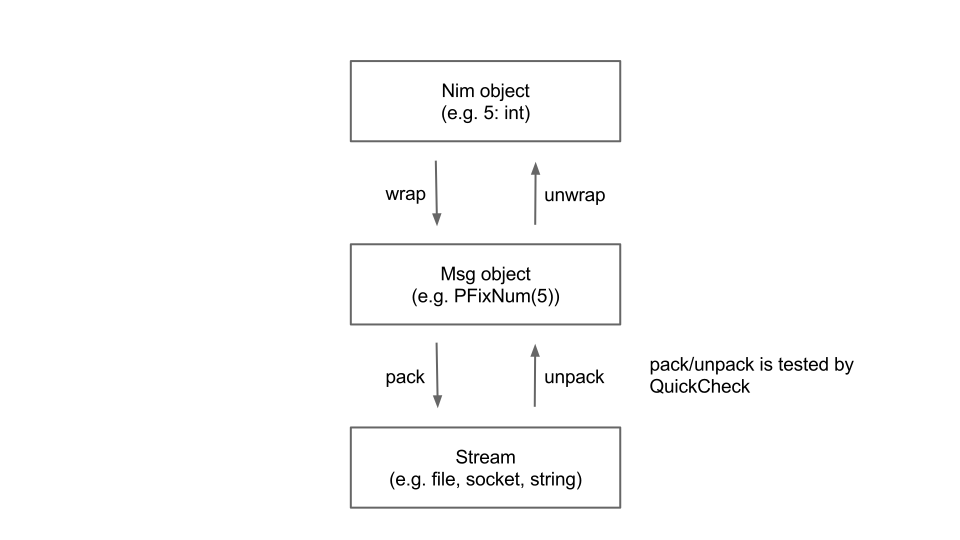
Install
$ nimble update $ nimble install msgpack
Example
import msgpack import streams # You can use any stream subclasses to serialize/deserialize # messages. e.g. FileStream let st: Stream = newStringStream() assert(st.getPosition == 0) # Type checking protects you from making trivial mistakes. # Now we pack {"a":[5,-3], "b":[1,2,3]} but more complex # combination of any Msg types is allowed. # # In xs we can mix specific conversion (PFixNum) and generic # conversion (unwrap). let xs: Msg = wrap(@[PFixNum(5), (-3).wrap]) let ys: Msg = wrap(@[("a".wrap, xs.wrap), ("b".wrap, @[1, 2, 3].wrap)]) st.pack(ys.wrap) # Serialize! # We need to reset the cursor to the beginning of the target # byte sequence. st.setPosition(0) let msg = st.unpack # Deserialize! # output: # a # 5 # -3 # b # 1 # 2 # 3 for e in msg.unwrapMap: echo e.key.unwrapStr for e in e.val.unwrapArray: echo e.unwrapInt
Todo
- Implement unwrapInto to convert Msg object to Nim object handily
- Evaluate performance and scalability
- Talk with offical Ruby implementation
- Don't repeat yourself: The code now has too much duplications. Using templates?
Author
Akira Hayakawa ([email protected])
jangko/msgpack4nim https://github.com/jangko/msgpack4nim
msgpack4nim
MessagePack implementation written in pure nim
I am fully aware of another msgpack implementation written in nim. But I want something easier to use. Another motivation come from the nim language itself. The current version of nim compiler offer many improvements, including 'generics ' specialization. I found out nim compiler is smart enough to make serialization/deserialization to/from msgpack easy and convenient.
requirement: nim ver 0.18.1 or later




Example
import msgpack4nim, streams type #lets try with a rather complex object CustomType = object count: int content: seq[int] name: string ratio: float attr: array[0..5, int] ok: bool proc initCustomType(): CustomType = result.count = -1 result.content = @[1,2,3] result.name = "custom" result.ratio = 1.0 for i in 0..5: result.attr[i] = i result.ok = false var x = initCustomType() var s = MsgStream.init() # besides MsgStream, you can also use Nim StringStream or FileStream s.pack(x) #here the magic happened var ss = MsgStream.init(s.data) var xx: CustomType ss.unpack(xx) #and here too assert xx == x echo "OK ", xx.name
see? you only need to call 'pack' and 'unpack', and the compiler do the hard work for you. Very easy, convenient, and works well
if you think setting up a MsgStream too much for you, you can simply call pack(yourobject) and it will return a string containing msgpack data.
var a = @[1,2,3,4,5,6,7,8,9,0] var buf = pack(a) var aa: seq[int] unpack(buf, aa) assert a == aa
in case the compiler cannot decide how to serialize or deserialize your very very complex object, you can help it in easy way by defining your own handler pack_type/unpack_type
type #not really complex, just for example mycomplexobject = object a: someSimpleType b: someSimpleType # help the compiler to decide # ByteStream is any Stream Compatible object such as MsgStream, FileStream, StringStream proc pack_type*[ByteStream](s: ByteStream, x: mycomplexobject) = s.pack(x.a) # let the compiler decide s.pack(x.b) # let the compiler decide # help the compiler to decide # ByteStream is any Stream Compatible object proc unpack_type*[ByteStream](s: ByteStream, x: var mycomplexobject) = s.unpack(x.a) s.unpack(x.b) var s = MsgStream.init() # besides MsgStream, you can also use Nim StringStream or FileStream var x: mycomplexobject s.pack(x) #pack as usual var ss = MsgStream.init(s.data) ss.unpack(x) #unpack as usual
Data Conversion
| nim | msgpack | JsonNode |
|---|---|---|
| int8/16/32/64 | int8/16/32/64 | JInt |
| uint8/16/32/64 | uint8/16/32/64 | JInt |
| true/false | true/false | JBool |
| nil | nil | JNull |
| procedural type | ignored | n/a |
| cstring | ignored | n/a |
| pointer | ignored | n/a |
| ptr | see ref-types | n/a |
| ref | see ref-types | n/a |
| circular ref | see ref-types | n/a |
| distinct types** | converted to base type | applicable base type |
| float32/64 | float32/64 | JFloat |
| string | string8/16/32 | JString |
| array/seq | array | JArray |
| set | array | JArray |
| range/subrange | int8/16/32/64 | JInt |
| enum | int8/16/32/64 | JInt |
| IntSet,Doubly/SinglyLinkedList* | array | JArray |
| Doubly/SinglyLinkedRing* | array | JArray |
| Queue,HashSet,OrderedSet* | array | JArray |
| Table,TableRef* | map | JObject |
| OrderedTable,OrderedTableRef* | map | JObject |
| StringTableRef* | map | JObject |
| CritBitTree[T]* | map | JObject |
| CritBitTree[void]* | array | JArray |
| object/tuple | array/map | JObject |
- (*) please import msgpakc4collection for Nim standard library collections, they are no longer part of codec core
- (**) provide your own implementation if you want to override default behavior
distinct types
If distinct types encountered, it will be converted back to it's base type.
If you don't like this behavior, since version 0.2.9 msgpack4nim allow you
to override this default behavior by supplying your own implementation of
pack_type and unpack_type.
import msgpack4nim, strutils type Guid = distinct string proc pack_type*[ByteStream](s: ByteStream, v: Guid) = s.pack_bin(len(v.string)) s.write(v.string) proc unpack_type*[ByteStream](s: ByteStream, v: var Guid) = let L = s.unpack_bin() v = Guid(s.readStr(L)) var b = Guid("AA") var s = b.pack echo s.tohex == "C4024141" echo s.stringify == "BIN: 4141 " var bb: Guid s.unpack(bb) check bb.string == b.string
object and tuple
object and tuple by default converted to msgpack array, however you can tell the compiler to convert it to map by supplying --define:msgpack_obj_to_map
nim c --define:msgpack_obj_to_map yourfile.nim
or --define:msgpack_obj_to_stream to convert object/tuple fields value into stream of msgpack objects
nim c --define:msgpack_obj_to_stream yourfile.nim
What this means? It means by default, each object/tuple will be converted to one msgpack array contains
field(s) value only without their field(s) name.
If you specify that the object/tuple will be converted to msgpack map, then each object/tuple will be
converted to one msgpack map contains key-value pairs. The key will be field name, and the value will be field value.
If you specify that the object/tuple will be converted to msgpack stream, then each object/tuple will be converted into one or more msgpack's type for each object's field and then the resulted stream will be concatenated to the msgpack stream buffer.
Which one should I use?
Usually, other msgpack libraries out there convert object/tuple/record/struct or whatever structured data supported by
the language into msgpack array, but always make sure to consult the documentation first.
If both of the serializer and deserializer agreed to one convention, then usually there will be no problem.
No matter which library/language you use, you can exchange msgpack data among them.
since version 0.2.4, you can set encoding mode at runtime to choose which encoding you would like to perform
note: the runtime encoding mode only available if you use MsgStream, otherwise only compile time flag available
| mode | msgpack_obj_to_map | msgpack_obj_to_array | msgpack_obj_to_stream | default |
|---|---|---|---|---|
| MSGPACK_OBJ_TO_DEFAULT | map | array | stream | array |
| MSGPACK_OBJ_TO_ARRAY | array | array | array | array |
| MSGPACK_OBJ_TO_MAP | map | map | map | map |
| MSGPACK_OBJ_TO_STREAM | stream | stream | stream | stream |
ref something :
- if ref value is nil, it will be packed into msgpack nil, and when unpacked, you will get nil too
- if ref value not nil, it will be dereferenced e.g. pack(val[]) or unpack(val[])
- ref subject to some restriction. see restriction below
- ptr will be treated like ref during pack
- unpacking ptr will invoke alloc, so you must dealloc it
circular reference: altough detecting circular reference is not too difficult(using set of pointers), the current implementation does not provide circular reference detection. If you pack something contains circular reference, you know something bad will happened
Restriction: For objects their type is not serialized. This means essentially that it does not work if the object has some other runtime type than its compiletime type:
import streams, msgpack4nim type TA = object of RootObj TB = object of TA f: int var a: ref TA b: ref TB new(b) a = b echo stringify(pack(a)) #produces "[ ]" or "{ }" #not "[ 0 ]" or '{ "f" : 0 }'
these types will be ignored:
- procedural type
- cstring(it is not safe to assume it always terminated by null)
- pointer
these types cannot be automatically pack/unpacked:
- void (will cause compile time error)
however, you can provide your own handler for cstring and pointer
Gotchas: because data conversion did not preserve original data types(only partial preservation), the following code is perfectly valid and will raise no exception
import msgpack4nim, streams, tables, sets, strtabs type Horse = object legs: int foals: seq[string] attr: Table[string, string] Cat = object legs: uint8 kittens: HashSet[string] traits: StringTableRef proc initHorse(): Horse = result.legs = 4 result.foals = @["jilly", "colt"] result.attr = initTable[string, string]() result.attr["color"] = "black" result.attr["speed"] = "120mph" var stallion = initHorse() var tom: Cat var buf = pack(stallion) #pack a Horse here unpack(buf, tom) #abracadabra, it will unpack into a Cat echo "legs: ", $tom.legs echo "kittens: ", $tom.kittens echo "traits: ", $tom.traits
another gotcha:
type KAB = object of RootObj aaa: int bbb: int KCD = object of KAB ccc: int ddd: int KEF = object of KCD eee: int fff: int var kk = KEF() echo stringify(pack(kk)) # will produce "{ "eee" : 0, "fff" : 0, "ccc" : 0, "ddd" : 0, "aaa" : 0, "bbb" : 0 }" # not "{ "aaa" : 0, "bbb" : 0, "ccc" : 0, "ddd" : 0, "eee" : 0, "fff" : 0 }"
bin and ext format
this implementation provide function to encode/decode msgpack bin/ext format header, but for the body, you must write it yourself or read it yourself to/from the MsgStream
- proc pack_bin*[ByteStream](s: ByteStream, len: int)
- proc pack_ext*[ByteStream](s: ByteStream, len: int, exttype: int8)
- proc unpack_bin*[ByteStream](s: ByteStream): int
- proc unpack_ext*[ByteStream](s: ByteStream): tuple[exttype:uint8, len: int]
import streams, msgpack4nim const exttype0 = 0 var s = MsgStream.init() var body = "this is the body" s.pack_ext(body.len, exttype0) s.write(body) #the same goes to bin format s.pack_bin(body.len) s.write(body) var ss = MsgStream.init(s.data) #unpack_ext return tuple[exttype:uint8, len: int] let (extype, extlen) = ss.unpack_ext() var extbody = ss.readStr(extlen) assert extbody == body let binlen = ss.unpack_bin() var binbody = ss.readStr(binlen) assert binbody == body
stringify
you can convert msgpack data to readable string using stringify function
type Horse = object legs: int speed: int color: string name: string var cc = Horse(legs:4, speed:150, color:"black", name:"stallion") var zz = pack(cc) echo stringify(zz)
the result will be:
default: [ 4, 150, "black", "stallion" ] msgpack_obj_to_map defined: { "legs" : 4, "speed" : 150, "color" : "black", "name" : "stallion" } msgpack_obj_to_stream defined: 4 150 "black" "stallion"
toAny
toAny takes a string of msgpack data or a stream, then it will produce msgAny which you can interrogate of it's type and value during runtime by accessing it's member kind
toAny recognize all valid msgpack message and translate it into a group of types:
msgMap, msgArray, msgString, msgBool,
msgBin, msgExt, msgFloat32, msgFloat64,
msgInt, msgUint, msgNull
for example, msg is a msgpack data with content [1, "hello", {"a": "b"}], you can interrogate it like this:
var a = msg.toAny() assert a.kind == msgArray assert a.arrayVal[0].kind == msgInt assert a.arrayVal[0].intVal == 1 assert a.arrayVal[1].kind == msgString assert a.arrayVal[1].stringVal == "hello" assert a.arrayVal[2].kind == msgMap var c = a[2] assert c[anyString("a")] == anyString("b")
since version 0.2.1, toAny was put into separate module msgpack2any,
it has functionality similar with json, with support of msgpack bin and ext natively
msgpack2any also support pretty printing similar with json pretty printing.
Primary usage for msgpack2any is to provide higher level API while dynamically querying underlying msgpack data at runtime. Currently, msgpack2any decode all msgpack stream at once. There are room for improvements such as progressive decoding at runtime, or selective decoding at runtime. Both of this improvements are not implemented, yet they are important for applications that need for finer control over decoding step.
JSON
Start version 0.2.0, msgpack4nim receive additional family member, msgpack2json module.
It consists of toJsonNode and fromJsonNode to interact with stdlib's json module.
Installation via nimble
nimble install msgpack4nim
Implementation specific
If an object can be represented in multiple possible output formats, serializers SHOULD use the format which represents the data in the smallest number of bytes.
According to the spec, the serializer should use smallest number of bytes, and this behavior is implemented in msgpack4nim. Therefore, some valid encoding would never produced by msgpack4nim.
For example: although 0xcdff00 and 0xceff000000 encoding is valid according to the spec which is decoded into positive integer 255, msgpack4nim never produce it, because the internal algorithm will select the smallest number of bytes needed, which is 0xccff.
However, if msgpack4nim received encoded streams from other msgpack library contains those longer than needed sequence, as long as it conforms to the spec, msgpack4nim will happily decoded it and convert it to the destination storage(variable) type.
Other msgpack library who consume msgpack4nim stream, will also decode it properly, although they might not produce smallest number of bytes required.
enjoy it, happy nim-ing
mcollina/msgpack5 https://github.com/mcollina/msgpack5
msgpack5 
A msgpack v5 implementation for node.js and the browser, with extension point support.
Install
npm install msgpack5 --save
Usage
var msgpack = require('msgpack5')() // namespace our extensions , a = new MyType(2, 'a') , encode = msgpack.encode , decode = msgpack.decode msgpack.register(0x42, MyType, mytipeEncode, mytipeDecode) console.log(encode({ 'hello': 'world' }).toString('hex')) // 81a568656c6c6fa5776f726c64 console.log(decode(encode({ 'hello': 'world' }))) // { hello: 'world' } console.log(encode(a).toString('hex')) // d5426161 console.log(decode(encode(a)) instanceof MyType) // true console.log(decode(encode(a))) // { value: 'a', size: 2 } function MyType(size, value) { this.value = value this.size = size } function mytipeEncode(obj) { var buf = new Buffer(obj.size) buf.fill(obj.value) return buf } function mytipeDecode(data) { var result = new MyType(data.length, data.toString('utf8', 0, 1)) , i for (i = 0; i < data.length; i++) { if (data.readUInt8(0) != data.readUInt8(i)) { throw new Error('should all be the same') } } return result }
In the Browser
This library is compatible with Browserify.
If you want to use standalone, grab the file in the dist folder of
this repo, and use in your own HTML page, the module will expose a
msgpack5 global.
<script type="text/javascript"
src="./msgpack5.min.js">
</script>
API
API
msgpack()msgpack().encode()msgpack().decode()msgpack().registerEncoder()msgpack().registerDecoder()msgpack().register()msgpack().encoder()msgpack().decoder()
Creates a new instance on which you can register new types for being encoded.
options:
-
forceFloat64, a boolean to that forces all floats to be encoded as 64-bits floats. Defaults to false. -
sortKeys, a boolean to force a determinate keys order -
compatibilityMode, a boolean that enables "compatibility mode" which doesn't use bin format family and str 8 format. Defaults to false. -
disableTimestampEncoding, a boolean that when set disables the encoding of Dates into the timestamp extension type. Defaults to false. -
preferMap, a boolean that forces all maps to be decoded toMaps rather than plain objects. This ensures thatdecode(encode(new Map())) instanceof Mapand that iteration order is preserved. Defaults to false. -
protoAction, a string which can beerror|ignore|removethat determines what happens when decoding a plain object with a__proto__property which would cause prototype poisoning.error(default) throws an error,removeremoves the property,ignore(not recommended) allows the property, thereby causing prototype poisoning on the decoded object.
Encodes object in msgpack, returns a bl.
Decodes buf from in msgpack. buf can be a Buffer or a bl instance.
In order to support a stream interface, a user must pass in a bl instance.
Register a new custom object type for being automatically encoded. The arguments are:
-
check, a function that will be called to check if the passed object should be encoded with theencodefunction -
encode, a function that will be called to encode an object in binary form; this function must return aBufferwhich include the same type for registerDecoder.
Register a new custom object type for being automatically decoded. The arguments are:
-
type, is a greater than zero integer identificating the type once serialized -
decode, a function that will be called to decode the object from the passedBuffer
Register a new custom object type for being automatically encoded and decoded. The arguments are:
-
type, is a greater than zero integer identificating the type once serialized -
constructor, the function that will be used to match the objects withinstanceof -
encode, a function that will be called to encode an object in binary form; this function must return aBufferthat can be deserialized by thedecodefunction -
decode, a function that will be called to decode the object from the passedBuffer
This is just a commodity that calls
registerEncoder and
registerDecoder internally.
Builds a stream in object mode that encodes msgpack.
Supported options:
-
wrap, objects should be passed to encoder in wrapped object {value: data}. Wrap option should be used if you need to pass null to encoder.
Builds a stream in object mode that decodes msgpack.
Supported options:
-
wrap, decoded objects returned in wrapped object {value: data}. Wrap option should be used if stream contains msgpack nil.
LevelUp Support
msgpack5 can be used as a LevelUp
valueEncoding straight away:
var level = require('level') , pack = msgpack() , db = level('foo', { valueEncoding: pack }) , obj = { my: 'obj' } db.put('hello', obj, function(err) { db.get('hello', function(err, result) { console.log(result) db.close() }) })
Related projects
- msgpack5rpc: An implementation of the msgpack-rpc spec on top of this library.
Disclaimer
This library is built fully on JS and on bl to simplify the code. Every improvement that keeps the same API is welcome.
Acknowledgements
This project was kindly sponsored by nearForm.
This library was originally built as the data format for JSChan.
License
MIT
sschizas/msgpack-response https://github.com/sschizas/msgpack-response
msgpack-response




An implementation of Message Pack middleware for ExpressJS.
Features
- Automatic Message Pack detection (from the HTTP headers) and encoding of all JSON messages to Message Pack.
- Extension of the current ExpressJS API; Introducing the
Response.msgPack(jsObject)method on the standard ExpressJS Response object.
Getting Started
With auto-detection and transformation enabled, the middleware detects automatically the HTTP header Accept: application/x-msgpack and piggybacks the Response.json() method of the ExpressJS API, to encode the JSON response as Message Pack. This method is useful when you have existing applications that need to use the middleware, without changing the codebase very much.
const msgpackResponse = require('msgpack-response'); app.use(msgpackResponse({auto_detect: true})); app.get('/test_json', (req, res) => { res.status(200).json({'message': 'a true test'}); })
Note: Remember to add the header
Accept: application/x-msgpackin the request.
Also, it can have auto-detection and transformation disabled. The middleware extends the Response object of the ExpressJS framework, by adding the msgPack() method to it. Then to return an encoded response, you just use the Response.msgPack() method that accepts the Javascript object as a parameter. For example,
const msgpackResponse = require('msgpack-response'); app.use(msgpackResponse({auto_detect: false})); //or app.use(msgpackResponse()); app.get('/test_msgpack', (req, res) => { res.status(200).msgPack({'message': 'a true test'}); });
Note: Initialize the middleware before the actual routes in the middleware chain to properly extend the
ResponseObject.
Requirements
Node.js >= 6.0
Installation
With npm do:
npm install msgpack-response -save
About
I
Check out my other open source projects or say
Contribute
Contributions are welcome
Authors
- Stavros Schizas - Initial work & Maintainer
- Vassilios Karakoidas - Initial work - Wizhut
See also the list of contributors who participated in this project.
License
msgpack-response is available under the MIT license. See the LICENSE file for more info.
msgpack/msgpack-ocaml https://github.com/msgpack/msgpack-ocaml
MsgPack for OCaml
BULID
$ make $ sudo make install
EXAMPLE
(* serialize *) let bytes = Msgpack.Serialize.serialize_string (`FixArray [`PFixnum 1; `PFixnum 2; `PFixnum 3]) (* deserialize *) let obj = Msgpack.Serialize.deserialize_string bytes
open Msgpack_conv type t = { int : int; str : string; } with conv(msgpack) (* serialize *) let bytes = Msgpack.Serialize.serialize_string (msgpack_of_t { int = 42; str = "ans" }) (* deserialize *) let obj = t_of_msgpack (Msgpack.Serialize.deserialize_string bytes)
See also, examlpe/
DEVELOPMENT
Setup development enviroment with docker:
$ docker-compose build $ docker-compose run app
TEST
$ ocaml setup.ml -configure --enable-tests
$ make testPROOF
If you want to use msgpack at OCaml, you need not do this section. This section for user intrested in formal verification.
You need Coq 8.4 and omake.
$ cd proof $ make $ cp *.ml* ../lib/core
gabriel/MPMessagePack https://github.com/gabriel/MPMessagePack
Install
Writing
#import <MPMessagePack/MPMessagePack.h> NSDictionary *dict = @{ @"n": @(32134123), @"bool": @(YES), @"array": @[@(1.1f), @(2.1)], @"body": [NSData data], }; NSData *data = [dict mp_messagePack];
Or via MPMessagePackWriter.
NSError *error = nil; NSData *data = [MPMessagePackWriter writeObject:dict error:&error];
If you need to use an ordered dictionary.
MPOrderedDictionary *dict = [[MPOrderedDictionary alloc] init]; [dict addEntriesFromDictionary:@{@"c": @(1), @"b": @(2), @"a": @(3)}]; [dict sortKeysUsingSelector:@selector(localizedCaseInsensitiveCompare:)]; [dict mp_messagePack];
Reading
id obj = [MPMessagePackReader readData:data error:&error];
MPMessagePackReader *reader = [[MPMessagePackReader alloc] initWithData:data]; id obj1 = [reader read:&error]; // Read an object id obj2 = [reader read:&error]; // Read another object
msgpack/msgpack-php https://github.com/msgpack/msgpack-php
Msgpack for PHP

This extension provides an API for communicating with MessagePack serialization.
MessagePack is a binary-based efficient object serialization library. It enables to exchange structured objects between many languages just like JSON. But unlike JSON, it is very fast and small.
Requirement
- PHP 7.0 +
Install
Msgpack is an PECL extension, thus you can simply install it by:
/path/to/phpize
./configure --with-php-config=/path/to/php-config
make && make install<?php $data = array(0 => 1, 1 => 2, 2 => 3); $msg = msgpack_pack($data); $data = msgpack_unpack($msg);
<?php $data = array(0 => 1, 1 => 2, 2 => 3); $packer = new \MessagePack(false); // ^ same as $packer->setOption(\MessagePack::OPT_PHPONLY, false); $packed = $packer->pack($data); $unpacker = new \MessagePackUnpacker(false); // ^ same as $unpacker->setOption(\MessagePack::OPT_PHPONLY, false); $unpacker->feed($packed); $unpacker->execute(); $unpacked = $unpacker->data(); $unpacker->reset();
<?php $data1 = array(0 => 1, 1 => 2, 2 => 3); $data2 = array("a" => 1, "b" => 2, "c" => 3); $packer = new \MessagePack(false); $packed1 = $packer->pack($data1); $packed2 = $packer->pack($data2); $unpacker = new \MessagePackUnpacker(false); $buffer = ""; $nread = 0; //Simulating streaming data :) $buffer .= $packed1; $buffer .= $packed2; while(true) { if($unpacker->execute($buffer, $nread)) { $msg = $unpacker->data(); var_dump($msg); $unpacker->reset(); $buffer = substr($buffer, $nread); $nread = 0; if(!empty($buffer)) { continue; } } break; }
Resources
rybakit/msgpack.php https://github.com/rybakit/msgpack.php
msgpack.php



A pure PHP implementation of the MessagePack serialization format.
Features
- Fully compliant with the latest MessagePack specification
- Supports streaming unpacking
- Supports unsigned 64-bit integers handling
- Supports object serialization
- Fully tested
- Relatively fast
Table of contents
Installation
The recommended way to install the library is through Composer:
composer require rybakit/msgpack
Usage
To pack values you can either use an instance of a Packer:
$packer = new Packer(); $packed = $packer->pack($value);
or call a static method on the MessagePack class:
$packed = MessagePack::pack($value);
In the examples above, the method pack automatically packs a value depending on its type. However, not all PHP types
can be uniquely translated to MessagePack types. For example, the MessagePack format defines map and array types,
which are represented by a single array type in PHP. By default, the packer will pack a PHP array as a MessagePack
array if it has sequential numeric keys, starting from 0 and as a MessagePack map otherwise:
$mpArr1 = $packer->pack([1, 2]); // MP array [1, 2] $mpArr2 = $packer->pack([0 => 1, 1 => 2]); // MP array [1, 2] $mpMap1 = $packer->pack([0 => 1, 2 => 3]); // MP map {0: 1, 2: 3} $mpMap2 = $packer->pack([1 => 2, 2 => 3]); // MP map {1: 2, 2: 3} $mpMap3 = $packer->pack(['a' => 1, 'b' => 2]); // MP map {a: 1, b: 2}
However, sometimes you need to pack a sequential array as a MessagePack map.
To do this, use the packMap method:
$mpMap = $packer->packMap([1, 2]); // {0: 1, 1: 2}
Here is a list of type-specific packing methods:
$packer->packNil(); // MP nil $packer->packBool(true); // MP bool $packer->packInt(42); // MP int $packer->packFloat(M_PI); // MP float (32 or 64) $packer->packFloat32(M_PI); // MP float 32 $packer->packFloat64(M_PI); // MP float 64 $packer->packStr('foo'); // MP str $packer->packBin("\x80"); // MP bin $packer->packArray([1, 2]); // MP array $packer->packMap(['a' => 1]); // MP map $packer->packExt(1, "\xaa"); // MP ext
Check the "Custom types" section below on how to pack custom types.
The Packer object supports a number of bitmask-based options for fine-tuning
the packing process (defaults are in bold):
| Name | Description |
|---|---|
FORCE_STR |
Forces PHP strings to be packed as MessagePack UTF-8 strings |
FORCE_BIN |
Forces PHP strings to be packed as MessagePack binary data |
DETECT_STR_BIN |
Detects MessagePack str/bin type automatically |
FORCE_ARR |
Forces PHP arrays to be packed as MessagePack arrays |
FORCE_MAP |
Forces PHP arrays to be packed as MessagePack maps |
DETECT_ARR_MAP |
Detects MessagePack array/map type automatically |
FORCE_FLOAT32 |
Forces PHP floats to be packed as 32-bits MessagePack floats |
FORCE_FLOAT64 |
Forces PHP floats to be packed as 64-bits MessagePack floats |
The type detection mode (
DETECT_STR_BIN/DETECT_ARR_MAP) adds some overhead which can be noticed when you pack large (16- and 32-bit) arrays or strings. However, if you know the value type in advance (for example, you only work with UTF-8 strings or/and associative arrays), you can eliminate this overhead by forcing the packer to use the appropriate type, which will save it from running the auto-detection routine. Another option is to explicitly specify the value type. The library provides 2 auxiliary classes for this,MapandBin. Check the "Custom types" section below for details.
Examples:
// detect str/bin type and pack PHP 64-bit floats (doubles) to MP 32-bit floats $packer = new Packer(PackOptions::DETECT_STR_BIN | PackOptions::FORCE_FLOAT32); // these will throw MessagePack\Exception\InvalidOptionException $packer = new Packer(PackOptions::FORCE_STR | PackOptions::FORCE_BIN); $packer = new Packer(PackOptions::FORCE_FLOAT32 | PackOptions::FORCE_FLOAT64);
To unpack data you can either use an instance of a BufferUnpacker:
$unpacker = new BufferUnpacker(); $unpacker->reset($packed); $value = $unpacker->unpack();
or call a static method on the MessagePack class:
$value = MessagePack::unpack($packed);
If the packed data is received in chunks (e.g. when reading from a stream), use the tryUnpack method, which attempts
to unpack data and returns an array of unpacked messages (if any) instead of throwing an InsufficientDataException:
while ($chunk = ...) { $unpacker->append($chunk); if ($messages = $unpacker->tryUnpack()) { return $messages; } }
If you want to unpack from a specific position in a buffer, use seek:
$unpacker->seek(42); // set position equal to 42 bytes $unpacker->seek(-8); // set position to 8 bytes before the end of the buffer
To skip bytes from the current position, use skip:
$unpacker->skip(10); // set position to 10 bytes ahead of the current position
To get the number of remaining (unread) bytes in the buffer:
$unreadBytesCount = $unpacker->getRemainingCount();
To check whether the buffer has unread data:
$hasUnreadBytes = $unpacker->hasRemaining();
If needed, you can remove already read data from the buffer by calling:
$releasedBytesCount = $unpacker->release();
With the read method you can read raw (packed) data:
$packedData = $unpacker->read(2); // read 2 bytes
Besides the above methods BufferUnpacker provides type-specific unpacking methods, namely:
$unpacker->unpackNil(); // PHP null $unpacker->unpackBool(); // PHP bool $unpacker->unpackInt(); // PHP int $unpacker->unpackFloat(); // PHP float $unpacker->unpackStr(); // PHP UTF-8 string $unpacker->unpackBin(); // PHP binary string $unpacker->unpackArray(); // PHP sequential array $unpacker->unpackMap(); // PHP associative array $unpacker->unpackExt(); // PHP MessagePack\Type\Ext object
The BufferUnpacker object supports a number of bitmask-based options for fine-tuning
the unpacking process (defaults are in bold):
| Name | Description |
|---|---|
BIGINT_AS_STR |
Converts overflowed integers to strings [1] |
BIGINT_AS_GMP |
Converts overflowed integers to GMP objects [2]
|
BIGINT_AS_DEC |
Converts overflowed integers to Decimal\Decimal objects [3]
|
1. The binary MessagePack format has unsigned 64-bit as its largest integer data type, but PHP does not support such integers, which means that an overflow can occur during unpacking.
2. Make sure the GMP extension is enabled.
3. Make sure the Decimal extension is enabled.
Examples:
$packedUint64 = "\xcf"."\xff\xff\xff\xff"."\xff\xff\xff\xff"; $unpacker = new BufferUnpacker($packedUint64); var_dump($unpacker->unpack()); // string(20) "18446744073709551615" $unpacker = new BufferUnpacker($packedUint64, UnpackOptions::BIGINT_AS_GMP); var_dump($unpacker->unpack()); // object(GMP) {...} $unpacker = new BufferUnpacker($packedUint64, UnpackOptions::BIGINT_AS_DEC); var_dump($unpacker->unpack()); // object(Decimal\Decimal) {...}
In addition to the basic types, the library provides functionality to serialize and deserialize arbitrary types. This can be done in several ways, depending on your use case. Let's take a look at them.
If you need to serialize an instance of one of your classes into one of the basic MessagePack types, the best way
to do this is to implement the CanBePacked interface in the class. A good example of such
a class is the Map type class that comes with the library. This type is useful when you want to explicitly specify
that a given PHP array should be packed as a MessagePack map without triggering an automatic type detection routine:
$packer = new Packer(); $packedMap = $packer->pack(new Map([1, 2, 3])); $packedArray = $packer->pack([1, 2, 3]);
More type examples can be found in the src/Type directory.
As with type objects, type transformers are only responsible for serializing values. They should be used when you need to serialize a value that does not implement the CanBePacked interface. Examples of such values could be instances of built-in or third-party classes that you don't own, or non-objects such as resources.
A transformer class must implement the CanPack interface. To use a transformer,
it must first be registered in the packer. Here is an example of how to serialize PHP streams into
the MessagePack bin format type using one of the supplied transformers, StreamTransformer:
$packer = new Packer(null, [new StreamTransformer()]); $packedBin = $packer->pack(fopen('/path/to/file', 'r+'));
More type transformer examples can be found in the src/TypeTransformer directory.
In contrast to the cases described above, extensions are intended to handle extension types and are responsible for both serialization and deserialization of values (types).
An extension class must implement the Extension interface. To use an extension, it must first be registered in the packer and the unpacker.
The MessagePack specification divides extension types into two groups: predefined and application-specific. Currently, there is only one predefined type in the specification, Timestamp.
Timestamp
The Timestamp extension type is a predefined
type. Support for this type in the library is done through the TimestampExtension class. This class is responsible
for handling Timestamp objects, which represent the number of seconds and optional adjustment in nanoseconds:
$timestampExtension = new TimestampExtension(); $packer = new Packer(); $packer = $packer->extendWith($timestampExtension); $unpacker = new BufferUnpacker(); $unpacker = $unpacker->extendWith($timestampExtension); $packedTimestamp = $packer->pack(Timestamp::now()); $timestamp = $unpacker->reset($packedTimestamp)->unpack(); $seconds = $timestamp->getSeconds(); $nanoseconds = $timestamp->getNanoseconds();
When using the MessagePack class, the Timestamp extension is already registered:
$packedTimestamp = MessagePack::pack(Timestamp::now()); $timestamp = MessagePack::unpack($packedTimestamp);
Application-specific extensions
In addition, the format can be extended with your own types. For example, to make the built-in PHP DateTime objects
first-class citizens in your code, you can create a corresponding extension, as shown in the example.
Please note, that custom extensions have to be registered with a unique extension ID (an integer from 0 to 127).
More extension examples can be found in the examples/MessagePack directory.
To learn more about how extension types can be useful, check out this article.
Exceptions
If an error occurs during packing/unpacking, a PackingFailedException or an UnpackingFailedException
will be thrown, respectively. In addition, an InsufficientDataException can be thrown during unpacking.
An InvalidOptionException will be thrown in case an invalid option (or a combination of mutually
exclusive options) is used.
Tests
Run tests as follows:
Also, if you already have Docker installed, you can run the tests in a docker container. First, create a container:
./dockerfile.sh | docker build -t msgpack -The command above will create a container named msgpack with PHP 8.1 runtime. You may change the default runtime
by defining the PHP_IMAGE environment variable:
PHP_IMAGE='php:8.0-cli' ./dockerfile.sh | docker build -t msgpack -
See a list of various images here.
Then run the unit tests:
docker run --rm -v $PWD:/msgpack -w /msgpack msgpackTo ensure that the unpacking works correctly with malformed/semi-malformed data, you can use a testing technique called Fuzzing. The library ships with a help file (target) for PHP-Fuzzer and can be used as follows:
php-fuzzer fuzz tests/fuzz_buffer_unpacker.php
To check performance, run:
php -n -dzend_extension=opcache.so \ -dpcre.jit=1 -dopcache.enable=1 -dopcache.enable_cli=1 \ tests/bench.php
Example output
Filter: MessagePack\Tests\Perf\Filter\ListFilter
Rounds: 3
Iterations: 100000
=============================================
Test/Target Packer BufferUnpacker
---------------------------------------------
nil .................. 0.0030 ........ 0.0139
false ................ 0.0037 ........ 0.0144
true ................. 0.0040 ........ 0.0137
7-bit uint #1 ........ 0.0052 ........ 0.0120
7-bit uint #2 ........ 0.0059 ........ 0.0114
7-bit uint #3 ........ 0.0061 ........ 0.0119
5-bit sint #1 ........ 0.0067 ........ 0.0126
5-bit sint #2 ........ 0.0064 ........ 0.0132
5-bit sint #3 ........ 0.0066 ........ 0.0135
8-bit uint #1 ........ 0.0078 ........ 0.0200
8-bit uint #2 ........ 0.0077 ........ 0.0212
8-bit uint #3 ........ 0.0086 ........ 0.0203
16-bit uint #1 ....... 0.0111 ........ 0.0271
16-bit uint #2 ....... 0.0115 ........ 0.0260
16-bit uint #3 ....... 0.0103 ........ 0.0273
32-bit uint #1 ....... 0.0116 ........ 0.0326
32-bit uint #2 ....... 0.0118 ........ 0.0332
32-bit uint #3 ....... 0.0127 ........ 0.0325
64-bit uint #1 ....... 0.0140 ........ 0.0277
64-bit uint #2 ....... 0.0134 ........ 0.0294
64-bit uint #3 ....... 0.0134 ........ 0.0281
8-bit int #1 ......... 0.0086 ........ 0.0241
8-bit int #2 ......... 0.0089 ........ 0.0225
8-bit int #3 ......... 0.0085 ........ 0.0229
16-bit int #1 ........ 0.0118 ........ 0.0280
16-bit int #2 ........ 0.0121 ........ 0.0270
16-bit int #3 ........ 0.0109 ........ 0.0274
32-bit int #1 ........ 0.0128 ........ 0.0346
32-bit int #2 ........ 0.0118 ........ 0.0339
32-bit int #3 ........ 0.0135 ........ 0.0368
64-bit int #1 ........ 0.0138 ........ 0.0276
64-bit int #2 ........ 0.0132 ........ 0.0286
64-bit int #3 ........ 0.0137 ........ 0.0274
64-bit int #4 ........ 0.0180 ........ 0.0285
64-bit float #1 ...... 0.0134 ........ 0.0284
64-bit float #2 ...... 0.0125 ........ 0.0275
64-bit float #3 ...... 0.0126 ........ 0.0283
fix string #1 ........ 0.0035 ........ 0.0133
fix string #2 ........ 0.0094 ........ 0.0216
fix string #3 ........ 0.0094 ........ 0.0222
fix string #4 ........ 0.0091 ........ 0.0241
8-bit string #1 ...... 0.0122 ........ 0.0301
8-bit string #2 ...... 0.0118 ........ 0.0304
8-bit string #3 ...... 0.0119 ........ 0.0315
16-bit string #1 ..... 0.0150 ........ 0.0388
16-bit string #2 ..... 0.1545 ........ 0.1665
32-bit string ........ 0.1570 ........ 0.1756
wide char string #1 .. 0.0091 ........ 0.0236
wide char string #2 .. 0.0122 ........ 0.0313
8-bit binary #1 ...... 0.0100 ........ 0.0302
8-bit binary #2 ...... 0.0123 ........ 0.0324
8-bit binary #3 ...... 0.0126 ........ 0.0327
16-bit binary ........ 0.0168 ........ 0.0372
32-bit binary ........ 0.1588 ........ 0.1754
fix array #1 ......... 0.0042 ........ 0.0131
fix array #2 ......... 0.0294 ........ 0.0367
fix array #3 ......... 0.0412 ........ 0.0472
16-bit array #1 ...... 0.1378 ........ 0.1596
16-bit array #2 ........... S ............. S
32-bit array .............. S ............. S
complex array ........ 0.1865 ........ 0.2283
fix map #1 ........... 0.0725 ........ 0.1048
fix map #2 ........... 0.0319 ........ 0.0405
fix map #3 ........... 0.0356 ........ 0.0665
fix map #4 ........... 0.0465 ........ 0.0497
16-bit map #1 ........ 0.2540 ........ 0.3028
16-bit map #2 ............. S ............. S
32-bit map ................ S ............. S
complex map .......... 0.2372 ........ 0.2710
fixext 1 ............. 0.0283 ........ 0.0358
fixext 2 ............. 0.0291 ........ 0.0371
fixext 4 ............. 0.0302 ........ 0.0355
fixext 8 ............. 0.0288 ........ 0.0384
fixext 16 ............ 0.0293 ........ 0.0359
8-bit ext ............ 0.0302 ........ 0.0439
16-bit ext ........... 0.0334 ........ 0.0499
32-bit ext ........... 0.1845 ........ 0.1888
32-bit timestamp #1 .. 0.0337 ........ 0.0547
32-bit timestamp #2 .. 0.0335 ........ 0.0560
64-bit timestamp #1 .. 0.0371 ........ 0.0575
64-bit timestamp #2 .. 0.0374 ........ 0.0542
64-bit timestamp #3 .. 0.0356 ........ 0.0533
96-bit timestamp #1 .. 0.0362 ........ 0.0699
96-bit timestamp #2 .. 0.0381 ........ 0.0701
96-bit timestamp #3 .. 0.0367 ........ 0.0687
=============================================
Total 2.7618 4.0820
Skipped 4 4
Failed 0 0
Ignored 0 0
With JIT:
php -n -dzend_extension=opcache.so \ -dpcre.jit=1 -dopcache.jit_buffer_size=64M -dopcache.jit=tracing -dopcache.enable=1 -dopcache.enable_cli=1 \ tests/bench.php
Example output
Filter: MessagePack\Tests\Perf\Filter\ListFilter
Rounds: 3
Iterations: 100000
=============================================
Test/Target Packer BufferUnpacker
---------------------------------------------
nil .................. 0.0005 ........ 0.0054
false ................ 0.0004 ........ 0.0059
true ................. 0.0004 ........ 0.0059
7-bit uint #1 ........ 0.0010 ........ 0.0047
7-bit uint #2 ........ 0.0010 ........ 0.0046
7-bit uint #3 ........ 0.0010 ........ 0.0046
5-bit sint #1 ........ 0.0025 ........ 0.0046
5-bit sint #2 ........ 0.0023 ........ 0.0046
5-bit sint #3 ........ 0.0024 ........ 0.0045
8-bit uint #1 ........ 0.0043 ........ 0.0081
8-bit uint #2 ........ 0.0043 ........ 0.0079
8-bit uint #3 ........ 0.0041 ........ 0.0080
16-bit uint #1 ....... 0.0064 ........ 0.0095
16-bit uint #2 ....... 0.0064 ........ 0.0091
16-bit uint #3 ....... 0.0064 ........ 0.0094
32-bit uint #1 ....... 0.0085 ........ 0.0114
32-bit uint #2 ....... 0.0077 ........ 0.0122
32-bit uint #3 ....... 0.0077 ........ 0.0120
64-bit uint #1 ....... 0.0085 ........ 0.0159
64-bit uint #2 ....... 0.0086 ........ 0.0157
64-bit uint #3 ....... 0.0086 ........ 0.0158
8-bit int #1 ......... 0.0042 ........ 0.0080
8-bit int #2 ......... 0.0042 ........ 0.0080
8-bit int #3 ......... 0.0042 ........ 0.0081
16-bit int #1 ........ 0.0065 ........ 0.0095
16-bit int #2 ........ 0.0065 ........ 0.0090
16-bit int #3 ........ 0.0056 ........ 0.0085
32-bit int #1 ........ 0.0067 ........ 0.0107
32-bit int #2 ........ 0.0066 ........ 0.0106
32-bit int #3 ........ 0.0063 ........ 0.0104
64-bit int #1 ........ 0.0072 ........ 0.0162
64-bit int #2 ........ 0.0073 ........ 0.0174
64-bit int #3 ........ 0.0072 ........ 0.0164
64-bit int #4 ........ 0.0077 ........ 0.0161
64-bit float #1 ...... 0.0053 ........ 0.0135
64-bit float #2 ...... 0.0053 ........ 0.0135
64-bit float #3 ...... 0.0052 ........ 0.0135
fix string #1 ....... -0.0002 ........ 0.0044
fix string #2 ........ 0.0035 ........ 0.0067
fix string #3 ........ 0.0035 ........ 0.0077
fix string #4 ........ 0.0033 ........ 0.0078
8-bit string #1 ...... 0.0059 ........ 0.0110
8-bit string #2 ...... 0.0063 ........ 0.0121
8-bit string #3 ...... 0.0064 ........ 0.0124
16-bit string #1 ..... 0.0099 ........ 0.0146
16-bit string #2 ..... 0.1522 ........ 0.1474
32-bit string ........ 0.1511 ........ 0.1483
wide char string #1 .. 0.0039 ........ 0.0084
wide char string #2 .. 0.0073 ........ 0.0123
8-bit binary #1 ...... 0.0040 ........ 0.0112
8-bit binary #2 ...... 0.0075 ........ 0.0123
8-bit binary #3 ...... 0.0077 ........ 0.0129
16-bit binary ........ 0.0096 ........ 0.0145
32-bit binary ........ 0.1535 ........ 0.1479
fix array #1 ......... 0.0008 ........ 0.0061
fix array #2 ......... 0.0121 ........ 0.0165
fix array #3 ......... 0.0193 ........ 0.0222
16-bit array #1 ...... 0.0607 ........ 0.0479
16-bit array #2 ........... S ............. S
32-bit array .............. S ............. S
complex array ........ 0.0749 ........ 0.0824
fix map #1 ........... 0.0329 ........ 0.0431
fix map #2 ........... 0.0161 ........ 0.0189
fix map #3 ........... 0.0205 ........ 0.0262
fix map #4 ........... 0.0252 ........ 0.0205
16-bit map #1 ........ 0.1016 ........ 0.0927
16-bit map #2 ............. S ............. S
32-bit map ................ S ............. S
complex map .......... 0.1096 ........ 0.1030
fixext 1 ............. 0.0157 ........ 0.0161
fixext 2 ............. 0.0175 ........ 0.0183
fixext 4 ............. 0.0156 ........ 0.0185
fixext 8 ............. 0.0163 ........ 0.0184
fixext 16 ............ 0.0164 ........ 0.0182
8-bit ext ............ 0.0158 ........ 0.0207
16-bit ext ........... 0.0203 ........ 0.0219
32-bit ext ........... 0.1614 ........ 0.1539
32-bit timestamp #1 .. 0.0195 ........ 0.0249
32-bit timestamp #2 .. 0.0188 ........ 0.0260
64-bit timestamp #1 .. 0.0207 ........ 0.0281
64-bit timestamp #2 .. 0.0212 ........ 0.0291
64-bit timestamp #3 .. 0.0207 ........ 0.0295
96-bit timestamp #1 .. 0.0222 ........ 0.0358
96-bit timestamp #2 .. 0.0228 ........ 0.0353
96-bit timestamp #3 .. 0.0210 ........ 0.0319
=============================================
Total 1.6432 1.9674
Skipped 4 4
Failed 0 0
Ignored 0 0
You may change default benchmark settings by defining the following environment variables:
| Name | Default |
|---|---|
| MP_BENCH_TARGETS |
pure_p,pure_u, see a list of available targets
|
| MP_BENCH_ITERATIONS | 100_000 |
| MP_BENCH_DURATION | not set |
| MP_BENCH_ROUNDS | 3 |
| MP_BENCH_TESTS |
-@slow, see a list of available tests
|
For example:
export MP_BENCH_TARGETS=pure_p export MP_BENCH_ITERATIONS=1000000 export MP_BENCH_ROUNDS=5 # a comma separated list of test names export MP_BENCH_TESTS='complex array, complex map' # or a group name # export MP_BENCH_TESTS='-@slow' // @pecl_comp # or a regexp # export MP_BENCH_TESTS='/complex (array|map)/'
Another example, benchmarking both the library and the PECL extension:
MP_BENCH_TARGETS=pure_p,pure_u,pecl_p,pecl_u \ php -n -dextension=msgpack.so -dzend_extension=opcache.so \ -dpcre.jit=1 -dopcache.enable=1 -dopcache.enable_cli=1 \ tests/bench.php
Example output
Filter: MessagePack\Tests\Perf\Filter\ListFilter
Rounds: 3
Iterations: 100000
===========================================================================
Test/Target Packer BufferUnpacker msgpack_pack msgpack_unpack
---------------------------------------------------------------------------
nil .................. 0.0031 ........ 0.0141 ...... 0.0055 ........ 0.0064
false ................ 0.0039 ........ 0.0154 ...... 0.0056 ........ 0.0053
true ................. 0.0038 ........ 0.0139 ...... 0.0056 ........ 0.0044
7-bit uint #1 ........ 0.0061 ........ 0.0110 ...... 0.0059 ........ 0.0046
7-bit uint #2 ........ 0.0065 ........ 0.0119 ...... 0.0042 ........ 0.0029
7-bit uint #3 ........ 0.0054 ........ 0.0117 ...... 0.0045 ........ 0.0025
5-bit sint #1 ........ 0.0047 ........ 0.0103 ...... 0.0038 ........ 0.0022
5-bit sint #2 ........ 0.0048 ........ 0.0117 ...... 0.0038 ........ 0.0022
5-bit sint #3 ........ 0.0046 ........ 0.0102 ...... 0.0038 ........ 0.0023
8-bit uint #1 ........ 0.0063 ........ 0.0174 ...... 0.0039 ........ 0.0031
8-bit uint #2 ........ 0.0063 ........ 0.0167 ...... 0.0040 ........ 0.0029
8-bit uint #3 ........ 0.0063 ........ 0.0168 ...... 0.0039 ........ 0.0030
16-bit uint #1 ....... 0.0092 ........ 0.0222 ...... 0.0049 ........ 0.0030
16-bit uint #2 ....... 0.0096 ........ 0.0227 ...... 0.0042 ........ 0.0046
16-bit uint #3 ....... 0.0123 ........ 0.0274 ...... 0.0059 ........ 0.0051
32-bit uint #1 ....... 0.0136 ........ 0.0331 ...... 0.0060 ........ 0.0048
32-bit uint #2 ....... 0.0130 ........ 0.0336 ...... 0.0070 ........ 0.0048
32-bit uint #3 ....... 0.0127 ........ 0.0329 ...... 0.0051 ........ 0.0048
64-bit uint #1 ....... 0.0126 ........ 0.0268 ...... 0.0055 ........ 0.0049
64-bit uint #2 ....... 0.0135 ........ 0.0281 ...... 0.0052 ........ 0.0046
64-bit uint #3 ....... 0.0131 ........ 0.0274 ...... 0.0069 ........ 0.0044
8-bit int #1 ......... 0.0077 ........ 0.0236 ...... 0.0058 ........ 0.0044
8-bit int #2 ......... 0.0087 ........ 0.0244 ...... 0.0058 ........ 0.0048
8-bit int #3 ......... 0.0084 ........ 0.0241 ...... 0.0055 ........ 0.0049
16-bit int #1 ........ 0.0112 ........ 0.0271 ...... 0.0048 ........ 0.0045
16-bit int #2 ........ 0.0124 ........ 0.0292 ...... 0.0057 ........ 0.0049
16-bit int #3 ........ 0.0118 ........ 0.0270 ...... 0.0058 ........ 0.0050
32-bit int #1 ........ 0.0137 ........ 0.0366 ...... 0.0058 ........ 0.0051
32-bit int #2 ........ 0.0133 ........ 0.0366 ...... 0.0056 ........ 0.0049
32-bit int #3 ........ 0.0129 ........ 0.0350 ...... 0.0052 ........ 0.0048
64-bit int #1 ........ 0.0145 ........ 0.0254 ...... 0.0034 ........ 0.0025
64-bit int #2 ........ 0.0097 ........ 0.0214 ...... 0.0034 ........ 0.0025
64-bit int #3 ........ 0.0096 ........ 0.0287 ...... 0.0059 ........ 0.0050
64-bit int #4 ........ 0.0143 ........ 0.0277 ...... 0.0059 ........ 0.0046
64-bit float #1 ...... 0.0134 ........ 0.0281 ...... 0.0057 ........ 0.0052
64-bit float #2 ...... 0.0141 ........ 0.0281 ...... 0.0057 ........ 0.0050
64-bit float #3 ...... 0.0144 ........ 0.0282 ...... 0.0057 ........ 0.0050
fix string #1 ........ 0.0036 ........ 0.0143 ...... 0.0066 ........ 0.0053
fix string #2 ........ 0.0107 ........ 0.0222 ...... 0.0065 ........ 0.0068
fix string #3 ........ 0.0116 ........ 0.0245 ...... 0.0063 ........ 0.0069
fix string #4 ........ 0.0105 ........ 0.0253 ...... 0.0083 ........ 0.0077
8-bit string #1 ...... 0.0126 ........ 0.0318 ...... 0.0075 ........ 0.0088
8-bit string #2 ...... 0.0121 ........ 0.0295 ...... 0.0076 ........ 0.0086
8-bit string #3 ...... 0.0125 ........ 0.0293 ...... 0.0130 ........ 0.0093
16-bit string #1 ..... 0.0159 ........ 0.0368 ...... 0.0117 ........ 0.0086
16-bit string #2 ..... 0.1547 ........ 0.1686 ...... 0.1516 ........ 0.1373
32-bit string ........ 0.1558 ........ 0.1729 ...... 0.1511 ........ 0.1396
wide char string #1 .. 0.0098 ........ 0.0237 ...... 0.0066 ........ 0.0065
wide char string #2 .. 0.0128 ........ 0.0291 ...... 0.0061 ........ 0.0082
8-bit binary #1 ........... I ............. I ........... F ............. I
8-bit binary #2 ........... I ............. I ........... F ............. I
8-bit binary #3 ........... I ............. I ........... F ............. I
16-bit binary ............. I ............. I ........... F ............. I
32-bit binary ............. I ............. I ........... F ............. I
fix array #1 ......... 0.0040 ........ 0.0129 ...... 0.0120 ........ 0.0058
fix array #2 ......... 0.0279 ........ 0.0390 ...... 0.0143 ........ 0.0165
fix array #3 ......... 0.0415 ........ 0.0463 ...... 0.0162 ........ 0.0187
16-bit array #1 ...... 0.1349 ........ 0.1628 ...... 0.0334 ........ 0.0341
16-bit array #2 ........... S ............. S ........... S ............. S
32-bit array .............. S ............. S ........... S ............. S
complex array ............. I ............. I ........... F ............. F
fix map #1 ................ I ............. I ........... F ............. I
fix map #2 ........... 0.0345 ........ 0.0391 ...... 0.0143 ........ 0.0168
fix map #3 ................ I ............. I ........... F ............. I
fix map #4 ........... 0.0459 ........ 0.0473 ...... 0.0151 ........ 0.0163
16-bit map #1 ........ 0.2518 ........ 0.2962 ...... 0.0400 ........ 0.0490
16-bit map #2 ............. S ............. S ........... S ............. S
32-bit map ................ S ............. S ........... S ............. S
complex map .......... 0.2380 ........ 0.2682 ...... 0.0545 ........ 0.0579
fixext 1 .................. I ............. I ........... F ............. F
fixext 2 .................. I ............. I ........... F ............. F
fixext 4 .................. I ............. I ........... F ............. F
fixext 8 .................. I ............. I ........... F ............. F
fixext 16 ................. I ............. I ........... F ............. F
8-bit ext ................. I ............. I ........... F ............. F
16-bit ext ................ I ............. I ........... F ............. F
32-bit ext ................ I ............. I ........... F ............. F
32-bit timestamp #1 ....... I ............. I ........... F ............. F
32-bit timestamp #2 ....... I ............. I ........... F ............. F
64-bit timestamp #1 ....... I ............. I ........... F ............. F
64-bit timestamp #2 ....... I ............. I ........... F ............. F
64-bit timestamp #3 ....... I ............. I ........... F ............. F
96-bit timestamp #1 ....... I ............. I ........... F ............. F
96-bit timestamp #2 ....... I ............. I ........... F ............. F
96-bit timestamp #3 ....... I ............. I ........... F ............. F
===========================================================================
Total 1.5625 2.3866 0.7735 0.7243
Skipped 4 4 4 4
Failed 0 0 24 17
Ignored 24 24 0 7
With JIT:
MP_BENCH_TARGETS=pure_p,pure_u,pecl_p,pecl_u \ php -n -dextension=msgpack.so -dzend_extension=opcache.so \ -dpcre.jit=1 -dopcache.jit_buffer_size=64M -dopcache.jit=tracing -dopcache.enable=1 -dopcache.enable_cli=1 \ tests/bench.php
Example output
Filter: MessagePack\Tests\Perf\Filter\ListFilter
Rounds: 3
Iterations: 100000
===========================================================================
Test/Target Packer BufferUnpacker msgpack_pack msgpack_unpack
---------------------------------------------------------------------------
nil .................. 0.0001 ........ 0.0052 ...... 0.0053 ........ 0.0042
false ................ 0.0007 ........ 0.0060 ...... 0.0057 ........ 0.0043
true ................. 0.0008 ........ 0.0060 ...... 0.0056 ........ 0.0041
7-bit uint #1 ........ 0.0031 ........ 0.0046 ...... 0.0062 ........ 0.0041
7-bit uint #2 ........ 0.0021 ........ 0.0043 ...... 0.0062 ........ 0.0041
7-bit uint #3 ........ 0.0022 ........ 0.0044 ...... 0.0061 ........ 0.0040
5-bit sint #1 ........ 0.0030 ........ 0.0048 ...... 0.0062 ........ 0.0040
5-bit sint #2 ........ 0.0032 ........ 0.0046 ...... 0.0062 ........ 0.0040
5-bit sint #3 ........ 0.0031 ........ 0.0046 ...... 0.0062 ........ 0.0040
8-bit uint #1 ........ 0.0054 ........ 0.0079 ...... 0.0062 ........ 0.0050
8-bit uint #2 ........ 0.0051 ........ 0.0079 ...... 0.0064 ........ 0.0044
8-bit uint #3 ........ 0.0051 ........ 0.0082 ...... 0.0062 ........ 0.0044
16-bit uint #1 ....... 0.0077 ........ 0.0094 ...... 0.0065 ........ 0.0045
16-bit uint #2 ....... 0.0077 ........ 0.0094 ...... 0.0063 ........ 0.0045
16-bit uint #3 ....... 0.0077 ........ 0.0095 ...... 0.0064 ........ 0.0047
32-bit uint #1 ....... 0.0088 ........ 0.0119 ...... 0.0063 ........ 0.0043
32-bit uint #2 ....... 0.0089 ........ 0.0117 ...... 0.0062 ........ 0.0039
32-bit uint #3 ....... 0.0089 ........ 0.0118 ...... 0.0063 ........ 0.0044
64-bit uint #1 ....... 0.0097 ........ 0.0155 ...... 0.0063 ........ 0.0045
64-bit uint #2 ....... 0.0095 ........ 0.0153 ...... 0.0061 ........ 0.0045
64-bit uint #3 ....... 0.0096 ........ 0.0156 ...... 0.0063 ........ 0.0047
8-bit int #1 ......... 0.0053 ........ 0.0083 ...... 0.0062 ........ 0.0044
8-bit int #2 ......... 0.0052 ........ 0.0080 ...... 0.0062 ........ 0.0044
8-bit int #3 ......... 0.0052 ........ 0.0080 ...... 0.0062 ........ 0.0043
16-bit int #1 ........ 0.0089 ........ 0.0097 ...... 0.0069 ........ 0.0046
16-bit int #2 ........ 0.0075 ........ 0.0093 ...... 0.0063 ........ 0.0043
16-bit int #3 ........ 0.0075 ........ 0.0094 ...... 0.0062 ........ 0.0046
32-bit int #1 ........ 0.0086 ........ 0.0122 ...... 0.0063 ........ 0.0044
32-bit int #2 ........ 0.0087 ........ 0.0120 ...... 0.0066 ........ 0.0046
32-bit int #3 ........ 0.0086 ........ 0.0121 ...... 0.0060 ........ 0.0044
64-bit int #1 ........ 0.0096 ........ 0.0149 ...... 0.0060 ........ 0.0045
64-bit int #2 ........ 0.0096 ........ 0.0157 ...... 0.0062 ........ 0.0044
64-bit int #3 ........ 0.0096 ........ 0.0160 ...... 0.0063 ........ 0.0046
64-bit int #4 ........ 0.0097 ........ 0.0157 ...... 0.0061 ........ 0.0044
64-bit float #1 ...... 0.0079 ........ 0.0153 ...... 0.0056 ........ 0.0044
64-bit float #2 ...... 0.0079 ........ 0.0152 ...... 0.0057 ........ 0.0045
64-bit float #3 ...... 0.0079 ........ 0.0155 ...... 0.0057 ........ 0.0044
fix string #1 ........ 0.0010 ........ 0.0045 ...... 0.0071 ........ 0.0044
fix string #2 ........ 0.0048 ........ 0.0075 ...... 0.0070 ........ 0.0060
fix string #3 ........ 0.0048 ........ 0.0086 ...... 0.0068 ........ 0.0060
fix string #4 ........ 0.0050 ........ 0.0088 ...... 0.0070 ........ 0.0059
8-bit string #1 ...... 0.0081 ........ 0.0129 ...... 0.0069 ........ 0.0062
8-bit string #2 ...... 0.0086 ........ 0.0128 ...... 0.0069 ........ 0.0065
8-bit string #3 ...... 0.0086 ........ 0.0126 ...... 0.0115 ........ 0.0065
16-bit string #1 ..... 0.0105 ........ 0.0137 ...... 0.0128 ........ 0.0068
16-bit string #2 ..... 0.1510 ........ 0.1486 ...... 0.1526 ........ 0.1391
32-bit string ........ 0.1517 ........ 0.1475 ...... 0.1504 ........ 0.1370
wide char string #1 .. 0.0044 ........ 0.0085 ...... 0.0067 ........ 0.0057
wide char string #2 .. 0.0081 ........ 0.0125 ...... 0.0069 ........ 0.0063
8-bit binary #1 ........... I ............. I ........... F ............. I
8-bit binary #2 ........... I ............. I ........... F ............. I
8-bit binary #3 ........... I ............. I ........... F ............. I
16-bit binary ............. I ............. I ........... F ............. I
32-bit binary ............. I ............. I ........... F ............. I
fix array #1 ......... 0.0014 ........ 0.0059 ...... 0.0132 ........ 0.0055
fix array #2 ......... 0.0146 ........ 0.0156 ...... 0.0155 ........ 0.0148
fix array #3 ......... 0.0211 ........ 0.0229 ...... 0.0179 ........ 0.0180
16-bit array #1 ...... 0.0673 ........ 0.0498 ...... 0.0343 ........ 0.0388
16-bit array #2 ........... S ............. S ........... S ............. S
32-bit array .............. S ............. S ........... S ............. S
complex array ............. I ............. I ........... F ............. F
fix map #1 ................ I ............. I ........... F ............. I
fix map #2 ........... 0.0148 ........ 0.0180 ...... 0.0156 ........ 0.0179
fix map #3 ................ I ............. I ........... F ............. I
fix map #4 ........... 0.0252 ........ 0.0201 ...... 0.0214 ........ 0.0167
16-bit map #1 ........ 0.1027 ........ 0.0836 ...... 0.0388 ........ 0.0510
16-bit map #2 ............. S ............. S ........... S ............. S
32-bit map ................ S ............. S ........... S ............. S
complex map .......... 0.1104 ........ 0.1010 ...... 0.0556 ........ 0.0602
fixext 1 .................. I ............. I ........... F ............. F
fixext 2 .................. I ............. I ........... F ............. F
fixext 4 .................. I ............. I ........... F ............. F
fixext 8 .................. I ............. I ........... F ............. F
fixext 16 ................. I ............. I ........... F ............. F
8-bit ext ................. I ............. I ........... F ............. F
16-bit ext ................ I ............. I ........... F ............. F
32-bit ext ................ I ............. I ........... F ............. F
32-bit timestamp #1 ....... I ............. I ........... F ............. F
32-bit timestamp #2 ....... I ............. I ........... F ............. F
64-bit timestamp #1 ....... I ............. I ........... F ............. F
64-bit timestamp #2 ....... I ............. I ........... F ............. F
64-bit timestamp #3 ....... I ............. I ........... F ............. F
96-bit timestamp #1 ....... I ............. I ........... F ............. F
96-bit timestamp #2 ....... I ............. I ........... F ............. F
96-bit timestamp #3 ....... I ............. I ........... F ............. F
===========================================================================
Total 0.9642 1.0909 0.8224 0.7213
Skipped 4 4 4 4
Failed 0 0 24 17
Ignored 24 24 0 7
Note that the msgpack extension (v2.1.2) doesn't support ext, bin and UTF-8 str types.
License
The library is released under the MIT License. See the bundled LICENSE file for details.
ymofen/msgpack-delphi https://github.com/ymofen/msgpack-delphi
Msgpack for Delphi
It's like JSON but small and fast.
unit Owner: D10.Mofen, qdac.swish
contact:
qq:185511468,
email:[email protected]
welcome to report bug
Works with
- Delphi 7 (tested)
- Delphi 2007 (tested)
- XE5, XE6, XE7, FMX (tested)
changes:
-
first release 2014-08-15 13:05:13
-
add array support 2014-08-19 12:18:47
-
add andriod support 2014-09-08 00:45:27
- fixed int32, int64 parse bug< integer, int64 parse zero> 2014-11-09 22:35:27
- add EncodeToFile/DecodeFromFile 2014-11-13 12:30:58
-
fix asVariant = null (thanks for cyw(26890954)) 2014-11-14 09:05:52
-
fix AsInteger = -1 bug (thanks for cyw(26890954)) 2014-11-14 12:15:52
-
fix AsInteger = -127 bug check int64/integer/cardinal/word/shortint/smallint/byte assign, encode,decode, read 2014-11-14 12:30:38
-
fix AsFloat = 2.507182 bug thanks fo [珠海]-芒果 1939331207 2014-11-21 12:37:04
-
add AddArrayChild func 2015-03-25 17:47:28
-
add remove/removeFromParent/Delete function 2015-08-29 22:37:48
var lvMsg, lvMsg2:TSimpleMsgPack; lvBytes:TBytes; s:string; begin lvMsg := TSimpleMsgPack.Create; lvMsg.S['key.obj'] := '汉字,ascii'; if dlgOpen.Execute then begin lvMsg.S['key.image.name'] := ExtractFileName(dlgOpen.FileName); // file binary data lvMsg.ForcePathObject('key.image.data').LoadBinaryFromFile(dlgOpen.FileName); end; // lvBytes := lvMsg.EncodeToBytes; lvMsg2 := TSimpleMsgPack.Create; lvMsg2.DecodeFromBytes(lvBytes); // Memo1.Lines.Add(lvMsg2.S['key.obj']); if lvMsg2.S['key.image.name'] <> '' then begin s := ExtractFilePath(ParamStr(0)) + lvMsg2.S['key.image.name']; Memo1.Lines.Add('file saved'); Memo1.Lines.Add(s); lvMsg2.ForcePathObject('key.image.data').SaveBinaryToFile(s); end;
msgpack/msgpack-perl https://github.com/msgpack/msgpack-perl

NAME
Data::MessagePack - MessagePack serializing/deserializing
SYNOPSIS
use Data::MessagePack;
my $mp = Data::MessagePack->new();
$mp->canonical->utf8->prefer_integer if $needed;
my $packed = $mp->pack($dat);
my $unpacked = $mp->unpack($dat);
DESCRIPTION
This module converts Perl data structures to MessagePack and vice versa.
ABOUT MESSAGEPACK FORMAT
MessagePack is a binary-based efficient object serialization format. It enables to exchange structured objects between many languages like JSON. But unlike JSON, it is very fast and small.
ADVANTAGES
-
PORTABLE
The MessagePack format does not depend on language nor byte order.
-
SMALL IN SIZE
say length(JSON::XS::encode_json({a=>1, b=>2})); # => 13 say length(Storable::nfreeze({a=>1, b=>2})); # => 21 say length(Data::MessagePack->pack({a=>1, b=>2})); # => 7The MessagePack format saves memory than JSON and Storable format.
-
STREAMING DESERIALIZER
MessagePack supports streaming deserializer. It is useful for networking such as RPC. See Data::MessagePack::Unpacker for details.
If you want to get more information about the MessagePack format, please visit to http://msgpack.org/.
METHODS
-
my $packed = Data::MessagePack->pack($data[, $max_depth]);Pack the $data to messagepack format string.
This method throws an exception when the perl structure is nested more than $max_depth levels(default: 512) in order to detect circular references.
Data::MessagePack->pack() throws an exception when encountering a blessed perl object, because MessagePack is a language-independent format.
-
my $unpacked = Data::MessagePack->unpack($msgpackstr);unpack the $msgpackstr to a MessagePack format string.
-
my $mp = Data::MesssagePack->new()Creates a new MessagePack instance.
-
$mp = $mp->prefer_integer([ $enable ]) -
$enabled = $mp->get_prefer_integer()If $enable is true (or missing), then the
packmethod tries a string as an integer if the string looks like an integer. -
$mp = $mp->canonical([ $enable ]) -
$enabled = $mp->get_canonical()If $enable is true (or missing), then the
packmethod will output packed data by sorting their keys. This is adding a comparatively high overhead. -
$mp = $mp->utf8([ $enable ]) -
$enabled = $mp->get_utf8()If $enable is true (or missing), then the
packmethod will applyutf8::encode()to all the string values.In other words, this property tell
$mpto deal with text strings. See perlunifaq for the meaning of text string. -
$packed = $mp->pack($data) -
$packed = $mp->encode($data)Same as
Data::MessagePack->pack(), but properties are respected. -
$data = $mp->unpack($data) -
$data = $mp->decode($data)Same as
Data::MessagePack->unpack(), but properties are respected.
Configuration Variables (DEPRECATED)
-
$Data::MessagePack::PreferInteger
Packs a string as an integer, when it looks like an integer.
This variable is deprecated. Use
$msgpack->prefer_integerproperty instead.
SPEED
This is a result of benchmark/serialize.pl and benchmark/deserialize.pl
on my SC440(Linux 2.6.32-23-server #37-Ubuntu SMP).
(You should benchmark them with your data if the speed matters, of course.)
-- serialize
JSON::XS: 2.3
Data::MessagePack: 0.24
Storable: 2.21
Benchmark: running json, mp, storable for at least 1 CPU seconds...
json: 1 wallclock secs ( 1.00 usr + 0.01 sys = 1.01 CPU) @ 141939.60/s (n=143359)
mp: 1 wallclock secs ( 1.06 usr + 0.00 sys = 1.06 CPU) @ 355500.94/s (n=376831)
storable: 1 wallclock secs ( 1.12 usr + 0.00 sys = 1.12 CPU) @ 38399.11/s (n=43007)
Rate storable json mp
storable 38399/s -- -73% -89%
json 141940/s 270% -- -60%
mp 355501/s 826% 150% --
-- deserialize
JSON::XS: 2.3
Data::MessagePack: 0.24
Storable: 2.21
Benchmark: running json, mp, storable for at least 1 CPU seconds...
json: 0 wallclock secs ( 1.05 usr + 0.00 sys = 1.05 CPU) @ 179442.86/s (n=188415)
mp: 0 wallclock secs ( 1.01 usr + 0.00 sys = 1.01 CPU) @ 212909.90/s (n=215039)
storable: 2 wallclock secs ( 1.14 usr + 0.00 sys = 1.14 CPU) @ 114974.56/s (n=131071)
Rate storable json mp
storable 114975/s -- -36% -46%
json 179443/s 56% -- -16%
mp 212910/s 85% 19% --
CAVEAT
Unpacking 64 bit integers
This module can unpack 64 bit integers even if your perl does not support them
(i.e. where perl -V:ivsize is 4), but you cannot calculate these values
unless you use Math::BigInt.
TODO
-
Error handling
MessagePack cannot deal with complex scalars such as object references, filehandles, and code references. We should report the errors more kindly.
-
Streaming deserializer
The current implementation of the streaming deserializer does not have internal buffers while some other bindings (such as Ruby binding) does. This limitation will astonish those who try to unpack byte streams with an arbitrary buffer size (e.g.
while(read($socket, $buffer, $arbitrary_buffer_size)) { ... }). We should implement the internal buffer for the unpacker.
FAQ
-
Why does Data::MessagePack have pure perl implementations?
msgpack C library uses C99 feature, VC++6 does not support C99. So pure perl version is needed for VC++ users.
AUTHORS
Tokuhiro Matsuno
Makamaka Hannyaharamitu
gfx
THANKS TO
Jun Kuriyama
Dan Kogai
FURUHASHI Sadayuki
hanekomu
Kazuho Oku
syohex
LICENSE
This library is free software; you can redistribute it and/or modify it under the same terms as Perl itself.
SEE ALSO
http://msgpack.org/ is the official web site for the MessagePack format.
pierre-vigier/Perl6-Data-MessagePack https://github.com/pierre-vigier/Perl6-Data-MessagePack
Perl6-Data-MessagePack

NAME
Data::MessagePack - Perl 6 implementation of MessagePack
SYNOPSIS
use Data::MessagePack;
my $data-structure = {
key => 'value',
k2 => [ 1, 2, 3 ]
};
my $packed = Data::MessagePack::pack( $data-structure );
my $unpacked = Data::MessagePack::unpack( $packed );
Or for streaming:
use Data::MessagePack::StreamingUnpacker;
my $supplier = Some Supplier; #Could be from IO::Socket::Async for instance
my $unpacker = Data::MessagePack::StreamingUnpacker.new(
source => $supplier.Supply
);
$unpacker.tap( -> $value {
say "Got new value";
say $value.perl;
}, done => { say "Source supply is done"; } );
DESCRIPTION
The present module proposes an implemetation of the MessagePack specification as described on http://msgpack.org/. The implementation is now in Pure Perl which could come as a performance penalty opposed to some other packer implemented in C.
WHY THAT MODULE
There are already some part of MessagePack implemented in Perl6, with for instance MessagePack available here: https://github.com/uasi/messagepack-pm6, however that module only implements the unpacking part of the specification. Futhermore, that module uses the unpack functionality which is tagged as experimental as of today
FUNCTIONS
function pack
That function takes a data structure as parameter, and returns a Blob with the packed version of the data structure.
function unpack
That function takes a MessagePack packed message as parameter, and returns the deserialized data structure.
Author
Pierre VIGIER
Contributors
Timo Paulssen
License
Artistic License 2.0
patriksimek/msgpack-postgres https://github.com/patriksimek/msgpack-postgres
msgpack-postgres 

MessagePack implementation for PostgreSQL written in PL/pgSQL.
Installation
Execute src/encode.sql or/and src/decode.sql on your database server.
Quick Example
select msgpack_encode('{"hello": "world"}'::jsonb); -- returns 0x81a568656c6c6fa5776f726c64 select msgpack_decode(decode('81a568656c6c6fa5776f726c64', 'hex')); -- returns '{"hello": "world"}'
Documentation
msgpack_encode(jsonb)
Encodes jsonb object into bytea string.
msgpack_decode(bytea)
Decodes jsonb object from bytea string.
Sponsors
Development is sponsored by Integromat.
License
Copyright (c) 2017 Patrik Simek
The MIT License
Permission is hereby granted, free of charge, to any person obtaining a copy of this software and associated documentation files (the "Software"), to deal in the Software without restriction, including without limitation the rights to use, copy, modify, merge, publish, distribute, sublicense, and/or sell copies of the Software, and to permit persons to whom the Software is furnished to do so, subject to the following conditions:
The above copyright notice and this permission notice shall be included in all copies or substantial portions of the Software.
THE SOFTWARE IS PROVIDED "AS IS", WITHOUT WARRANTY OF ANY KIND, EXPRESS OR IMPLIED, INCLUDING BUT NOT LIMITED TO THE WARRANTIES OF MERCHANTABILITY, FITNESS FOR A PARTICULAR PURPOSE AND NONINFRINGEMENT. IN NO EVENT SHALL THE AUTHORS OR COPYRIGHT HOLDERS BE LIABLE FOR ANY CLAIM, DAMAGES OR OTHER LIABILITY, WHETHER IN AN ACTION OF CONTRACT, TORT OR OTHERWISE, ARISING FROM, OUT OF OR IN CONNECTION WITH THE SOFTWARE OR THE USE OR OTHER DEALINGS IN THE SOFTWARE.
msgpack/msgpack-python https://msgpack.org/
MessagePack for Python

What's this
MessagePack is an efficient binary serialization format. It lets you exchange data among multiple languages like JSON. But it's faster and smaller. This package provides CPython bindings for reading and writing MessagePack data.
Very important notes for existing users
Package name on PyPI was changed from msgpack-python to msgpack from 0.5.
When upgrading from msgpack-0.4 or earlier, do pip uninstall msgpack-python before
pip install -U msgpack.
You can use use_bin_type=False option to pack bytes
object into raw type in the old msgpack spec, instead of bin type in new msgpack spec.
You can unpack old msgpack format using raw=True option.
It unpacks str (raw) type in msgpack into Python bytes.
See note below for detail.
-
Python 2
- The extension module does not support Python 2 anymore.
The pure Python implementation (
msgpack.fallback) is used for Python 2.
- The extension module does not support Python 2 anymore.
The pure Python implementation (
-
Packer
-
use_bin_type=Trueby default. bytes are encoded in bin type in msgpack. If you are still using Python 2, you must use unicode for all string types. You can useuse_bin_type=Falseto encode into old msgpack format. -
encodingoption is removed. UTF-8 is used always.
-
-
Unpacker
-
raw=Falseby default. It assumes str types are valid UTF-8 string and decode them to Python str (unicode) object. -
encodingoption is removed. You can useraw=Trueto support old format. - Default value of
max_buffer_sizeis changed from 0 to 100 MiB. - Default value of
strict_map_keyis changed to True to avoid hashdos. You need to passstrict_map_key=Falseif you have data which contain map keys which type is not bytes or str.
-
Install
The extension module in msgpack (msgpack._cmsgpack) does not support
Python 2 and PyPy.
But msgpack provides a pure Python implementation (msgpack.fallback)
for PyPy and Python 2.
When you can't use a binary distribution, you need to install Visual Studio or Windows SDK on Windows. Without extension, using pure Python implementation on CPython runs slowly.
How to use
NOTE: In examples below, I use raw=False and use_bin_type=True for users
using msgpack < 1.0. These options are default from msgpack 1.0 so you can omit them.
Use packb for packing and unpackb for unpacking.
msgpack provides dumps and loads as an alias for compatibility with
json and pickle.
pack and dump packs to a file-like object.
unpack and load unpacks from a file-like object.
>>> import msgpack >>> msgpack.packb([1, 2, 3], use_bin_type=True) '\x93\x01\x02\x03' >>> msgpack.unpackb(_, raw=False) [1, 2, 3]
unpack unpacks msgpack's array to Python's list, but can also unpack to tuple:
>>> msgpack.unpackb(b'\x93\x01\x02\x03', use_list=False, raw=False) (1, 2, 3)
You should always specify the use_list keyword argument for backward compatibility.
See performance issues relating to use_list option_ below.
Read the docstring for other options.
Unpacker is a "streaming unpacker". It unpacks multiple objects from one
stream (or from bytes provided through its feed method).
import msgpack from io import BytesIO buf = BytesIO() for i in range(100): buf.write(msgpack.packb(i, use_bin_type=True)) buf.seek(0) unpacker = msgpack.Unpacker(buf, raw=False) for unpacked in unpacker: print(unpacked)
It is also possible to pack/unpack custom data types. Here is an example for
datetime.datetime.
import datetime import msgpack useful_dict = { "id": 1, "created": datetime.datetime.now(), } def decode_datetime(obj): if '__datetime__' in obj: obj = datetime.datetime.strptime(obj["as_str"], "%Y%m%dT%H:%M:%S.%f") return obj def encode_datetime(obj): if isinstance(obj, datetime.datetime): return {'__datetime__': True, 'as_str': obj.strftime("%Y%m%dT%H:%M:%S.%f")} return obj packed_dict = msgpack.packb(useful_dict, default=encode_datetime, use_bin_type=True) this_dict_again = msgpack.unpackb(packed_dict, object_hook=decode_datetime, raw=False)
Unpacker's object_hook callback receives a dict; the
object_pairs_hook callback may instead be used to receive a list of
key-value pairs.
It is also possible to pack/unpack custom data types using the ext type.
>>> import msgpack >>> import array >>> def default(obj): ... if isinstance(obj, array.array) and obj.typecode == 'd': ... return msgpack.ExtType(42, obj.tostring()) ... raise TypeError("Unknown type: %r" % (obj,)) ... >>> def ext_hook(code, data): ... if code == 42: ... a = array.array('d') ... a.fromstring(data) ... return a ... return ExtType(code, data) ... >>> data = array.array('d', [1.2, 3.4]) >>> packed = msgpack.packb(data, default=default, use_bin_type=True) >>> unpacked = msgpack.unpackb(packed, ext_hook=ext_hook, raw=False) >>> data == unpacked True
As an alternative to iteration, Unpacker objects provide unpack,
skip, read_array_header and read_map_header methods. The former two
read an entire message from the stream, respectively de-serialising and returning
the result, or ignoring it. The latter two methods return the number of elements
in the upcoming container, so that each element in an array, or key-value pair
in a map, can be unpacked or skipped individually.
Notes
Early versions of msgpack didn't distinguish string and binary types. The type for representing both string and binary types was named raw.
You can pack into and unpack from this old spec using use_bin_type=False
and raw=True options.
>>> import msgpack >>> msgpack.unpackb(msgpack.packb([b'spam', u'eggs'], use_bin_type=False), raw=True) [b'spam', b'eggs'] >>> msgpack.unpackb(msgpack.packb([b'spam', u'eggs'], use_bin_type=True), raw=False) [b'spam', 'eggs']
To use the ext type, pass msgpack.ExtType object to packer.
>>> import msgpack >>> packed = msgpack.packb(msgpack.ExtType(42, b'xyzzy')) >>> msgpack.unpackb(packed) ExtType(code=42, data='xyzzy')
You can use it with default and ext_hook. See below.
To unpacking data received from unreliable source, msgpack provides two security options.
max_buffer_size (default: 100*1024*1024) limits the internal buffer size.
It is used to limit the preallocated list size too.
strict_map_key (default: True) limits the type of map keys to bytes and str.
While msgpack spec doesn't limit the types of the map keys,
there is a risk of the hashdos.
If you need to support other types for map keys, use strict_map_key=False.
CPython's GC starts when growing allocated object.
This means unpacking may cause useless GC.
You can use gc.disable() when unpacking large message.
List is the default sequence type of Python.
But tuple is lighter than list.
You can use use_list=False while unpacking when performance is important.
vsergeev/u-msgpack-python https://github.com/vsergeev/u-msgpack-python
u-msgpack-python 


u-msgpack-python is a lightweight MessagePack serializer and deserializer module written in pure Python, compatible with both Python 2 and 3, as well CPython and PyPy implementations of Python. u-msgpack-python is fully compliant with the latest MessagePack specification.
u-msgpack-python is currently distributed on PyPI: https://pypi.python.org/pypi/u-msgpack-python and as a single file: umsgpack.py
Installation
With pip:
$ pip install u-msgpack-python
With easy_install:
$ easy_install u-msgpack-python
or simply drop umsgpack.py into your project!
$ wget https://raw.github.com/vsergeev/u-msgpack-python/master/umsgpack.py
Examples
Basic Example:
>>> import umsgpack >>> umsgpack.packb({u"compact": True, u"schema": 0}) b'\x82\xa7compact\xc3\xa6schema\x00' >>> umsgpack.unpackb(_) {u'compact': True, u'schema': 0} >>>
A more complicated example:
>>> umsgpack.packb( ... [1, True, False, 0xffffffff, {u"foo": b"\x80\x01\x02", ... u"bar": [1,2,3, {u"a": [1,2,3,{}]}]}, -1, 2.12345] ) b'\x97\x01\xc3\xc2\xce\xff\xff\xff\xff\x82\xa3foo\xc4\x03\x80\x01\ \x02\xa3bar\x94\x01\x02\x03\x81\xa1a\x94\x01\x02\x03\x80\xff\xcb\ @\x00\xfc\xd3Z\x85\x87\x94' >>> umsgpack.unpackb(_) [1, True, False, 4294967295, {u'foo': b'\x80\x01\x02', \ u'bar': [1, 2, 3, {u'a': [1, 2, 3, {}]}]}, -1, 2.12345] >>>
Streaming serialization with file-like objects:
>>> f = open('test.bin', 'wb') >>> umsgpack.pack({u"compact": True, u"schema": 0}, f) >>> umsgpack.pack([1,2,3], f) >>> f.close() >>> >>> f = open('test.bin', 'rb') >>> umsgpack.unpack(f) {u'compact': True, u'schema': 0} >>> umsgpack.unpack(f) [1, 2, 3] >>> f.close() >>>
Serializing and deserializing a raw Ext type:
>>> # Create an Ext object with type 5 and data b"\x01\x02\x03" ... foo = umsgpack.Ext(5, b"\x01\x02\x03") >>> umsgpack.packb({u"stuff": foo, u"awesome": True}) b'\x82\xa5stuff\xc7\x03\x05\x01\x02\x03\xa7awesome\xc3' >>> >>> bar = umsgpack.unpackb(_) >>> print(bar['stuff']) Ext Object (Type: 5, Data: 0x01 0x02 0x03) >>> bar['stuff'].type 5 >>> bar['stuff'].data b'\x01\x02\x03' >>>
Serializing and deserializing application-defined types with ext_serializable():
>>> @umsgpack.ext_serializable(0x50) ... class Point(collections.namedtuple('Point', ['x', 'y'])): ... def packb(self): ... return struct.pack(">ii", self.x, self.y) ... @staticmethod ... def unpackb(data): ... return Point(*struct.unpack(">ii", data)) ... >>> umsgpack.packb(Point(1, 2)) b'\xd7P\x00\x00\x00\x01\x00\x00\x00\x02' >>> umsgpack.unpackb(_) Point(x=1, y=2) >>>
Serializing and deserializing application-defined types with Ext handlers:
>>> umsgpack.packb([complex(1,2), decimal.Decimal("0.31")], ... ext_handlers = { ... complex: lambda obj: ... umsgpack.Ext(0x30, struct.pack("ff", obj.real, obj.imag)), ... decimal.Decimal: lambda obj: ... umsgpack.Ext(0x40, str(obj).encode()), ... }) b'\x92\xd70\x00\x00\x80?\x00\x00\x00@\xd6@0.31' >>> umsgpack.unpackb(_, ... ext_handlers = { ... 0x30: lambda ext: ... complex(*struct.unpack("ff", ext.data)), ... 0x40: lambda ext: ... decimal.Decimal(ext.data.decode()), ... }) [(1+2j), Decimal('0.31')] >>>
Python standard library style names dump, dumps, load, loads are also
available:
>>> umsgpack.dumps({u"compact": True, u"schema": 0}) b'\x82\xa7compact\xc3\xa6schema\x00' >>> umsgpack.loads(_) {u'compact': True, u'schema': 0} >>> >>> f = open('test.bin', 'wb') >>> umsgpack.dump({u"compact": True, u"schema": 0}, f) >>> f.close() >>> >>> f = open('test.bin', 'rb') >>> umsgpack.load(f) {u'compact': True, u'schema': 0} >>>
More Information
See the project page for more information on options, exceptions, behavior, and testing.
License
u-msgpack-python is MIT licensed. See the included LICENSE file for more details.
aviramha/ormsgpack https://github.com/aviramha/ormsgpack
ormsgpack


ormsgpack is a fast msgpack library for Python. It is a fork/reboot of orjson It serializes faster than msgpack-python and deserializes a bit slower (right now). It supports serialization of: dataclass, datetime, numpy, pydantic and UUID instances natively.
Its features and drawbacks compared to other Python msgpack libraries:
- serializes
dataclassinstances natively. - serializes
datetime,date, andtimeinstances to RFC 3339 format, e.g., "1970-01-01T00:00:00+00:00" - serializes
numpy.ndarrayinstances natively and faster. - serializes
pydantic.BaseModelinstances natively (disregards the configuration ATM). - serializes arbitrary types using a
defaulthook
ormsgpack supports CPython 3.6, 3.7, 3.8, 3.9, and 3.10. ormsgpack does not support PyPy. Releases follow semantic versioning and serializing a new object type without an opt-in flag is considered a breaking change.
ormsgpack is licensed under both the Apache 2.0 and MIT licenses. The repository and issue tracker is github.com/aviramha/ormsgpack, and patches may be submitted there. There is a CHANGELOG available in the repository.
Usage
To install a wheel from PyPI:
pip install --upgrade "pip>=19.3" # manylinux2014 support pip install --upgrade ormsgpack
Notice that Linux environments with a pip version shipped in 2018 or earlier
must first upgrade pip to support manylinux2014 wheels.
To build a wheel, see packaging.
This is an example of serializing, with options specified, and deserializing:
>>> import ormsgpack, datetime, numpy >>> data = { "type": "job", "created_at": datetime.datetime(1970, 1, 1), "status": "🆗", "payload": numpy.array([[1, 2], [3, 4]]), } >>> ormsgpack.packb(data, option=ormsgpack.OPT_NAIVE_UTC | ormsgpack.OPT_SERIALIZE_NUMPY) b'\x84\xa4type\xa3job\xaacreated_at\xb91970-01-01T00:00:00+00:00\xa6status\xa4\xf0\x9f\x86\x97\xa7payload\x92\x92\x01\x02\x92\x03\x04' >>> ormsgpack.unpackb(_) {'type': 'job', 'created_at': '1970-01-01T00:00:00+00:00', 'status': '🆗', 'payload': [[1, 2], [3, 4]]}
def packb( __obj: Any, default: Optional[Callable[[Any], Any]] = ..., option: Optional[int] = ..., ) -> bytes: ...
packb() serializes Python objects to msgpack.
It natively serializes
bytes, str, dict, list, tuple, int, float, bool,
dataclasses.dataclass, typing.TypedDict, datetime.datetime,
datetime.date, datetime.time, uuid.UUID, numpy.ndarray, and
None instances. It supports arbitrary types through default. It
serializes subclasses of str, int, dict, list,
dataclasses.dataclass, and enum.Enum. It does not serialize subclasses
of tuple to avoid serializing namedtuple objects as arrays. To avoid
serializing subclasses, specify the option ormsgpack.OPT_PASSTHROUGH_SUBCLASS.
The output is a bytes object containing UTF-8.
The global interpreter lock (GIL) is held for the duration of the call.
It raises MsgpackEncodeError on an unsupported type. This exception message
describes the invalid object with the error message
Type is not JSON serializable: .... To fix this, specify
default.
It raises MsgpackEncodeError on a str that contains invalid UTF-8.
It raises MsgpackEncodeError if a dict has a key of a type other than str or bytes,
unless OPT_NON_STR_KEYS is specified.
It raises MsgpackEncodeError if the output of default recurses to handling by
default more than 254 levels deep.
It raises MsgpackEncodeError on circular references.
It raises MsgpackEncodeError if a tzinfo on a datetime object is
unsupported.
MsgpackEncodeError is a subclass of TypeError. This is for compatibility
with the standard library.
To serialize a subclass or arbitrary types, specify default as a
callable that returns a supported type. default may be a function,
lambda, or callable class instance. To specify that a type was not
handled by default, raise an exception such as TypeError.
>>> import ormsgpack, decimal >>> def default(obj): if isinstance(obj, decimal.Decimal): return str(obj) raise TypeError >>> ormsgpack.packb(decimal.Decimal("0.0842389659712649442845")) MsgpackEncodeError: Type is not JSON serializable: decimal.Decimal >>> ormsgpack.packb(decimal.Decimal("0.0842389659712649442845"), default=default) b'\xb80.0842389659712649442845' >>> ormsgpack.packb({1, 2}, default=default) ormsgpack.MsgpackEncodeError: Type is not msgpack serializable: set
The default callable may return an object that itself
must be handled by default up to 254 times before an exception
is raised.
It is important that default raise an exception if a type cannot be handled.
Python otherwise implicitly returns None, which appears to the caller
like a legitimate value and is serialized:
>>> import ormsgpack, json, rapidjson >>> def default(obj): if isinstance(obj, decimal.Decimal): return str(obj) >>> ormsgpack.unpackb(ormsgpack.packb({"set":{1, 2}}, default=default)) {'set': None}
To modify how data is serialized, specify option. Each option is an integer
constant in ormspgack. To specify multiple options, mask them together, e.g.,
option=ormspgack.OPT_NON_STR_KEYS | ormspgack.OPT_NAIVE_UTC.
OPT_NAIVE_UTC
Serialize datetime.datetime objects without a tzinfo as UTC. This
has no effect on datetime.datetime objects that have tzinfo set.
>>> import ormsgpack, datetime >>> ormsgpack.unpackb(ormsgpack.packb( datetime.datetime(1970, 1, 1, 0, 0, 0), )) "1970-01-01T00:00:00" >>> ormsgpack.unpackb(ormsgpack.packb( datetime.datetime(1970, 1, 1, 0, 0, 0), option=ormsgpack.OPT_NAIVE_UTC, )) "1970-01-01T00:00:00+00:00"
OPT_NON_STR_KEYS
Serialize dict keys of type other than str. This allows dict keys
to be one of str, int, float, bool, None, datetime.datetime,
datetime.date, datetime.time, enum.Enum, and uuid.UUID. For comparison,
the standard library serializes str, int, float, bool or None by
default.
>>> import ormsgpack, datetime, uuid >>> ormsgpack.packb( {uuid.UUID("7202d115-7ff3-4c81-a7c1-2a1f067b1ece"): [1, 2, 3]}, option=ormsgpack.OPT_NON_STR_KEYS, ) >>> ormsgpack.packb( {datetime.datetime(1970, 1, 1, 0, 0, 0): [1, 2, 3]}, option=ormsgpack.OPT_NON_STR_KEYS | ormsgpack.OPT_NAIVE_UTC, )
These types are generally serialized how they would be as
values, e.g., datetime.datetime is still an RFC 3339 string and respects
options affecting it.
This option has the risk of creating duplicate keys. This is because non-str
objects may serialize to the same str as an existing key, e.g.,
{"1970-01-01T00:00:00+00:00": true, datetime.datetime(1970, 1, 1, 0, 0, 0): false}.
The last key to be inserted to the dict will be serialized last and a msgpack deserializer will presumably take the last
occurrence of a key (in the above, false). The first value will be lost.
OPT_OMIT_MICROSECONDS
Do not serialize the microsecond field on datetime.datetime and
datetime.time instances.
>>> import ormsgpack, datetime >>> ormsgpack.packb( datetime.datetime(1970, 1, 1, 0, 0, 0, 1), ) >>> ormsgpack.packb( datetime.datetime(1970, 1, 1, 0, 0, 0, 1), option=ormsgpack.OPT_OMIT_MICROSECONDS, )
OPT_PASSTHROUGH_BIG_INT
Enables passthrough of big (Python) ints. By setting this option, one can set a default function for ints larger than 63 bits, smaller ints are still serialized efficiently.
>>> import ormsgpack >>> ormsgpack.packb( 2**65, ) TypeError: Integer exceeds 64-bit range >>> ormsgpack.unpackb( ormsgpack.packb( 2**65, option=ormsgpack.OPT_PASSTHROUGH_BIG_INT, default=lambda _: {"type": "bigint", "value": str(_) } ) ) {'type': 'bigint', 'value': '36893488147419103232'}
OPT_PASSTHROUGH_DATACLASS
Passthrough dataclasses.dataclass instances to default. This allows
customizing their output but is much slower.
>>> import ormsgpack, dataclasses >>> @dataclasses.dataclass class User: id: str name: str password: str def default(obj): if isinstance(obj, User): return {"id": obj.id, "name": obj.name} raise TypeError >>> ormsgpack.packb(User("3b1", "asd", "zxc")) b'\x83\xa2id\xa33b1\xa4name\xa3asd\xa8password\xa3zxc' >>> ormsgpack.packb(User("3b1", "asd", "zxc"), option=ormsgpack.OPT_PASSTHROUGH_DATACLASS) TypeError: Type is not msgpack serializable: User >>> ormsgpack.packb( User("3b1", "asd", "zxc"), option=ormsgpack.OPT_PASSTHROUGH_DATACLASS, default=default, ) b'\x82\xa2id\xa33b1\xa4name\xa3asd'
OPT_PASSTHROUGH_DATETIME
Passthrough datetime.datetime, datetime.date, and datetime.time instances
to default. This allows serializing datetimes to a custom format, e.g.,
HTTP dates:
>>> import ormsgpack, datetime >>> def default(obj): if isinstance(obj, datetime.datetime): return obj.strftime("%a, %d %b %Y %H:%M:%S GMT") raise TypeError >>> ormsgpack.packb({"created_at": datetime.datetime(1970, 1, 1)}) b'\x81\xaacreated_at\xb31970-01-01T00:00:00' >>> ormsgpack.packb({"created_at": datetime.datetime(1970, 1, 1)}, option=ormsgpack.OPT_PASSTHROUGH_DATETIME) TypeError: Type is not msgpack serializable: datetime.datetime >>> ormsgpack.packb( {"created_at": datetime.datetime(1970, 1, 1)}, option=ormsgpack.OPT_PASSTHROUGH_DATETIME, default=default, ) b'\x81\xaacreated_at\xbdThu, 01 Jan 1970 00:00:00 GMT'
This does not affect datetimes in dict keys if using OPT_NON_STR_KEYS.
OPT_PASSTHROUGH_SUBCLASS
Passthrough subclasses of builtin types to default.
>>> import ormsgpack >>> class Secret(str): pass def default(obj): if isinstance(obj, Secret): return "******" raise TypeError >>> ormsgpack.packb(Secret("zxc")) b'\xa3zxc' >>> ormsgpack.packb(Secret("zxc"), option=ormsgpack.OPT_PASSTHROUGH_SUBCLASS) TypeError: Type is not msgpack serializable: Secret >>> ormsgpack.packb(Secret("zxc"), option=ormsgpack.OPT_PASSTHROUGH_SUBCLASS, default=default) b'\xa6******'
This does not affect serializing subclasses as dict keys if using
OPT_NON_STR_KEYS.
OPT_PASSTHROUGH_TUPLE
Passthrough tuples to default.
>>> import ormsgpack >>> ormsgpack.unpackb( ormsgpack.packb( (9193, "test", 42), ) ) [9193, 'test', 42] >>> ormsgpack.unpackb( ormsgpack.packb( (9193, "test", 42), option=ormsgpack.OPT_PASSTHROUGH_TUPLE, default=lambda _: {"type": "tuple", "value": list(_)} ) ) {'type': 'tuple', 'value': [9193, 'test', 42]}
OPT_SERIALIZE_NUMPY
Serialize numpy.ndarray instances. For more, see
numpy.
OPT_SERIALIZE_PYDANTIC
Serialize pydantic.BaseModel instances. Right now it ignores the config (str transformations), support might be added
later.
OPT_UTC_Z
Serialize a UTC timezone on datetime.datetime instances as Z instead
of +00:00.
>>> import ormsgpack, datetime >>> ormsgpack.packb( datetime.datetime(1970, 1, 1, 0, 0, 0, tzinfo=datetime.timezone.utc), ) b'"1970-01-01T00:00:00+00:00"' >>> ormsgpack.packb( datetime.datetime(1970, 1, 1, 0, 0, 0, tzinfo=datetime.timezone.utc), option=ormsgpack.OPT_UTC_Z ) b'"1970-01-01T00:00:00Z"'
def unpackb(__obj: Union[bytes, bytearray, memoryview], / , option=None) -> Any: ...
unpackb() deserializes msgpack to Python objects. It deserializes to dict,
list, int, float, str, bool, bytes and None objects.
bytes, bytearray, memoryview input are accepted.
ormsgpack maintains a cache of map keys for the duration of the process. This causes a net reduction in memory usage by avoiding duplicate strings. The keys must be at most 64 bytes to be cached and 512 entries are stored.
The global interpreter lock (GIL) is held for the duration of the call.
It raises MsgpackDecodeError if given an invalid type or invalid
msgpack.
MsgpackDecodeError is a subclass of ValueError.
unpackb() supports the OPT_NON_STR_KEYS option, that is similar to original msgpack's strict_map_keys=False.
Be aware that this option is considered unsafe and disabled by default in msgpack due to possibility of HashDoS.
Types
ormsgpack serializes instances of dataclasses.dataclass natively. It serializes
instances 40-50x as fast as other libraries and avoids a severe slowdown seen
in other libraries compared to serializing dict.
It is supported to pass all variants of dataclasses, including dataclasses
using __slots__, frozen dataclasses, those with optional or default
attributes, and subclasses. There is a performance benefit to not
using __slots__.
Dataclasses are serialized as maps, with every attribute serialized and in the order given on class definition:
>>> import dataclasses, ormsgpack, typing @dataclasses.dataclass class Member: id: int active: bool = dataclasses.field(default=False) @dataclasses.dataclass class Object: id: int name: str members: typing.List[Member] >>> ormsgpack.packb(Object(1, "a", [Member(1, True), Member(2)])) b'\x83\xa2id\x01\xa4name\xa1a\xa7members\x92\x82\xa2id\x01\xa6active\xc3\x82\xa2id\x02\xa6active\xc2'
Users may wish to control how dataclass instances are serialized, e.g.,
to not serialize an attribute or to change the name of an
attribute when serialized. ormsgpack may implement support using the
metadata mapping on field attributes,
e.g., field(metadata={"json_serialize": False}), if use cases are clear.

--------------------------------------------------------------------------------- benchmark 'dataclass': 2 tests --------------------------------------------------------------------------------
Name (time in ms) Min Max Mean StdDev Median IQR Outliers OPS Rounds Iterations
-------------------------------------------------------------------------------------------------------------------------------------------------------------------------------------------------
test_dataclass_ormsgpack 3.4248 (1.0) 7.7949 (1.0) 3.6266 (1.0) 0.3293 (1.0) 3.5815 (1.0) 0.0310 (1.0) 4;34 275.7434 (1.0) 240 1
test_dataclass_msgpack 140.2774 (40.96) 143.6087 (18.42) 141.3847 (38.99) 1.0038 (3.05) 141.1823 (39.42) 0.7304 (23.60) 2;1 7.0729 (0.03) 8 1
-------------------------------------------------------------------------------------------------------------------------------------------------------------------------------------------------
ormsgpack serializes datetime.datetime objects to
RFC 3339 format,
e.g., "1970-01-01T00:00:00+00:00". This is a subset of ISO 8601 and
compatible with isoformat() in the standard library.
>>> import ormsgpack, datetime, zoneinfo >>> ormsgpack.packb( datetime.datetime(2018, 12, 1, 2, 3, 4, 9, tzinfo=zoneinfo.ZoneInfo('Australia/Adelaide')) ) >>> ormsgpack.unpackb(_) "2018-12-01T02:03:04.000009+10:30" >>> ormsgpack.packb( datetime.datetime.fromtimestamp(4123518902).replace(tzinfo=datetime.timezone.utc) ) >>> ormsgpack.unpackb(_) "2100-09-01T21:55:02+00:00" >>> ormsgpack.packb( datetime.datetime.fromtimestamp(4123518902) ) >>> ormsgpack.unpackb(_) "2100-09-01T21:55:02"
datetime.datetime supports instances with a tzinfo that is None,
datetime.timezone.utc, a timezone instance from the python3.9+ zoneinfo
module, or a timezone instance from the third-party pendulum, pytz, or
dateutil/arrow libraries.
datetime.time objects must not have a tzinfo.
>>> import ormsgpack, datetime >>> ormsgpack.packb(datetime.time(12, 0, 15, 290)) >>> ormsgpack.unpackb(_) "12:00:15.000290"
datetime.date objects will always serialize.
>>> import ormsgpack, datetime >>> ormsgpack.packb(datetime.date(1900, 1, 2)) >>> ormsgpack.unpackb(_) "1900-01-02"
Errors with tzinfo result in MsgpackEncodeError being raised.
It is faster to have ormsgpack serialize datetime objects than to do so
before calling packb(). If using an unsupported type such as
pendulum.datetime, use default.
To disable serialization of datetime objects specify the option
ormsgpack.OPT_PASSTHROUGH_DATETIME.
To use "Z" suffix instead of "+00:00" to indicate UTC ("Zulu") time, use the option
ormsgpack.OPT_UTC_Z.
To assume datetimes without timezone are UTC, se the option ormsgpack.OPT_NAIVE_UTC.
ormsgpack serializes enums natively. Options apply to their values.
>>> import enum, datetime, ormsgpack >>> class DatetimeEnum(enum.Enum): EPOCH = datetime.datetime(1970, 1, 1, 0, 0, 0) >>> ormsgpack.packb(DatetimeEnum.EPOCH) >>> ormsgpack.unpackb(_) "1970-01-01T00:00:00" >>> ormsgpack.packb(DatetimeEnum.EPOCH, option=ormsgpack.OPT_NAIVE_UTC) >>> ormsgpack.unpackb(_) "1970-01-01T00:00:00+00:00"
Enums with members that are not supported types can be serialized using
default:
>>> import enum, ormsgpack >>> class Custom: def __init__(self, val): self.val = val def default(obj): if isinstance(obj, Custom): return obj.val raise TypeError class CustomEnum(enum.Enum): ONE = Custom(1) >>> ormsgpack.packb(CustomEnum.ONE, default=default) >>> ormsgpack.unpackb(_) 1
ormsgpack serializes and deserializes double precision floats with no loss of precision and consistent rounding.
ormsgpack serializes and deserializes 64-bit integers by default. The range supported is a signed 64-bit integer's minimum (-9223372036854775807) to an unsigned 64-bit integer's maximum (18446744073709551615).
ormsgpack natively serializes numpy.ndarray and individual numpy.float64,
numpy.float32, numpy.int64, numpy.int32, numpy.int8, numpy.uint64,
numpy.uint32, and numpy.uint8 instances. Arrays may have a
dtype of numpy.bool, numpy.float32, numpy.float64, numpy.int32,
numpy.int64, numpy.uint32, numpy.uint64, numpy.uintp, or numpy.intp.
ormsgpack is faster than all compared libraries at serializing
numpy instances. Serializing numpy data requires specifying
option=ormsgpack.OPT_SERIALIZE_NUMPY.
>>> import ormsgpack, numpy >>> ormsgpack.packb( numpy.array([[1, 2, 3], [4, 5, 6]]), option=ormsgpack.OPT_SERIALIZE_NUMPY, ) >>> ormsgpack.unpackb(_) [[1,2,3],[4,5,6]]
The array must be a contiguous C array (C_CONTIGUOUS) and one of the
supported datatypes.
If an array is not a contiguous C array or contains an supported datatype,
ormsgpack falls through to default. In default, obj.tolist() can be
specified. If an array is malformed, which is not expected,
ormsgpack.MsgpackEncodeError is raised.


---------------------------------------------------------------------------------- benchmark 'numpy float64': 2 tests ---------------------------------------------------------------------------------
Name (time in ms) Min Max Mean StdDev Median IQR Outliers OPS Rounds Iterations
-------------------------------------------------------------------------------------------------------------------------------------------------------------------------------------------------------
test_numpy_ormsgpack[float64] 77.9625 (1.0) 85.2507 (1.0) 79.0326 (1.0) 1.9043 (1.0) 78.5505 (1.0) 0.7408 (1.0) 1;1 12.6530 (1.0) 13 1
test_numpy_msgpack[float64] 511.5176 (6.56) 606.9395 (7.12) 559.0017 (7.07) 44.0661 (23.14) 572.5499 (7.29) 81.2972 (109.75) 3;0 1.7889 (0.14) 5 1
-------------------------------------------------------------------------------------------------------------------------------------------------------------------------------------------------------
------------------------------------------------------------------------------------- benchmark 'numpy int32': 2 tests -------------------------------------------------------------------------------------
Name (time in ms) Min Max Mean StdDev Median IQR Outliers OPS Rounds Iterations
------------------------------------------------------------------------------------------------------------------------------------------------------------------------------------------------------------
test_numpy_ormsgpack[int32] 197.8751 (1.0) 210.3111 (1.0) 201.1033 (1.0) 5.1886 (1.0) 198.8518 (1.0) 3.8297 (1.0) 1;1 4.9726 (1.0) 5 1
test_numpy_msgpack[int32] 1,363.8515 (6.89) 1,505.4747 (7.16) 1,428.2127 (7.10) 53.4176 (10.30) 1,425.3516 (7.17) 72.8064 (19.01) 2;0 0.7002 (0.14) 5 1
------------------------------------------------------------------------------------------------------------------------------------------------------------------------------------------------------------
-------------------------------------------------------------------------------- benchmark 'numpy int8': 2 tests ---------------------------------------------------------------------------------
Name (time in ms) Min Max Mean StdDev Median IQR Outliers OPS Rounds Iterations
--------------------------------------------------------------------------------------------------------------------------------------------------------------------------------------------------
test_numpy_ormsgpack[int8] 107.8013 (1.0) 113.7336 (1.0) 109.0364 (1.0) 1.7805 (1.0) 108.3574 (1.0) 0.4066 (1.0) 1;2 9.1712 (1.0) 10 1
test_numpy_msgpack[int8] 685.4149 (6.36) 703.2958 (6.18) 693.2396 (6.36) 7.9572 (4.47) 691.5435 (6.38) 14.4142 (35.45) 1;0 1.4425 (0.16) 5 1
--------------------------------------------------------------------------------------------------------------------------------------------------------------------------------------------------
------------------------------------------------------------------------------------- benchmark 'numpy npbool': 2 tests --------------------------------------------------------------------------------------
Name (time in ms) Min Max Mean StdDev Median IQR Outliers OPS Rounds Iterations
--------------------------------------------------------------------------------------------------------------------------------------------------------------------------------------------------------------
test_numpy_ormsgpack[npbool] 87.9005 (1.0) 89.5460 (1.0) 88.7928 (1.0) 0.5098 (1.0) 88.8508 (1.0) 0.6609 (1.0) 4;0 11.2622 (1.0) 12 1
test_numpy_msgpack[npbool] 1,095.0599 (12.46) 1,176.3442 (13.14) 1,120.5916 (12.62) 32.9993 (64.73) 1,110.4216 (12.50) 38.4189 (58.13) 1;0 0.8924 (0.08) 5 1
--------------------------------------------------------------------------------------------------------------------------------------------------------------------------------------------------------------
--------------------------------------------------------------------------------- benchmark 'numpy uint8': 2 tests ---------------------------------------------------------------------------------
Name (time in ms) Min Max Mean StdDev Median IQR Outliers OPS Rounds Iterations
----------------------------------------------------------------------------------------------------------------------------------------------------------------------------------------------------
test_numpy_ormsgpack[uint8] 133.1743 (1.0) 134.7246 (1.0) 134.2793 (1.0) 0.4946 (1.0) 134.3120 (1.0) 0.4492 (1.0) 1;1 7.4472 (1.0) 8 1
test_numpy_msgpack[uint8] 727.1393 (5.46) 824.8247 (6.12) 775.7032 (5.78) 34.9887 (70.73) 775.9595 (5.78) 36.2824 (80.78) 2;0 1.2892 (0.17) 5 1
----------------------------------------------------------------------------------------------------------------------------------------------------------------------------------------------------
ormsgpack serializes uuid.UUID instances to
RFC 4122 format, e.g.,
"f81d4fae-7dec-11d0-a765-00a0c91e6bf6".
>>> import ormsgpack, uuid >>> ormsgpack.packb(uuid.UUID('f81d4fae-7dec-11d0-a765-00a0c91e6bf6')) >>> ormsgpack.unpackb(_) "f81d4fae-7dec-11d0-a765-00a0c91e6bf6" >>> ormsgpack.packb(uuid.uuid5(uuid.NAMESPACE_DNS, "python.org")) >>> ormsgpack.unpackb(_) "886313e1-3b8a-5372-9b90-0c9aee199e5d"
 ormsgpack serializes
 pydantic.BaseModel instances natively. Currently it ignores pydantic.BaseModel.Config.
-------------------------------------------------------------------------------- benchmark 'pydantic': 2 tests ---------------------------------------------------------------------------------
Name (time in ms) Min Max Mean StdDev Median IQR Outliers OPS Rounds Iterations
------------------------------------------------------------------------------------------------------------------------------------------------------------------------------------------------
test_pydantic_ormsgpack 4.3918 (1.0) 12.6521 (1.0) 4.8550 (1.0) 1.1455 (3.98) 4.6101 (1.0) 0.0662 (1.0) 11;24 205.9727 (1.0) 204 1
test_pydantic_msgpack 124.5500 (28.36) 125.5427 (9.92) 125.0582 (25.76) 0.2877 (1.0) 125.0855 (27.13) 0.2543 (3.84) 2;0 7.9963 (0.04) 8 1
------------------------------------------------------------------------------------------------------------------------------------------------------------------------------------------------
Latency


----------------------------------------------------------------------------- benchmark 'canada packb': 2 tests ------------------------------------------------------------------------------
Name (time in ms) Min Max Mean StdDev Median IQR Outliers OPS Rounds Iterations
----------------------------------------------------------------------------------------------------------------------------------------------------------------------------------------------
test_ormsgpack_packb[canada] 3.5302 (1.0) 3.8939 (1.0) 3.7319 (1.0) 0.0563 (1.0) 3.7395 (1.0) 0.0484 (1.0) 56;22 267.9571 (1.0) 241 1
test_msgpack_packb[canada] 8.8642 (2.51) 14.0432 (3.61) 9.3660 (2.51) 0.5649 (10.03) 9.2983 (2.49) 0.0982 (2.03) 3;11 106.7691 (0.40) 106 1
----------------------------------------------------------------------------------------------------------------------------------------------------------------------------------------------
------------------------------------------------------------------------------- benchmark 'canada unpackb': 2 tests --------------------------------------------------------------------------------
Name (time in ms) Min Max Mean StdDev Median IQR Outliers OPS Rounds Iterations
----------------------------------------------------------------------------------------------------------------------------------------------------------------------------------------------------
test_msgpack_unpackb[canada] 10.1176 (1.0) 62.0466 (1.18) 33.4806 (1.0) 18.8279 (1.0) 46.6582 (1.0) 38.5921 (1.02) 30;0 29.8680 (1.0) 67 1
test_ormsgpack_unpackb[canada] 11.3992 (1.13) 52.6587 (1.0) 34.1842 (1.02) 18.9461 (1.01) 47.6456 (1.02) 37.8024 (1.0) 8;0 29.2533 (0.98) 20 1
----------------------------------------------------------------------------------------------------------------------------------------------------------------------------------------------------
----------------------------------------------------------------------------- benchmark 'citm_catalog packb': 2 tests -----------------------------------------------------------------------------
Name (time in ms) Min Max Mean StdDev Median IQR Outliers OPS Rounds Iterations
---------------------------------------------------------------------------------------------------------------------------------------------------------------------------------------------------
test_ormsgpack_packb[citm_catalog] 1.8024 (1.0) 2.1259 (1.0) 1.9487 (1.0) 0.0346 (1.0) 1.9525 (1.0) 0.0219 (1.0) 79;60 513.1650 (1.0) 454 1
test_msgpack_packb[citm_catalog] 3.4195 (1.90) 3.8128 (1.79) 3.6928 (1.90) 0.0535 (1.55) 3.7009 (1.90) 0.0250 (1.14) 47;49 270.7958 (0.53) 257 1
---------------------------------------------------------------------------------------------------------------------------------------------------------------------------------------------------
------------------------------------------------------------------------------ benchmark 'citm_catalog unpackb': 2 tests ------------------------------------------------------------------------------
Name (time in ms) Min Max Mean StdDev Median IQR Outliers OPS Rounds Iterations
-------------------------------------------------------------------------------------------------------------------------------------------------------------------------------------------------------
test_ormsgpack_unpackb[citm_catalog] 5.6986 (1.0) 46.1843 (1.0) 14.2491 (1.0) 15.9791 (1.0) 6.1051 (1.0) 0.3074 (1.0) 5;5 70.1798 (1.0) 23 1
test_msgpack_unpackb[citm_catalog] 7.2600 (1.27) 56.6642 (1.23) 16.4095 (1.15) 16.3257 (1.02) 7.7364 (1.27) 0.4944 (1.61) 28;29 60.9404 (0.87) 125 1
-------------------------------------------------------------------------------------------------------------------------------------------------------------------------------------------------------
----------------------------------------------------------------------------------- benchmark 'github packb': 2 tests -----------------------------------------------------------------------------------
Name (time in us) Min Max Mean StdDev Median IQR Outliers OPS (Kops/s) Rounds Iterations
---------------------------------------------------------------------------------------------------------------------------------------------------------------------------------------------------------
test_ormsgpack_packb[github] 73.0000 (1.0) 215.9000 (1.0) 80.4826 (1.0) 4.8889 (1.0) 80.3000 (1.0) 1.1000 (1.83) 866;1118 12.4250 (1.0) 6196 1
test_msgpack_packb[github] 103.8000 (1.42) 220.8000 (1.02) 112.8049 (1.40) 4.9686 (1.02) 113.0000 (1.41) 0.6000 (1.0) 1306;1560 8.8649 (0.71) 7028 1
---------------------------------------------------------------------------------------------------------------------------------------------------------------------------------------------------------
----------------------------------------------------------------------------------- benchmark 'github unpackb': 2 tests -----------------------------------------------------------------------------------
Name (time in us) Min Max Mean StdDev Median IQR Outliers OPS (Kops/s) Rounds Iterations
-----------------------------------------------------------------------------------------------------------------------------------------------------------------------------------------------------------
test_ormsgpack_unpackb[github] 201.3000 (1.0) 318.5000 (1.0) 219.0861 (1.0) 6.7340 (1.0) 219.1000 (1.0) 1.2000 (1.0) 483;721 4.5644 (1.0) 3488 1
test_msgpack_unpackb[github] 289.8000 (1.44) 436.0000 (1.37) 314.9631 (1.44) 9.4130 (1.40) 315.1000 (1.44) 2.3000 (1.92) 341;557 3.1750 (0.70) 2477 1
-----------------------------------------------------------------------------------------------------------------------------------------------------------------------------------------------------------
--------------------------------------------------------------------------------------- benchmark 'twitter packb': 2 tests ---------------------------------------------------------------------------------------
Name (time in us) Min Max Mean StdDev Median IQR Outliers OPS Rounds Iterations
------------------------------------------------------------------------------------------------------------------------------------------------------------------------------------------------------------------
test_ormsgpack_packb[twitter] 820.7000 (1.0) 2,945.2000 (2.03) 889.3791 (1.0) 78.4139 (2.43) 884.2000 (1.0) 12.5250 (1.0) 4;76 1,124.3799 (1.0) 809 1
test_msgpack_packb[twitter] 1,209.3000 (1.47) 1,451.2000 (1.0) 1,301.3615 (1.46) 32.2147 (1.0) 1,306.7000 (1.48) 14.1000 (1.13) 118;138 768.4260 (0.68) 592 1
------------------------------------------------------------------------------------------------------------------------------------------------------------------------------------------------------------------
------------------------------------------------------------------------------ benchmark 'twitter unpackb': 2 tests -----------------------------------------------------------------------------
Name (time in ms) Min Max Mean StdDev Median IQR Outliers OPS Rounds Iterations
-------------------------------------------------------------------------------------------------------------------------------------------------------------------------------------------------
test_ormsgpack_unpackb[twitter] 2.7097 (1.0) 41.1530 (1.0) 3.2721 (1.0) 3.5860 (1.03) 2.8868 (1.0) 0.0614 (1.32) 4;38 305.6098 (1.0) 314 1
test_msgpack_unpackb[twitter] 3.8079 (1.41) 42.0617 (1.02) 4.4459 (1.36) 3.4893 (1.0) 4.1097 (1.42) 0.0465 (1.0) 2;54 224.9267 (0.74) 228 1
-------------------------------------------------------------------------------------------------------------------------------------------------------------------------------------------------
The above was measured using Python 3.7.9 on Azure Linux VM (x86_64) with ormsgpack 0.2.1 and msgpack 1.0.2.
The latency results can be reproduced using ./scripts/benchmark.sh and graphs using
pytest --benchmark-histogram benchmarks/bench_*.
Questions
Probably pip needs to be upgraded to version 20.3 or later to support
the latest manylinux_x_y or universal2 wheel formats.
No. This requires a schema specifying what types are expected and how to handle errors etc. This is addressed by data validation libraries a level above this.
If someone implements it well.
Packaging
To package ormsgpack requires Rust on the
nightly channel and the maturin
build tool. maturin can be installed from PyPI or packaged as
well. This is the simplest and recommended way of installing
from source, assuming rustup is available from a
package manager:
rustup default nightly pip wheel --no-binary=ormsgpack ormsgpack
This is an example of building a wheel using the repository as source,
rustup installed from upstream, and a pinned version of Rust:
pip install maturin curl https://sh.rustup.rs -sSf | sh -s -- --default-toolchain nightly-2021-05-25 --profile minimal -y export RUSTFLAGS="-C target-cpu=k8" maturin build --release --strip --manylinux off ls -1 target/wheels
Problems with the Rust nightly channel may require pinning a version.
nightly-2021-05-25 is known to be ok.
ormsgpack is tested for amd64 and aarch64 on Linux, macOS, and Windows. It
may not work on 32-bit targets. It has recommended RUSTFLAGS
specified in .cargo/config so it is recommended to either not set
RUSTFLAGS or include these options.
There are no runtime dependencies other than libc.
License
orjson was written by ijl <[email protected]>, copyright 2018 - 2021, licensed under both the Apache 2 and MIT licenses.
ormsgpack was forked from orjson and is maintained by Aviram Hassan <[email protected]>, licensed same as orjson.
jakm/txmsgpackrpc https://github.com/jakm/txmsgpackrpc
txmsgpackrpc

For the latest source code, see http://github.com/jakm/txmsgpackrpc
txmsgpackrpc is a library for writing asynchronous
msgpack-rpc
servers and clients in Python, using Twisted
framework. Library is based on
txMsgpack, but some
improvements and fixes were made.
Features
- user friendly API
- modular object model
- working timeouts and reconnecting
- connection pool support
- TCP, SSL, UDP and UNIX sockets
Python 3 note
To use UNIX sockets with Python 3 please use Twisted framework 15.3.0 and above.
Dependencies
- msgpack-python https://pypi.python.org/pypi/msgpack-python/
- Twisted http://twistedmatrix.com/trac/
Installation
% pip install txmsgpackrpc
Debian packages are available on project's Releases page.
TCP example
Computation of PI using Chudnovsky algorithm in subprocess. For details, see http://www.craig-wood.com/nick/articles/pi-chudnovsky/.
Computation of PI with 5 places finished in 0.022390 seconds Computation of PI with 100 places finished in 0.037856 seconds Computation of PI with 1000 places finished in 0.038070 seconds Computation of PI with 10000 places finished in 0.073907 seconds Computation of PI with 100000 places finished in 6.741683 seconds Computation of PI with 5 places finished in 0.001142 seconds Computation of PI with 100 places finished in 0.001182 seconds Computation of PI with 1000 places finished in 0.001206 seconds Computation of PI with 10000 places finished in 0.001230 seconds Computation of PI with 100000 places finished in 0.001255 seconds Computation of PI with 1000000 places finished in 432.574457 seconds Computation of PI with 1000000 places finished in 402.551226 seconds DONE
from __future__ import print_function from collections import defaultdict from twisted.internet import defer, reactor, utils from twisted.python import failure from txmsgpackrpc.server import MsgpackRPCServer pi_chudovsky_bs = ''' """ Python3 program to calculate Pi using python long integers, binary splitting and the Chudnovsky algorithm See: http://www.craig-wood.com/nick/articles/pi-chudnovsky/ for more info Nick Craig-Wood <[email protected]> """ import math from time import time def sqrt(n, one): """ Return the square root of n as a fixed point number with the one passed in. It uses a second order Newton-Raphson convgence. This doubles the number of significant figures on each iteration. """ # Use floating point arithmetic to make an initial guess floating_point_precision = 10**16 n_float = float((n * floating_point_precision) // one) / floating_point_precision x = (int(floating_point_precision * math.sqrt(n_float)) * one) // floating_point_precision n_one = n * one while 1: x_old = x x = (x + n_one // x) // 2 if x == x_old: break return x def pi_chudnovsky_bs(digits): """ Compute int(pi * 10**digits) This is done using Chudnovsky's series with binary splitting """ C = 640320 C3_OVER_24 = C**3 // 24 def bs(a, b): """ Computes the terms for binary splitting the Chudnovsky infinite series a(a) = +/- (13591409 + 545140134*a) p(a) = (6*a-5)*(2*a-1)*(6*a-1) b(a) = 1 q(a) = a*a*a*C3_OVER_24 returns P(a,b), Q(a,b) and T(a,b) """ if b - a == 1: # Directly compute P(a,a+1), Q(a,a+1) and T(a,a+1) if a == 0: Pab = Qab = 1 else: Pab = (6*a-5)*(2*a-1)*(6*a-1) Qab = a*a*a*C3_OVER_24 Tab = Pab * (13591409 + 545140134*a) # a(a) * p(a) if a & 1: Tab = -Tab else: # Recursively compute P(a,b), Q(a,b) and T(a,b) # m is the midpoint of a and b m = (a + b) // 2 # Recursively calculate P(a,m), Q(a,m) and T(a,m) Pam, Qam, Tam = bs(a, m) # Recursively calculate P(m,b), Q(m,b) and T(m,b) Pmb, Qmb, Tmb = bs(m, b) # Now combine Pab = Pam * Pmb Qab = Qam * Qmb Tab = Qmb * Tam + Pam * Tmb return Pab, Qab, Tab # how many terms to compute DIGITS_PER_TERM = math.log10(C3_OVER_24/6/2/6) N = int(digits/DIGITS_PER_TERM + 1) # Calclate P(0,N) and Q(0,N) P, Q, T = bs(0, N) one = 10**digits sqrtC = sqrt(10005*one, one) return (Q*426880*sqrtC) // T if __name__ == "__main__": import sys digits = int(sys.argv[1]) pi = pi_chudnovsky_bs(digits) print(pi) ''' def set_timeout(deferred, timeout=30): def callback(value): if not watchdog.called: watchdog.cancel() return value deferred.addBoth(callback) watchdog = reactor.callLater(timeout, defer.timeout, deferred) class ComputePI(MsgpackRPCServer): def __init__(self): self.waiting = defaultdict(list) self.results = {} def remote_PI(self, digits, timeout=None): if digits in self.results: return defer.succeed(self.results[digits]) d = defer.Deferred() if digits not in self.waiting: subprocessDeferred = self.computePI(digits, timeout) def callWaiting(res): waiting = self.waiting[digits] del self.waiting[digits] if isinstance(res, failure.Failure): func = lambda d: d.errback(res) else: func = lambda d: d.callback(res) for d in waiting: func(d) subprocessDeferred.addBoth(callWaiting) self.waiting[digits].append(d) return d def computePI(self, digits, timeout): d = utils.getProcessOutputAndValue('/usr/bin/python', args=('-c', pi_chudovsky_bs, str(digits))) def callback((out, err, code)): if code == 0: pi = int(out) self.results[digits] = pi return pi else: return failure.Failure(RuntimeError('Computation failed: ' + err)) if timeout is not None: set_timeout(d, timeout) d.addCallback(callback) return d def main(): server = ComputePI() reactor.listenTCP(8000, server.getStreamFactory()) if __name__ == '__main__': reactor.callWhenRunning(main) reactor.run()
from __future__ import print_function import sys import time from twisted.internet import defer, reactor, task from twisted.python import failure @defer.inlineCallbacks def main(): try: from txmsgpackrpc.client import connect c = yield connect('localhost', 8000, waitTimeout=900) def callback(res, digits, start_time): if isinstance(res, failure.Failure): print('Computation of PI with %d places failed: %s' % (digits, res.getErrorMessage()), end='\n\n') else: print('Computation of PI with %d places finished in %f seconds' % (digits, time.time() - start_time), end='\n\n') sys.stdout.flush() defers = [] for _ in range(2): for digits in (5, 100, 1000, 10000, 100000, 1000000): d = c.createRequest('PI', digits, 600) d.addBoth(callback, digits, time.time()) defers.append(d) # wait for 30 seconds yield task.deferLater(reactor, 30, lambda: None) yield defer.DeferredList(defers) print('DONE') except Exception: import traceback traceback.print_exc() finally: reactor.stop() if __name__ == '__main__': reactor.callWhenRunning(main) reactor.run()
Multicast UDP example
Example servers join to group 224.0.0.5 and listen on port 8000. Their only
method echo returns its parameter.
Client joins group to 224.0.0.5, sends multicast request to group on port 8000 and waits for 5 seconds for responses. If some responses are received, protocol callbacks with tuple of results and individual parts are checked for errors. If no responses are received, protocol errbacks with TimeoutError.
Because there is no common way to determine number of peers in group, MsgpackMulticastDatagramProtocol always wait for responses until waitTimeout expires.
$ # setup multicast routing $ ip route add 224.0.0.0/4 dev eth0 $ echo 1 > /proc/sys/net/ipv4/ip_forward $ $ # start servers listening on port 8000 $ python examples/tx_rpc_server_udp_multicast.py & [1] 3584 $ python examples/tx_rpc_server_udp_multicast.py & [2] 3585 $ python examples/tx_rpc_server_udp_multicast.py & [3] 3586 $ python examples/tx_rpc_server_udp_multicast.py & [4] 3587 $ python examples/tx_rpc_server_udp_multicast.py & [5] 3588 $ $ # execute client $ python examples/tx_rpc_client_udp_multicast.py Received results from 5 peers $
from twisted.internet import defer, reactor, task from txmsgpackrpc.server import MsgpackRPCServer class EchoRPC(MsgpackRPCServer): @defer.inlineCallbacks def remote_echo(self, value, delay=None, msgid=None): if delay is not None: yield task.deferLater(reactor, delay, lambda: None) defer.returnValue(value) def main(): server = EchoRPC() reactor.listenMulticast(8000, server.getMulticastProtocol('228.0.0.5', ttl=5), listenMultiple=True) if __name__ == '__main__': reactor.callWhenRunning(main) reactor.run()
from __future__ import print_function from twisted.internet import defer, reactor @defer.inlineCallbacks def main(): try: from txmsgpackrpc.client import connect_multicast c = yield connect_multicast('228.0.0.5', 8000, ttl=5, waitTimeout=5) data = { 'firstName': 'John', 'lastName': 'Smith', 'isAlive': True, 'age': 25, 'height_cm': 167.6, 'address': { 'streetAddress': "21 2nd Street", "city": 'New York', "state": 'NY', 'postalCode': '10021-3100' }, 'phoneNumbers': [ { 'type': 'home', 'number': '212 555-1234' }, { 'type': 'office', 'number': '646 555-4567' } ], 'children': [], 'spouse': None } results = yield c.createRequest('echo', data) assert isinstance(results, tuple) print('Received results from %d peers' % len(results)) for i, result in enumerate(results): if result != data: print('Result %d mismatch' % i) print(result) except Exception: import traceback traceback.print_exc() finally: reactor.stop() if __name__ == '__main__': reactor.callWhenRunning(main) reactor.run()
romixlab/qmsgpack https://github.com/romixlab/qmsgpack
MessagePack for Qt
Full documentation is here mp.marsw.ru
Installation
Clone repository:
git clone https://github.com/romixlab/qmsgpack.git cd qmsgpack mkdir build cd build cmake .. make install
Sample usage
Packing
QVariantList list; list << 1 << 2 << 3; QByteArray array = MsgPack::pack(list);
Unpacking:
QVariantList unpacked = MsgPack::unpack(array).toList();
Streaming API:
// packing MsgPackStream stream(&ba, QIODevice::WriteOnly); stream << 1 << 2.3 << "some string"; // unpacking MsgPackStream stream(ba); int a; double b; QSting s; stream >> a >> b >> s;
Qt types and User types
There is packers and unpackers for QColor, QTime, QDate, QDateTime, QPoint, QSize, QRect. Also you can create your own packer/unpacker methods for Qt or your own types. See docs for details.
eddelbuettel/rcppmsgpack https://github.com/eddelbuettel/rcppmsgpack
RcppMsgPack
Convert to and from msgpack objects in R using the official msgpack-c API through Rcpp.
 A flowchart describing the conversion of R objects into msgpack objects and back.
Msgpack EXT types are converted to raw vectors with EXT attributes containing the extension type. The extension type must be an integer from 0 to 127.
Maps are converted to data.frames with additional class "map". Map objects in R contain key and value list columns and can be simplified to named lists or named vectors. The helper function msgpack_map creates map objects that can be serialized into msgpack.
For more information on msgpack types, see here.
install.packages("RcppMsgPack")
See tests/tests.r for more examples.
library(RcppMsgPack)
library(microbenchmark)
x <- as.list(1:1e6)
microbenchmark(xpk <- msgpack_pack(x), times=3)
microbenchmark(xu <- msgpack_unpack(xpk), times=3)
owenthereal/msgpack_rails https://github.com/jingweno/msgpack_rails
MessagePack for Rails 

The Rails way to serialize/deserialize objects with Message Pack. It implements the ActiveSupport encoder & decoder and the ActiveModel serializer for Message Pack.
Installation
Add this line to your application's Gemfile:
And then execute:
Or install it yourself as:
$ gem install msgpack_rails
Usage
msgpack_rails converts data type using as_json before feeding it into msgpack.
Here are a few examples:
$ ActiveSupport::MessagePack.encode(:a => :b)
=> "\x81\xA1a\xA1b"
$ ActiveSupport::MessagePack.encode(Time.now)
=> "\xB92013-09-11T10:40:39-07:00"
$ Time.now.as_msgpack
=> "2013-09-11T10:48:13-07:00"
$ Time.now.to_msgpack
=> "\xB92013-09-11T10:40:39-07:00"
$ ActiveSupport::MessagePack.decode Time.now.to_msgpack
=> "2013-09-11T11:23:07-07:00"
# After setting ActiveSupport.parse_msgpack_times to true
$ ActiveSupport::MessagePack.decode Time.now.to_msgpack
=> Wed, 11 Sep 2013 11:25:18 -0700
You can also use it as part of ActiveModel, similar to to_json:
class Contact include ActiveModel::Serializers::MessagePack ... end @contact = Contact.new @contact.name = 'Owen Ou' @contact.age = 28 @contact.created_at = Time.utc(2006, 8, 1) @contact.awesome = true @contact.preferences = { 'shows' => 'anime' } @contact.to_msgpack # => msgpack output @contact.to_msgpack(:root => true) # => include root in msgpack output
Contributing
- Fork it
- Create your feature branch (
git checkout -b my-new-feature) - Commit your changes (
git commit -am 'Add some feature') - Push to the branch (
git push origin my-new-feature) - Create new Pull Request
komamitsu/retrofit-converter-msgpack https://github.com/komamitsu/retrofit-converter-msgpack
Retrofit-Converter-MessagePack


Retrofit Converter for MessagePack
Install
dependencies {
implementation 'org.komamitsu:retrofit-converter-msgpack:x.x.x'
}<dependency> <groupId>org.komamitsu</groupId> <artifactId>retrofit-converter-msgpack</artifactId> <version>x.x.x</version> </dependency>
Usage
To use, supply an instance of this converter when building your Retrofit instance.
Retrofit retrofit = new Retrofit.Builder()
.baseUrl("https://api.example.com")
.addConverterFactory(MessagePackConverterFactory.create())
.build();
msgpack/msgpack-ruby https://github.com/msgpack/msgpack-ruby
MessagePack for Ruby
require 'msgpack'
msg = [1,2,3].to_msgpack #=> "\x93\x01\x02\x03"
MessagePack.unpack(msg) #=> [1,2,3]
Install
Use cases
- Create REST API returing MessagePack using Rails + RABL
- Store objects efficiently in memcached or Redis
- Upload data in efficient format from mobile devices. See also MessagePack for Objective-C and Java
Links
Streaming API
# serialize a 2-element array [e1, e2]
pk = MessagePack::Packer.new(io)
pk.write_array_header(2).write(e1).write(e2).flush
# deserialize objects from an IO
u = MessagePack::Unpacker.new(io)
u.each { |obj| ... }
# event-driven deserialization
def on_read(data)
@u ||= MessagePack::Unpacker.new
@u.feed_each(data) { |obj| ... }
end
3Hren/msgpack-rust https://github.com/3Hren/msgpack-rust
RMP - Rust MessagePack
RMP is a pure Rust MessagePack implementation.


This repository consists of three separate crates: the RMP core and two implementations to ease serializing and deserializing Rust structs.
| crates.rs | API Documentation |
|---|---|
 |
RMP |
 |
RMP Serde |
 |
RMP Value |
Features
-
Convenient API
RMP is designed to be lightweight and straightforward. There are low-level API, which gives you full control on data encoding/decoding process and makes no heap allocations. On the other hand there are high-level API, which provides you convenient interface using Rust standard library and compiler reflection, allowing to encode/decode structures using
deriveattribute. -
Zero-copy value decoding
RMP allows to decode bytes from a buffer in a zero-copy manner easily and blazingly fast, while Rust static checks guarantees that the data will be valid as long as the buffer lives.
-
Clear error handling
RMP's error system guarantees that you never receive an error enum with unreachable variant.
-
Robust and tested
This project is developed using TDD and CI, so any found bugs will be fixed without breaking existing functionality.
Requirements
- Rust 1.53.0 or later
dankogai/swift-sion https://github.com/dankogai/swift-sion
SION supports MessagePack natively
Synopsis
import SION import Foundation let data = Data([ // ["compact":true,"schema":0] 0x82,0xa7,0x63,0x6f,0x6d,0x70,0x61,0x63, 0x74,0xc3,0xa6,0x73,0x63,0x68,0x65,0x6d, 0x61,0x00 ]) let sion = SION(msgPack: data) // deselialize let msgPack = sion.msgPack // serialize data == msgPack // true
for details of the module, visit:
for details of the SION serialization format, visit:
msgpack/msgpack-scala https://github.com/msgpack/msgpack-scala
MessagePack for Scala

- Message Pack specification: https://github.com/msgpack/msgpack/blob/master/spec.md
Quick Start

libraryDependencies += "org.msgpack" %% "msgpack-scala" % "(version)"
General usage is the same with msgpack-java. See this example code (Java).
For MessagePack Developers
Enter the sbt console:
Here is a list of sbt commands for daily development:
> ~compile # Compile source codes
> ~test:compile # Compile both source and test codes
> ~test # Run tests upon source code change
> ~test-only *MessagePackTest # Run tests in the specified class
> ~test-only *MessagePackTest -- -n prim # Run the test tagged as "prim"
> project msgpack-scala # Focus on a specific project
> package # Create a jar file in the target folder of each project
> scalafmt # Reformat source codes
> ; coverage; test; coverageReport; coverageAggregate; # Code coverage
> publishLocal # Install to local .ivy2 repository
> publish # Publishing a snapshot version to the Sonatype repository
> release # Run the release procedure (set a new version, run tests, upload artifacts, then deploy to Sonatype)
For publishing to Maven central, msgpack-scala uses sbt-sonatype plugin. Set Sonatype account information (user name and password) in the global sbt settings. To protect your password, never include this file in your project.
$HOME/.sbt/(sbt-version)/sonatype.sbt
credentials += Credentials("Sonatype Nexus Repository Manager",
"oss.sonatype.org",
"(Sonatype user name)",
"(Sonatype password)")
jakm/msgpack-cli https://github.com/jakm/msgpack-cli
msgpack-cli

msgpack-cli is command line tool that converts data from JSON to Msgpack and vice versa. Also allows calling RPC methods via msgpack-rpc.
Installation
% go get github.com/jakm/msgpack-cli
Debian packages and Windows binaries are available on project's Releases page.
Usage
msgpack-cli
Usage:
msgpack-cli encode <input-file> [--out=<output-file>] [--disable-int64-conv]
msgpack-cli decode <input-file> [--out=<output-file>] [--pp]
msgpack-cli rpc <host> <port> <method> [<params>|--file=<input-file>] [--pp]
[--timeout=<timeout>][--disable-int64-conv]
msgpack-cli -h | --help
msgpack-cli --version
Commands:
encode Encode data from input file to STDOUT
decode Decode data from input file to STDOUT
rpc Call RPC method and write result to STDOUT
Options:
-h --help Show this help message and exit
--version Show version
--out=<output-file> Write output data to file instead of STDOUT
--file=<input-file> File where parameters or RPC method are read from
--pp Pretty-print - indent output JSON data
--timeout=<timeout> Timeout of RPC call [default: 30]
--disable-int64-conv Disable the default behaviour such that JSON numbers
are converted to float64 or int64 numbers by their
meaning, all result numbers will have float64 type
Arguments:
<input-file> File where data are read from
<host> Server hostname
<port> Server port
<method> Name of RPC method
<params> Parameters of RPC method in JSON format
Examples
Encoding/decoding:
$ cat test.json
{
"firstName": "John",
"lastName": "Smith",
"isAlive": true,
"age": 25,
"height_cm": 167.6,
"address": {
"streetAddress": "21 2nd Street",
"city": "New York",
"state": "NY",
"postalCode": "10021-3100"
},
"phoneNumbers": [
{
"type": "home",
"number": "212 555-1234"
},
{
"type": "office",
"number": "646 555-4567"
}
],
"children": [],
"spouse": null
}
$
$ msgpack-cli encode test.json --out test.bin
$
$ ls -l test.* | awk '{print $9, $5}'
test.bin 242
test.json 429
$
$ msgpack-cli decode test.bin --pp # pretty-print
{
"address": {
"city": "New York",
"postalCode": "10021-3100",
"state": "NY",
"streetAddress": "21 2nd Street"
},
"age": 25,
"children": [],
"firstName": "John",
"height_cm": 167.6,
"isAlive": true,
"lastName": "Smith",
"phoneNumbers": [
{
"number": "212 555-1234",
"type": "home"
},
{
"number": "646 555-4567",
"type": "office"
}
],
"spouse": null
}
RPC calling:
$ # zero params
$ msgpack-cli rpc localhost 8000 echo
[]
$
$ # single param
$ msgpack-cli rpc localhost 8000 echo 3.14159
[3.14159]
$
$ # multiple params (as json array)
$ msgpack-cli rpc localhost 8000 echo '["abc", "def", "ghi", {"A": 65, "B": 66, "C": 67}]'
["abc","def","ghi",{"A":65,"B":66,"C":67}]
msgpack/msgpack-smalltalk https://github.com/msgpack/msgpack-smalltalk
msgpack-smalltalk
MessagePack serialization library for various Smalltalk dialects.
- Squeak
- Pharo
- VisualWorks
- VA Smalltalk
- Dolphin Smalltalk
- GNU Smalltalk (Beta)
- Cuis
Sources are put as Cypress for the neutral accesses from various Smalltalk dialects.
How to use
MpMessagePack pack: <your object>
or:
<your object> messagePacked
MpMessagePack unpack: msgpackBytes
or:
Object fromMessagePack: msgBytes
map := Dictionary new. map at: 'someArray' asByteArray put: #(1 2.2 #[3 4 5]). packed := map messagePacked. (Object fromMessagePack: packed) inspect.
writeStream := WriteStream on: ByteArray new. encoder := MpEncoder on: writeStream. encoder nextPut: 1. encoder nextPut: #(2 3). dic := Dictionary new. dic at: 4 put: 5. encoder nextPut: dic. encoder nextPut: 'four' asByteArray. bytes := encoder contents. readStream := ReadStream on: bytes. decoder := MpDecoder on: readStream. [decoder atEnd] whileFalse: [ Transcript cr; show: decoder next printString ]
Please read HowToInstall.md.
Installer squeaksource project: 'MessagePack'; install: 'ConfigurationOfMessagePack'. (Smalltalk at: #ConfigurationOfMessagePack) project development load
Metacello new repository: 'github://msgpack/msgpack-smalltalk/repository'; baseline: 'MessagePack'; load.
You might need MpTypeMapper initializeAll on new encoder/decoder-related updates.
briandw/SwiftPack https://github.com/briandw/SwiftPack
SwiftPack
SwiftPack is MessagePack packer and unpacker written almost entirely in Swift.
Issues
- There are few Objective-C dependencies, mostly NSData. I hope to remove these dependencies as Swift matures.
- Maps currently only support String types for keys.
Copyright and License
Copyright (c) 2014 Brian Williams
This software is licensed under the terms of the MIT license.
a2/MessagePack.swift https://github.com/a2/MessagePack.swift
MessagePack.swift



A fast, zero-dependency MessagePack implementation written in Swift 4. Supports Apple platforms and Linux.
Installation
To use CocoaPods, add the following to your Podfile:
pod 'MessagePack.swift', '~> 4.0'
To use Carthage, add the following to your Cartfile:
github "a2/MessagePack.swift" ~> 4.0
You can easily integrate MessagePack.swift in your app with SPM. Just add MessagePack.swift as a dependency:
import PackageDescription let package = Package( name: "MyAwesomeApp", dependencies: [ .Package(url: "https://github.com/a2/MessagePack.swift.git", majorVersion: 4), ] )
Version
- Versions 4.x support Swift 5.2.
- Versions 3.x support Swift 4.
- Support for Swift 3 was dropped after 2.1.1.
- Support for Swift 2 was dropped after 1.2.0.
Authors
Alexsander Akers, [email protected]
License
MessagePack.swift is available under the MIT license. See the LICENSE file for more info.
michael-yuji/YSMessagePack https://github.com/michael-yuji/YSMessagePack
YSMessagePack- for swift 3
YSMessagePack is a messagePack packer/unpacker written in swift (swift 3 ready). It is designed to be easy to use. YSMessagePack include following features:
- Pack custom structs and classes / unpack objects by groups and apply handler to each group (easier to re-construct your struct$)
- Asynchronous unpacking
- Pack and unpack multiple message-packed data regardless of types with only one line of code
- Specify how many items to unpack
- Get remaining bytes that were not message-packed ; start packing from some index -- so you can mix messagepack with other protocol!!!
- Helper methods to cast NSData to desired types
- Operator +^ and +^= to join NSData
Version
1.6.2 (Dropped swift 2 support, swift 3 support only from now on)
Installation
- Simply add files under
YSMessagePack/Classesto your project, - use cocoapod, add "pod
'YSMessagePack', '~> 1.6.2'to your podfile
Usage
let exampleInt: Int = 1 let exampleStr: String = "Hello World" let exampleArray: [Int] = [1, 2, 3, 4, 5, 6] let bool: Bool = true // To pack items, just put all of them in a single array // and call the `pack(items:)` function //this will be the packed data let msgPackedBytes: NSData = pack(items: [true, foo, exampleInt, exampleStr, exampleArray]) // Now your payload is ready to send!!!
But what if we have some custom data structure to send?
//To make your struct / class packable struct MyStruct: Packable { //Confirm to this protocol var name: String var index: Int func packFormat() -> [Packable] { //protocol function return [name, index] //pack order } func msgtype() -> MsgPackTypes { return .Custom } } let exampleInt: Int = 1 let exampleStr: String = "Hello World" let exampleArray: [Int] = [1, 2, 3, 4, 5] let bool: Bool = true let foo = MyStruct(name: "foo", index: 626) let msgPackedBytes = pack(items: [bool, foo, exampleInt, exampleStr, exampleArray])
Or you can pack them individually and add them to a byte array manually (Which is also less expensive)
let exampleInt: Int = 1 let exampleStr: String = "Hello World" let exampleArray: [Int] = [1, 2, 3, 4, 5, 6] //Now pack them individually let packedInt = exampleInt.packed() //if you didn't specific encoding, the default encoding will be ASCII #if swift(>=3) let packedStr = exampleStr.packed(withEncoding: NSASCIIStringEncoding) #else let packedStr = exampleStr.packed(withEncoding: .ascii) #endif let packedArray = exampleArray.packed() //You can use this operator +^ the join the data on rhs to the end of data on lhs let msgPackedBytes: NSData = packedInt +^ packedStr +^ packedArray
Unpack
YSMessagePack offer a number of different ways and options to unpack include unpack asynchronously, see the example project for detail.
To unpack a messagepacked bytearray is pretty easy:
do { //The unpack method will return an array of NSData which each element is an unpacked object let unpackedItems = try msgPackedBytes.itemsUnpacked() //instead of casting the NSData to the type you want, you can call these `.castTo..` methods to do the job for you let int: Int = unpackedItems[2].castToInt() //Same as packing, you can also specify the encoding you want to use, default is ASCII let str: String = unpackedItem[3].castToString() let array: NSArray = unpackedItems[4].castToArray() } catch let error as NSError{ NSLog("Error occurs during unpacking: %@", error) } //Remember how to pack your struct? Here is a better way to unpack a stream of bytes formatted in specific format let testObj1 = MyStruct(name: "TestObject1", index: 1) let testObj2 = MyStruct(name: "TestObject2", index: 2) let testObj3 = MyStruct(name: "TestObject3", index: 3) let packed = packCustomObjects(testObj1, testObj2, testObj3) //This is an other method that can pack your own struct easier let nobjsInOneGroup = 2 try! packed.unpackByGroupsWith(nobjsInOneGroup) { (unpackedData, isLast) -> Bool //you can also involve additional args like number of groups to unpack guard let name = unpackedData[0].castToString() else {return false} //abort unpacking hen something wrong let index = unpackedData[1] let testObj = MyStruct(name: name, index: index) // assembly return true //proceed unpacking, or return false to abort }
If you don't want to unpack every single thing included in the message-pack byte array, you can also specify an amount to unpack, if you want to keep the remaining bytes, you can put true in the returnRemainingBytes argument, the remaining bytes will stored in the end of the NSData array.
do { //Unpack only 2 objects, and we are not interested in remaining bytes let unpackedItems = try msgPackedBytes.itemsUnpacked(specific_amount: 2, returnRemainingBytes: false) print(unpackedItems.count) //will print 2 } catch let error as NSError{ NSLog("Error occurs during unpacking: %@", error) }
hirotakan/MessagePacker https://github.com/hirotakan/MessagePacker
MessagePacker






MessagePacker is a MessagePack encoder & decoder for Swift and supports Codable.
- Message Pack specification: https://github.com/msgpack/msgpack/blob/master/spec.md
Usage
import MessagePacker struct Coordinate: Codable { var latitude: Double var longitude: Double } struct Landmark: Codable { var name: String var foundingYear: Int var location: Coordinate } let input = Landmark( name: "Mojave Desert", foundingYear: 0, location: Coordinate( latitude: 35.0110079, longitude: -115.4821313 ) ) let data = try! MessagePackEncoder().encode(input) let landmark = try! MessagePackDecoder().decode(Landmark.self, from: data) print([UInt8](data)) print(landmark) // [131, 164, 110, 97, 109, 101, 173, 77, 111, 106, // 97, 118, 101, 32, 68, 101, 115, 101, 114, 116, // 172, 102, 111, 117, 110, 100, 105, 110, 103, 89, // 101, 97, 114, 0, 168, 108, 111, 99, 97, 116, // 105, 111, 110, 130, 168, 108, 97, 116, 105, 116, // 117, 100, 101, 203, 64, 65, 129, 104, 180, 245, // 63, 179, 169, 108, 111, 110, 103, 105, 116, 117, // 100, 101, 203, 192, 92, 222, 219, 61, 61, 120, 49] // Landmark( // name: "Mojave Desert", // foundingYear: 0, // location: MessagePackerTests.Coordinate( // latitude: 35.0110079, // longitude: -115.4821313 // ) // )
Installation
Add the following to your Cartfile:
github "hirotakan/MessagePacker"
Add the following to your Podfile:
Add MessagePacker as a dependency:
import PackageDescription let package = Package( name: "YourApp", dependencies: [ .Package(url: "https://github.com/hirotakan/MessagePacker.git", majorVersion: 0), ] )
Requirements
- Swift 5.0 or later
- iOS 8.0 or later
- macOS 10.10 or later
- tvOS 9.0 or later
- watchOS 2.0 or later
License
MessagePacker is released under the MIT license. See LICENSE for details.
swiftstack/messagepack https://github.com/swiftstack/messagepack
MessagePack
MessagePack is an efficient binary serialization format. It lets you exchange data among multiple languages like JSON. But it's faster and smaller. Small integers are encoded into a single byte, and typical short strings require only one extra byte in addition to the strings themselves.
Package.swift
.package(url: "https://github.com/swiftstack/messagepack.git", .branch("dev"))
Memo
public enum MessagePack { case `nil` case int(Int) case uint(UInt) case bool(Bool) case float(Float) case double(Double) case string(String) case binary([UInt8]) case array([MessagePack]) case map([MessagePack : MessagePack]) case extended(Extended) public struct Extended { public let type: Int8 public let data: [UInt8] public init(type: Int8, data: [UInt8]) { self.type = type self.data = data } } }
Usage
You can find this code and more in examples.
let hey = MessagePack("hey there!") let bytes = try MessagePack.encode(hey) let original = String(try MessagePack.decode(bytes: bytes))
let hey = MessagePack("hey there!") let stream = BufferedStream(stream: NetworkStream(socket: client)) try MessagePack.encode(hey, to: stream) try stream.flush() let original = String(try MessagePack.decode(from: stream))
let output = OutputByteStream() var encoder = MessagePackWriter(output) try encoder.encode("one") try encoder.encode(2) try encoder.encode(3.0) let encoded = output.bytes var decoder = MessagePackReader(InputByteStream(encoded)) let string = try decoder.decode(String.self) let int = try decoder.decode(UInt8.self) let double = try decoder.decode(Double.self) print("decoded manually: \(string), \(int), \(double)")
esensar/kotlinx-serialization-msgpack https://www.ensarsarajcic.com/kotlinx-serialization-msgpack/
kotlinx-serialization-msgpack




Project is under active development! Important features may be missing and bugs are present!
Check out milestones for progress.
About
This library provides MsgPack support for kotlinx.serialization. It supports all of kotlin targets (JVM, JS, Native).
Integration
Gradle:
implementation("com.ensarsarajcic.kotlinx:serialization-msgpack:${kotlinxSerializationMsgPackVersion}")To also use timestamp support with kotlinx-datetime, use serialization-msgpack-timestamp-extension:
implementation("com.ensarsarajcic.kotlinx:serialization-msgpack-timestamp-extension:${kotlinxSerializationMsgPackVersion}")NOTE:
Timestamp support is available in core library as well, the additional library just adds a specific serializer that can be used with kotlinx-datetime types. These are MsgPackTimestamp32DatetimeSerializer, MsgPackTimestamp64DatetimeSerializer and MsgPackTimestamp96DatetimeSerializer.
For experimental kotlin unsigned types support, use serialization-msgpack-unsigned-support:
implementation("com.ensarsarajcic.kotlinx:serialization-msgpack-unsigned-support:${kotlinxSerializationMsgPackVersion}")Gradle:
repositories {
maven {
url = uri("https://oss.sonatype.org/content/repositories/snapshots")
}
}
implementation("com.ensarsarajcic.kotlinx:serialization-msgpack:${kotlinxSerializationMsgPackSnapshotVersion}")To also use timestamp support with kotlinx-datetime, use serialization-msgpack-timestamp-extension:
implementation("com.ensarsarajcic.kotlinx:serialization-msgpack-timestamp-extension:${kotlinxSerializationMsgPackSnapshotVersion}")For experimental kotlin unsigned types support, use serialization-msgpack-unsigned-support:
implementation("com.ensarsarajcic.kotlinx:serialization-msgpack-unsigned-support:${kotlinxSerializationMsgPackSnapshotVersion}")Usage
Library should be used in same way as any other kotlinx.serialization library. Created models are annotated with @Serializable annotation and their serializer() can be passed to MsgPack.
Example:
@Serializable data class SampleClass( val testString: String, val testInt: Int, val testBoolean: Boolean ) fun encode() { println( MsgPack.encodeToByteArray( SampleClass.serializer(), SampleClass("def", 123, true) ).joinToString(separator = "") { it.toInt().and(0xff).toString(16).padStart(2, '0') } ) // Outputs: 83aa74657374537472696e67a3646566a774657374496e747bab74657374426f6f6c65616ec3 } fun decode() { println( MsgPack.decodeFromByteArray( SampleClass.serializer(), "83aa74657374537472696e67a3646566a774657374496e747bab74657374426f6f6c65616ec3".let { bytesString -> ByteArray(bytesString.length / 2) { bytesString.substring(it * 2, it * 2 + 2).toInt(16).toByte() } } ) ) // Outputs: SampleClass(testString=def, testInt=123, testBoolean=true) }
Contributing
Check out contributing guidelines.
License
suzukaze/mruby-msgpack MessagePack for mruby
mruby-msgpack 

Welcome to MessagePack for mruby
MessagePack for mruby is MessagePack implimented in mruby language.
msg = [1, 2, 3].to_msgpack #=> "\x93\x01\x02\x03" MessagePack.unpack(msg) #=> [1, 2, 3]
This is early vesion. Please check the methods that work in test folder.
Platform
I test MessagePack for mruby in mac OSX 10.8.4. In the future it will work in Windows and Linux OS.
Getting Started
-
Download MessagePack for mruby at the command prompt:
git clone https://github.com/suzukaze/mruby-msgpack.git -
Add config.gem line to
build_config.rb
MRuby::Build.new do |conf| # ...(snip)... conf.gem :git => 'https://github.com/suzukaze/mruby-msgpack.git' end
-
Test at the command prompt:
-
Build at the command prompt:
msgpack-ruby commit
mruby-msgpack is based on msgpack-ruby(a7c2dc34ef69c9132167e38009baa8420c460c9b)
Contributing
I encourage you to contribute to MessagePack for mruby!
License
Author : Jun Hiroe
Copyrigh : Copyright (c) 2013 Jun Hiroe
License : MIT License
Asmod4n/mruby-simplemsgpack https://github.com/Asmod4n/mruby-simplemsgpack

mruby-simplemsgpack
Breaking changes
Starting with Release 2.0 only mruby-3 is supported, if you are on an older version check out a commit from before 2021.
Installation
First get a working copy of mruby then add
conf.gem mgem: 'mruby-simplemsgpack'
to the build_conf.rb of the mruby directory
mruby-simplemsgpack searches for msgpack-c on your system, if it can find it it links against it, otherwise it builds against msgpack-c from source. You need at least msgpack-c 1 and depending on your system also pkg-config.
For building from source you need to have cmake installed on your system, take a look at https://github.com/msgpack/msgpack-c/blob/c_master/QUICKSTART-C.md#install-with-source-code for more information.
Example
Objects can be packed with Object#to_msgpack or MessagePack.pack:
packed_hash = { a: 'hash', with: [1, 'embedded', 'array'] }.to_msgpack packed_string = MessagePack.pack('bye') packed_hash # => "\x82\xA1a\xA4hash\xA4with\x93\x01\xA8embedded\xA5array" packed_string # => "\xA3bye"
They are unpacked with MessagePack.unpack:
MessagePack.unpack(packed_hash) # => { a: 'hash', with: [1, 'embedded', 'array'] } MessagePack.unpack(packed_string) # => 'bye'
A string with multiple packed values can be unpacked by handing a block to
MessagePack.unpack:
packed = packed_string + packed_hash unpacked = [] MessagePack.unpack(packed) do |result| unpacked << result end unpacked # => ['bye', { a: 'hash', with: [1, 'embedded', 'array'] }]
When using MessagePack.unpack with a block and passing it a incomplete packed Message
it returns the position of the first offending byte, if it was able to unpack the whole Message it returns self.
This is helpful if the given data contains an incomplete
last object and we want to continue unpacking after we have more data.
packed = packed_string + packed_hash.slice(0, packed_hash.length/2) unpacked = [] offending_byte = MessagePack.unpack(packed) do |result| unpacked << result end offending_byte # => 19 (length of packed) unpacked # => ['bye']
Extension Types
To customize how objects are packed, define an extension type.
By default, MessagePack packs symbols as strings and does not convert them back when unpacking them. Symbols can be preserved by registering an extension type for them:
sym_ext_type = 0 MessagePack.register_pack_type(sym_ext_type, Symbol) { |symbol| symbol.to_s } MessagePack.register_unpack_type(sym_ext_type) { |data| data.to_sym } MessagePack.unpack(:symbol.to_msgpack) # => :symbol
Other objects like classes can also be preserved:
cls_ext_type = 1 MessagePack.register_pack_type(cls_ext_type, Class) { |cls| cls.to_s } MessagePack.register_unpack_type(cls_ext_type) { |data| data.constantize } MessagePack.unpack(Object.to_msgpack) # => Object
For nil, true, false, Integer, Float, String, Array and Hash a registered ext type is ignored. They are always packed according to the MessagePack specification.
Proc, blocks or lambas
If you want to pack and unpack mruby blocks take a look at the mruby-proc-irep-ext gem, it can be registered like the other extension types
Overriding to_msgpack
It's not supported to override to_msgpack, MessagePack.pack ignores it, same when that object is included in a Hash or Array.
This gem treats objects like ruby does, if you want to change the way your custom Class gets handled you can add to_hash, to_ary, to_int or to_str methods so it will be packed like a Hash, Array, Integer or String (in that order) then.
Acknowledgements
This is using code from https://github.com/msgpack/msgpack-c
Copyright (C) 2008-2015 FURUHASHI Sadayuki
Distributed under the Boost Software License, Version 1.0. (See accompanying file LICENSE_1_0.txt or copy at http://www.boost.org/LICENSE_1_0.txt)
tagomoris/msgpack-inspect https://github.com/tagomoris/msgpack-inspect
msgpack-inspect
This is a command line tool to inspect/show a data serialized by MessagePack.
Installation
Executable binary files are available from releases. Download a file for your platform, and use it.
Otherwise, you can install rubygem version on your CRuby runtime:
$ gem install msgpack-inspect
Usage
Usage: msgpack-inspect [options] FILE
Options:
-f, --format FORMAT output format of inspection result (yaml/json/jsonl) [default: yaml]
-r, --require LIB ruby file path to require (to load ext type definitions)
-v, --version Show version of this software
-h, --help Show this message
-r option is available oly with rubygem version, and unavailable with mruby binary release.
FILE is a file which msgpack binary stored. Specify - to inspect data from STDIN.
This command shows the all data contained in specified format (YAML in default).
---
- format: "false"
header: "0xc2"
data: "0xc2"
value: false
- format: "true"
header: "0xc3"
data: "0xc3"
value: true
Example
This is an example to inspect a data from STDIN.
The data corresponds to {"compact":true,"schema":0} in JSON.
$ printf "\x82\xa7compact\xc3\xa6schema\x00" | msgpack-inspect -
---
- format: "fixmap"
header: "0x82"
length: 2
children:
- key:
format: "fixstr"
header: "0xa7"
length: 7
data: "0x636f6d70616374"
value: "compact"
value:
format: "true"
header: "0xc3"
data: "0xc3"
value: true
- key:
format: "fixstr"
header: "0xa6"
length: 6
data: "0x736368656d61"
value: "schema"
value:
format: "fixint"
header: "0x00"
data: "0x00"
value: 0
TODO: show more example
Contributing
Bug reports and pull requests are welcome on GitHub at [https://github.com/tagomoris/msgpack-inspect].