Python Functions
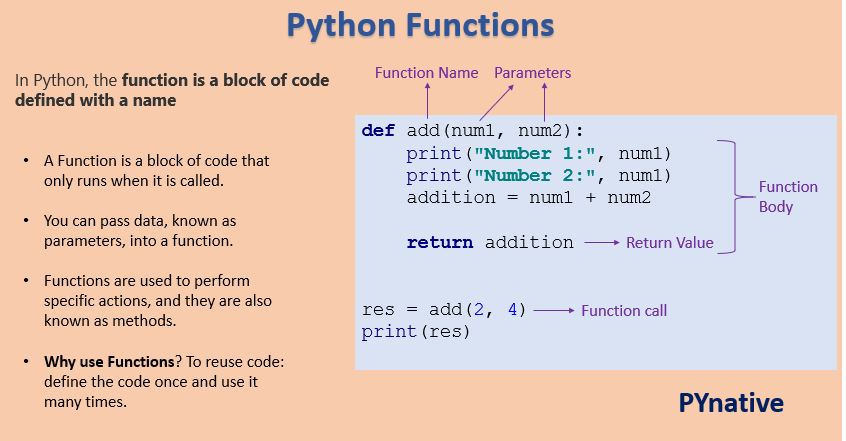
In Python, the function is a block of code defined with a name. We use functions whenever we need to perform the same task multiple times without writing the same code again. It can take arguments and returns the value.
Python has a DRY principle like other programming languages. DRY stands for Don’t Repeat Yourself. Consider a scenario where we need to do some action/task many times. We can define that action only once using a function and call that function whenever required to do the same activity.
Function improves efficiency and reduces errors because of the reusability of a code. Once we create a function, we can call it anywhere and anytime. The benefit of using a function is reusability and modularity.
Table of contents
Types of Functions
Python support two types of functions
- Built-in function
- User-defined function
Built-in function
The functions which are come along with Python itself are called a built-in function or predefined function. Some of them are listed below.range(), id(), type(), input(), eval() etc.
Example: Python range() function generates the immutable sequence of numbers starting from the given start integer to the stop integer.
User-defined function
Functions which are created by programmer explicitly according to the requirement are called a user-defined function.
Creating a Function
Use the following steps to to define a function in Python.
- Use the
defkeyword with the function name to define a function. - Next, pass the number of parameters as per your requirement. (Optional).
- Next, define the function body with a block of code. This block of code is nothing but the action you wanted to perform.
In Python, no need to specify curly braces for the function body. The only indentation is essential to separate code blocks. Otherwise, you will get an error.
Syntax of creating a function
def function_name(parameter1, parameter2):
       # function body
       # write some action
return valueCode language: Python (python)Here,
function_name: Function name is the name of the function. We can give any name to function.parameter: Parameter is the value passed to the function. We can pass any number of parameters. Function body uses the parameter’s value to perform an actionfunction_body: The function body is a block of code that performs some task. This block of code is nothing but the action you wanted to accomplish.- return value: Return value is the output of the function.
Note: While defining a function, we use two keywords, def (mandatory) and return (optional).
Creating a function without any parameters
Now, Let’s the example of creating a simple function that prints a welcome message.
Output
Welcome to PYnative
Creating a function with parameters
Let’s create a function that takes two parameters and displays their values.
In this example, we are creating function with two parameters ‘ name’ and ‘age’.
Output
Hello John Welcome to PYnative
Your course name is Python
Creating a function with parameters and return value
Functions can return a value. The return value is the output of the function. Use the return keyword to return value from a function.
Calling a function
Once we defined a function or finalized structure, we can call that function by using its name. We can also call that function from another function or program by importing it.
To call a function, use the name of the function with the parenthesis, and if the function accepts parameters, then pass those parameters in the parenthesis.
Example
Calling a function of a module
You can take advantage of the built-in module and use the functions defined in it. For example, Python has a random module that is used for generating random numbers and data. It has various functions to create different types of random data.
Let’s see how to use functions defined in any module.
- First, we need to use the import statement to import a specific function from a module.
- Next, we can call that function by its name.
Docstrings
In Python, the documentation string is also called a docstring. It is a descriptive text (like a comment) written by a programmer to let others know what block of code does.
We write docstring in source code and define it immediately after module, class, function, or method definition.
It is being declared using triple single quotes (''' ''') or triple-double quote(""" """).
We can access docstring using doc attribute (__doc__) for any object like list, tuple, dict, and user-defined function, etc.
Single-Line Docstring
The single-line docstring is a docstring that fits in one line. We can use the triple single or triple-double quotes to define it. The Opening and closing quotes need to be the same. By convention, we should use to use the triple-double quotes to define docstring.
Output
This function is going to return the factorial of a given number
When you use the help function to get the information of any function, it returns the docstring.
Output
Help on function factorial in module main:
factorial(x)
     This function returns the factorial of a given number.
None
Multi-Line Docstring
A multi-line Docstrings is the same single-line Docstrings, but it is followed by a single blank line with the descriptive text.
The general format of writing a multi-line Docstring is as follows:
Example
Output
Description of function

Arguments
parameter1(int):Description of parameter1

Returns:
int value
Return Value From a Function
In Python, to return value from the function, a return statement is used. It returns the value of the expression following the returns keyword.
Syntax of return statement
def fun():
    statement-1
    statement-2
    statement-3
    .
    .
    return [expression]Code language: Python (python)
The return value is nothing but a outcome of function.
- The
returnstatement ends the function execution. - For a function, it is not mandatory to return a value.
- If a
returnstatement is used without any expression, then theNoneis returned. - The
returnstatement should be inside of the function block.
Example
Output
Even numbers are: [2, 42, 62, 70]
Return Multiple Values
You can also return multiple values from a function. Use the return statement by separating each expression by a comma.
Example: –
In this example, we are returning three values from a function. We will also see how to process or read multiple return values in our code.
The pass Statement
In Python, the pass is the keyword, which won’t do anything. Sometimes there is a situation where we need to define a syntactically empty block. We can define that block using the pass keyword.
When the interpreter finds a pass statement in the program, it returns no operation.
Example
How does Function work in Python?
In Python, functions allow the programmer to create short and clean code to be reused in an entire program.
The function helps us to organize code. The function accepts parameters as input, processes them, and in the end, returns values as output.
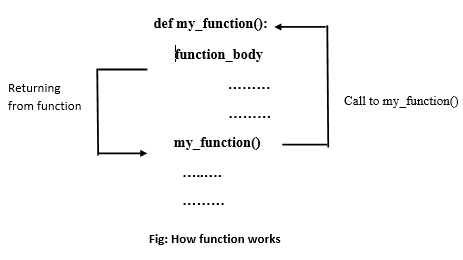
Let’s assume we defined a function that computes some task. When we call that function from another function, the program controller goes to that function, does some computation, and returns some value as output to the caller function.
The following diagram shows how the function works.
Scope and Lifetime of Variables
When we define a function with variables, then those variables’ scope is limited to that function. In Python, the scope of a variable is an area where a variable is declared. It is called the variable’s local scope.
We cannot access the local variables from outside of the function. Because the scope is local, those variables are not visible from the outside of the function.
Note: The inner function does have access to the outer function’s local scope.
When we are executing a function, the life of the variables is up to running time. Once we return from the function, those variables get destroyed. So function does no need to remember the value of a variable from its previous call.
The following code shows the scope of a variable inside a function.
Example
In the above example, we print the local and global variable values from outside of the function. The global variable is accessible with its name global_lang.
But when we try to access the local variable with its name local_lang, we got a NameError, because the local variable is not accessible from outside of the function.
Local Variable in function
A local variable is a variable declared inside the function that is not accessible from outside of the function. The scope of the local variable is limited to that function only where it is declared.
If we try to access the local variable from the outside of the function, we will get the error as NameError.
Example
Output
Value is : 888
print("Value is :", loc_var) # gives error,
NameError: name 'loc_var' is not defined
Global Variable in function
A Global variable is a variable that declares outside of the function. The scope of a global variable is broad. It is accessible in all functions of the same module.
Example
Output
Value in 1nd function : 999
Value in 2nd function : 999
Global Keyword in Function
In Python, global is the keyword used to access the actual global variable from outside the function. we use the global keyword for two purposes:
- To declare a global variable inside the function.
- Declaring a variable as global, which makes it available to function to perform the modification.
Let’s see what happens when we don’t use global keyword to access the global variable in the function
Output
Value in 1st function : 5
Value in 2nd function : 555
Value in 3rd function : 5
As you can see, function2() treated global_var as a new variable (local variable). To solve such issues or access/modify global variables inside a function, we use the global keyword.
Example:
Output
Value in 1st function : 5
Value in 2nd function : 555
Value in 3rd function : 555
Nonlocal Variable in Function
In Python, nonlocal is the keyword used to declare a variable that acts as a global variable for a inner function (i.e., function within another function).
We can use a nonlocal keyword when we want to declare a variable in the local scope but act as a global scope.
Example
Output
value of x inside inner function is : 700
value of x inside outer function is : 700
Python Function Arguments
The argument is a value, a variable, or an object that we pass to a function or method call. In Python, there are four types of arguments allowed.
- Positional arguments
- keyword arguments
- Default arguments
- Variable-length arguments
Read the complete guide on Python function arguments.
Positional Arguments
Positional arguments are arguments that are pass to function in proper positional order. That is, the 1st positional argument needs to be 1st when the function is called. The 2nd positional argument needs to be 2nd when the function is called, etc. See the following example for more understanding.
Example
If you try to use pass more parameters you will get an error.
Output
TypeError: add() takes 2 positional arguments but 3 were given
In the positional argument number and position of arguments must be matched. If we change the order, then the result may change. Also, If we change the number of arguments, then we will get an error.
Keyword Arguments
A keyword argument is an argument value, passed to function preceded by the variable name and an equals sign.
Example
Output
Hello John Wilson
Hello Kelly Ault
In keyword arguments order of argument is not matter, but the number of arguments must match. Otherwise, we will get an error.
While using keyword and positional argument simultaneously, we need to pass 1st arguments as positional arguments and then keyword arguments. Otherwise, we will get SyntaxError. See the following example.
Example
Default Arguments
Default arguments take the default value during the function call if we do not pass them. We can assign a default value to an argument in function definition using the = assignment operator.
For example, A function show_employee() that accepts the employee’s name and salary and displays both. Let’s modify a function definition and assigned a default value 8000 to a salary. Next, if salary value is missing in the function call, the function automatically takes default value 9000 as a salary.
Example
Output
Hello John
Hello Guest
When we call a function with an argument, it will take that value.
Variable-length Arguments
In Python, sometimes, there is a situation where we need to pass multiple numbers of arguments to the function. Such types of arguments are called variable-length arguments. We can declare a variable-length argument with the * (asterisk) symbol.
def fun(*var):
    function bodyCode language: Python (python)
We can pass any number of arguments to this function. Internally all these values are represented in the form of a tuple.
Example
Output
Sum is: 0
Sum is: 26
Sum is: 87.5
Read more: The complete guide on Python function arguments.
Recursive Function
A recursive function is a function that calls itself, again and again.
Consider, calculating the factorial of a number is a repetitive activity, in that case, we can call a function again and again, which calculates factorial.
factorial(5)

5*factorial(4)
5*4*factorial(3)
5*4*3*factorial(2)
5*4*3*2*factorial(1)
5*4*3*2*1 = 120
Example
Output
factorial of a number is: 40320
The advantages of the recursive function are:
- By using recursive, we can reduce the length of the code.
- The readability of code improves due to code reduction.
- Useful for solving a complex problem
The disadvantage of the recursive function:
- The recursive function takes more memory and time for execution.
- Debugging is not easy for the recursive function.
Python Anonymous/Lambda Function
Sometimes we need to declare a function without any name. The nameless property function is called an anonymous function or lambda function.
The reason behind the using anonymous function is for instant use, that is, one-time usage. Normal function is declared using the def function. Whereas the anonymous function is declared using the lambda keyword.
In opposite to a normal function, a Python lambda function is a single expression. But, in a lambda body, we can expand with expressions over multiple lines using parentheses or a multiline string.
ex : lambda n:n+n
Syntax of lambda function:
lambda: argument_list:expressionCode language: Python (python)When we define a function using the lambda keyword, the code is very concise so that there is more readability in the code. A lambda function can have any number of arguments but return only one value after expression evaluation.
Let’s see an example to print even numbers without a lambda function and with a lambda function. See the difference in line of code as well as readability of code.
Example 1: Program for even numbers without lambda function
Output
Even numbers are: [10, 12, 78, 6]
Example 2: Program for even number with a lambda function
Output
Even numbers are: [10, 12, 78, 6]
We are not required to write explicitly return statements in the lambda function because the lambda internally returns expression value.
Lambda functions are more useful when we pass a function as an argument to another function. We can also use the lambda function with built-in functions such as filter, map, reduce because this function requires another function as an argument.
filter() function in Python
In Python, the filter() function is used to return the filtered value. We use this function to filter values based on some conditions.
Syntax of filter() function:
filter(funtion, sequence)Code language: Python (python)where,
- function – Function argument is responsible for performing condition checking.
- sequence – Sequence argument can be anything like list, tuple, string
Example: lambda function with filter()
Output
Positive numbers are: [5, 12, 6, 9]
map() function in Python
In Python, the map() function is used to apply some functionality for every element present in the given sequence and generate a new series with a required modification.
Ex: for every element present in the sequence, perform cube operation and generate a new cube list.
Syntax of map() function:
map(function,sequence)Code language: Python (python)where,
function– function argument responsible for applied on each element of the sequencesequence– Sequence argument can be anything like list, tuple, string
Example: lambda function with map() function
Output
Cube values are: [8, 27, 64, 512, 729]
reduce() function in Python
In Python, the reduce() function is used to minimize sequence elements into a single value by applying the specified condition.
The reduce() function is present in the functools module; hence, we need to import it using the import statement before using it.
Syntax of reduce() function:
reduce(function, sequence)Code language: Python (python)Example: lambda function with reduce()
Output
Addition of all list elements is : 54