Python Lists
Python list is an ordered sequence of items.
In this article you will learn the different methods of creating a list, adding, modifying, and deleting elements in the list. Also, learn how to iterate the list and access the elements in the list in detail. Nested Lists and List Comprehension are also discussed in detail with examples.
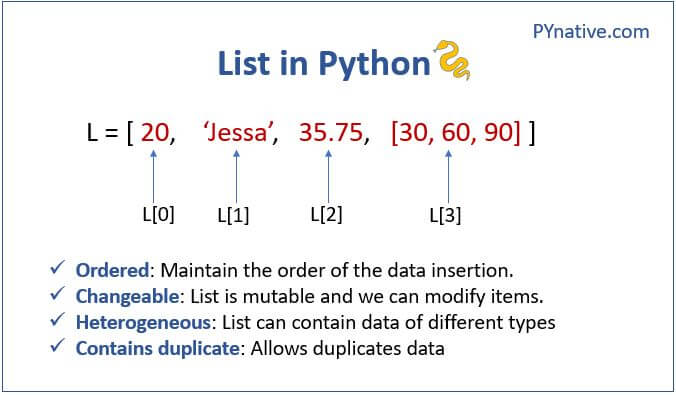
The following are the properties of a list.
- Mutable: The elements of the list can be modified. We can add or remove items to the list after it has been created.
- Ordered: The items in the lists are ordered. Each item has a unique index value. The new items will be added to the end of the list.
- Heterogenous: The list can contain different kinds of elements i.e; they can contain elements of string, integer, boolean, or any type.
- Duplicates: The list can contain duplicates i.e., lists can have two items with the same values.
Why use a list?
- The list data structure is very flexible It has many unique inbuilt functionalities like
pop(),append(), etc which makes it easier, where the data keeps changing. - Also, the list can contain duplicate elements i.e two or more items can have the same values.
- Lists are Heterogeneous i.e, different kinds of objects/elements can be added
- As Lists are mutable it is used in applications where the values of the items change frequently.
Table of contents
- Creating a Python list
- Length of a List
- Accessing items of a List
- Iterating a List
- Adding elements to the list
- Modify the items of a List
- Removing elements from a List
- Finding an element in the list
- Concatenation of two lists
- Copying a list
- List operations
- Python Built-in functions with List
- Nested List
- List Comprehension
- Summary of List operations
Creating a Python list
The list can be created using either the list constructor or using square brackets [].
- Using
list()constructor: In general, the constructor of a class has its class name. Similarly, Create a list by passing the comma-separated values inside thelist(). - Using square bracket (
[]): In this method, we can create a list simply by enclosing the items inside the square brackets.
Let us see examples for creating the list using the above methods
Length of a List
In order to find the number of items present in a list, we can use the len() function.
Accessing items of a List
The items in a list can be accessed through indexing and slicing. This section will guide you by accessing the list using the following two ways
- Using indexing, we can access any item from a list using its index number
- Using slicing, we can access a range of items from a list
Indexing
The list elements can be accessed using the “indexing” technique. Lists are ordered collections with unique indexes for each item. We can access the items in the list using this index number.
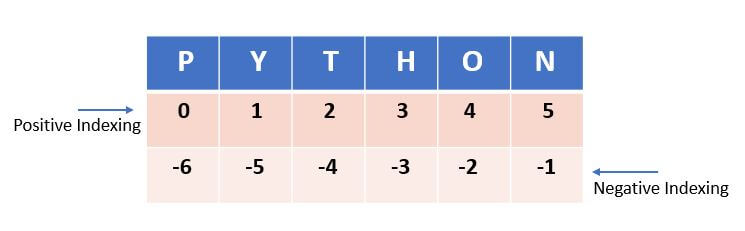
To access the elements in the list from left to right, the index value starts from zero to (length of the list-1) can be used. For example, if we want to access the 3rd element we need to use 2 since the index value starts from 0.
Note:
- As Lists are ordered sequences of items, the index values start from 0 to the Lists length.
- Whenever we try to access an item with an index more than the Lists length, it will throw the
'Index Error'. - Similarly, the index values are always an integer. If we give any other type, then it will throw
Type Error.
Example
As seen in the above example we accessed the second element in the list by passing the index value as 1. Similarly, we passed index 4 to access the 5th element in the list.
Negative Indexing
The elements in the list can be accessed from right to left by using negative indexing. The negative value starts from -1 to -length of the list. It indicates that the list is indexed from the reverse/backward.
As seen in the above example to access the 4th element from the last (right to left) we pass ‘-4’ in the index value.
List Slicing
Slicing a list implies, accessing a range of elements in a list. For example, if we want to get the elements in the position from 3 to 7, we can use the slicing method. We can even modify the values in a range by using this slicing technique.
The below is the syntax for list slicing.
listname[start_index : end_index : step]Code language: Python (python)- The
start_indexdenotes the index position from where the slicing should begin and theend_indexparameter denotes the index positions till which the slicing should be done. - The
stepallows you to take each nth-element within astart_index:end_indexrange.
Example
Let us see few more examples of slicing a list such as
- Extract a portion of the list
- Reverse a list
- Slicing with a step
- Slice without specifying start or end position
Example
Iterating a List
The objects in the list can be iterated over one by one, by using a for a loop.
Output
5
8
Tom
7.5
Emma
Iterate along with an index number
The index value starts from 0 to (length of the list-1). Hence using the function range() is ideal for this scenario.
The range function returns a sequence of numbers. By default, it returns starting from 0 to the specified number (increments by 1). The starting and ending values can be passed according to our needs.
Example
Output
5
8
Tom
7.5
Emma
Adding elements to the list
We can add a new element/list of elements to the list using the list methods such as append(), insert(), and extend().
Append item at the end of the list
The append() method will accept only one parameter and add it at the end of the list.
Let’s see the example to add the element ‘Emma’ at the end of the list.
Add item at the specified position in the list
Use the insert() method to add the object/item at the specified position in the list. The insert method accepts two parameters position and object.
insert(index, object)Code language: Python (python)It will insert the object in the specified index. Let us see this with an example.
As seen in the above example item 25 is added at the index position 2.
Using extend()
The extend method will accept the list of elements and add them at the end of the list. We can even add another list by using this method.
Let’s add three items at the end of the list.
As seen in the above example we have three integer values at once. All the values get added in the order they were passed and it gets appended at the end of the list.
Modify the items of a List
The list is a mutable sequence of iterable objects. It means we can modify the items of a list. Use the index number and assignment operator (=) to assign a new value to an item.
Let’s see how to perform the following two modification scenarios
- Modify the individual item.
- Modify the range of items
Modify all items
Use for loop to iterate and modify all items at once. Let’s see how to modify each item of a list.
Removing elements from a List
The elements from the list can be removed using the following list methods.
| method | Description |
|---|---|
remove(item) | To remove the first occurrence of the item from the list. |
pop(index) | Removes and returns the item at the given index from the list. |
clear() | To remove all items from the list. The output will be an empty list. |
del list_name | Delete the entire list. |
Remove specific item
Use the remove() method to remove the first occurrence of the item from the list.
Note: It Throws a keyerror if an item not present in the original list.
Example
Remove all occurrence of a specific item
Use a loop to remove all occurrence of a specific item
Remove item present at given index
Use the pop() method to remove the item at the given index. The pop() method removes and returns the item present at the given index.
Note: It will remove the last time from the list if the index number is not passed.
Example
Remove the range of items
Use del keyword along with list slicing to remove the range of items
Remove all items
Use the list’ clear() method to remove all items from the list. The clear() method truncates the list.
Finding an element in the list
Use the index() function to find an item in a list.
The index() function will accept the value of the element as a parameter and returns the first occurrence of the element or returns ValueError if the element does not exist.
Concatenation of two lists
The concatenation of two lists means merging of two lists. There are two ways to do that.
- Using the
+operator. - Using the
extend()method. Theextend()method appends the new list’s items at the end of the calling list.
Example
Copying a list
There are two ways by which a copy of a list can be created. Let us see each one with an example.
Using assignment operator (=)
This is a straightforward way of creating a copy. In this method, the new list will be a deep copy. The changes that we make in the original list will be reflected in the new list.
This is called deep copying.
As seen in the above example a copy of the list has been created. The changes made to the original list are reflected in the copied list as well.
Note: When you set list1 = list2, you are making them refer to the same list object, so when you modify one of them, all references associated with that object reflect the current state of the object. So don’t use the assignment operator to copy the dictionary instead use the copy() method.
Using the copy() method
The copy method can be used to create a copy of a list. This will create a new list and any changes made in the original list will not reflect in the new list. This is shallow copying.
As seen in the above example a copy of the list has been created. The changes made to the original list are not reflected in the copy.
List operations
We can perform some operations over the list by using certain functions like sort(), reverse(), clear() etc.
Sort List using sort()
The sort function sorts the elements in the list in ascending order.
Output
[1, 2, 3]
As seen in the above example the items are sorted in the ascending order.
Reverse a List using reverse()
The reverse function is used to reverse the elements in the list.
Output
[1, 6, 5, 4, 3]
As seen in the above example the items in the list are printed in the reverse order here.
Python Built-in functions with List
In addition to the built-in methods available in the list, we can use the built-in functions as well on the list. Let us see a few of them for example.
Using max() & min()
The max function returns the maximum value in the list while the min function returns the minimum value in the list.
Output
6
1
As seen in the above example the max function returns 6 and min function returns 1.
Using sum()
The sum function returns the sum of all the elements in the list.
Output
19
As seen in the above example the sum function returns the sum of all the elements in the list.
all()
In the case of all() function, the return value will be true only when all the values inside the list are true. Let us see the different item values and the return values.
| Item Values in List | Return Value |
|---|---|
| All Values are True | True |
| One or more False Values | False |
| All False Values | False |
| Empty List | True |
Output
all() All True values:: True
all() with One false value :: False
all() with all false values :: False
all() Empty list :: True
any()
The any() method will return true if there is at least one true value. In the case of Empty List, it will return false.
Let us see the same possible combination of values for any() function in a list and its return values.
| Item Values in List | Return Value |
|---|---|
| All Values are True | True |
| One or more False Values | True |
| All False Values | False |
| Empty List | False |
Similarly, let’s see each one of the above scenarios with a small example.
Output
any() True values:: True
any() One false value :: True
any() all false values :: False
any() Empty list :: False
Nested List
The list can contain another list (sub-list), which in turn contains another list and so on. This is termed a nested list.
In order to retrieve the elements of the inner list we need a nested For-Loop.
Output
Accessing the third element of the second list 5
list [2, 4, 6, 8, 10] elements
2
4
6
8
10
list [1, 3, 5, 7, 9] elements
1
3
5
7
9
As we can see in the above output the indexing of the nested lists with the index value of the outer loop first followed by the inner list. We can print values of the inner lists through a nested for-loop.
List Comprehension
List comprehension is a simpler method to create a list from an existing list. It is generally a list of iterables generated with an option to include only the items which satisfy a condition.
outputList = {expression(variable) for variable in inputList [if variable condition1][if variable condition2]Code language: Python (python)expression: Optional. expression to compute the members of the output List which satisfies the optional conditionsvariable: Required. a variable that represents the members of the input List.inputList: Required. Represents the input set.condition1,condition2etc; : Optional. Filter conditions for the members of the output List.
Output
[16, 324, 400]
As seen in the above example we have created a new list from an existing input list in a single statement. The new list now contains only the squares of the even numbers present in the input list.
We can even create a list when the input is a continuous range of numbers.
Output
[0, 4, 16, 36, 64]
As seen in the above example we have created a list of squares of only even numbers in a range. The output is again a list so the items will be ordered.
Summary of List operations
For the following examples, we assume that l1 and l2 are lists, x, i, j, k, n are integers.
l1 = [10, 20, 30, 40, 50] and l2 = [60, 70, 80, 60]
| Operation | Description |
|---|---|
x in l1 | Check if the list l1 contains item x. |
x not in l2 | Check if list l1 does not contain item x. |
l1 + l2 | Concatenate the lists l1 and l2. Creates a new list containing the items from l1 and l2. |
l1 * 5 | Repeat the list l1 5 times. |
l1[i] | Get the item at index i. Example l1[2] is 30. |
l1[i:j] | List slicing. Get the items from index i up to index j (excluding j) as a List. An example l1[0:2] is [10, 20] |
l1[i:j:k] | List slicing with step. Returns a List with the items from index i up to index j taking every k-th item. An example l1[0:4:2] is [10, 30]. |
len(l1) | Returns a count of total items in a list. |
l2.count(60) | Returns the number of times a particular item (60) appears in a list. The answer is 2. |
l1.index(30) | Returns the index number of a particular item (30) in a list. The answer is 2. |
l1.index(30, 2, 5) | Returns the index number of a particular item (30) in a list. But search Returns the item with maximum value from a list. The answer is 60 only from index number 2 to 5. |
min(l1) | Returns the item with a minimum value from a list. The answer is 10. |
max(l1) | Returns the item with maximum value from a list. The answer is 60. |
l1.append(100) | Add item at the end of the list |
l1.append([2, 5, 7]) | Append the nested list at the end |
l1[2] = 40 | Modify the item present at index 2 |
l1.remove(40) | Removes the first occurrence of item 40 from the list. |
pop(2) | Removes and returns the item at index 2 from the list. |
l1.clear() | Make list empty |
l3= l1.copy() | Copy l1 into l2 |