Python Operators
Learning the operators is an excellent place to start to learn Python. Operators are special symbols that perform specific operations on one or more operands (values) and then return a result. For example, you can calculate the sum of two numbers using an addition (+) operator.
The following image shows operator and operands
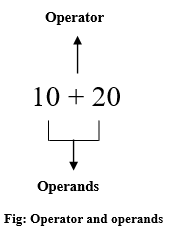
Python has seven types of operators that we can use to perform different operation and produce a result.
- Arithmetic operator
- Relational operators
- Assignment operators
- Logical operators
- Membership operators
- Identity operators
- Bitwise operators
Table of contents
Arithmetic operator
Arithmetic operators are the most commonly used. The Python programming language provides arithmetic operators that perform addition, subtraction, multiplication, and division. It works the same as basic mathematics.
There are seven arithmetic operators we can use to perform different mathematical operations, such as:
+(Addition)-(Subtraction)*(Multiplication)/(Division)//Floor division)℅(Modulus)**(Exponentiation)
Now, let’s see how to use each arithmetic operator in our program with the help of examples.
Addition operator +
It adds two or more operands and gives their sum as a result. It works the same as a unary plus. In simple terms, It performs the addition of two or more than two values and gives their sum as a result.
Example
Also, we can use the addition operator with strings, and it will become string concatenation.
Subtraction -
Use to subtracts the second value from the first value and gives the difference between them. It works the same as a unary minus. The subtraction operator is denoted by - symbol.
Example
Multiplication *
Multiply two operands. In simple terms, it is used to multiplies two or more values and gives their product as a result. The multiplication operator is denoted by a * symbol.
Example
You can also use the multiplication operator with string. When used with string, it works as a repetition.
Example
Division /
Divide the left operand (dividend) by the right one (divisor) and provide the result (quotient ) in a float value. The division operator is denoted by a / symbol.
Note:
- The division operator performs floating-point arithmetic. Hence it always returns a float value.
- Don’t divide any number by zero. You will get a
Zero Division Error: Division by zero
Example
Floor division //
Floor division returns the quotient (the result of division) in which the digits after the decimal point are removed. In simple terms, It is used to divide one value by a second value and gives a quotient as a round figure value to the next smallest whole value.
It works the same as a division operator, except it returns a possible integer. The // symbol denotes a floor division operator.
Note:
- Floor division can perform both floating-point and integer arithmetic.
- If both operands are int type, then the result types. If at least one operand type, then the result is a
floattype.
Example
Modulus ℅
The remainder of the division of left operand by the right. The modulus operator is denoted by a % symbol. In simple terms, the Modulus operator divides one value by a second and gives the remainder as a result.
Example
Exponent **
Using exponent operator left operand raised to the power of right. The exponentiation operator is denoted by a double asterisk ** symbol. You can use it as a shortcut to calculate the exponential value.
For example, 2**3 Here 2 is multiplied by itself 3 times, i.e., 2*2*2. Here the 2 is the base, and 3 is an exponent.
Example
Relational (comparison) operators
Relational operators are also called comparison operators. It performs a comparison between two values. It returns a boolean True or False depending upon the result of the comparison.
Python has the following six relational operators.
Assume variable x holds 10 and variable y holds 5
| Operator | Description | Example |
|---|---|---|
> (Greater than) | It returns True if the left operand is greater than the right | x > y result is True |
< (Less than) | It returns True if the left operand is less than the right | x < y result is False |
== (Equal to) | It returns True if both operands are equal | x == y result is False |
!= (Not equal to) | It returns True if both operands are equal | x != y result is True |
>= (Greater than or equal to) | It returns True if the left operand is greater than or equal to the right | x >= y result is True |
<= (Less than or equal to) | It returns True if the left operand is less than or equal to the right | x <= y result is False |
You can compare more than two values also. Assume variable x holds 10, variable y holds 5, and variable z holds 2.
So print(x > y > z) will return True because x is greater than y, and y is greater than z, so it makes x is greater than z.
Example
Assignment operators
In Python, Assignment operators are used to assigning value to the variable. Assign operator is denoted by = symbol. For example, name = "Jessa" here, we have assigned the string literal ‘Jessa’ to a variable name.
Also, there are shorthand assignment operators in Python. For example, a+=2 which is equivalent to a = a+2.
| Operator | Meaning | Equivalent |
|---|---|---|
= (Assign) | a=5Assign 5 to variable a | a = 5 |
+= (Add and assign) | a+=5Add 5 to a and assign it as a new value to a | a = a+5 |
-= (Subtract and assign) | a-=5Subtract 5 from variable a and assign it as a new value to a | a = a-5 |
*= (Multiply and assign) | a*=5Multiply variable a by 5 and assign it as a new value to a | a = a*5 |
/= (Divide and assign) | a/=5Divide variable a by 5 and assign a new value to a | a = a/5 |
%= (Modulus and assign) | a%=5Performs modulus on two values and assigns it as a new value to a | a = a%5 |
**= (Exponentiation and assign) | a**=5Multiply a five times and assigns the result to a | a = a**5 |
//= (Floor-divide and assign) | a//=5Floor-divide a by 5 and assigns the result to a | a = a//5 |
Example
Logical operators
Logical operators are useful when checking a condition is true or not. Python has three logical operators. All logical operator returns a boolean value True or False depending on the condition in which it is used.
| Operator | Description | Example |
|---|---|---|
and (Logical and) | True if both the operands are True | a and b |
or (Logical or) | True if either of the operands is True | a or b |
not (Logical not) | True if the operand is False | not a |
and (Logical and)
The logical and operator returns True if both expressions are True. Otherwise, it will return. False.
Example
Output
False
True
False
False
 8
In the case of arithmetic values, Logical and always returns the second value; as a result, see the following example.
Example
or (Logical or)
The logical or the operator returns a boolean True if one expression is true, and it returns False if both values are false.
Example
Output
True
True
False
True
6
In the case of arithmetic values, Logical or it always returns the first value; as a result, see the following code.
Example
not (Logical not)
The logical not operator returns boolean True if the expression is false.
Example
Output
Do nothing
In the case of arithmetic values, Logical not always return False for nonzero value.
Example
Membership operators
Python’s membership operators are used to check for membership of objects in sequence, such as string, list, tuple. It checks whether the given value or variable is present in a given sequence. If present, it will return True else False.
In Python, there are two membership operator in and not in
In operator
It returns a result as True if it finds a given object in the sequence. Otherwise, it returns False.
Let’s check if the number 15 present in a given list using the in operator.
Example
Output
number is present
Not in operator
It returns True if the object is not present in a given sequence. Otherwise, it returns False
Example
Output
number not is present
Identity operators
Use the Identity operator to check whether the value of two variables is the same or not. This operator is known as a reference-quality operator because the identity operator compares values according to two variables’ memory addresses.
Python has 2 identity operators is and is not.
is operator
The is operator returns Boolean True or False. It Return True if the memory address first value is equal to the second value. Otherwise, it returns False.
Example
Output
False
True
Here, we can use is() function to check whether both variables are pointing to the same object or not.
is not operator
The is not the operator returns boolean values either True or False. It Return True if the first value is not equal to the second value. Otherwise, it returns False.
Example
Output
True
False
Bitwise Operators
In Python, bitwise operators are used to performing bitwise operations on integers. To perform bitwise, we first need to convert integer value to binary (0 and 1) value.
The bitwise operator operates on values bit by bit, so it’s called bitwise. It always returns the result in decimal format. Python has 6 bitwise operators listed below.
&Bitwise and|Bitwise or^Bitwise xor~Bitwise 1’s complement<<Bitwise left-shift>>Bitwise right-shift
Bitwise and &
It performs logical AND operation on the integer value after converting an integer to a binary value and gives the result as a decimal value. It returns True only if both operands are True. Otherwise, it returns False.
Example
Output
4
5
4
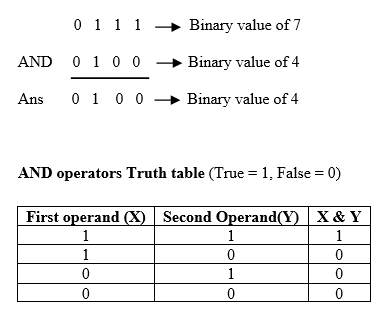
Here, every integer value is converted into a binary value. For example, a =7, its binary value is 0111, and b=4, its binary value is 0100. Next we performed logical AND, and got 0100 as a result, similarly for a and c, b and c
Following diagram shows AND operator evaluation.
Bitwise or |
It performs logical OR operation on the integer value after converting integer value to binary value and gives the result a decimal value. It returns False only if both operands are True. Otherwise, it returns True.
Example
Output
7
7
5
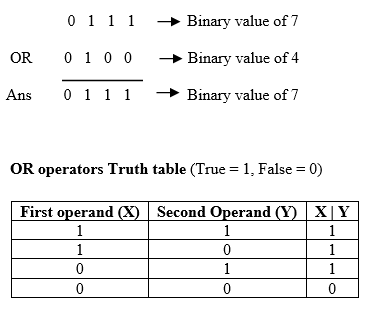
Here, every integer value is converted into binary. For example, a =7 its binary value is 0111, and b=4, its binary value is 0100, after logical OR, we got 0111 as a result. Similarly for a and c, b and c.
Bitwise xor ^
It performs Logical XOR ^ operation on the binary value of a integer and gives the result as a decimal value.
Example: –
Output
3
2
1
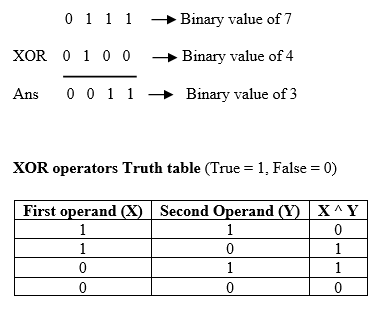
Here, again every integer value is converted into binary. For example, a =7 its binary value is 0111 and b=4, and its binary value is 0100, after logical XOR we got 0011 as a result. Similarly for a and c, b and c.
Bitwise 1’s complement ~
It performs 1’s complement operation. It invert each bit of binary value and returns the bitwise negation of a value as a result.
Example
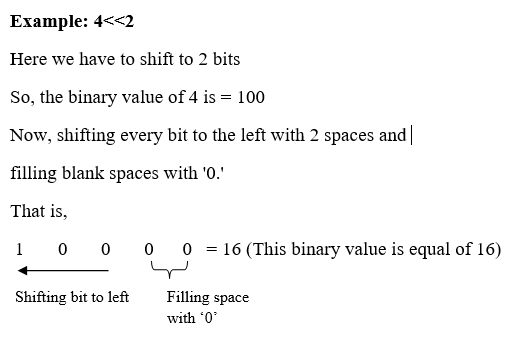
Bitwise left-shift <<
The left-shift << operator performs a shifting bit of value by a given number of the place and fills 0’s to new positions.
Example: –
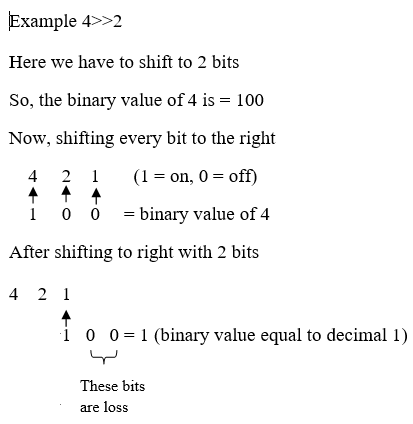
Bitwise right-shift >>
The left-shift >> operator performs shifting a bit of value to the right by a given number of places. Here some bits are lost.
Python Operators Precedence
In Python, operator precedence and associativity play an essential role in solving the expression. An expression is the combination of variables and operators that evaluate based on operator precedence.
We must know what the precedence (priority) of that operator is and how they will evaluate down to a single value. Operator precedence is used in an expression to determine which operation to perform first.
Example: –
In the above example. 1st precedence goes to a parenthesis(), then for plus and minus operators. The expression will be executed as.
(10 - 4) * 2 +(10+2)
6 * 2 + 12
12 + 12
The following tables shows operator precedence highest to lowest.
| Precedence level | Operator | Meaning |
|---|---|---|
| 1 (Highest) | () | Parenthesis |
| 2 | ** | Exponent |
| 3 | +x, -x ,~x | Unary plus, Unary Minus, Bitwise negation |
| 4 | *, /, //, % | Multiplication, Division, Floor division, Modulus |
| 5 | +, - | Addition, Subtraction |
| 6 | <<, >> | Bitwise shift operator |
| 7 | & | Bitwise AND |
| 8 | ^ | Bitwise XOR |
| 9 | | | Bitwise OR |
| 10 | ==, !=, >, >=, <, <= | Comparison |
| 11 | is, is not, in, not in | Identity, Membership |
| 12 | not | Logical NOT |
| 13 | and | Logical AND |
| 14 (Lowest) | or | Logical OR |