Python Update SQLite Table
In this lesson, learn to execute an UPDATE Query from a Python application to update the SQLite table’s data. You’ll learn how to use Python’s sqlite3 module to update the SQLite table.
Table of contents
Prerequisites
Before executing the following program, please make sure you know the SQLite table name and its column details.
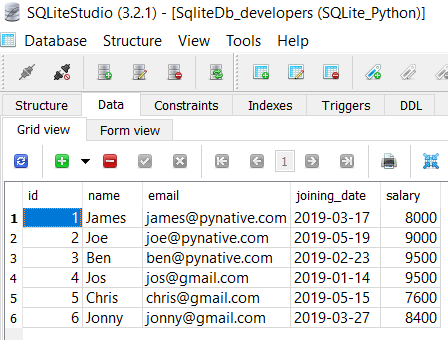
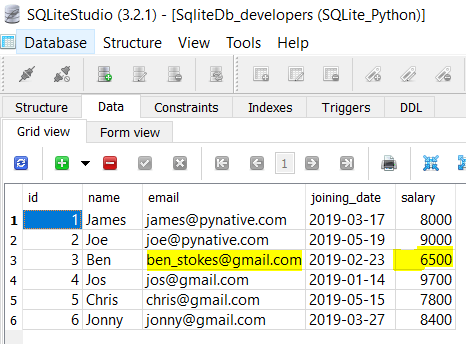
For this lesson, I am using the ‘SqliteDb_developers’ table present in my SQLite database.
If a table is not present in your SQLite database, then please refer to the following articles: –
Steps to update a single row of SQLite table
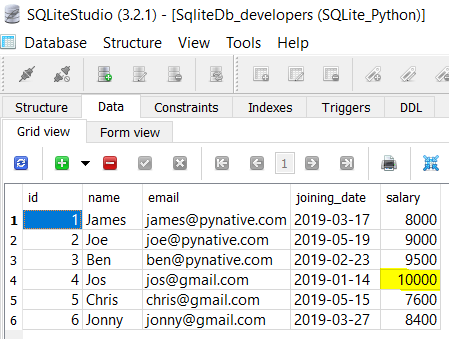
As of now, the ‘SqliteDb_developers’ table contains six rows, so let’s update the salary of a developer whose id is 4. To perform SQLite UPDATE query from Python, you need to follow these simple steps:
How to Update SQLite Table in Python
- Connect to MySQL from Python
Refer to Python SQLite database connection to connect to SQLite database from Python using sqlite3 module.
- Prepare a SQL Update Query
Prepare an update statement query with data to update. Mention the column name we want to update and its new value. For example,
UPDATE table_name SET column1 = value1, column2 = value2...., columnN = valueN WHERE [condition]; - Execute the UPDATE query, using cursor.execute()
This method executes the operation stored in the UPDATE query.
- Commit your changes
After the successful execution of the SQLite update query, Don’t forget to commit your changes to the database using
connection.comit(). - Extract the number of rows affected
After a successful update operation, use a
cursor.rowcountmethod to get the number of rows affected. The count depends on how many rows you are updating. - Verify result using the SQL SELECT query
Execute a SQLite select query from Python to see the new changes
- Close the cursor object and database connection object
use
cursor.clsoe()andconnection.clsoe()method to close SQLite connections once the update operation completes.
Example
Output
Connected to SQLite Record Updated successfully The SQLite connection is closed
Note: Note: If you are doing multiple update operations and wanted to revert your change in case of failure of any operations, use the rollback() method of a connection class to revert the changes. Use the rollback() method of a connection class. in except block.
Using Python variables in SQLite UPDATE query
Most of the time, we need to update a table with some runtime values. For example, when users update their profile or any other details through a user interface, we need to update a table with those new values. In such cases, It is always best practice to use a parameterized query.
The parameterized query uses placeholders (?) inside SQL statements that contain input from users. It helps us to update runtime values and prevent SQL injection concerns.
Output
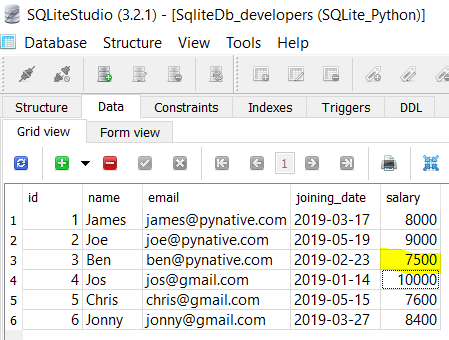
Let’s understand the above program
- We used two placeholders in the update query, one for the salary column and the other is for the id column.
- Next, We prepared a data tuple by specifying two Python variables in sequential order.
- Next, we passed the SQL update query and data tuple to the
cursor.execute()method. Remember variables order in the tuple is sequential as per column placeholders order.
Note: If you have a date column in the SQLite table, and you want to update the Python DateTime variable into a column, then please refer to working with SQLite data time values in Python.
Update multiple rows of SQLite table using cursor’s executemany()
In the above example, we have used execute() method of cursor object to update a single record. But sometimes, we need to update multiple rows of the SQLite table. For example, you want to increase the salary of developers by 20%.
Instead of executing the UPDATE query every time to update each record, you can perform bulk update operations in a single query using the cursor.executemany() method.
The executemany(query, seq_param) method accepts the following two parameters
- SQL query
- list of records to be updated.
Now, let see the example. In this example, we are updating three rows.
Output:
Connected to SQLite Total 3 Records updated successfully The SQLite connection is closed
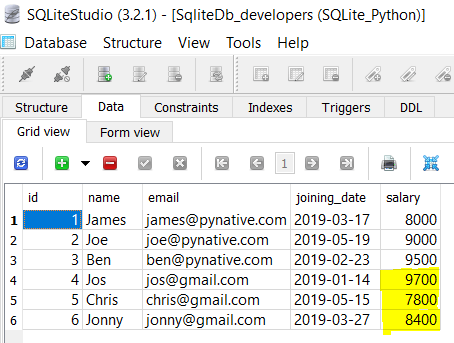
You can verify the result by selecting data from a SQLite table using Python.
Let’s understand the above example
- We prepared the SQLite update query with two placeholders (“salary” and “Id” column ) and a list of records to update in tuple format.
- Each element of a list is nothing but a tuple for each row. Each tuple contains two values, i.e., salary and id of a developer.
- We passed SQLite update query and record list to
executemany()as arguments. - To get to know the number of records updated, we used a
cursor.rowcountfunction.
Update multiple Columns of SQLite table
We can also update multiple columns of an SQLite table in a single query. Just prepare a parameterized query using a placeholder to update multiple columns. Let see this with an example program.
Output
Connected to SQLite Multiple columns updated successfully sqlite connection is closed
Next Steps:
To practice what you learned in this article, Please solve a Python Database Exercise project to Practice and master the Python Database operations.
About Vishal

I’m Vishal Hule, the Founder of PYnative.com. As a Python developer, I enjoy assisting students, developers, and learners. Follow me on Twitter.
Python Exercises and Quizzes
Free coding exercises and quizzes cover Python basics, data structure, data analytics, and more.
- 15+ Topic-specific Exercises and Quizzes
- Each Exercise contains 25+ questions
- Each Quiz contains 25 MCQ