Python Datetime Tutorial
datetime - Basic date and time types
To print the current date, we can utilize the datetime module. Dates are objects, like anything in Python. Datetime has several subclasses, which can be confusing at first.
Related course: Practice Python with interactive exercises →
Date Example
We can use its method strftime() to change the format.
To show the current date (today):
import datetime
today = datetime.date.today()
print(today)
This will show the date in the format
YYYY-MM-DD
If you want another format, use the method strftime():
import datetime
today = datetime.date.today().strftime("%d-%m-%Y")
print(today)
DD-MM-YYYY
Get current time in Python
You can get the current time like this:
import datetime
currentTime = datetime.datetime.now().time()
print(currentTime)
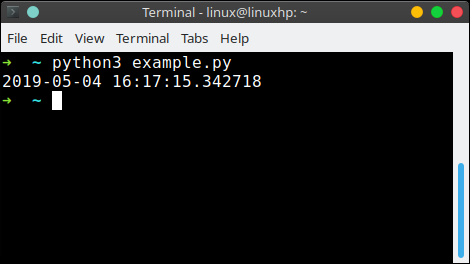
To get the date and time, use:
import datetime
currentTime = datetime.datetime.now()
print(currentTime)
Practice Python with interactive exercises →
Format codes
When using the method strftime() we can specify the type of date format we want to show.
So which format codes do we have?
| Format Code | Meanining |
|---|---|
| %a | Locale’s abbreviated weekday name. |
| %A | Locale’s full weekday name. |
| %b | Locale’s abbreviated month name. |
| %B | Locale’s full month name. |
| %c | Locale’s appropriate date and time representation. |
| %d | Day of the month as a decimal number [01,31]. |
| %f | Microsecond as a decimal number [0,999999], zero-padded on the left |
| %H | Hour (24-hour clock) as a decimal number [00,23]. |
| %I | Hour (12-hour clock) as a decimal number [01,12]. |
| %j | Day of the year as a decimal number [001,366]. |
| %m | Month as a decimal number [01,12]. |
| %M | Minute as a decimal number [00,59]. |
| %p | Locale’s equivalent of either AM or PM. |
| %S | Second as a decimal number [00,61]. |
| %U | Week number of the year (Sunday as the first day of the week) |
| %w | Weekday as a decimal number [0(Sunday),6]. |
| %W | Week number of the year (Monday as the first day of the week) |
| %x | Locale’s appropriate date representation. |
| %X | Locale’s appropriate time representation. |
| %y | Year without century as a decimal number [00,99]. |
| %Y | Year with century as a decimal number. |
| %z | UTC offset in the form +HHMM or -HHMM. |
| %Z | Time zone name (empty string if the object is naive). |
| %% | A literal ‘%’ character. |
Run Python online: PythonAnywhere lets you host and run Python scripts in the cloud — free tier available.