Python Pyqt Combobox Tutorial
How to use a QComboBox in Python PyQt
A combobox can be created with the QComboBox class. Items are added using the class method addItem, followed by a string parameter.
Sometimes its called a listbox, as it shows a list of items a user can select from. If you want a user to choose from a set of items, the listbox is the best option.
Related course: Create PyQt Desktop Appications with Python (GUI)
Combobox example
In Python PyQt you can create a combobox with the widget QComboBox. This type of widget lets you select from a list of options. To use it, first import it from the PyQt module.
from PyQt5.QtWidgets import QComboBox
Then you can create one or more instances of the QComboBox.
self.comboBox = QComboBox(centralWidget)
Then you want to configure it, like changing the size and its position (x,y,width,height). You can do that with the method call setGeometry().
self.comboBox.setGeometry(QRect(40, 40, 491, 31))
And adding several items to the combo box, these items are shown when you click on the combobox. A combobox can have any number of items.
self.comboBox.addItem("Item 1")
self.comboBox.addItem("Item 2")
self.comboBox.addItem("Item 3")
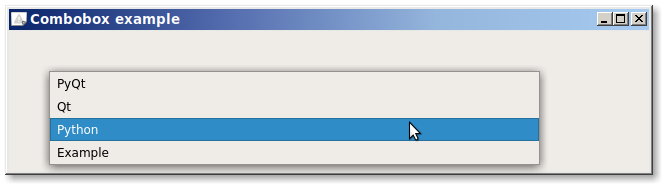
The code below creates a combobox using the class QComboBox. The appearance of the combbox depends on the operating system you are using.
import sys
from PyQt5 import QtCore, QtWidgets
from PyQt5.QtWidgets import QMainWindow, QLabel, QGridLayout, QWidget, QComboBox
from PyQt5.QtCore import QSize, QRect

class ExampleWindow(QMainWindow):
    def __init__(self):
        QMainWindow.__init__(self)

        self.setMinimumSize(QSize(640, 140))
        self.setWindowTitle("Combobox example")

        centralWidget = QWidget(self)
        self.setCentralWidget(centralWidget)


        self.comboBox = QComboBox(centralWidget)
        self.comboBox.setGeometry(QRect(40, 40, 491, 31))
        self.comboBox.setObjectName(("comboBox"))
        self.comboBox.addItem("PyQt")
        self.comboBox.addItem("Qt")
        self.comboBox.addItem("Python")
        self.comboBox.addItem("Example")

if __name__ == "__main__":
    app = QtWidgets.QApplication(sys.argv)
    mainWin = ExampleWindow()
    mainWin.show()
    sys.exit( app.exec_() )
If you have a list of options or items you can use a for loop to add them.
options = ["Athens","Bruxelles","Chengmai","Dover"]
for option in options:
    self.comboBox.addItem(option)
If you are new to Python PyQt, then I highly recommend this book.