Python Pyqt5 Sliders Tutorial
Sliders in Python PyQt5
PyQt5 comes with sliders out of the box.
Sliders can be either vertical or horizontal. We can connect them with a method the same way as we do with buttons.
A slider is often used in conjunction with a spinbox, QSpinBox. In this example we won’t use a spinbox, as that’s optional. You can connect a slider to any widget or functionality you want.
Related course: Create PyQt Desktop Appications with Python (GUI)
Slider example
We create a groupbox which contains 4 sliders. A slider is created with the class QSlider, which accepts the flags Qt.Horizontal or Qt.Vertical.
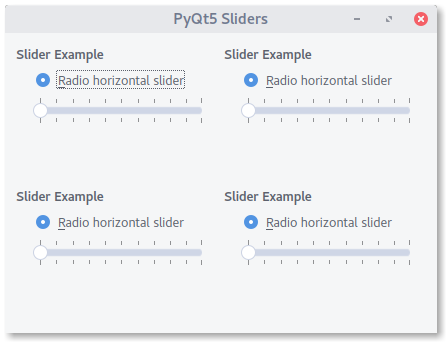
If you want to add a slider to your existing code, don’t forget to import QSlider from PyQt5.QtWidgets.
import sys
from PyQt5.QtCore import Qt
from PyQt5.QtWidgets import (QApplication, QCheckBox, QGridLayout, QGroupBox,
                             QMenu, QPushButton, QRadioButton, QVBoxLayout, QWidget, QSlider)

class Window(QWidget):
    def __init__(self, parent=None):
        super(Window, self).__init__(parent)

        grid = QGridLayout()
        grid.addWidget(self.createExampleGroup(), 0, 0)
        grid.addWidget(self.createExampleGroup(), 1, 0)
        grid.addWidget(self.createExampleGroup(), 0, 1)
        grid.addWidget(self.createExampleGroup(), 1, 1)
        self.setLayout(grid)

        self.setWindowTitle("PyQt5 Sliders")
        self.resize(400, 300)

    def createExampleGroup(self):
        groupBox = QGroupBox("Slider Example")

        radio1 = QRadioButton("&Radio horizontal slider")

        slider = QSlider(Qt.Horizontal)
        slider.setFocusPolicy(Qt.StrongFocus)
        slider.setTickPosition(QSlider.TicksBothSides)
        slider.setTickInterval(10)
        slider.setSingleStep(1)

        radio1.setChecked(True)

        vbox = QVBoxLayout()
        vbox.addWidget(radio1)
        vbox.addWidget(slider)
        vbox.addStretch(1)
        groupBox.setLayout(vbox)

        return groupBox

if __name__ == '__main__':
    app = QApplication(sys.argv)
    clock = Window()
    clock.show()
    sys.exit(app.exec_())
If you are new to Python PyQt, then I highly recommend this book.