Python Pyqt5 Video Widget Tutorial
pyqt5 video widget
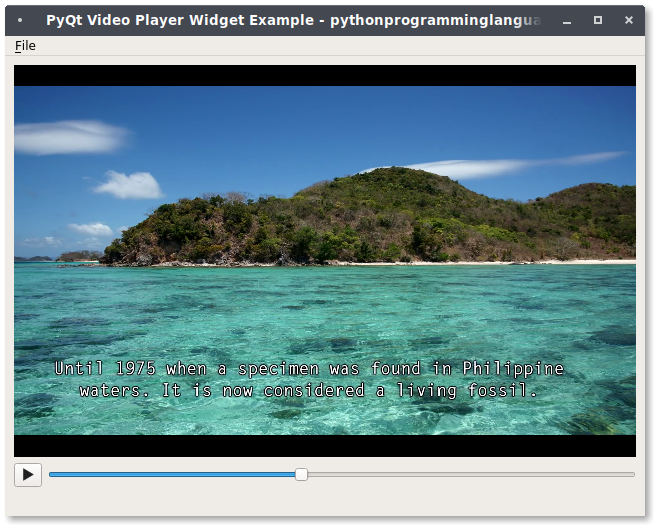
In this article you’ll see the code to create a video player with PyQT5.
It contains a menu bar for opening the video file.
PyQt5 supports multimedia, including a video widget: QVideoWidget. This is used in combination with the class QMediaPlayer.
The QMediaPlayer class has all kinds of properties that you may know from video players: audioAvailable, duration, position, volume and a few others.
Related course: Create PyQt Desktop Appications with Python (GUI)
Introduction
We create a window (QMainWindow) that contains a widget for its contents (QWidget).
Then we add the videowidget and control widgets.
videoWidget = QVideoWidget()

self.playButton = QPushButton()
self.playButton.setEnabled(False)
self.playButton.setIcon(self.style().standardIcon(QStyle.SP_MediaPlay))
self.playButton.clicked.connect(self.play)
The player will only play a video, in this example we don’t use back buttons, stop buttons.
The complete code below:
from PyQt5.QtCore import QDir, Qt, QUrl
from PyQt5.QtMultimedia import QMediaContent, QMediaPlayer
from PyQt5.QtMultimediaWidgets import QVideoWidget
from PyQt5.QtWidgets import (QApplication, QFileDialog, QHBoxLayout, QLabel,
        QPushButton, QSizePolicy, QSlider, QStyle, QVBoxLayout, QWidget)
from PyQt5.QtWidgets import QMainWindow,QWidget, QPushButton, QAction
from PyQt5.QtGui import QIcon
import sys

class VideoWindow(QMainWindow):

    def __init__(self, parent=None):
        super(VideoWindow, self).__init__(parent)
        self.setWindowTitle("PyQt Video Player Widget Example - pythonprogramminglanguage.com")

        self.mediaPlayer = QMediaPlayer(None, QMediaPlayer.VideoSurface)

        videoWidget = QVideoWidget()

        self.playButton = QPushButton()
        self.playButton.setEnabled(False)
        self.playButton.setIcon(self.style().standardIcon(QStyle.SP_MediaPlay))
        self.playButton.clicked.connect(self.play)

        self.positionSlider = QSlider(Qt.Horizontal)
        self.positionSlider.setRange(0, 0)
        self.positionSlider.sliderMoved.connect(self.setPosition)

        self.errorLabel = QLabel()
        self.errorLabel.setSizePolicy(QSizePolicy.Preferred,
                QSizePolicy.Maximum)


        openAction = QAction(QIcon('open.png'), '&Open', self)
        openAction.setShortcut('Ctrl+O')
        openAction.setStatusTip('Open movie')
        openAction.triggered.connect(self.openFile)


        exitAction = QAction(QIcon('exit.png'), '&Exit', self)
        exitAction.setShortcut('Ctrl+Q')
        exitAction.setStatusTip('Exit application')
        exitAction.triggered.connect(self.exitCall)


        menuBar = self.menuBar()
        fileMenu = menuBar.addMenu('&File')

        fileMenu.addAction(openAction)
        fileMenu.addAction(exitAction)


        wid = QWidget(self)
        self.setCentralWidget(wid)


        controlLayout = QHBoxLayout()
        controlLayout.setContentsMargins(0, 0, 0, 0)
        controlLayout.addWidget(self.playButton)
        controlLayout.addWidget(self.positionSlider)

        layout = QVBoxLayout()
        layout.addWidget(videoWidget)
        layout.addLayout(controlLayout)
        layout.addWidget(self.errorLabel)


        wid.setLayout(layout)

        self.mediaPlayer.setVideoOutput(videoWidget)
        self.mediaPlayer.stateChanged.connect(self.mediaStateChanged)
        self.mediaPlayer.positionChanged.connect(self.positionChanged)
        self.mediaPlayer.durationChanged.connect(self.durationChanged)
        self.mediaPlayer.error.connect(self.handleError)

    def openFile(self):
        fileName, _ = QFileDialog.getOpenFileName(self, "Open Movie",
                QDir.homePath())

        if fileName != '':
            self.mediaPlayer.setMedia(
                    QMediaContent(QUrl.fromLocalFile(fileName)))
            self.playButton.setEnabled(True)

    def exitCall(self):
        sys.exit(app.exec_())

    def play(self):
        if self.mediaPlayer.state() == QMediaPlayer.PlayingState:
            self.mediaPlayer.pause()
        else:
            self.mediaPlayer.play()

    def mediaStateChanged(self, state):
        if self.mediaPlayer.state() == QMediaPlayer.PlayingState:
            self.playButton.setIcon(
                    self.style().standardIcon(QStyle.SP_MediaPause))
        else:
            self.playButton.setIcon(
                    self.style().standardIcon(QStyle.SP_MediaPlay))

    def positionChanged(self, position):
        self.positionSlider.setValue(position)

    def durationChanged(self, duration):
        self.positionSlider.setRange(0, duration)

    def setPosition(self, position):
        self.mediaPlayer.setPosition(position)

    def handleError(self):
        self.playButton.setEnabled(False)
        self.errorLabel.setText("Error: " + self.mediaPlayer.errorString())

if __name__ == '__main__':
    app = QApplication(sys.argv)
    player = VideoWindow()
    player.resize(640, 480)
    player.show()
    sys.exit(app.exec_())
If you are new to Python PyQt, then I highly recommend this book.